
Community listing page, reviews may not be monitored by the author.
ReSync (Sync mod fork)


No reviews yet
One mind. Many bodies. - Fix of a forge port of a Fabric 1.20.1 port of Sync mod by iChun on 1.12.2

Community voices
Reviews
No reviews yet. Be the first to review this project!
Get it on
Available Platforms
Compatibility
Supported Environments
Must be installed on both the client and the server.
About
Project Details
For authors
Embed Badge
If you're the author of this project, you can embed a live badge anywhere that supports HTML or Markdown. It updates automatically whenever ratings change.
Use HTML for any page that supports it, or Markdown for README files and Markdown-based descriptions.
Identifiers
Platform IDs
Resources
External Links
About
Description

Sync (Forge)
Sync (Forge) is an unofficial reimplementation of the Sync mod, that was originally developed by iChun.
This particular fork is different because it works more stable with curios, and other mods like Zoe Isn't Cyberpunk, or any other mods that change player in more ways than just inventory or NBT. This mod will get deprecated when Sync (Forge) updates and officially fixes curios, and other incompatibilities.
As for the brief description of the mod, I think the original one says it all:
This mod provides clones, or as we like to call it, "shells". These shells are basically new individuals, with their own inventory, experience level, and even gamemode. However, they lack a mind that would control them. That's where the player comes in. Each shell is biometrically tied to the player whose sample was used to create it, and allows the player to "sync" their mind with it, essentially creating multiple player instances.
Crafting recipes
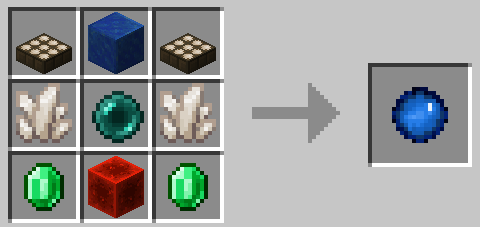
Sync Core:
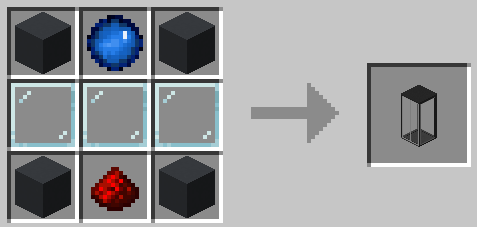
Shell Constructor:
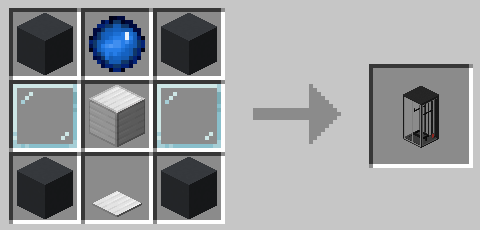
Shell Storage:
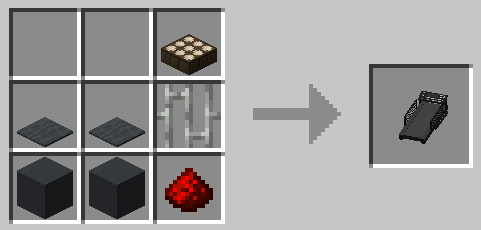
Treadmill:
How to play
- You need to craft a
shell constructorand place it down. - Then you need to provide it with a sample - just
right-clickthe thing. ⚠️WARNING: this action will kill you! In order to create a shell with full health, the constructor must absorb 20HP (40 for Hardcore players). If you don't want to die, you can eat a golden apple to increase your maximum health, or you can hold a totem of undying during the process (which is the only option for Hardcore players). - The shell constructor needs power to work, so put a
treadmillnext to it (it should touch any side of any part of the shell constructor) and lure apigor awolfto its center to start generating piggawatts. You should end up with something like this: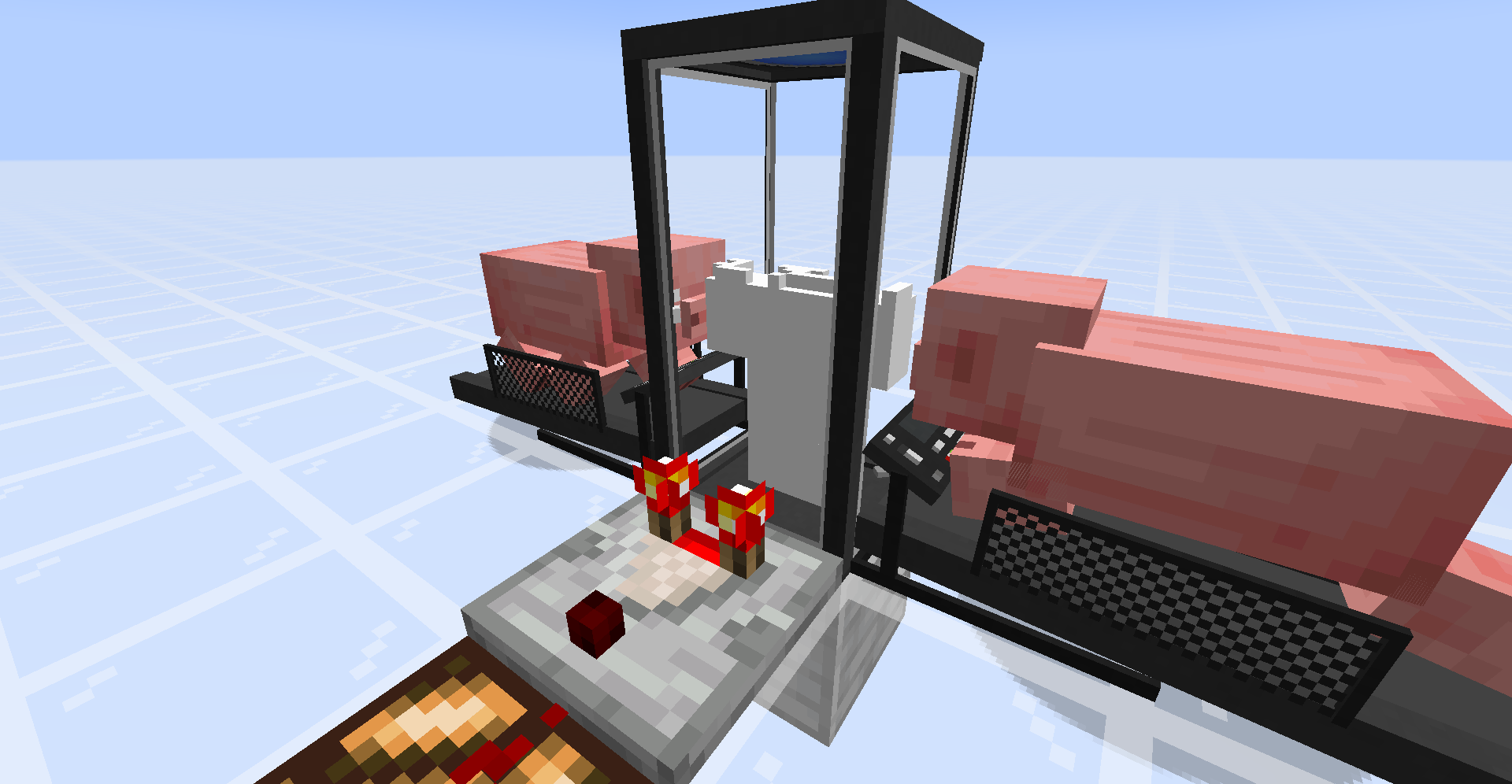 P.S. - You don't really need a comparator, it's here just to demonstrate that you can determine progress of the shell construction process via strength of the comparator output.
 - Once your new shell is constructed, you need to craft a
shell storageand place it down. - Supply it with
redstone power. - Once doors of the shell storage are open, you can
walk into it. - You'll see a radial
menuthat displays your shells: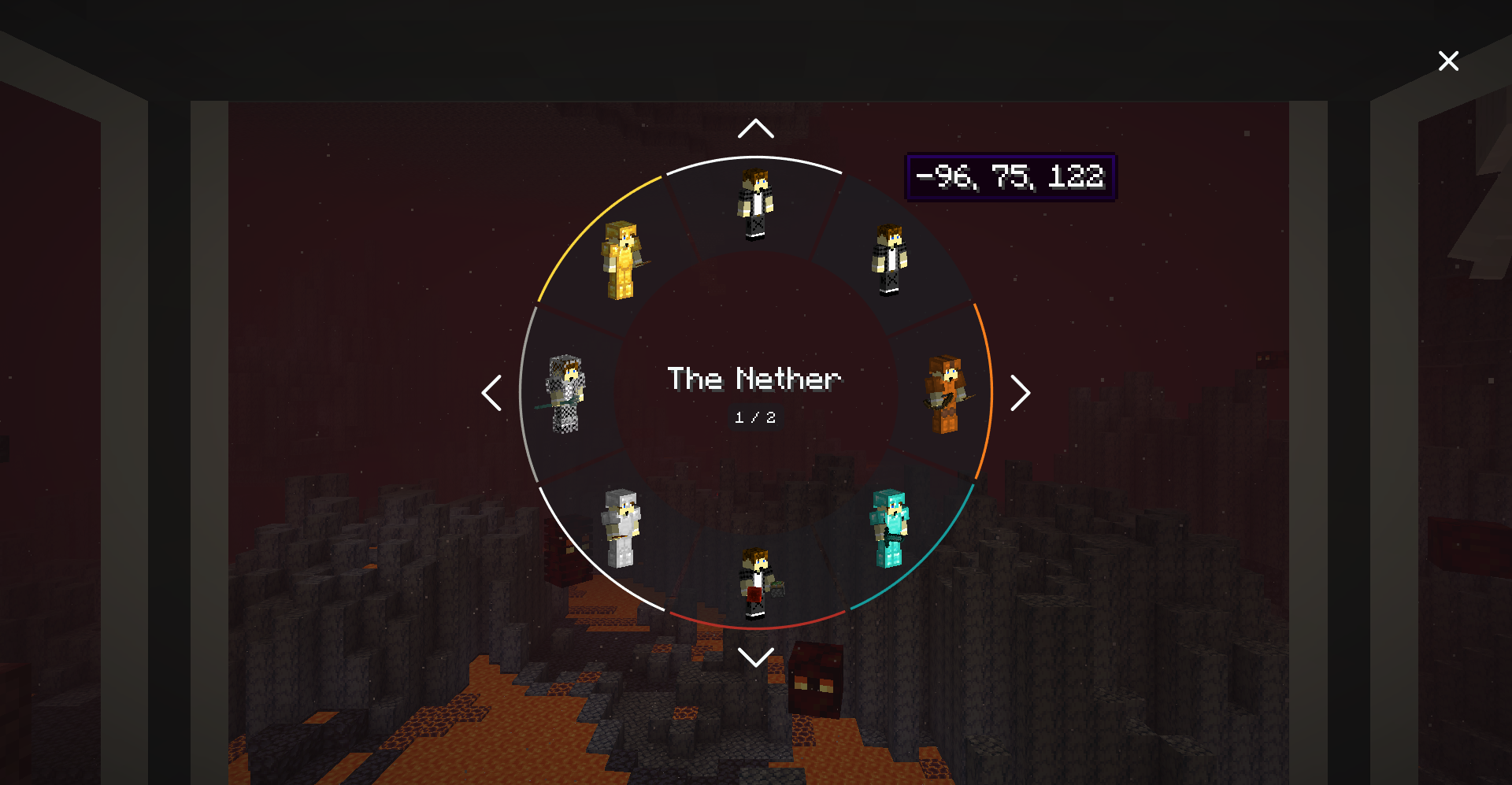
Selectthe shell you want to transfer your mind into, and enjoy the process!
Notes
You can color-code shells stored in shell storages. Just right-click a shell storage with dye.
Syncing works cross dimensional, and should support custom dimensions.
If you die while using a shell, you'll be immediately synced with your original body (if you still have one; otherwise your mind will be transferred to a random shell).
Death of a shell doesn't increase your death counter.
Shell can be equipped (or unequipped) with armor, tools, etc. via hoppers connected to a corresponding shell container.
Shell storage should be constantly supplied with power in order to keep stored shell alive.
- Shell storage can be powered by redstone, if the
shellStorageAcceptsRedstoneoption is set totrue. - Shell storage can be powered by any valid energy source (e.g., treadmills, machinery from popular tech mods, etc.).
- Shell storage can be powered by redstone, if the
It's possible to measure a shell container's state with a comparator.
- You can determine progress of the shell construction process via strength of the comparator output.
- You can measure the fullness of a shell's inventory via strength of the comparator output.
- You can change a comparator output type by right-clicking on a shell container with a wrench.
Shell storage and shell constructor are pretty fragile, so don't try to mine them without
silk touchenchantment.Credits
- Original Sync mod by iChun
- Forked from Sync (Forge)
License
This project is licensed under the MIT License
Sync (Forge)
Sync (Forge) is an unofficial reimplementation of the Sync mod, that was originally developed by iChun.
This particular fork is different because it works more stable with curios, and other mods like Zoe Isn't Cyberpunk, or any other mods that change player in more ways than just inventory or NBT. This mod will get deprecated when Sync (Forge) updates and officially fixes curios, and other incompatibilities.
As for the brief description of the mod, I think the original one says it all:
This mod provides clones, or as we like to call it, "shells". These shells are basically new individuals, with their own inventory, experience level, and even gamemode. However, they lack a mind that would control them. That's where the player comes in. Each shell is biometrically tied to the player whose sample was used to create it, and allows the player to "sync" their mind with it, essentially creating multiple player instances.
Crafting recipes
Sync Core:
Shell Constructor:
Shell Storage:
Treadmill:
How to play
- You need to craft a
shell constructorand place it down. - Then you need to provide it with a sample - just
right-clickthe thing. ⚠️WARNING: this action will kill you! In order to create a shell with full health, the constructor must absorb 20HP (40 for Hardcore players). If you don't want to die, you can eat a golden apple to increase your maximum health, or you can hold a totem of undying during the process (which is the only option for Hardcore players). - The shell constructor needs power to work, so put a
treadmillnext to it (it should touch any side of any part of the shell constructor) and lure apigor awolfto its center to start generating piggawatts. You should end up with something like this: P.S. - You don't really need a comparator, it's here just to demonstrate that you can determine progress of the shell construction process via strength of the comparator output. - Once your new shell is constructed, you need to craft a
shell storageand place it down. - Supply it with
redstone power. - Once doors of the shell storage are open, you can
walk into it. - You'll see a radial
menuthat displays your shells: Selectthe shell you want to transfer your mind into, and enjoy the process!
Notes
-
You can color-code shells stored in shell storages. Just right-click a shell storage with dye.
-
Syncing works cross dimensional, and should support custom dimensions.
-
If you die while using a shell, you'll be immediately synced with your original body (if you still have one; otherwise your mind will be transferred to a random shell).
-
Death of a shell doesn't increase your death counter.
-
Shell can be equipped (or unequipped) with armor, tools, etc. via hoppers connected to a corresponding shell container.
-
Shell storage should be constantly supplied with power in order to keep stored shell alive.
- Shell storage can be powered by redstone, if the
shellStorageAcceptsRedstoneoption is set totrue. - Shell storage can be powered by any valid energy source (e.g., treadmills, machinery from popular tech mods, etc.).
-
It's possible to measure a shell container's state with a comparator.
- You can determine progress of the shell construction process via strength of the comparator output.
- You can measure the fullness of a shell's inventory via strength of the comparator output.
- You can change a comparator output type by right-clicking on a shell container with a wrench.
-
Shell storage and shell constructor are pretty fragile, so don't try to mine them without
silk touchenchantment.Credits
- Original Sync mod by iChun
- Forked from Sync (Forge)
License
This project is licensed under the MIT License
- Shell storage can be powered by redstone, if the
Screenshots
Gallery
Versions
Files
Relations
Project Relations
More like this
Similar Mods
Suggestions use data such as tags, dependencies, dependents, descriptions, titles, and more to rank how much they overlap with this mod.
On ModDex
Community snapshot
By the numbers
Statistics

Get it on
Available Platforms
On ModDex
Community snapshot
By the numbers
Statistics
Resources