
Community listing page, reviews here may not be monitored by the author.
Ripples


No reviews yet
Improving audio experience: Live audio spectrum and sound map
Community voices
Reviews
No reviews yet. Be the first to review this project!
Get it on
Available Platforms
Compatibility
Supported Environments
Runs entirely on the client. Works on vanilla servers.
About
Project Details
For authors
Embed Badge
If you're the author of this project, you can embed a live badge anywhere that supports HTML or Markdown. It updates automatically whenever ratings change.
Use HTML for any page that supports it, or Markdown for README files and Markdown-based descriptions.
Identifiers
Platform IDs
About
Description
Ripples
This mod improves Minecraft in-game audio experience.
Currently it provides mainly 3 features, Audio Spectrum, Sound Map, Music Title Toast.
They are customizable, for example, their opacity, color (including gradient), rendering styles.
Please edit config, or open in-game setting by pressing Alt+R to customize.
This is Client-Only mod, you don't have to install in server
Live Audio Spectrum
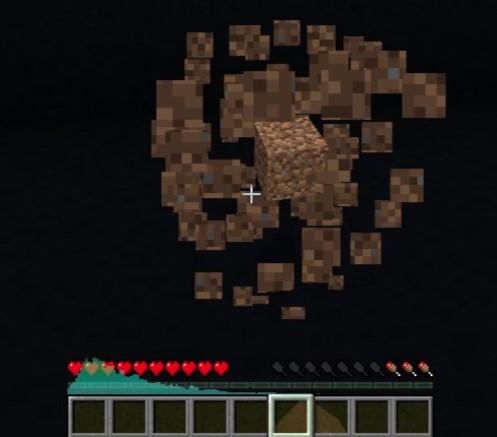
It shows Live Audio Spectrum for playing sounds in-game, it supports sound effects, bgm.
You can customize the spectrum shape by selecting combinations of Spectrum Type and Spectrum Style.
The example image is a combination of Type : Hotbar / Style : Blocks.
Sound Map
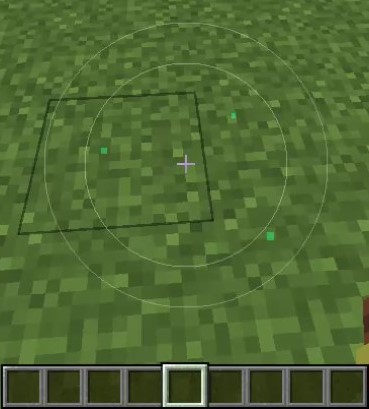
You can use Sound Map instead of audio spectrum, it shows playing audio source direction on screen.
This is also customizable, the example image is Type : Radar

Ripples
This mod improves Minecraft in-game audio experience.
Currently it provides mainly 3 features, Audio Spectrum, Sound Map, Music Title Toast.
They are customizable, for example, their opacity, color (including gradient), rendering styles.
Please edit config, or open in-game setting by pressing Alt+R.
This is Client-Only mod, you don't have to install in server
Live Audio Spectrum
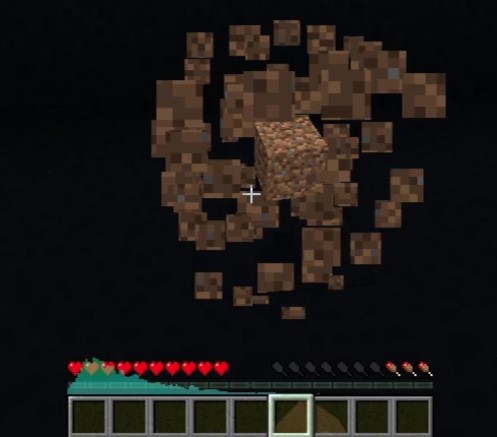
It shows Live Audio Spectrum for playing sounds in-game, it supports sound effects, bgm.
You can customize the spectrum shape by selecting combinations of Spectrum Type and Spectrum Style.
The example image is a combination of Type : Hotbar / Style : Blocks.
Sound Map
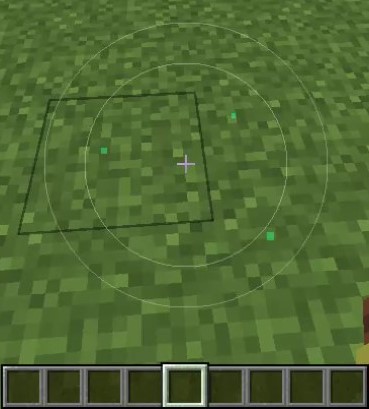
You can use Sound Map instead of audio spectrum, it shows playing audio source direction on screen.
This is also customizable, the example image is Type : Radar
Screenshots
Gallery
-
Radar Sound Map
-
Audio Spectrum of default settings
-
 Logo
Logo
-
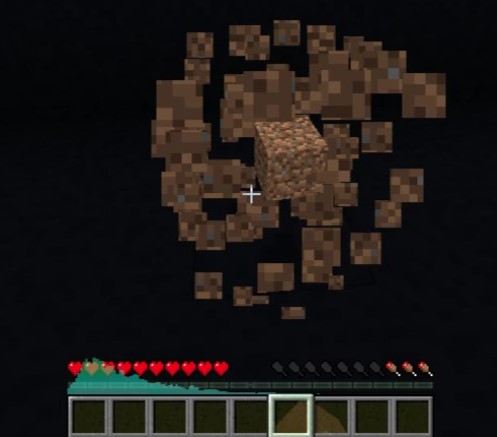 Audio Spectrum Shows in-game audio spectrum in real time. Spectrum style is customizable
 -
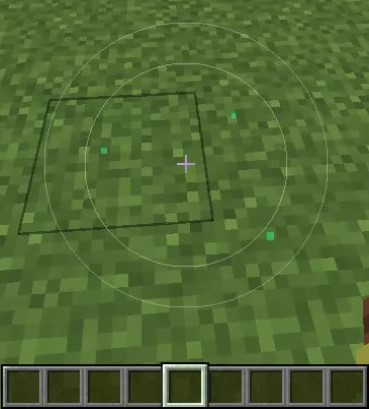 Sound Map Shows sound source direction from your view. It tells also the sound pressure in real time.
Versions
Files
Relations
Project Relations
More like this
Similar Mods
Suggestions use data such as tags, dependencies, dependents, descriptions, titles, and more to rank how much they overlap with this mod.
- Ripples of the Past: Killer Queen Addon
- Ripples of the Past: Made in Heaven Addon
- Ripples of the Past: Hermit Purple + Emperor Addon
- Ripples of the Past: C-Moon Addon
- Ripples of the Past: Extra Stands Addon
- Ripples of the Past: King Crimson Addon
- Ripples of the Past: Mobs With Powers Addon
- Ripples of the Past: Mandom Addon
- Ripples of the Past: Bad Company Addon
- Ripples of The Past: Harvest Addon
- Ripples of The Past: Stone Legacy Addon
- Ripples of the Past: Pearl Jam Addon
On ModDex
Community snapshot
By the numbers
Statistics
Want to reach Minecraft players?
We're looking for a server hosting partner to feature here and other parts of the site. Interested? Send us a message!
Get in touchGet it on
Available Platforms
On ModDex
Community snapshot
By the numbers