Community listing page, reviews may not be monitored by the author.


Community voices
Reviews
No reviews yet. Be the first to review this project!
Get it on
Available Platforms
About
Project Details
For authors
Embed Badge
If you're the author of this project, you can embed a live badge anywhere that supports HTML or Markdown. It updates automatically whenever ratings change.
Use HTML for any page that supports it, or Markdown for README files and Markdown-based descriptions.
Identifiers
Platform IDs
About
Description
Hello and welcome to RPGCore!
What is RPGCore
RPGCore is an API. Currently, it adds a skills implementation system, which makes it incredibly easy for any developer to create a new skill - for example to make an existing mod optionally harder by requiring progression or just outright new mods.
Alone, RPGCore does very little, which is why I need you guys to make some skills!
How does it work?
RPGCore is loosely based around the skill system used in the anime Sword-Art Online, in terms of design and layout. In fact, it's close enough that I've been asked to make a modified version of it for the MCSAO mod - meaning all skills made for this will work with that and vice versa.
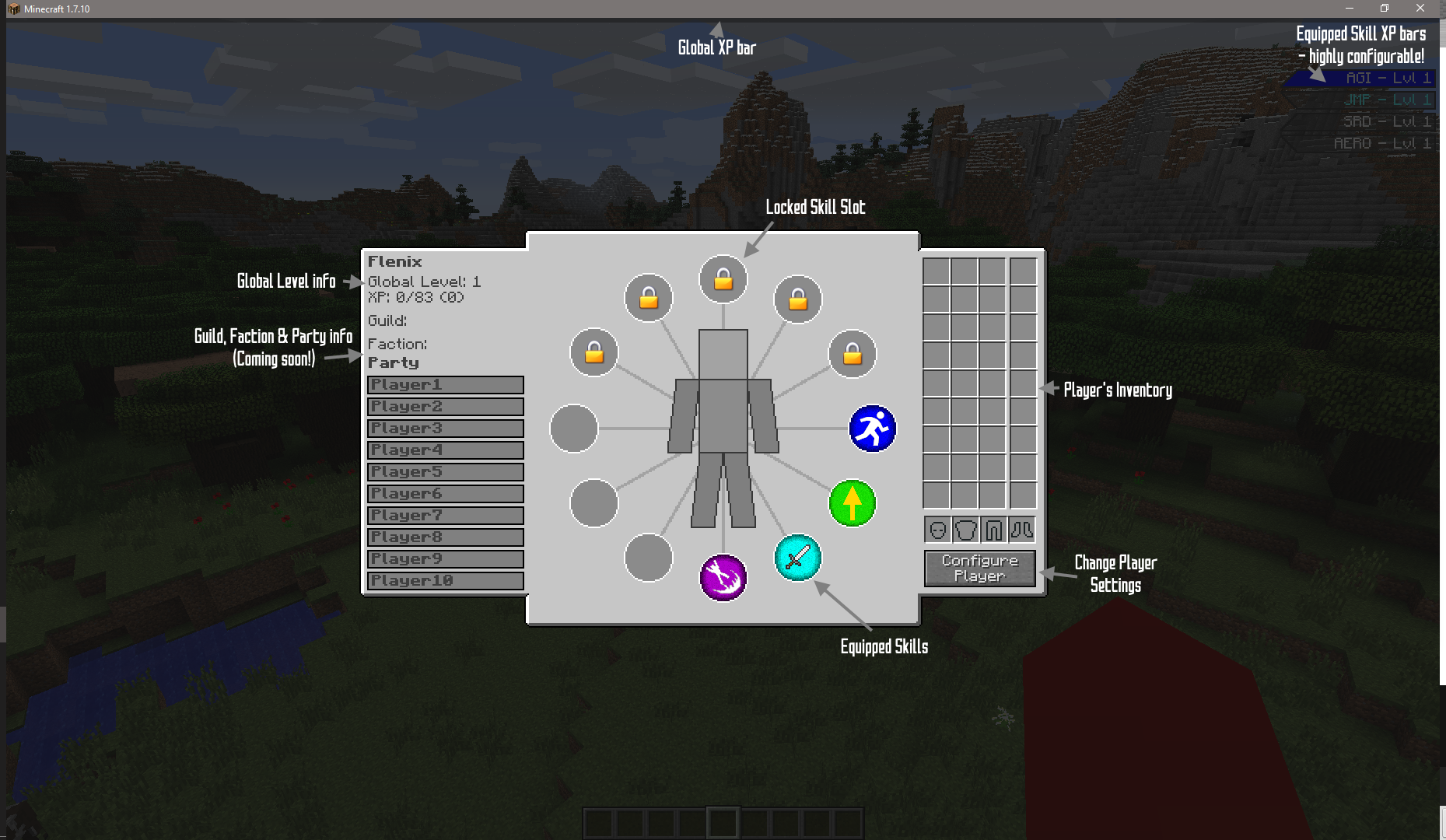
The player opens their skill GUI by pressing F4 by default. In there, they can equip new skills, configure the layout of their screen, and (when implemented) sort out their guild, faction and party groups.
The player can eventually equip a maximum of 12 skills at once (or 8, if wearing full armour) - but some slots are locked until you reach a certain Global Level. Only skills which are equipped can be used or gain experience.
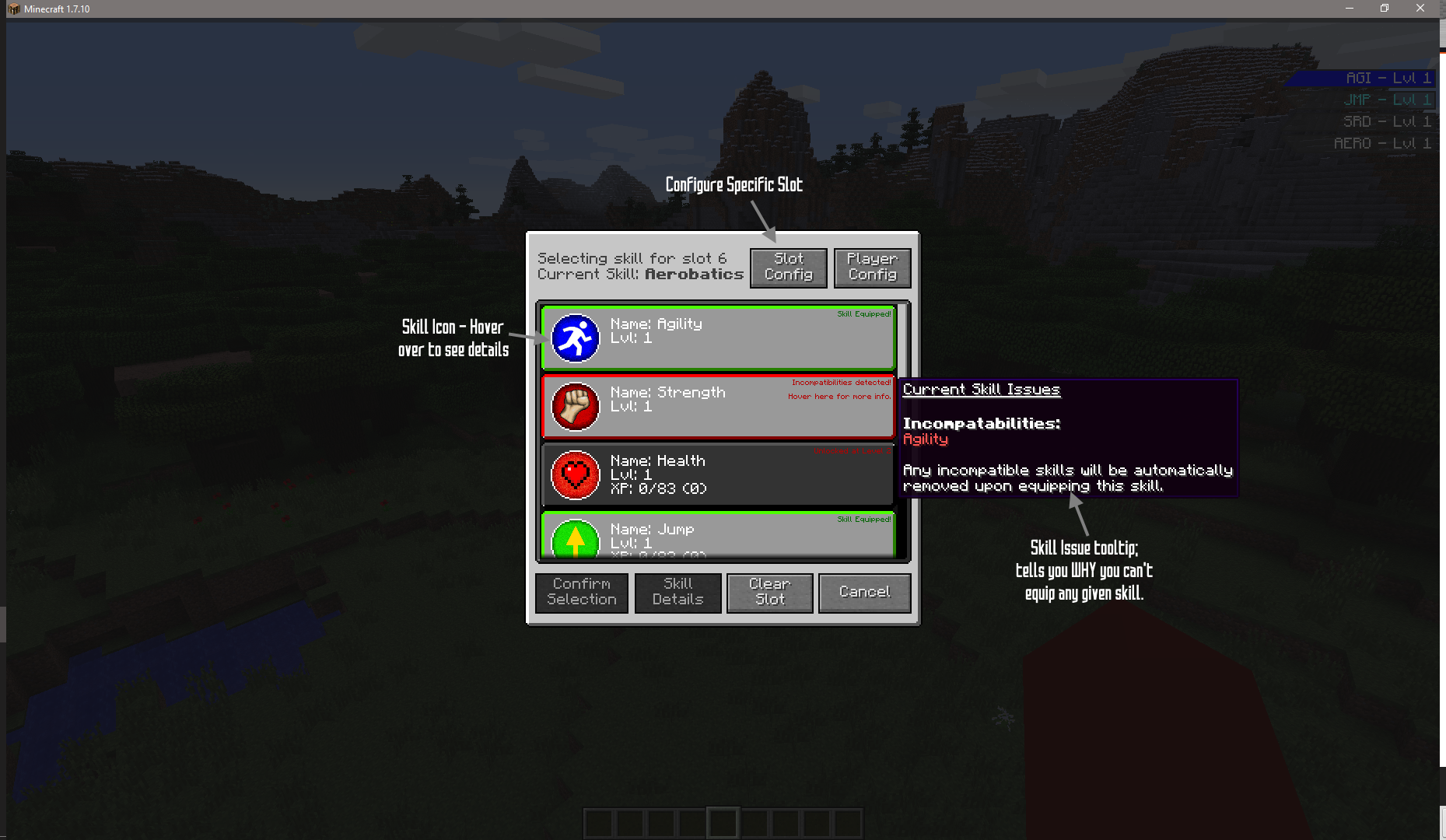
Some skills require one or more other skills to be equipped in order to use, and some are incompatible with others. For example, two base skills included are Strength and Agility, which are incompatible with one another but are both required by various other skills.

Skill Equip screen - accessed via F4 (can be changed in Controls)
So what's this Global Level?
Global Level is your overall level which will be visible to other players. Every 10XP you gain in any skill also gives 1XP to your Global Level. Skills can require a certain GL to be reached before you can use them. Global Level doesn't take up a skill slot and is always equipped.
Great, how do I level up my other skills?
The skill must be equipped in order to gain experience. From there, it's up to whoever made the skill on how you get XP. The mod doesn't include any usable skills by default, just some examples - but my first addon Flenix's Skills has Aerobatics, which is levelled by dropping more than 3 blocks without taking damage. There are exceptions though; Strength and Agility are Non-XP skills. To level those up, you must spend skill points - you get 3 points for every Global Level you achieve. Points are allocated via the Configure Player button on the Skill Equip screen.

Skill Select screen. Accessed by clicking a slot, choose a skill to assign it to that slot.
NB: the "Player Config" button in here doesn't work right now - use the one in the main Skill screen.
Awesome, I can't wait to use it!
Hold your horses! As I said before, there's not really any skills yet. You'll have to pester developers to make some!
Of course, I'll be making a few too as parts of my various mods. Currently planned are a Mining skill in cOre, a cooking skill in FlenixCitiesFood and various combat-based skills in Advanced Armoury. But, I decided to get this out early and let other developers have a crack at it too! ;)
I'm a developer! How do I have a crack at it?
I've made it as easy and as streamlined as possible to implement a new skill. I've also made a mod called ExampleSkills, which does nothing but implement two new skills and document the whole process.
All you need to do is download the deobfuscated version of the mod, put it in /yourdevelopmentfolder/libs (you may need to create the libs folder), and then add it to your IDE's build path as an external .jar file. You may also want to add the javadocs.
From there, extend SkillLevelBase, implement IExtendedEntityProperties and make sure you add all the required methods as shown in my examples (Some are not abstracted!)
There may be changes in the API in the future, especially to keep comparability with MCSAO. As such I recommend depending on specific version ranges until I call it complete :)
If you have an existing mod, you can soft-depend on RPGCore and only enable the levelling system if it's installed, making it optional for your users. Use Loader.isModLoaded for your registration, save that as a static final boolean then anywhere you have a level XP gain/requirement just check against it :)
License, modpacks etc
Yes, you can put it in a modpack so long as you tell me. You cannot redistribute it on other sites though.
Anyone making addons/new skills, you can do anything you like; the only rule is you must also allow modpacks, and you need to link here for people to download RPGCore.
Final Notes
- The logo is temporary. I suck at making logos. halp!
- ExampleSkills is not meant for production use and should be considered complete. The skills can be levelled, but I'll never add features to those levels.
- FlenixSkills one skill, Aerobatics, WILL have features to its level-ups, but they're not implemented just yet.
- I'm still testing balancing, so please bear that in mind when using on servers. Players may level faster than you might want them to.
- All player XP data is saved into their NBT (the player.dat file). If you delete that for any reason, all experience will be lost.
- If needed, the command /rpgcore addxp skillId amount can add/remove XP
- All XP bars are completely configurable in terms of position, size, text and show/hide icon. I suggest configuring them in-game by going to skills (F4) -> configure player -> configure slot X/configure global if you don't like the current layout.
- The skill GUI needs a screen resolution of at least 256x450 to display in full. By default Minecraft is slightly short of this, so you may need to resize your window to see it all. You should still be able to access important parts regardless.
- The player inventory currently it just for show and interacting is buggy. This will be fixed in a future update.
Please report any bugs!
Screenshots
Gallery
-
 skill list gui
 -
 skill select gui
Versions
Files
Relations
Project Relations
More like this
Similar Mods
Suggestions use data such as tags, dependencies, dependents, descriptions, titles, and more to rank how much they overlap with this mod.
On ModDex
Community snapshot
By the numbers
Statistics

Get it on
Available Platforms
On ModDex
Community snapshot
By the numbers