
Community listing page, reviews here may not be monitored by the author.
RTStructures Framework


No reviews yet
A library focused on RTS structures mechanics
Community voices
Reviews
No reviews yet. Be the first to review this project!
Get it on
Available Platforms
Compatibility
Supported Environments
Must be installed on both the client and the server.
About
Project Details
For authors
Embed Badge
If you're the author of this project, you can embed a live badge anywhere that supports HTML or Markdown. It updates automatically whenever ratings change.
Use HTML for any page that supports it, or Markdown for README files and Markdown-based descriptions.
Identifiers
Platform IDs
About
Description
This mod provides functional for RTS multiblock structures. It also can be used as a structure copy/paste
In-game functions
- Save structures
- Paste structures
To save structure you need structure tool - use /give or operator tab;
Right click - position 1;
Left click - position 2;
Shift + right click - anchor position
CTRL + mouse click - expand area (can be changed in keybinds)
Shift + left click - placement anchor
/rtstrucutres save <name> - saves structure
/rtstrucutres load <name> <anchor> - pre-loads structure + displays paste box
/rtstrucutres execute <build_type> - pastes pre-loaded structure in world
/rtstrucutres execload <name> <anchor> <build_type> - pastes structure in world
/rtstrucutres toggle_boxes <true/false> - alway display tool selection area
Mod-Developer functions
Installation Guide
repositories {
    maven {
        url = "https://api.modrinth.com/maven"
    }
}

dependencies {
    implementation "maven.modrinth:rtstrucures-framework:0.1.4"
}
Mod Guide
Here is the example of /execload command
ServerLevel level = ctx.getSource().getLevel();
String filename = "house";

Path worldDir = level.getServer().getWorldPath(LevelResource.ROOT);
StructureTemplate template = StructureCache.get(worldDir, filename);

BlockPos anchorPos = StructureToolState.placeAnchor; // Place position
PlacementAnchor anchorMode = PlacementAnchor.CUSTOM; // Recommended to use custom anchor
StructureInstance instance = new StructureInstance(level, template, anchorPos, anchorMode);

StructureManager.add(instance);
instance.build(BuildType.FAST, 2.0f); // Execute in the world; Layer-by layer building
StructureInstance class provides more methods for structure management;
Basic Usage
Saving Structure
StructureTemplate template = StructureCapture.capture(level, pos1, pos2, customAnchor);
Path path = worldDir.resolve("generated/rtstructures/house.rtstructure");

StructureSerializer.save(template, path);
Loading Structure
Path path = worldDir.resolve("generated/rtstructures/house.rtstructure");

StructureTemplate template = StructureDeserializer.load(path);
Register Structure
StructureManager.add(instance);Start Building
instance.build(BuildType.FAST,10);BuildType= construction logicspeed= blocks per tick
Validation System
Check Damage
boolean damaged = instance.isDamaged();Completion Percent
float percent = instance.getCompletionPercent();Damage Percent
float percent = instance.getDamagePercent();Full Validation Result
ValidationResult result = instance.validate();Build Modes
WARNING! If structure won't be able to finish constructing, it will infinitly tick. Be aware of it (max steps amount will be added in next version)
FAST
Instant layered building
- fast
- unrestricted
- replaces blocks
Best for:
- debugging
- cinematic building
- RTS instant construction
FAST_SAFE
Layered building without replacing existing blocks
- preserves world
- safer placement
- slower completion
Best for:
- survival gameplay
- protected worlds
CONNECT
Builds only connected blocks
- realistic propagation
- support-dependent
- may stall if disconnected
Best for:
- RTS simulation
- organic building systems
SEPARATED
Growth-style construction from anchor
- spreading build effect
- directional expansion
- organic appearance
Best for:
- alien structures
- plant-like construction
- visual effects
SEPARATED_DIAGONAL
Just like SEPARATED but corner blocks are used as anchor too
DEMOLISH
Demolished structure from top to bottom
Advanced Usage (0.1.4+)
Registering Structure
Mod provides DefferedRegistered structure
public final class StructuresInit {
    private StructuresInit() {}

    public static final DeferredRegister<StructureType> STRUCTURES =
            DeferredRegister.create(RTSRegistries.STRUCTURES, RTStructureFramework.MOD_ID);


    public static final Supplier<StructureType> SIMPLE_HOUSE = STRUCTURES.register("simple_house", SimpleHouseStructure::new);
    public static final Supplier<StructureType> AIRFIELD = STRUCTURES.register("airfield", AirfieldStructure::new);
    public static final Supplier<StructureType> CRYSTAL = STRUCTURES.register("crystal", CrystalStructure::new);
    public static final Supplier<StructureType> PROTECTED_STRUCTURE = STRUCTURES.register("protected_structure", ProtectedStructure::new);


    public static void register(IEventBus bus) {
        STRUCTURES.register(bus);
    }
}
Structure class
public class SimpleHouseStructure extends StructureType {

    public SimpleHouseStructure() {
        super("simple_house", StructureProperties.create()
                // Structure file
                .modPath("basic/simple_house", RTStructureFramework.MOD_ID) // In your resources/data/mod_id/...

                // Default placement
                .defaultAnchor(PlacementAnchor.CENTER)

                // Default build behavior
                .defaultBuildType(BuildType.FAST)
                .defaultBuildSpeed(2f)

                // Validation
                .damagedThreshold(0.15f)
                .destroyedThreshold(0.5f)
        );
    }
}
Library provides some methods for management
    public void onCompleted(StructureInstance instance) {}

    public void onDamaged(StructureInstance instance) {}

    public void onDestroyed(StructureInstance instance) {}

    public void onDemolished(StructureInstance instance) {}
Example usage:
public class AirfieldStructure extends StructureType {
    private int productionTick;

    public AirfieldStructure() {
        super("airfield", StructureProperties.create()
                .modPath("basic/airfield", RTStructureFramework.MOD_ID)
                .defaultAnchor(PlacementAnchor.CENTER)
                .defaultBuildType(BuildType.FAST)

                .defaultBuildSpeed(3f)
                .damagedThreshold(0.2f)
                .destroyedThreshold(0.6f)
        );
    }

    @Override
    public void onCompleted(StructureInstance instance) {
        System.out.println("[RTS] Airfield completed");
    }

    @Override
    public void onTick(StructureInstance instance) {
        if (!instance.isCompleted()) return;

        productionTick++;
        if (productionTick >= 100) {
            productionTick = 0;

            System.out.println("[RTS] Kirov reporting...");
            // Do your stuff. E.g spawn unit
        }
    }

    @Override
    public void onDestroyed(StructureInstance instance) {
        System.out.println("[RTS] Airfield destroyed!");
    }
}
Spawning structure
    StructureInstance instance = StructuresInit.AIRFIELD.get().create(level, anchorPos);
    StructureManager.add(instance);

    instance.build();
Warning!
StructureManager.add(instance); Actually creates your structure class;
instance.build(); just constructs your structure;
If you need to remove your structure use instance.destroy(); (warning! could call stackoverflow)
Example of usage:
public class CrystalStructure extends StructureType {

    public CrystalStructure() {
        super("crystal", StructureProperties.create()
                .modPath("crystal", RTStructureFramework.MOD_ID)
                .defaultBuildType(BuildType.FAST)
                .defaultBuildSpeed(1f)
                .defaultAnchor(PlacementAnchor.CUSTOM)

                .damagedThreshold(0.05f)
                .destroyedThreshold(0.8f)
        );
    }

    @Override
    public void onTick(StructureInstance instance) {
        if (instance.isDamaged()) {
            if (!instance.isBuilding()) {
                instance.build(BuildType.FAST, 0.5f);
            }
        }
    }

    @Override
    public void onDestroyed(StructureInstance instance) {
        if (instance.getDamagePercent() >= 0.95f) {
            instance.destroy();
        }
    }

    @Override
    public void onCompleted(StructureInstance instance) {
        System.out.println(instance.debugInfo());
    }
}
This description will be scratched to a normal mod description. For documentation view github wiki
This mod provides functional for RTS multiblock structures. It also can be used as a structure copy/paste
In-game functions
- Save structures
- Paste structures
To save structure you need structure tool - use /give or operator tab;
Right click - position 1;
Left click - position 2;
Shift + right click - anchor position
CTRL + mouse click - expand area (can be changed in keybinds)
Shift + left click - placement anchor
/rtstrucutres save - saves structure
/rtstrucutres load - pre-loads structure + displays paste box
/rtstrucutres execute <build_type> - pastes pre-loaded structure in world
/rtstrucutres execload <build_type> - pastes structure in world
/rtstrucutres toggle_boxes <true/false> - always displays tool selection area
Mod-Developer functions
Installation Guide
repositories {
    maven {
        url = "https://api.modrinth.com/maven"
    }
}

dependencies {
    implementation "maven.modrinth:rtstrucures-framework:0.1.4"
}
Mod Guide
Here is the example of /execload command
ServerLevel level = ctx.getSource().getLevel();
String filename = "house";

Path worldDir = level.getServer().getWorldPath(LevelResource.ROOT);
StructureTemplate template = StructureCache.get(worldDir, filename);

BlockPos anchorPos = StructureToolState.placeAnchor; // Place position
PlacementAnchor anchorMode = PlacementAnchor.CUSTOM; // Recommended to use custom anchor
StructureInstance instance = new StructureInstance(level, template, anchorPos, anchorMode);

StructureManager.add(instance);
instance.build(BuildType.FAST, 2.0f); // Execute in the world; Layer-by layer building
StructureInstance class provides more methods for structure management;
Basic Usage
Saving Structure
StructureTemplate template = StructureCapture.capture(level, pos1, pos2, customAnchor);
Path path = worldDir.resolve("generated/rtstructures/house.rtstructure");

StructureSerializer.save(template, path);
Loading Structure
Path path = worldDir.resolve("generated/rtstructures/house.rtstructure");

StructureTemplate template = StructureDeserializer.load(path);
Register Structure
StructureManager.add(instance);
Start Building
instance.build(BuildType.FAST,10);
BuildType= construction logicspeed= blocks per tick
Validation System
Check Damage
boolean damaged = instance.isDamaged();
Completion Percent
float percent = instance.getCompletionPercent();
Damage Percent
float percent = instance.getDamagePercent();
Full Validation Result
ValidationResult result = instance.validate();
Build Modes
WARNING! If structure won't be able to finish constructing, it will infinitly tick. Be aware of it (max steps amount will be added in next version)
FAST
Instant layered building
- fast
- unrestricted
- replaces blocks
Best for:
- debugging
- cinematic building
- RTS instant construction
FAST_SAFE
Layered building without replacing existing blocks
- preserves world
- safer placement
- slower completion
Best for:
- survival gameplay
- protected worlds
CONNECT
Builds only connected blocks
- realistic propagation
- support-dependent
- may stall if disconnected
Best for:
- RTS simulation
- organic building systems
SEPARATED
Growth-style construction from anchor
- spreading build effect
- directional expansion
- organic appearance
Best for:
- alien structures
- plant-like construction
- visual effects
SEPARATED_DIAGONAL
Just like SEPARATED but corner blocks are used as anchor too
DEMOLISH
Demolished structure from top to bottom
Advanced Usage (0.1.4+)
Registering Structure
Mod provides DefferedRegistered structure
public final class StructuresInit {
    private StructuresInit() {}

    public static final DeferredRegister<StructureType> STRUCTURES =
            DeferredRegister.create(RTSRegistries.STRUCTURES, RTStructureFramework.MOD_ID);


    public static final Supplier<StructureType> SIMPLE_HOUSE = STRUCTURES.register("simple_house", SimpleHouseStructure::new);
    public static final Supplier<StructureType> AIRFIELD = STRUCTURES.register("airfield", AirfieldStructure::new);
    public static final Supplier<StructureType> CRYSTAL = STRUCTURES.register("crystal", CrystalStructure::new);
    public static final Supplier<StructureType> PROTECTED_STRUCTURE = STRUCTURES.register("protected_structure", ProtectedStructure::new);


    public static void register(IEventBus bus) {
        STRUCTURES.register(bus);
    }
}
Structure class
public class SimpleHouseStructure extends StructureType {

    public SimpleHouseStructure() {
        super("simple_house", StructureProperties.create()
                // Structure file
                .modPath("basic/simple_house", RTStructureFramework.MOD_ID) // In your resources/data/mod_id/...

                // Default placement
                .defaultAnchor(PlacementAnchor.CENTER)

                // Default build behavior
                .defaultBuildType(BuildType.FAST)
                .defaultBuildSpeed(2f)

                // Validation
                .damagedThreshold(0.15f)
                .destroyedThreshold(0.5f)
        );
    }
}
Library provides some methods for management
    public void onCompleted(StructureInstance instance) {}

    public void onDamaged(StructureInstance instance) {}

    public void onDestroyed(StructureInstance instance) {}

    public void onDemolished(StructureInstance instance) {}
Example usage:
public class AirfieldStructure extends StructureType {
    private int productionTick;

    public AirfieldStructure() {
        super("airfield", StructureProperties.create()
                .modPath("basic/airfield", RTStructureFramework.MOD_ID)
                .defaultAnchor(PlacementAnchor.CENTER)
                .defaultBuildType(BuildType.FAST)

                .defaultBuildSpeed(3f)
                .damagedThreshold(0.2f)
                .destroyedThreshold(0.6f)
        );
    }

    @Override
    public void onCompleted(StructureInstance instance) {
        System.out.println("[RTS] Airfield completed");
    }

    @Override
    public void onTick(StructureInstance instance) {
        if (!instance.isCompleted()) return;

        productionTick++;
        if (productionTick >= 100) {
            productionTick = 0;

            System.out.println("[RTS] Kirov reporting...");
            // Do your stuff. E.g spawn unit
        }
    }

    @Override
    public void onDestroyed(StructureInstance instance) {
        System.out.println("[RTS] Airfield destroyed!");
    }
}
Spawning structure
    StructureInstance instance = StructuresInit.AIRFIELD.get().create(level, anchorPos);
    StructureManager.add(instance);

    instance.build();
Warning!
StructureManager.add(instance); Actually creates your structure;
instance.build(); Just constructs your structure;
If you need to remove your structure use instance.destroy(); (Warning! could call stackoverflow in case of spam. Never put it in tick();)
Example of usage:
public class CrystalStructure extends StructureType {

    public CrystalStructure() {
        super("crystal", StructureProperties.create()
                .modPath("crystal", RTStructureFramework.MOD_ID)
                .defaultBuildType(BuildType.FAST)
                .defaultBuildSpeed(1f)
                .defaultAnchor(PlacementAnchor.CUSTOM)

                .damagedThreshold(0.05f)
                .destroyedThreshold(0.8f)
        );
    }

    @Override
    public void onTick(StructureInstance instance) {
        if (instance.isDamaged()) {
            if (!instance.isBuilding()) {
                instance.build(BuildType.FAST, 0.5f);
            }
        }
    }

    @Override
    public void onDestroyed(StructureInstance instance) {
        if (instance.getDamagePercent() >= 0.95f) {
            instance.destroy();
        }
    }

    @Override
    public void onCompleted(StructureInstance instance) {
        System.out.println(instance.debugInfo());
    }
}
This description will be scratched to a normal mod description. For documentation view github wiki
Screenshots
Gallery
-
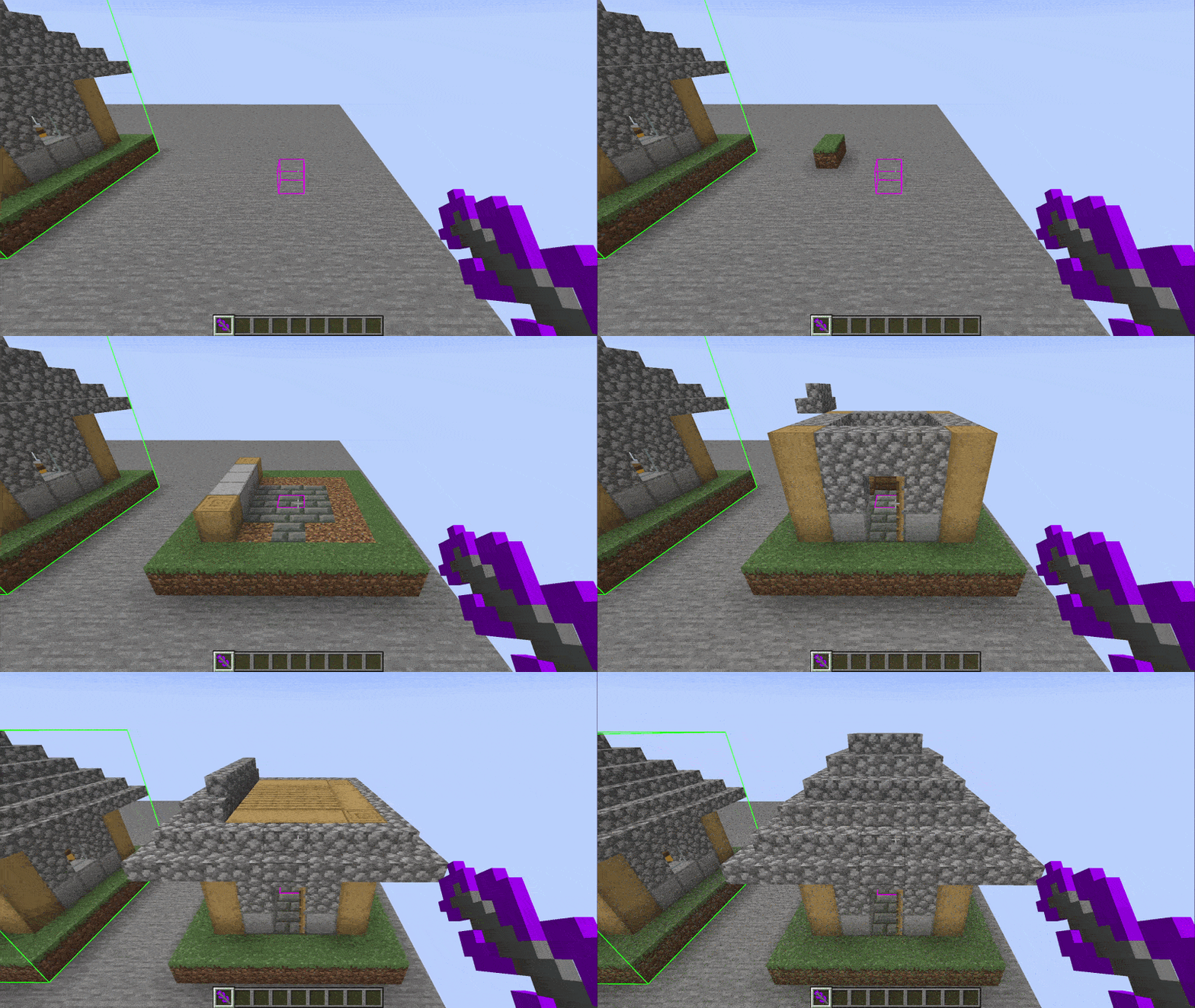 Example of usage Currently code only (Or use /debug with a name of "house")
 -
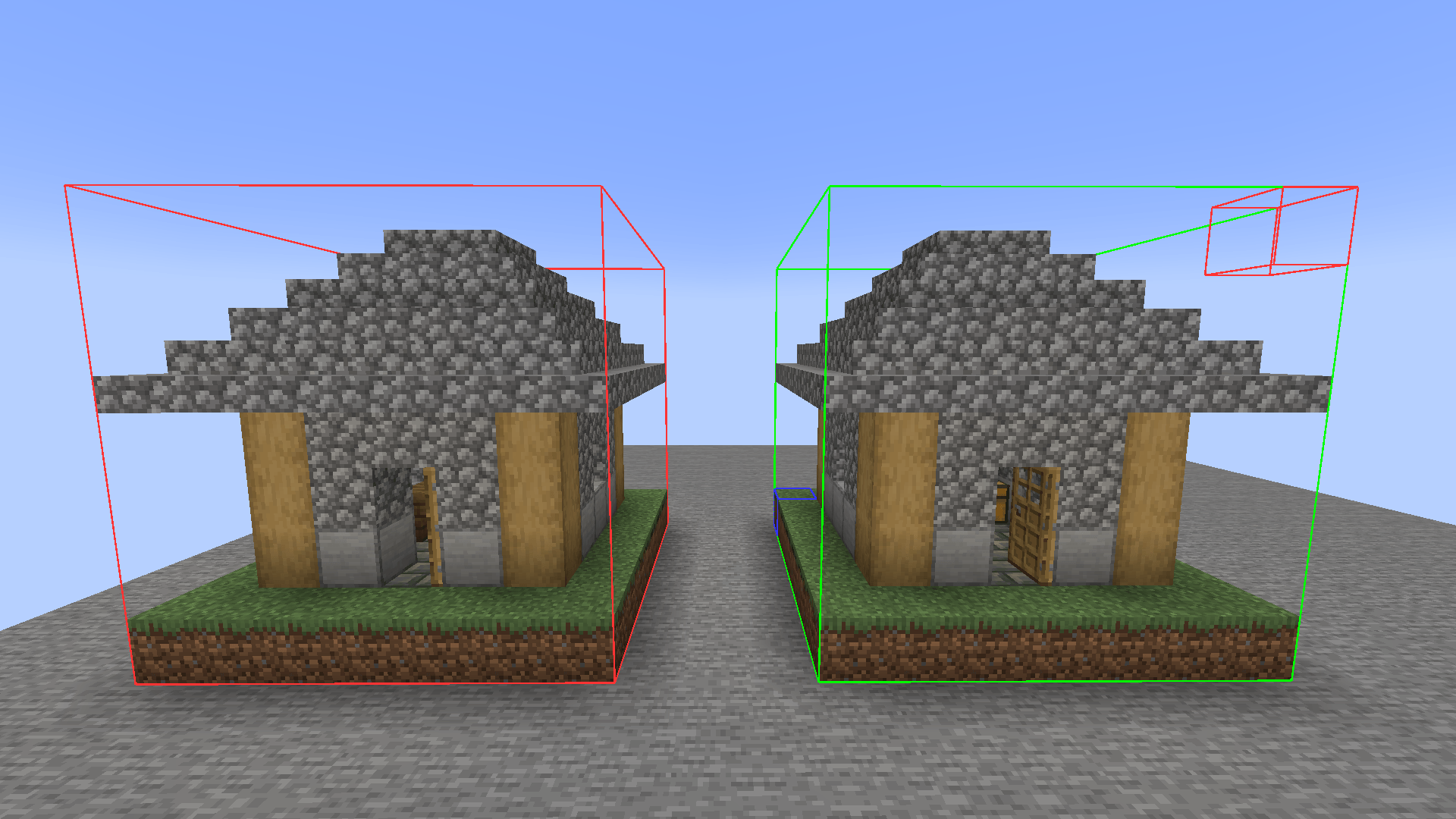 Copy - paste Left one is a copy of a right one
-
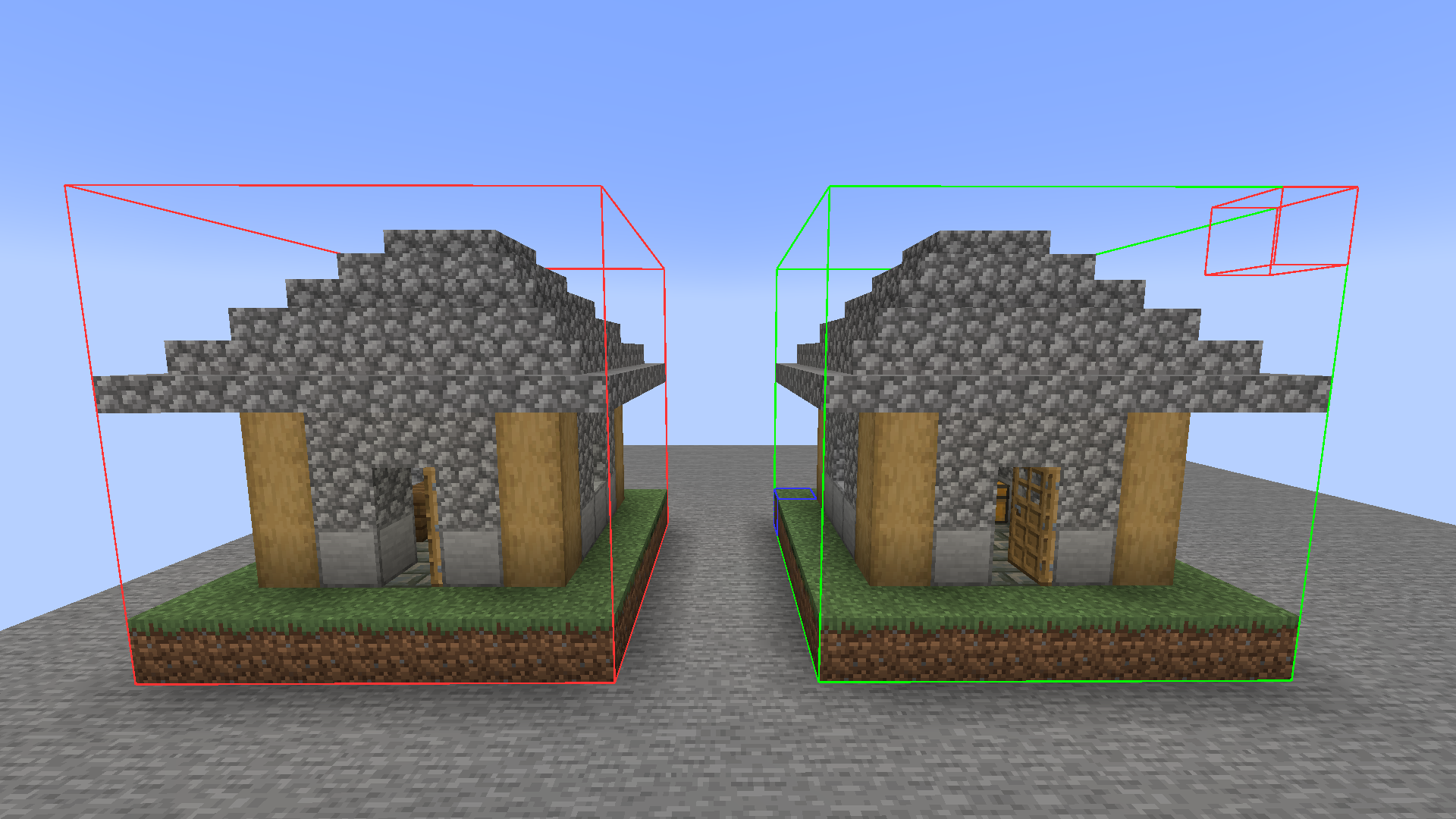 Copy - paste Left one is a copy of a right one
 -
 Logo
Logo -
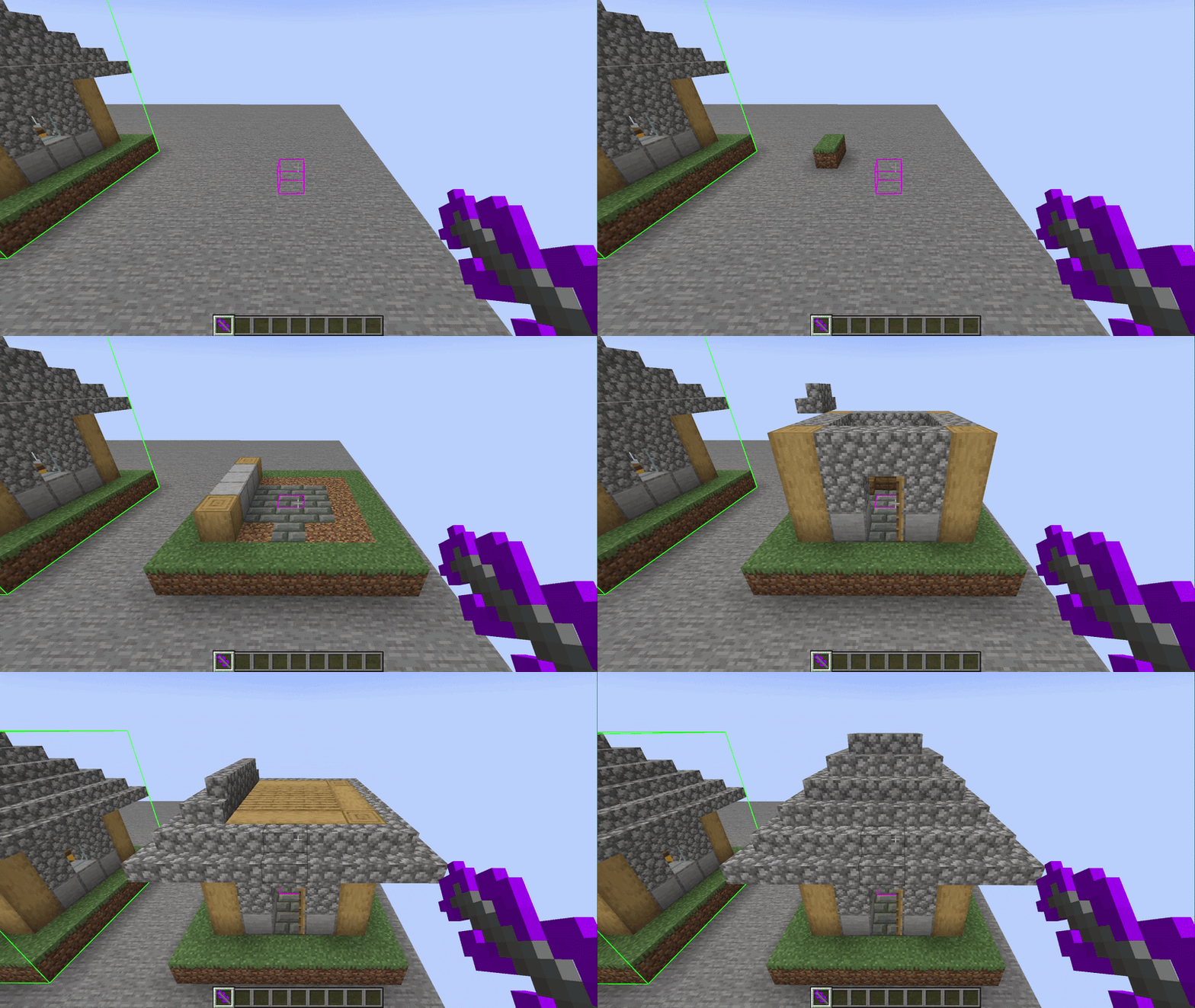 Example of usage Build type FAST
Versions
Files
Relations
Project Relations
More like this
Similar Mods
Suggestions use data such as tags, dependencies, dependents, descriptions, titles, and more to rank how much they overlap with this mod.
On ModDex
Community snapshot
By the numbers
Statistics
Want to reach Minecraft players?
We're looking for a server hosting partner to feature here and other parts of the site. Interested? Send us a message!
Get in touchGet it on
Available Platforms
On ModDex
Community snapshot
By the numbers