
Community listing page, reviews here may not be monitored by the author.
Runal

No reviews yet
Runal, a lightweight utility mod adding custom waypoints with visible beams and name labels, a player health bar overlay, and team tracking, and way more, all managed through a simple in-game settings menu.
Community voices
Reviews
No reviews yet. Be the first to review this project!
Get it on
Available Platforms
Compatibility
Supported Environments
Runs entirely on the client. Works on vanilla servers.
About
Project Details
For authors
Embed Badge
If you're the author of this project, you can embed a live badge anywhere that supports HTML or Markdown. It updates automatically whenever ratings change.
Use HTML for any page that supports it, or Markdown for README files and Markdown-based descriptions.
Identifiers
Platform IDs
About
Description
What is Runal?
Runal is a lightweight, all-in-one Fabric client mod built for ScepterRPG and MageRPG. It focuses on combat awareness, visual customization, and detailed progress tracking, with everything organized into a single ClickGUI. Players with Runal installed also show a small star badge next to their name to other Runal users on either server.
✨ Features
Runal is split into four categories accessible via the ClickGUI:
Combat
Stay aware and stay alive.
- Auto Sprint: Automatically sprint at all times.
- Health Indicator: Configurable sound and title warnings when your HP drops below Low/Mid thresholds.
- Hitboxes: Render hitboxes for players and entities, with custom colors and line width.
- Weapon / Armor / Accessory Cooldown: A unified cooldown panel for weapon abilities, armor abilities, and accessories - switch between Percent and Seconds display.
- Boss Callout: On-screen title when a tracked raid or dungeon boss uses an attack.
Visual
Customize your HUD and view for maximum clarity.
- Health Bar: Overhead health bar with Bar, Compact, or Text render styles, damage flash, and smooth interpolation.
- Armor HUD: Displays your currently equipped armor pieces.
- Fullbright: See clearly in the dark.
- Hide Players / Hide Armor: Hide other players, or hide armor on yourself and others.
- Hide Scoreboard: Hide the sidebar scoreboard.
- Player Size: Fully adjust the scale of your player model.
- View Model: Customize the position, scale, rotation, and swing animation of your held item.
- Inventory HUD: Shows your three main inventory rows on-screen without opening your inventory.
- Boss Bar Scale: Resize boss bars without hiding any of their information.
- Teammate Track: Glow your teammates - auto-synced with your party (adds/removes members automatically as people join, leave, get kicked, or the party disbands).
Tracking
Stay informed with detailed tracking systems.
- Session Manager: Track playtime for the current session.
- Performance HUD: FPS, TPS, Ping, and facing direction.
- Dungeon Tracker: Current dungeon, room number, and rooms remaining until Parkour/Boss/Treasure.
- Kill Counter: Running counter for boss defeats.
- Waypoints: Create and manage waypoints with optional beams, per-dimension.
- Event Tracker: Track live server events.
Misc
Quality-of-life tools.
- Auto GG: Automatically responds in chat to item finds (filterable by rarity: Legendary/Epic/Mythical) and achievement completions.
- Auto Trash: Automatically trash shards by rarity.
- Hotbar Swap: Instantly swap hotbar rows with a keybind.
- Command Binds: Bind chat commands to keys.
- DiscordRPC: Show your current activity on Discord - automatically switches between the ScepterRPG and MageRPG Discord apps (with matching icon and invite button) depending on which server you're on.
- Click GUI: The menu itself - includes a drag-and-drop HUD editor, accent color, chat notifications, and the cooldown display mode.
Runal also adds custom chat emojis usable in any chat box on either server.
⚙️ Installation & Setup
Requirements:
- Download the latest version of Runal for your Minecraft version (1.21.4, 1.21.11, 26.1.2, or 26.2).
- Place the
.jarfile in your.minecraft/modsfolder. - Make sure Fabric API is installed.
Navigating the Menu:
- Open the ClickGUI: Press Right Shift or Left Alt.
- Configure Modules: Left-Click a module to toggle it on/off. Right-Click (or click the arrow) to expand its detailed settings.
- Edit your HUD: Open the HUD Editor from the Click GUI module's settings, then drag any enabled HUD element to reposition it.
💬 Support, Bugs & Suggestions
Runal is actively maintained. Bug reports and suggestions are handled through our Discord and GitHub.


Page layout inspired by Melinoe.
Screenshots
Gallery
-
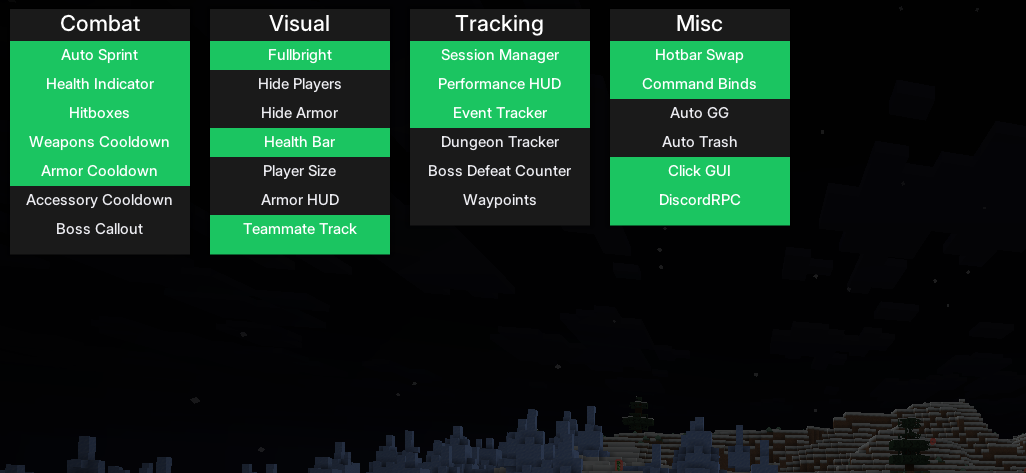 Click GUI Runal's main menu, opened with Right Shift or Left Alt. Modules are organized into four categories, Combat, Visual, Tracking, and Misc. Left-click a module to toggle it on/off, right-click to expand its settings.
 -
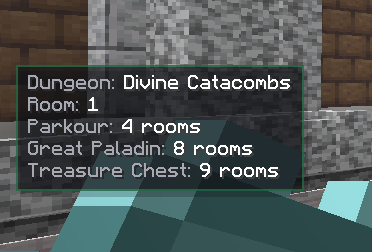 Dungeon Tracker Live dungeon HUD showing the current dungeon (Divine Catacombs), your room number, and exactly how many rooms remain until the next Parkour room, the boss (dynamically named per dungeon, Great Paladin here), and the Treasure Chest room.
 -
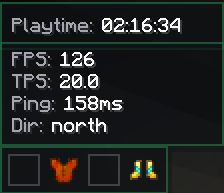 Session, Performance & Armor HUDs Three independently draggable HUD panels: Session Manager tracking playtime for the current session, Performance HUD showing FPS/TPS/Ping/facing direction, and the Armor HUD displaying currently equipped gear at a glance.
 -
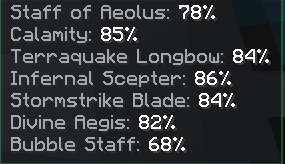 Weapon Cooldown Panel Unified cooldown tracking for all your weapons on cooldown at once. Can be switched between Percent (shown here) and Seconds remaining via the Cooldown Display setting in the ClickGUI.
 -
 Team Tracker - Player Selector Select online players as teammates to glow-highlight them in world. Automatically stays in sync with your party too, teammates get added and removed on their own as people join, leave, get kicked, or the party disbands.
 -
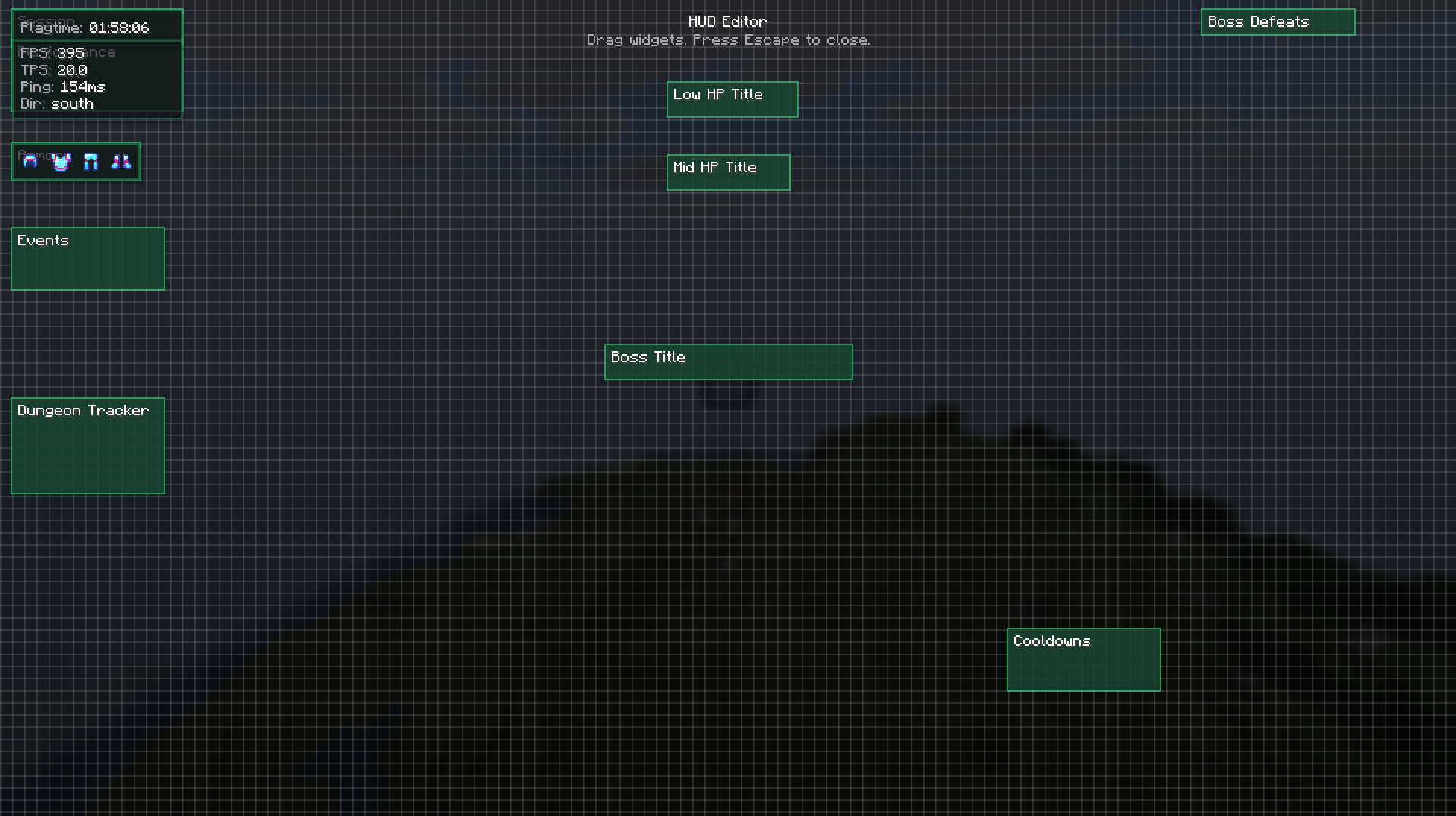 HUD Editor - Drag & Drop Positioning Every HUD element snaps to a grid and can be dragged to reposition — Session Manager, Performance HUD, Armor HUD, Health Warnings, Boss Title, Boss Defeats, Dungeon Tracker, Events, and the Cooldown panel are all independently placeable.
 -
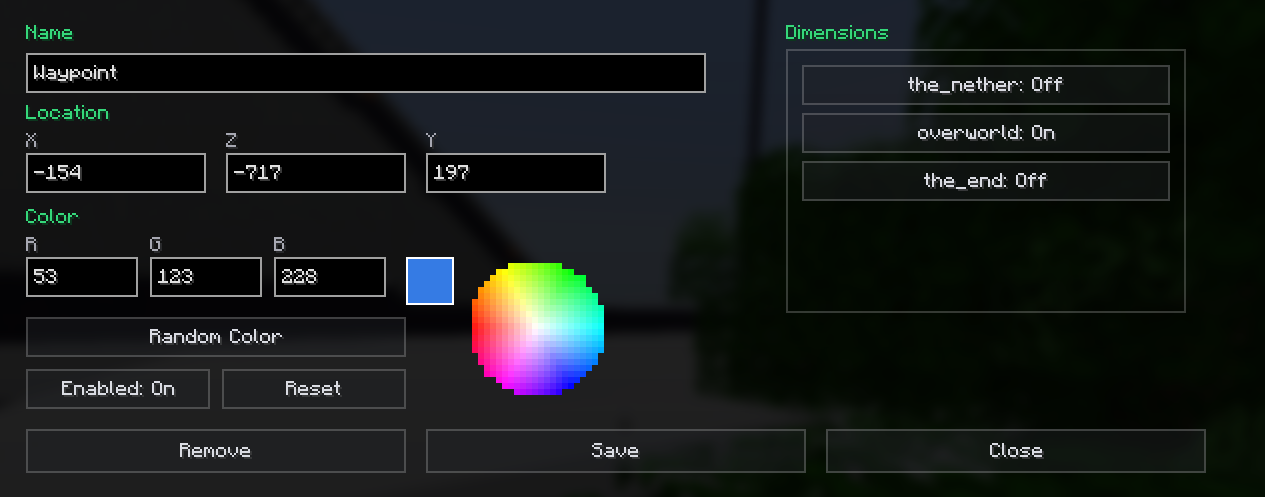 Waypoints Create custom waypoints with colored beams visible from a distance, and on-screen name + distance labels when you're looking their direction. Manage them per-dimension (Overworld/Nether/End) from the Waypoint Manager, with quick teleport support.
Versions
Files
Relations
Project Relations
More like this
Similar Mods
Suggestions use data such as tags, dependencies, dependents, descriptions, titles, and more to rank how much they overlap with this mod.
On ModDex
Community snapshot
By the numbers
Statistics

Want to reach Minecraft players?
We're looking for a server hosting partner to feature here and other parts of the site. Interested? Send us a message!
Get in touchGet it on
Available Platforms
On ModDex
Community snapshot
By the numbers