
Scavenger-Host
No reviews yet
A Fabric item speedrun mod for Minecraft 1.21-1.21.11 with server, LAN, solo, duo, trio, teams, custom nicknames, synced timers, and victory screens.
Features small, self-contained games within Minecraft.
Fabric is a mod loader for versions 1.14+ of Minecraft, particularly popular for client side and optimization mods.
Community voices
Reviews
Click once to include, again to exclude, again to clear
No reviews yet. Be the first to review this project!
Get it on
Available Platforms
 Modrinth
Compatibility
Supported Environments
About
Project Details
For authors
Embed Badge
If you're the author of this project, you can embed a live badge anywhere that supports HTML or Markdown. It updates automatically whenever ratings change.
Use HTML for any page that supports it, or Markdown for README files and Markdown-based descriptions.
Identifiers
Platform IDs
About
Description
Scavenger Host
Scavenger Host is a modified GPL-3.0 fork of Scavenger for Minecraft Fabric item speedruns. It lets a server admin, moderator, or single-player/LAN host roll or choose a target block or item, choose an extra challenge modifier, select solo/duo/trio mode, and then start a timed race with /scavenger startgame.
This fork is designed for dedicated servers, LAN worlds, Radmin VPN play, and single-player worlds.
What It Adds
- Server-ready Scavenger runs with synchronized item, modifier, timer, winner, and victory screen data.
- A control menu for admins, moderators, server operators, and single-player/LAN hosts.

- A separate preparation step and start step, so choosing teams or rolling the wheels does not start the timer.
/scavenger startgameto begin the prepared run.- Solo, duo, and trio race modes.
- Team management commands for duo/trio runs.
- Custom Scavenger nicknames for chat, victory messages, and team display.
- Shared win announcements when a player or team finds the target item.
- Solo win flow that shows the winner and then disconnects players so the host can recreate the world.
- Support for Minecraft 1.21 through 1.21.11 with version-specific dependency requirements.
- Safer handling for world-generation modifiers: server/LAN runs reject modifiers that require a new world, while single-player can recreate the world when needed.
Installation
Install Fabric Loader 0.18.4 or newer, Fabric API, Architectury API, and the correct OctoLib or ShatterLib build for your Minecraft version.
Use exactly one Scavenger jar for your Minecraft version. For example, use the 1.21.1 Scavenger jar only on Minecraft 1.21.1.
On Modrinth, each Minecraft version should be uploaded as its own project version with one primary Scavenger jar. Do not upload jars for other Minecraft versions as additional files. Additional files should only be used for things such as sources.jar or Javadocs.
Version Dependencies
| Minecraft | Fabric API | Architectury | Library |
|---|---|---|---|
| 1.21 | 0.102.0+1.21 | 13.0.8+ | OctoLib 0.6.2+1.21 |
| 1.21.1 | 0.116.12+1.21.1 | 13.0.8+ | OctoLib 0.6.2+1.21 |
| 1.21.2 | 0.106.1+1.21.2 | 14.0.4+ | OctoLib 0.6.2+1.21 |
| 1.21.3 | 0.114.1+1.21.3 | 14.0.4+ | OctoLib 0.6.2+1.21 |
| 1.21.4 | 0.119.4+1.21.4 | 15.0.3+ | OctoLib 0.6.2+1.21 |
| 1.21.5 | 0.128.2+1.21.5 | 16.1.4+ | OctoLib 0.6.2+1.21 |
| 1.21.6 | 0.128.2+1.21.6 | 17.0.6+ | OctoLib 0.6.2+1.21 |
| 1.21.7 | 0.129.0+1.21.7 | 17.0.8+ | OctoLib 0.6.2+1.21 |
| 1.21.8 | 0.136.1+1.21.8 | 17.0.8+ | ShatterLib 0.6.0.4+1.21.8 |
| 1.21.9 | 0.134.1+1.21.9 | 18.0.5+ | ShatterLib 0.6.0.5+1.21.9 |
| 1.21.10 | 0.138.4+1.21.10 | 18.0.8+ | ShatterLib 0.6.0.5+1.21.9 |
| 1.21.11 | 0.141.4+1.21.11 | 19.0.1+ | ShatterLib 0.6.0.8+1.21.11 |
Do not mix dependencies from different Minecraft versions. For example, Architectury 19.0.1 is for Minecraft 1.21.11 and should not be installed on a Minecraft 1.21.1 profile.
How To Start A Run
- Join the dedicated server, LAN world, or single-player world.
- An admin, operator, moderator, or host opens the Scavenger menu or uses commands.
- Roll or choose the target block/item.
- Roll or choose the modifier.
- Choose
solo,duo, ortrio. - Set up teams if the mode is
duoortrio. - Run
/scavenger startgamewhen everyone is ready.
Preparing a run does not start the timer. The timer starts only after /scavenger startgame.
Modes
solo: every player races alone. The first player to obtain the target item wins.duo: teams can have up to 2 players. If one team member obtains the target item, the whole team wins.trio: teams can have up to 3 players. If one team member obtains the target item, the whole team wins.
Players without a team in duo or trio mode race as solo players. Oversized teams are blocked when the game starts.
Commands
Run management commands require server operator/admin permissions, or single-player/LAN host access.
/scavenger
/scavenger help
/scavenger menu
/scavenger random
/scavenger random <solo|duo|trio>
/scavenger start <item> <modifier>
/scavenger start <item> <modifier> <solo|duo|trio>
/scavenger startgame
/scavenger stop
/scavenger clear
Team commands:
/scavenger addteam <leader> add <player>
/scavenger addteam <leader> remove <player>
/scavenger addteam <leader> list
/scavenger addteam <leader> delete
/scavenger addteam <leader> clear
/scavenger team <leader> add <player>
/scavenger teams
/scavenger teamlist
/scavenger teams clear
/scavenger unteam <player>
Nickname commands:
/scavenger nick
/scavenger nick <nickname>
/scavenger nick clear
/scavenger nick set <player> <nickname>
/scavenger nick clearplayer <player>
/scavenger nick list
Examples:
/scavenger random duo
/scavenger addteam minesgames11 add vanya228
/scavenger nick SpeedRunner
/scavenger start minecraft:diamond scavenger:none trio
/scavenger startgame
Configuration
The config file is saved at:
config/scavenger.yaml
You can configure timer display, wheel behavior, rollable items, modifier blacklist entries, item blacklist/whitelist behavior, and victory screen colors.
License And Attribution
This project is a modified fork of Scavenger by catboybinary.
- Original project: https://github.com/catboybinary/scavenger
- Fork source repository: https://github.com/nrxzwq/scavenger-host
- License: GNU General Public License v3.0
This fork keeps the GPL-3.0 license, includes the original license text, and marks the project as modified. See NOTICE.md for attribution and a summary of the major fork changes.
Screenshots
Gallery
-
-
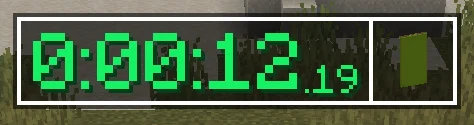 What's an item speedrun? Whenever you begin to create your world - you are presented with a couple of wheels you can spin, to determine your goal. Once you create the world - the timer will start and your goal is to find that item, while following the additional modifier that you
Versions
Files
Relations
Project Relations
More like this
Similar Mods
Suggestions use data such as tags, dependencies, dependents, descriptions, titles, and more to rank how much they overlap with this mod.
On ModDex
Community snapshot
By the numbers
Statistics

Want to reach Minecraft players?
We're looking for a server hosting partner to feature here and other parts of the site. Interested? Send us a message!
Get in touchGet it on
Available Platforms
On ModDex
Community snapshot
By the numbers