Community listing page, reviews here may not be monitored by the author.
Sculpture


No reviews yet
Capture creatures from the game and turn them into beautiful statues forever!
Community voices
Reviews
No reviews yet. Be the first to review this project!
Get it on
Available Platforms
Compatibility
Supported Environments
Must be installed on both the client and the server.
About
Project Details
For authors
Embed Badge
If you're the author of this project, you can embed a live badge anywhere that supports HTML or Markdown. It updates automatically whenever ratings change.
Use HTML for any page that supports it, or Markdown for README files and Markdown-based descriptions.
Identifiers
Platform IDs
Resources
External Links
About
Description
🎨 Sculpture - Creature Statue Mod
Capture creatures from the game and turn them into beautiful statues forever!
✨ Mod Overview
Sculpture is an innovative Minecraft mod that allows you to use professional camera tools to capture creatures in the game and transform them into placeable decorative statue blocks. Whether it's your beloved pets, rare creatures, or powerful bosses, they can all become eternal artworks in your building creations!
🎯 Core Features
📷 Smart Camera System
- Precise Targeting: When holding the camera, the HUD displays real-time information about creatures in your crosshairs
- Permission Check: Automatically identifies which creatures can be photographed and which are protected
- Distance Detection: Intelligently determines shooting distance to ensure optimal photography results
- Cooldown Mechanism: Prevents overuse and adds game balance
🗿 Statue Generation System
- Perfect Replication: Precisely captures the appearance, posture, and characteristics of creatures
- Decorative Blocks: Generated statues can be placed as decorative blocks anywhere
- Persistent Storage: Statues permanently preserve all visual information of creatures
⚙️ Highly Configurable
- Entity Whitelist/Blacklist: Customize which creatures can be photographed
- Detection Range Adjustment: Adjust camera detection distance as needed
- HUD Display Control: Choose whether to show heads-up display information
🎮 How to Use
- Get Camera: Find the camera item in the Tools tab of Creative Mode
- Aim at Creature: Hold the camera and point your crosshairs at the creature you want to photograph
- View Information: The HUD will display the creature's name and whether photography is allowed
- Take Photo: Right-click on the creature to generate the corresponding statue block
Download now and start your statue art journey! Turn every precious gaming moment into eternal artwork!
🎨 Sculpture - Creature Statue Mod
Capture creatures from the game and turn them into beautiful statues forever!
✨ Mod Overview
Sculpture is an innovative Minecraft mod that allows you to use professional camera tools to capture creatures in the game and transform them into placeable decorative statue blocks. Whether it's your beloved pets, rare creatures, or powerful bosses, they can all become eternal artworks in your building creations!
🎯 Core Features
📷 Smart Camera System
- Precise Targeting: When holding the camera, the HUD displays real-time information about creatures in your crosshairs
- Permission Check: Automatically identifies which creatures can be photographed and which are protected
- Distance Detection: Intelligently determines shooting distance to ensure optimal photography results
- Cooldown Mechanism: Prevents overuse and adds game balance
🗿 Statue Generation System
- Perfect Replication: Precisely captures the appearance, posture, and characteristics of creatures
- Decorative Blocks: Generated statues can be placed as decorative blocks anywhere
- Persistent Storage: Statues permanently preserve all visual information of creatures
⚙️ Highly Configurable
- Entity Whitelist/Blacklist: Customize which creatures can be photographed
- Detection Range Adjustment: Adjust camera detection distance as needed
- HUD Display Control: Choose whether to show heads-up display information
🎮 How to Use
- Get Camera: Find the camera item in the Tools tab of Creative Mode
- Aim at Creature: Hold the camera and point your crosshairs at the creature you want to photograph
- View Information: The HUD will display the creature's name and whether photography is allowed
- Take Photo: Right-click on the creature to generate the corresponding statue block
Download now and start your statue art journey! Turn every precious gaming moment into eternal artwork!
Screenshots
Gallery
-
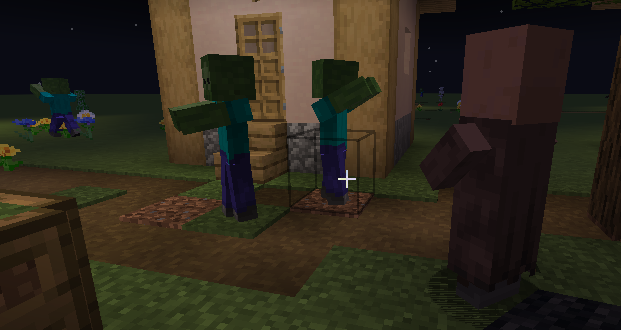 the sculputure of zombies and villager
Versions
Files
Relations
Project Relations
More like this
Similar Mods
Suggestions use data such as tags, dependencies, dependents, descriptions, titles, and more to rank how much they overlap with this mod.
On ModDex
Community snapshot
By the numbers
Statistics
Want to reach Minecraft players?
We're looking for a server hosting partner to feature here and other parts of the site. Interested? Send us a message!
Get in touchGet it on
Available Platforms
On ModDex
Community snapshot
By the numbers
Statistics
Resources