
Server Auctions
No reviews yet
A lightweight Fabric economy mod featuring a global auction house GUI and physical, interactive shop stands styled with red carpets.
Includes systems for trading and managing economies.
Neoforge is a fork of the Minecraft Forge available for versions 1.20.1+ of Minecraft. Many Forge mods are compatible with Neoforge and vice versa.
Fabric is a mod loader for versions 1.14+ of Minecraft, particularly popular for client side and optimization mods.
Community voices
Reviews
Click once to include, again to exclude, again to clear
No reviews yet. Be the first to review this project!
Get it on
Available Platforms
 Modrinth
Compatibility
Supported Environments
About
Project Details
For authors
Embed Badge
If you're the author of this project, you can embed a live badge anywhere that supports HTML or Markdown. It updates automatically whenever ratings change.
Use HTML for any page that supports it, or Markdown for README files and Markdown-based descriptions.
Identifiers
Platform IDs
Resources
External Links
About
Description
Server Auctions
A lightweight economy and trading mod for Fabric 1.21.4. Combine a global virtual auction house with physical, interactive player shop stands!
Features at a Glance
- Global Auction House (
/auction): List and buy items from anywhere using an intuitive chest GUI. Filter by "My Listings" to easily manage your auctions. - Auction Blocks (Bazaar Stands): Placeable scaffolding stands with a red carpet. Players can walk through them (with a slight slowness effect) and climb them like ladders.
- Interactive Shops: Place items in your block and set custom prices. Other players can hover to see the seller/price and click to buy instantly.
- Grief Protection: Only the owner who placed the Auction Block (or an OP) can break it.
- Live Chat Feedback: Sellers receive instant chat notifications showing who bought their items and how much they paid.
- Financial Stats (
/balance stats): Track detailed statistics showing exactly how you earned (sell, auction, block) and spent your money. - Server Economy: Precise balances down to the cent, direct player payments (
/balance pay), and instant server selling (/sell).
Commands
/auction— Open the global marketplace./balance— Check your pocket money./balance stats— View your earning and spending history./balance pay <player> <amount>— Send money to another player./sell— Instantly sell the item in your hand to the server./balance <add/remove> <player> <amount>— (OP Only) Edit player balances.
Crafting
Craft the Auction Block using:
- 2x Gold Ingots (top left and top right slots)
- 4x Wood Planks (forming a U-shape in the middle and bottom rows)
Screenshots
Gallery
-
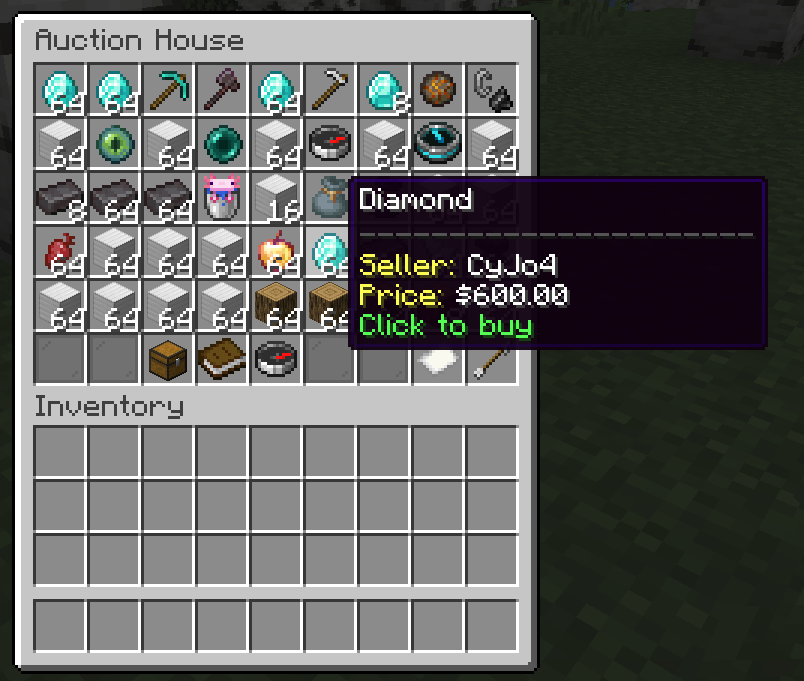 Auction House Trading with others. settings: your own, filter, search, pages
 -
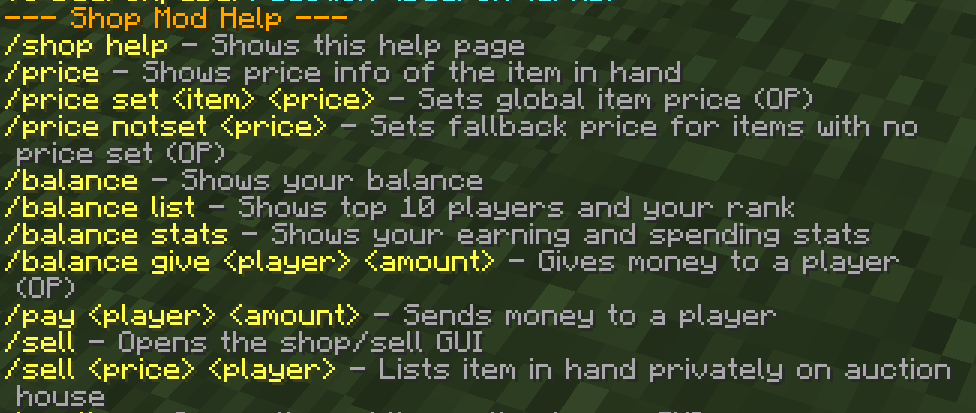 Command List 1/2 1/2 of all commands in this mod
 -
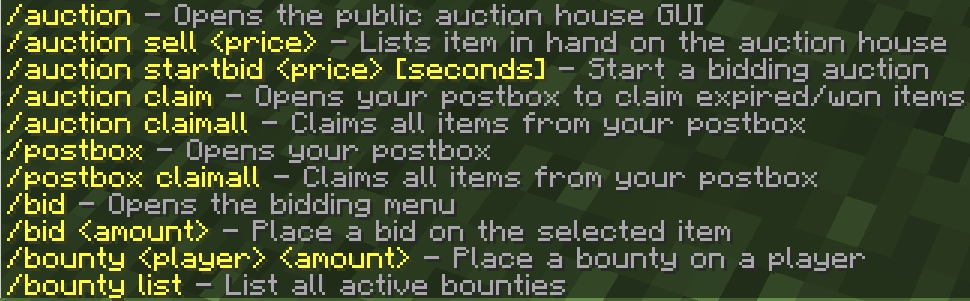 Command List 1/2 1/2 of all commands in this mod
Versions
Files
Relations
Project Relations
More like this
Similar Mods
Suggestions use data such as tags, dependencies, dependents, descriptions, titles, and more to rank how much they overlap with this mod.
On ModDex
Community snapshot
By the numbers
Statistics

Want to reach Minecraft players?
We're looking for a server hosting partner to feature here and other parts of the site. Interested? Send us a message!
Get in touchGet it on
Available Platforms
On ModDex
Community snapshot
By the numbers
Statistics
Resources