
Dedicated Power
No reviews yet
Gives the dedicated server interface a new look for easier server management and more power over your server.
Fabric is a mod loader for versions 1.14+ of Minecraft, particularly popular for client side and optimization mods.
Community voices
Reviews
Click once to include, again to exclude, again to clear
No reviews yet. Be the first to review this project!
Get it on
Available Platforms
 Modrinth
Compatibility
Supported Environments
About
Project Details
For authors
Embed Badge
If you're the author of this project, you can embed a live badge anywhere that supports HTML or Markdown. It updates automatically whenever ratings change.
Use HTML for any page that supports it, or Markdown for README files and Markdown-based descriptions.
Identifiers
Platform IDs
About
Description
This mod completely overhauls the default Minecraft dedicated server GUI, giving you more power over your server.
Key Features
Enhanced Console & Log System
- Log Filtering: Filter logs by type (INFO, WARN, ERROR, DEBUG, CHAT)
- Search Feture: Instantly search through log entries
- Command Autocomplete: Tab-completion for all Minecraft commands
- Command History: Navigate through previous commands with arrow keys
- Export Logs: Save your logs to a files
Advanced Player Management
- Player List: See all online players with their skins
- Player Statistics: View ping, health, hunger, and game mode at a glance
- Player Actions: Quick access to kick, ban, message, and op/deop players
- Search & Sort: Find players quickly with search and sort by name, ping, or game mode
- Ban Management: Full ban list interface with easy unban's
- Whitelist Manager: Add/remove players from whitelist with a simple GUI
Real-time Performance Monitoring
- Live Graphs: Real-time graphs for memory usage and tick performance
- TPS Monitoring: TPS display with color-coded warnings
- Entity & Chunk Count: Track loaded entities and chunks across all dimensions
- Memory Usage: Monitor JVM memory with detailed statistics
- Interactive Tooltips: Hover over graphs for detailed information
- Uptime Tracker: See how long your server has been running
Comprehensive Server Controls
Server Menu:
- Edit server.properties directly from the GUI
- Change difficulty and default game mode instantly
- Manage whitelist settings
- One-click world saving
- Automated backup creation (with zip compression)
World Menu:
- Quick time control (day, night, custom times)
- Weather management (clear, rain, thunder)
- Game Rules Editor
- Player & Mob management
- World border settings
- Force save and chunk reloading
- Individual world backups
- World information display
Performance Menu:
- Clear entities by type (items, hostile mobs, all mobs)
- Optimize chunks
- Force garbage collection
- Generate thread dumps for debugging
- Full performance reports with system info
Tools Menu:
- Command palette (Ctrl+Shift+P) for quick command execution
- Datapack manager
- Resource pack configuration
- Server icon uploader
- Future: Scheduled tasks and RCON support
Help Menu:
- Built-in command reference
- Keyboard shortcuts guide
- System information display
- Direct links to Minecraft Wiki
Keyboard Shortcuts
- Ctrl+S - Save all worlds
- Ctrl+Shift+P - Open command palette
- F1 - Show keyboard shortcuts
- Tab - Autocomplete commands
- Up/Down - Navigate command history
- Esc - Clear suggestions
FAQ
- Q: Does this work on the client? No, this mod is designed specifically for dedicated servers. It replaces the server GUI.
- Q: Will this work with existing servers? Yes! Just install it like any other mod. Your world data is completely safe.
- Q: Does this affect server performance? No! The GUI runs on separate threads and has minimal impact on server performance.
- Q: Can I use this with other mods? A: Absolutely! It's compatible with all server-side mods.
🐛 Bug Reports
Found a bug? Please report it on our GitHub Issues page!
💖 Support the Project
If you enjoy this mod, please:
- ⭐ Star the project on GitHub
- 📢 Share it with other server admins
- 💬 Leave feedback and suggestions
- 🐛 Report bugs to help improve it
Made by SuperSirvu
Screenshots
Gallery
-
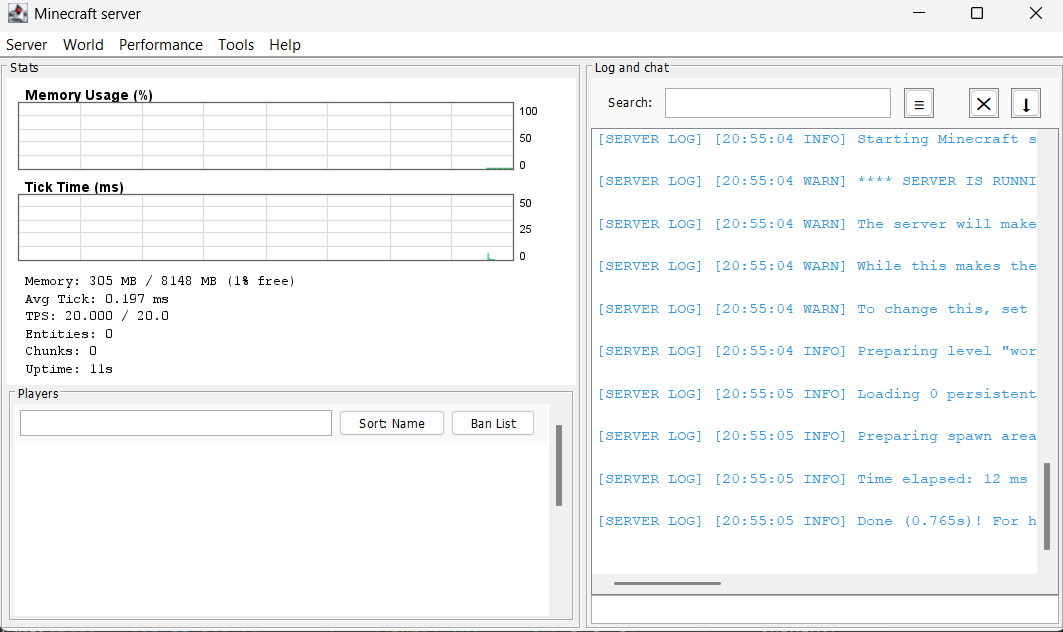 Main Screen The new UI added by the mod
 -
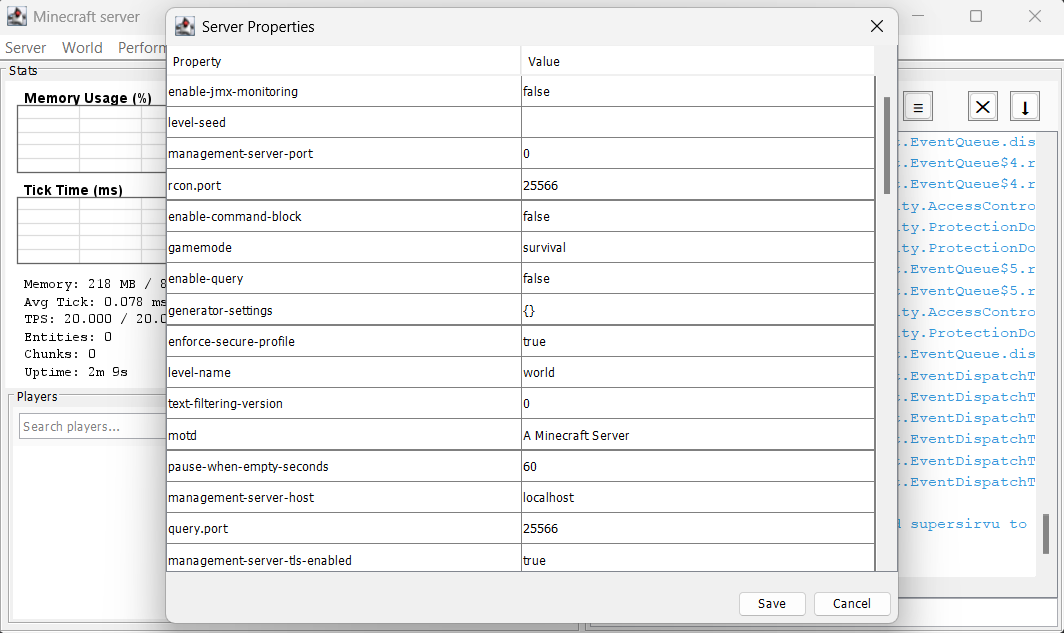 Server Properties GUI The GUI used to manage server properties
 -
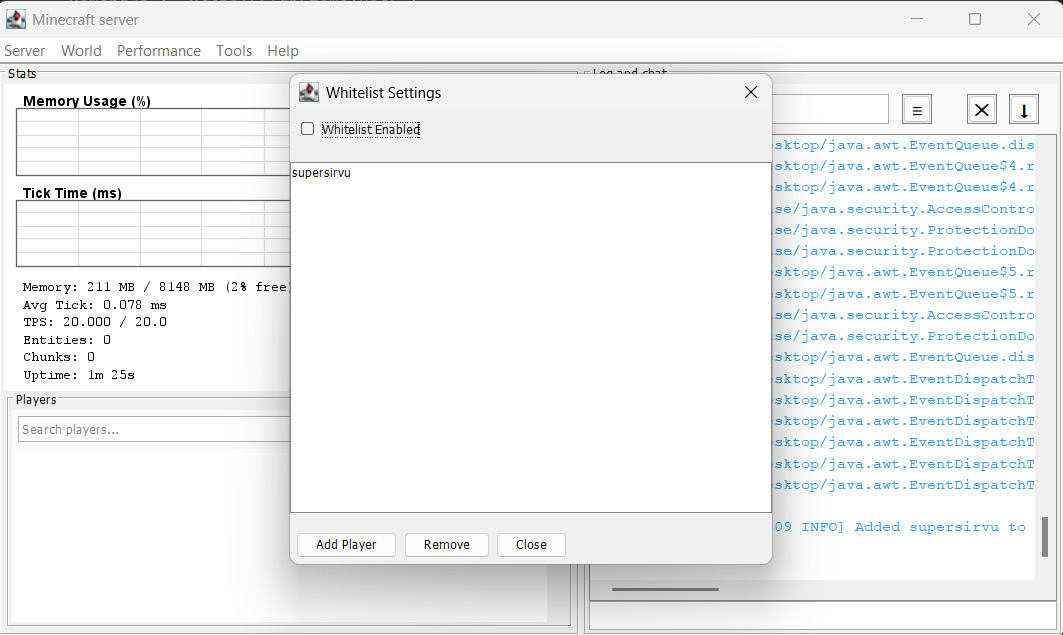 Whitelist GUI The GUI used to manage the server whitelist
Versions
Files
Relations
Project Relations
More like this
Similar Mods
Suggestions use data such as tags, dependencies, dependents, descriptions, titles, and more to rank how much they overlap with this mod.
On ModDex
Community snapshot
By the numbers
Statistics

Want to reach Minecraft players?
We're looking for a server hosting partner to feature here and other parts of the site. Interested? Send us a message!
Get in touchGet it on
Available Platforms
On ModDex
Community snapshot
By the numbers