
Server Relics
No reviews yet
Adds the ability to create relics on the server side
Centers around fantasy elements such as spells, rituals, and magical energies, often involving personal empowerment and magical automation.
Includes a large focus on traversing worlds with enhanced world generation, structures, dungeons, and more for players to find unique loot.
Community voices
Reviews
Click once to include, again to exclude, again to clear
No reviews yet. Be the first to review this project!
Get it on
Available Platforms
 Modrinth
Compatibility
Supported Environments
About
Project Details
For authors
Embed Badge
If you're the author of this project, you can embed a live badge anywhere that supports HTML or Markdown. It updates automatically whenever ratings change.
Use HTML for any page that supports it, or Markdown for README files and Markdown-based descriptions.
Identifiers
Platform IDs
Resources
External Links
About
Description
❗If you want me to port the mod to a certain version of the game, feel free to write on the discord server
The mod by default adds 7 relics:
- 🪶Speed Feather - gives speed 1
- 🔥Fire Powder - gives fire resistance
- 🐬Water Core - gives water breath
- ⛏️Miners pickaxe - gives haste 2 and glowing
- 👁️Eye Of Nocturne - gives night vision
- 🐰Amulet Of Lightness - gives jump boost 1
- ❤️Health Sphere - gives health boost 1
How do I change or add a recipe/title/legend of a relic?
- Open the jar file as an archive
- Go to the path data\serverrelics
- Change what you need to change
- Don't forget to save your changes!
How do I add/change relic textures?
- Open the jar file as an archive
- Go to the path assets\serverrelics
- Add the texture to the textures\item folder
- In the models\item folder, create a JSON file with the name of your relic
- Save and restart the server
example_relic.json
{
  "parent": "item/handheld",
  "textures": {
    "layer0": "serverrelics:item/your_texture"
  }
}
Write /polymer generate-pack command. Resource pack will be located in your server folder as polymer\resource_pack.zip
How do I add my relic?
- Go to the path config\relics-config.json5
- Add your relic
- Save and restart the server
Example
		{
			"item": "serverrelics:example_relic",
			"effects": {
				"health_boost": 15
			}
		}
Screenshots
Gallery
-
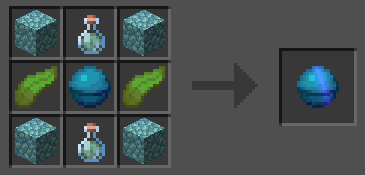 Potion of Water Breathing
 -
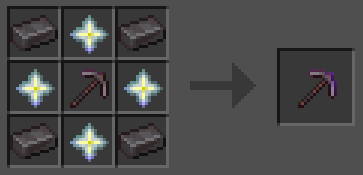
-
 Potion of Swiftness
 -
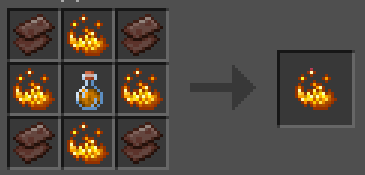 Potion of Fire Resistance
Versions
Files
Relations
Project Relations
More like this
Similar Mods
Suggestions use data such as tags, dependencies, dependents, descriptions, titles, and more to rank how much they overlap with this mod.
On ModDex
Community snapshot
By the numbers
Statistics

Want to reach Minecraft players?
We're looking for a server hosting partner to feature here and other parts of the site. Interested? Send us a message!
Get in touchGet it on
Available Platforms
On ModDex
Community snapshot
By the numbers
Statistics
Resources