
Community listing page, reviews here may not be monitored by the author.
Server Utilities

No reviews yet
Server Utilities is a server module specifically designed for Neoforge 1.21.1, adding various practical functions
Community voices
Reviews
No reviews yet. Be the first to review this project!
Get it on
Available Platforms
Compatibility
Supported Environments
Runs entirely on the server. Also works in singleplayer.
About
Project Details
For authors
Embed Badge
If you're the author of this project, you can embed a live badge anywhere that supports HTML or Markdown. It updates automatically whenever ratings change.
Use HTML for any page that supports it, or Markdown for README files and Markdown-based descriptions.
Identifiers
Platform IDs
About
Description
Server Utilities
A Minecraft server-side utility mod built on NeoForge, providing convenient teleportation, account security, inventory inspection, and private message monitoring for server admins and players.
- Supported version: Minecraft 1.21.1 / NeoForge
- Mod ID:
server_utilities - Mod version: see
mod_versioningradle.properties
Features
1. TPA Teleport System
Teleport requests between online players with complete safety and fairness mechanics:
| Command | Description |
|---|---|
/tpa <player> |
Request to teleport to the target player |
/tpahere <player> |
Invite the target to teleport to you |
/tpaccept |
Accept a teleport request |
/tpdeny / /tpadeny |
Deny a teleport request (both aliases work) |
/tpalock |
Lock / unlock teleport requests |
- Stand-still check: You must remain stationary for a duration after accepting; moving resets the timer
- Experience cost: Cost based on distance, with an extra fee for cross-dimension teleports
- Timeout: Requests expire automatically
- Clear feedback for offline targets, self-lock, target-lock, etc.
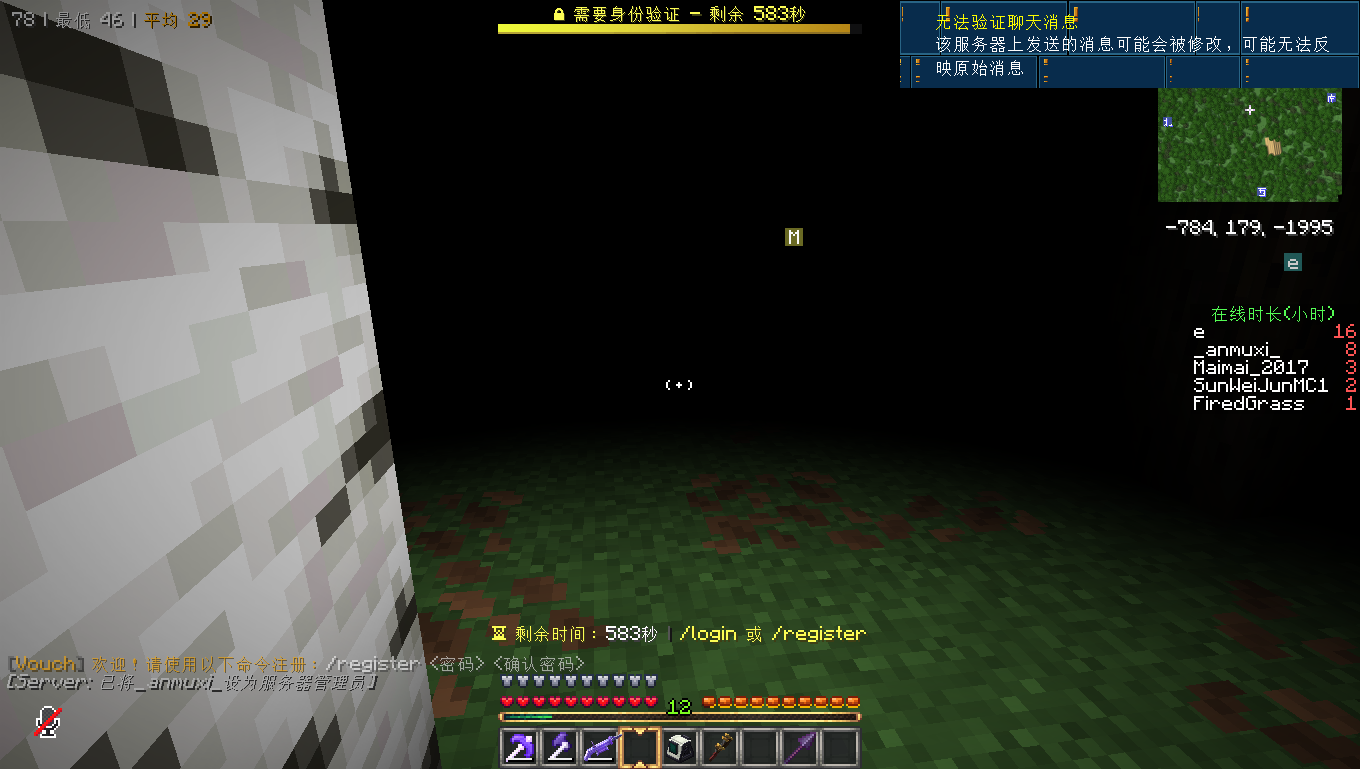
2. Login / Register System
Password protection for your server:
| Command | Description |
|---|---|
/register <password> <confirm> (alias /reg) |
Register on first join |
/login <password> (alias /l) |
Log in with an existing account |
/logout |
Delete your local account data |
- Unverified players are locked high above the spawn area, blocked from chatting and commands (except
/login/register/logout), with periodic reminders - Auto-kick on login timeout
- Data safety: full player data (inventory, ender chest, XP, health, hunger, position) is backed up / cleared / restored around login
- Unauthenticated players have their data cleared; it is fully restored after a successful login
- Backups are also written to disk (
world/playerdata/auth_backups/) so data survives a server restart
- Join / leave messages of unauthenticated players are suppressed to hide their online status
3. Inventory / Ender Chest Inspection (Admins)
| Command | Description |
|---|---|
/invsee |
Open the inventory of the player you are looking at |
/invsee <player> |
Open a specific player's inventory (including offline players) |
/endersee |
Open the ender chest of the player you are looking at |
/endersee <player> |
Open a specific player's ender chest (including offline players) |
- Requires permission level 2 (admin)
- Online players are auto-completed when typing a name; offline players can still be typed manually
- With no argument, defaults to the player in your line of sight (distance configurable)
4. Private Message Monitoring (Admins)
- Vanilla
/msg,/tell,/wprivate messages are monitored - Admins see them in real time in gray italics:
<playerA> whispers to <playerB>: message(format configurable) - Every private message is also written to the server log (
[MSG] sender -> receiver: content)
Configuration
Config file: config/server_utilities.toml, containing these groups:
[tpa]:tpa_enabled,lock_enabled,timeout_ms, stand-still duration, XP cost settings, etc.[login]:enabled,timeout_seconds, reminder interval, etc.[invsee]:invsee_enabled,endersee_enabled,invsee_look_range(line-of-sight distance, default 5), etc.[msg]:msg_monitor_enabled,msg_monitor_format(admin monitor message format)
Mapping Names
By default, this project uses the official Mojang mappings to access Minecraft code. These names are covered by a specific license; see the mapping file itself or the reference copy for the latest license text: https://github.com/NeoForged/NeoForm/blob/main/Mojang.md
Additional Resources
- Community documentation: https://docs.neoforged.net/
- NeoForged Discord: https://discord.neoforged.net/
Screenshots
Gallery

Versions
Files
Relations
Project Relations
More like this
Similar Mods
Suggestions use data such as tags, dependencies, dependents, descriptions, titles, and more to rank how much they overlap with this mod.
On ModDex
Community snapshot
By the numbers
Statistics

Want to reach Minecraft players?
We're looking for a server hosting partner to feature here and other parts of the site. Interested? Send us a message!
Get in touchGet it on
Available Platforms
On ModDex
Community snapshot
By the numbers