
Setsumeisho
No reviews yet
Recreate the instructions from Eufonia Studios that were used in Squid Craft Games and DEDsafio
Forge is a popular mod loader for versions 1.1+ of Minecraft.
Fabric is a mod loader for versions 1.14+ of Minecraft, particularly popular for client side and optimization mods.
Paper is a fork of Spigot that adds its own plugin API on top of the Bukkit API. All Spigot plugins are compatible with paper, not all paper plugins are compatible with Spigot.
Spigot is a popular software for running dedicated servers that can load Plugins created with the Bukkit API.
Community voices
Reviews
Click once to include, again to exclude, again to clear
No reviews yet. Be the first to review this project!
Get it on
Available Platforms
 Modrinth
Compatibility
Supported Environments
About
Project Details
For authors
Embed Badge
If you're the author of this project, you can embed a live badge anywhere that supports HTML or Markdown. It updates automatically whenever ratings change.
Use HTML for any page that supports it, or Markdown for README files and Markdown-based descriptions.
Identifiers
Platform IDs
Resources
External Links
About
Description
Setsumeisho
A Minecraft mod that displays in-game instruction overlays to players, designed for minigames and events. The server sends instruction screens to clients showing controls, descriptions, and timers — with optional auto-translation, cinematic sequences, and keyboard icon rendering.
Features
- Instruction overlay with title, subtitle, controls, and description sections
- Custom keyboard/icon font rendered inside the overlay
- Per-language content: each instruction file supports multiple
langentries (es,en, etc.) - Auto-translation via the MyMemory API (optional)
- Pre-translation cache so players receive content in their language on open
- Minimize/restore animation via a post-process shader
- Timer display with configurable countdown
- Cinematic support: run console commands on a schedule when an instruction opens
- Background texture support sent from server to client
Installation
- Place the mod JAR in the
mods/folder. - Start the server once to generate the default configuration file at
config/setsumeisho/default.json.
Commands
All commands require operator permissions (level 2+).
| Command | Description |
|---|---|
/setsumeisho open <file> |
Opens the named instruction screen for the executing player |
/setsumeisho open <file> <player> |
Opens the instruction screen for a specific player |
/setsumeisho close |
Closes the currently open instruction overlay |
/setsumeisho create <name> |
Creates a new template JSON file at config/setsumeisho/<name>.json |
/setsumeisho pretranslate <file> |
Pre-translates the instruction file and caches the result |
Configuration
All instruction files live in config/setsumeisho/. Each file is a JSON array with three objects: the language entries, the config block, and the cinematics block.
Structure
[
  {
    "lang": "es",
    "title": "TÍTULO",
    "subtitle": "Subtítulo",
    "title_controls": "Controles Especiales",
    "title_description": "Instrucciones",
    "controls": [
      "[[ICON:LEFT_CLICK]] Descripción del control.",
      "[[ICON:SPACE]] Otro control."
    ],
    "description": "Descripción del objetivo del minijuego."
  },
  {
    "lang": "en",
    "title": "TITLE",
    "subtitle": "Subtitle",
    "title_controls": "Special Controls",
    "title_description": "Instructions",
    "controls": [
      "[[ICON:LEFT_CLICK]] Control description.",
      "[[ICON:SPACE]] Another control."
    ],
    "description": "Minigame objective description."
  },
  {
    "config": {
      "timer": "00:00:10",
      "minimize_scale": [0.36, 0.356],
      "minimize_position": [0.57, 0.395],
      "title_pos": [0.5, 0.08],
      "subtitle_pos": [0.5, 0.15],
      "title_controls_pos": [0.02, 0.2],
      "controls_pos": [0.5, 0.25],
      "title_description_pos": [0.02, 0.65],
      "description_pos": [0.05, 0.7],
      "title_scale": 4.0,
      "subtitle_scale": 3.0,
      "title_controls_scale": 1.6,
      "controls_scale": 1.6,
      "title_description_scale": 1.6,
      "description_scale": 1.6,
      "timer_pos": [0.5, 0.01],
      "timer_scale": 1.45
    }
  },
  {
    "cinematics": {
      "commands": [
        "console_command: cam-server start wawa @a 10s",
        "wait: 10s",
        "console_command: say La cinemática ha finalizado."
      ]
    }
  }
]
Language entries
| Field | Description |
|---|---|
lang |
Language code (es, en, etc.) — matched to the client's language setting |
title |
Main title shown at the top of the overlay |
subtitle |
Subtitle shown below the title |
title_controls |
Section header for the controls list |
controls |
Array of control descriptions; supports [[ICON:KEY]] placeholders and \n line breaks |
title_description |
Section header for the description block |
description |
Body text for the description section |
Icon placeholders
Use [[ICON:KEY_NAME]] inside controls or description strings to embed keyboard/mouse icons. Examples:
[[ICON:LEFT_CLICK]][[ICON:RIGHT_CLICK]][[ICON:SPACE]][[ICON:CTRL]][[ICON:W]],[[ICON:A]],[[ICON:S]],[[ICON:D]]
Text formatting
Inside any text field you can use:
&<code>— Minecraft chat formatting codes (e.g.&lbold,&cred)#RRGGBB— Inline hex color
Config block
All position values are normalized screen coordinates [x, y] where (0, 0) is top-left and (1, 1) is bottom-right.
| Field | Type | Description |
|---|---|---|
timer |
"HH:MM:SS" |
Countdown duration shown at the top |
timer_pos |
[x, y] |
Timer position |
timer_scale |
float | Timer text scale |
minimize_scale |
[x, y] |
Scale of the minimized state widget |
minimize_position |
[x, y] |
Position of the minimized widget |
title_pos |
[x, y] |
Title position |
title_scale |
float | Title text scale |
subtitle_pos |
[x, y] |
Subtitle position |
subtitle_scale |
float | Subtitle text scale |
title_controls_pos |
[x, y] |
Controls section header position |
title_controls_scale |
float | Controls section header scale |
controls_pos |
[x, y] |
Controls list position |
controls_scale |
float | Controls list text scale |
title_description_pos |
[x, y] |
Description section header position |
title_description_scale |
float | Description section header scale |
description_pos |
[x, y] |
Description body position |
description_scale |
float | Description body text scale |
Cinematics block
The commands array runs sequentially when the instruction screen opens.
| Prefix | Example | Description |
|---|---|---|
console_command: |
console_command: say Hello |
Runs a server command |
wait: |
wait: 5s |
Waits the specified time before the next command |
Translation
The mod can auto-translate instruction content using the MyMemory free API. Configure this in config/setsumeisho/translation.json:
{
  "enabled": false,
  "source_lang": "es",
  "api_key": ""
}
Use /setsumeisho pretranslate <file> to pre-generate translations and cache them, so clients receive content in their own language without latency when the screen opens.
Screenshots
Gallery
-
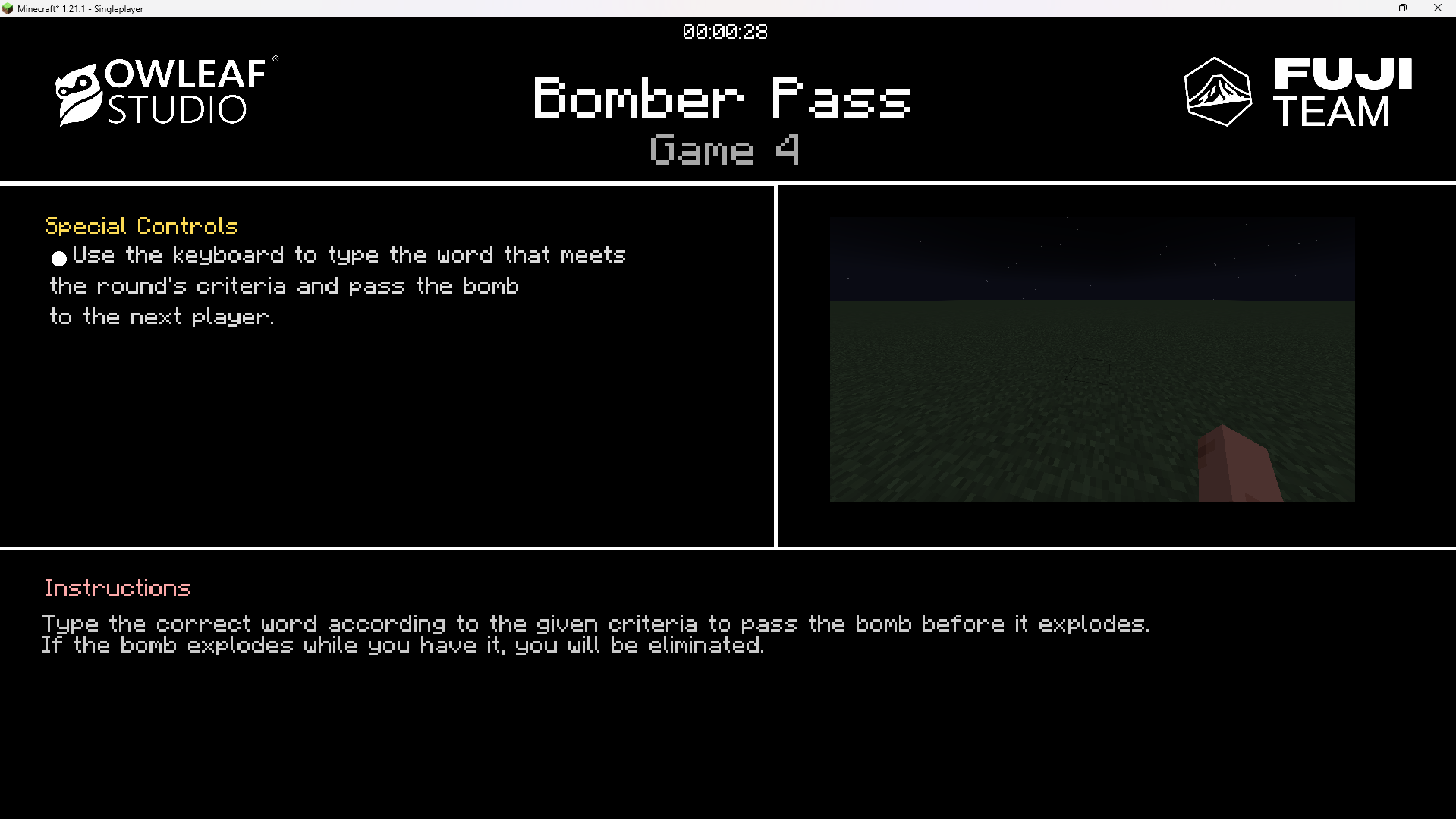 Instructions in English
 -
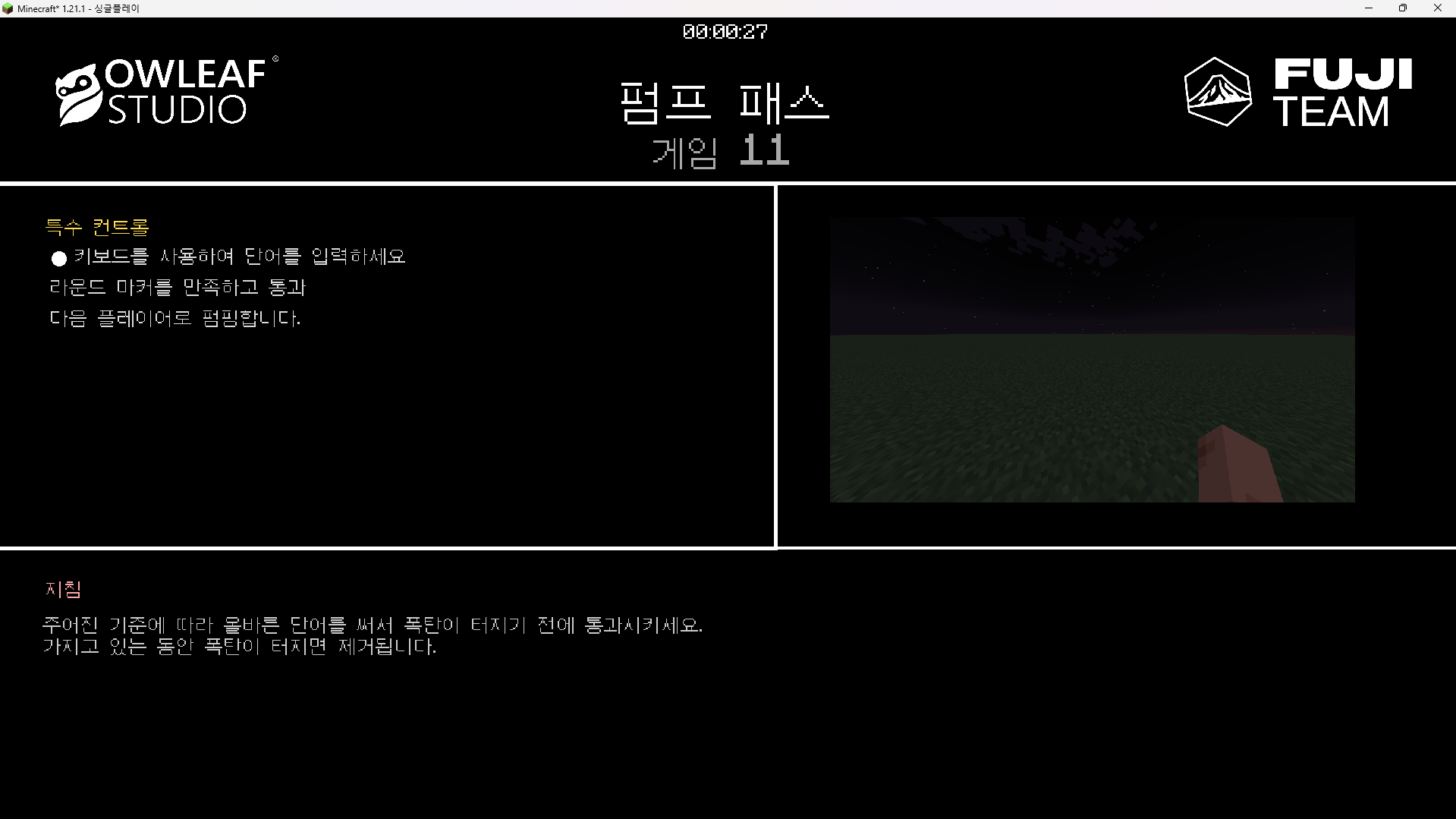 Instructions in Korean (한국인)
Versions
Files
Relations
Project Relations
More like this
Similar Mods
Suggestions use data such as tags, dependencies, dependents, descriptions, titles, and more to rank how much they overlap with this mod.
On ModDex
Community snapshot
By the numbers
Statistics

Want to reach Minecraft players?
We're looking for a server hosting partner to feature here and other parts of the site. Interested? Send us a message!
Get in touchGet it on
Available Platforms
On ModDex
Community snapshot
By the numbers
Statistics
Resources