
Community listing page, reviews may not be monitored by the author.
Shader Fps Slider

No reviews yet
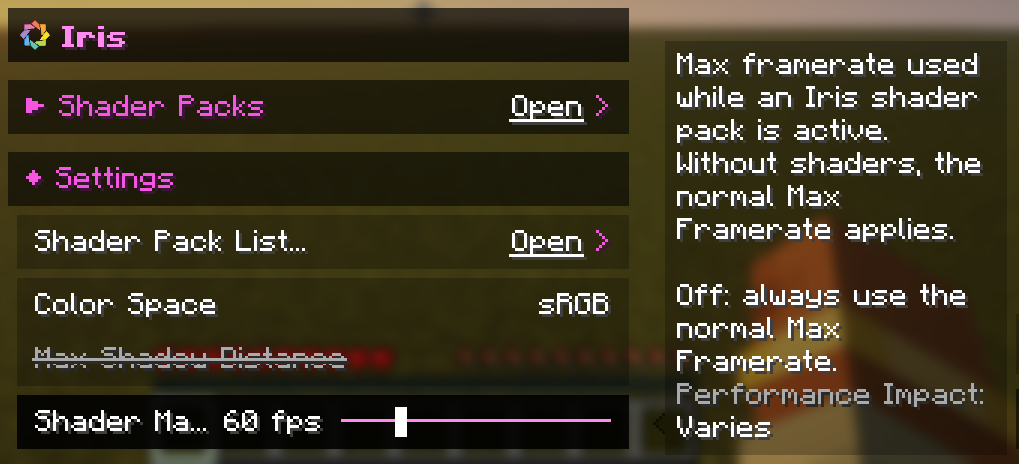
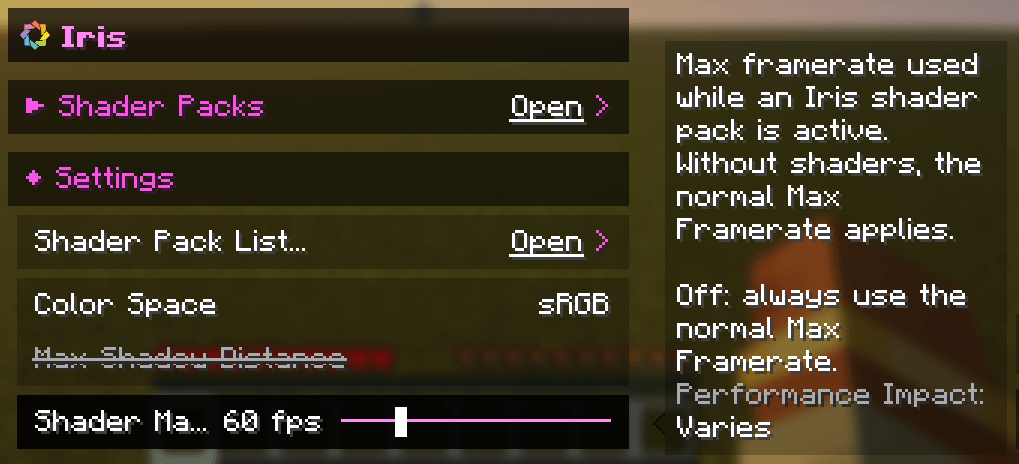
A separate Max Framerate that is used while a shader pack is active.

Community voices
Reviews
No reviews yet. Be the first to review this project!
Get it on
Available Platforms
About
Project Details
For authors
Embed Badge
If you're the author of this project, you can embed a live badge anywhere that supports HTML or Markdown. It updates automatically whenever ratings change.
Use HTML for any page that supports it, or Markdown for README files and Markdown-based descriptions.
Identifiers
Platform IDs
About
Description
Shader Fps Slider
A small addition to Iris that gives you a separate Max Framerate for when a shader pack is active.
Shaders are heavy, and sometimes you just want to cap your FPS while they're on so your GPU stays cool and quiet, but still play at full speed without them. Normally that means changing the Max Framerate every time you toggle shaders. With this addition it happens automatically: when a shader pack is active your Shader Max Framerate is used, and when it's off you're back to your normal one. Minecraft's own throttling in menus, while AFK or when the window is minimized keeps working as usual.
You'll find the slider in Video Settings → Iris → Settings, right next to the other Iris options. Set it anywhere from 10 to 250 FPS, to Unlimited, or to Off if you want to use your normal Max Framerate even with shaders. It starts at 60 FPS.
This is an unofficial addition and is not affiliated with the Iris or Sodium teams.
Screenshots
Gallery
-
 content
Versions
Files
Relations
Project Relations
More like this
Similar Mods
Suggestions use data such as tags, dependencies, dependents, descriptions, titles, and more to rank how much they overlap with this mod.
On ModDex
Community snapshot
By the numbers
Statistics

Get it on
Available Platforms
On ModDex
Community snapshot
By the numbers