Community listing page, reviews here may not be monitored by the author.


Community voices
Reviews
No reviews yet. Be the first to review this project!
Get it on
Available Platforms
Compatibility
Supported Environments
Runs on a dedicated server only; does not work in singleplayer.
About
Project Details
For authors
Embed Badge
If you're the author of this project, you can embed a live badge anywhere that supports HTML or Markdown. It updates automatically whenever ratings change.
Use HTML for any page that supports it, or Markdown for README files and Markdown-based descriptions.
Identifiers
Platform IDs
Resources
External Links
About
Description
Languages
Shared Player Data
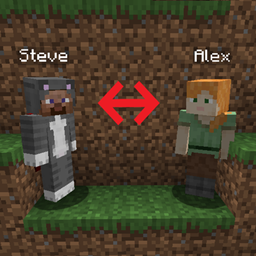
A server-side Fabric mod that lets selected players share the same persistent player data through administrator-managed groups.
Command Overview
/playerbind list/playerbind find <name>/playerbind group add <name> [name] .../playerbind group <group> add <name> [name] ...
Notes:
<group>means an existing group number<name> [name] ...means one or more player names
Commands
List Groups
Lists all existing groups and their members.
/playerbind listFind Player
Shows whether a player belongs to a group.
/playerbind find <name>Create Group
Creates a new group and adds one or more online players.
/playerbind group add <name> [name] ...Example:
/playerbind group add Steve AlexPlayers being added must:
- Be online
- Not already belong to another group
- Not appear more than once in the same command
List Group Members
Lists all members of an existing group.
/playerbind group <group> listExample:
/playerbind group 2 listAdd Players
Adds one or more online players to an existing group.
/playerbind group <group> add <name> [name] ...Example:
/playerbind group 2 add Steve AlexPlayers being added must:
- Be online
- Not already belong to another group
- Not appear more than once in the same command
Remove Players
Removes one or more players from an existing group.
/playerbind group <group> remove <name> [name] ...Example:
/playerbind group 2 remove Steve AlexOnly players currently belonging to the selected group can be removed.
When a player is removed from a group:
- The player stops sharing data with the group
- The player's shared player data is reset
- The player's operator status is removed
Purge Group
Deletes an existing group.
/playerbind group <group> purge confirmExample:
/playerbind group 2 purge confirmPurging a group only removes the binding relationship.
It does not reset the former members' player data or operator status.
Shared Player Data
Players in the same group share persistent gameplay data, including:
- Inventory
- Position
- Experience
- Health
- Statistics
- Advancements
- Other saved player data
Minecraft accounts and authentication identities remain separate.
Multiplayer Behavior
Only one normal player from the same group may use the shared profile at the same time.
If another member attempts to join while the shared profile is already in use, they are disconnected with Minecraft's vanilla duplicate-login message.
Players outside the group are unaffected.
Operator Synchronization
Operator status is synchronized between known members of the same group.
If one member is granted operator status, the other known members are also granted operator status.
If operator status is removed, it is also removed from the other known members.
Notes
- All
/playerbindcommands require owner-level server permission (Level 4 OP) - Players must be online when being added to a group
- A player can only belong to one group
- The same player cannot be specified more than once in the same command
- Removing a player and purging a group have different effects
- Purging a group does not reset former members' data
Supported Versions
- Minecraft 26.3
- Fabric Loader 0.19.5+
- Fabric API 0.160.5+
- Java 25
License
MIT
Languages
Shared Player Data
A server-side Fabric mod that lets selected players share the same persistent player data through administrator-managed groups.
Command Overview
/playerbind list/playerbind find <name>/playerbind group add <name> [name] .../playerbind group <group> add <name> [name] ...
Notes:
<group>means an existing group number<name> [name] ...means one or more player names
Commands
List Groups
Lists all existing groups and their members.
/playerbind list
Find Player
Shows whether a player belongs to a group.
/playerbind find <name>
Create Group
Creates a new group and adds one or more online players.
/playerbind group add <name> [name] ...
Example:
/playerbind group add Steve Alex
Players being added must:
- Be online
- Not already belong to another group
- Not appear more than once in the same command
List Group Members
Lists all members of an existing group.
/playerbind group <group> list
Example:
/playerbind group 2 list
Add Players
Adds one or more online players to an existing group.
/playerbind group <group> add <name> [name] ...
Example:
/playerbind group 2 add Steve Alex
Players being added must:
- Be online
- Not already belong to another group
- Not appear more than once in the same command
Remove Players
Removes one or more players from an existing group.
/playerbind group <group> remove <name> [name] ...
Example:
/playerbind group 2 remove Steve Alex
Only players currently belonging to the selected group can be removed.
When a player is removed from a group:
- The player stops sharing data with the group
- The player's shared player data is reset
- The player's operator status is removed
Purge Group
Deletes an existing group.
/playerbind group <group> purge confirm
Example:
/playerbind group 2 purge confirm
Purging a group only removes the binding relationship.
It does not reset the former members' player data or operator status.
Shared Player Data
Players in the same group share persistent gameplay data, including:
- Inventory
- Position
- Experience
- Health
- Statistics
- Advancements
- Other saved player data
Minecraft accounts and authentication identities remain separate.
Multiplayer Behavior
Only one normal player from the same group may use the shared profile at the same time.
If another member attempts to join while the shared profile is already in use, they are disconnected with Minecraft's vanilla duplicate-login message.
Players outside the group are unaffected.
Operator Synchronization
Operator status is synchronized between known members of the same group.
If one member is granted operator status, the other known members are also granted operator status.
If operator status is removed, it is also removed from the other known members.
Notes
- All
/playerbindcommands require owner-level server permission (Level 4 OP) - Players must be online when being added to a group
- A player can only belong to one group
- The same player cannot be specified more than once in the same command
- Removing a player and purging a group have different effects
- Purging a group does not reset former members' data
Supported Versions
- Minecraft 26.3
- Fabric Loader 0.19.5+
- Fabric API 0.160.5+
- Java 25
License
MIT
Screenshots
Gallery
Versions
Files
Relations
Project Relations
More like this
Similar Mods
Suggestions use data such as tags, dependencies, dependents, descriptions, titles, and more to rank how much they overlap with this mod.
On ModDex
Community snapshot
By the numbers
Statistics
Want to reach Minecraft players?
We're looking for a server hosting partner to feature here and other parts of the site. Interested? Send us a message!
Get in touchGet it on
Available Platforms
On ModDex
Community snapshot
By the numbers
Statistics
Resources