
Community listing page, reviews here may not be monitored by the author.
Shop Plugin

No reviews yet
A flexible shop system for Minecraft servers
Community voices
Reviews
No reviews yet. Be the first to review this project!
Get it on
Available Platforms
About
Project Details
For authors
Embed Badge
If you're the author of this project, you can embed a live badge anywhere that supports HTML or Markdown. It updates automatically whenever ratings change.
Use HTML for any page that supports it, or Markdown for README files and Markdown-based descriptions.
Identifiers
Platform IDs
About
Description
ShopPlugin
A flexible shop system for Minecraft servers with advanced features like NBT support, potions, and automatic restock system.





Save 20% on your next order with my code: moritxius-a-6421
Features
- 🏪 Flexible Shop Creation - Create unlimited shops with individual names
- 🎨 Customizable Display Names - Shops can have beautiful, colored display names
- ⚡ NBT Support - Items with custom names and enchantments
- 🧪 Potion System - Easy creation of potion trades with all effects
- 🔄 Automatic Restock - Trades become available again after configurable time
- 🔐 Permission System - Control over shop access and management
- 💾 Persistent Storage - All shops are automatically saved
- 📋 Tab Completion - Full auto-completion for all commands
Installation
- Download the
shopplugin-*.jarfile - Place it in your
plugins/folder - Restart the server
- The plugin automatically creates the
plugins/ShopPlugin/shops/folder
Commands
Basic Commands (for all players)
/shop <shopname>           - Opens a shop
/shop list                 - Shows all available shops
/shop info                 - Plugin information
Admin Commands (requires shopplugin.admin permission)
/shop create <shopname> [display_name]                    - Creates a new shop
/shop addtrade <shop> <input> <amount> <output> <amount> [max_uses]  - Adds a trade
/shop addpotion <shop> <input> <amount> <potion_type> [max_uses]     - Adds a potion trade
/shop addtradeadvanced <shop> <input> <amount> <output> <amount> [max_uses] [input_name] [output_name] [input_enchants] [output_enchants] [input_potion] [output_potion]  - Advanced trade creation
/shop removetrade <shopname> <trade_index>                - Removes a trade
/shop rename <shopname> <new_display_name>                - Changes the display name
/shop trades <shopname>                                   - Shows all trades in a shop
/shop remove <shopname>                                   - Deletes a shop
/shop potions                                             - Shows all available potion types
/shop restock <shopname> [hours]                          - Sets restock interval
Permissions
shopplugin.admin: true     # Full access to all shop management functions
shopplugin.use.*: true     # Access to all shops
shopplugin.use.<shopname>: true  # Access to specific shop
Examples
Create a simple shop
/shop create general "§6General Shop"
Add basic trade
/shop addtrade general DIAMOND 1 DIAMOND_SWORD 1 10
Add potion trade
/shop addpotion general EMERALD 2 HEALING 5
/shop addpotion general GOLD_INGOT 1 HEALING:UPGRADED 3
/shop addpotion general DIAMOND 1 REGENERATION:EXTENDED 1
Add advanced trade with NBT
/shop addtradeadvanced general DIAMOND 1 DIAMOND_SWORD 1 10 "&bMagical Diamond" "&cFire Sword" "" "FIRE_ASPECT:2,SHARPNESS:5"
Set restock interval
/shop restock general 12    # Every 12 hours
/shop restock vip 6         # Every 6 hours
Potion Types
Available Base Potions:
HEALING- Instant HealthHARMING- Instant DamageREGENERATION- RegenerationPOISON- PoisonSTRENGTH- StrengthWEAKNESS- WeaknessSPEED- SpeedSLOWNESS- SlownessJUMP- Jump BoostFIRE_RESISTANCE- Fire ResistanceWATER_BREATHING- Water BreathingINVISIBILITY- InvisibilityNIGHT_VISION- Night Vision
Modifiers:
:EXTENDED- Longer duration:UPGRADED- Stronger effect (Level II)
Examples:
HEALING:UPGRADED- Healing IISPEED:EXTENDED- Speed with longer durationREGENERATION:UPGRADED- Regeneration II
Enchantments
Enchantments are specified in the format ENCHANTMENT:LEVEL, multiple separated by comma:
"SHARPNESS:5,FIRE_ASPECT:2,UNBREAKING:3"
Common Enchantments:
SHARPNESS- SharpnessFIRE_ASPECT- Fire AspectUNBREAKING- UnbreakingEFFICIENCY- EfficiencyFORTUNE- FortuneSILK_TOUCH- Silk TouchPROTECTION- ProtectionTHORNS- Thorns
Restock System
The plugin features an automatic restock system:
- Default Interval: 24 hours
- Customizable: Individually adjustable per shop
- Automatic: Trades are checked and restocked when opening the shop
- Persistent: Restock times are saved and survive server restarts
How it works:
- When a trade reaches its maximum uses, it's marked as "sold out"
- After the configured restock time expires, the trade becomes available again
- The check occurs every time a player opens the shop
Configuration
Shops are automatically saved in plugins/ShopPlugin/shops/ as YAML files. Each shop has its own file with the following format:
display-name: "§6My Shop"
restock-hours: 24
trades:
  - input-material: DIAMOND
    input-amount: 1
    output-material: DIAMOND_SWORD
    output-amount: 1
    max-uses: 10
    output-display-name: "&cFire Sword"
    output-enchantments: "FIRE_ASPECT:2,SHARPNESS:5"
restock-times:
  0: 1640995200000
Troubleshooting
Shop won't open
- Check the permission
shopplugin.use.<shopname>orshopplugin.use.* - Make sure the shop exists with
/shop list
Trades don't work
- Check material names (must be exact)
- Use
/shop trades <shopname>to see all trades
Potions have no effects
- Make sure you use
POTION,SPLASH_POTIONorLINGERING_POTIONas material - Check the potion type with
/shop potions
Support
For problems or questions:
- Check server logs for error messages
- Make sure all permissions are set correctly
- Use
/shop infoto get plugin information
Screenshots
Gallery
-
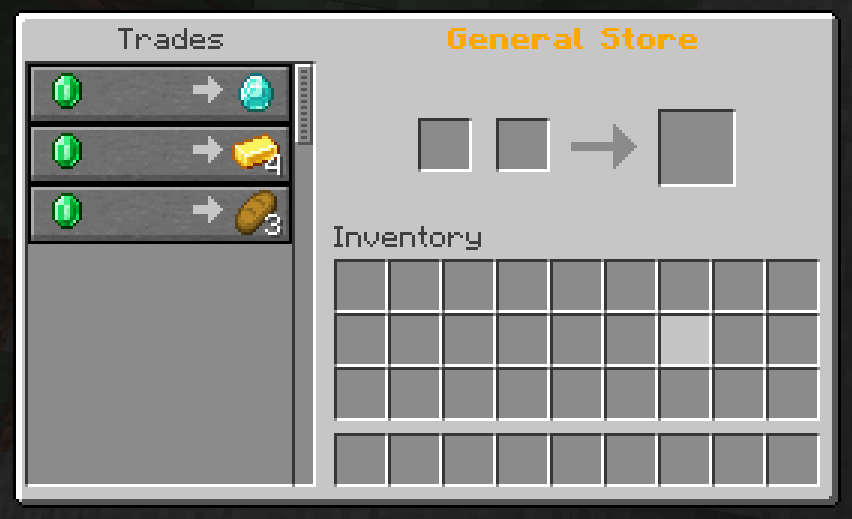 Example Store
Versions
Files
Relations
Project Relations
More like this
Similar Mods
Suggestions use data such as tags, dependencies, dependents, descriptions, titles, and more to rank how much they overlap with this mod.
On ModDex
Community snapshot
By the numbers
Statistics

Want to reach Minecraft players?
We're looking for a server hosting partner to feature here and other parts of the site. Interested? Send us a message!
Get in touchGet it on
Available Platforms
On ModDex
Community snapshot
By the numbers