Community listing page, reviews here may not be monitored by the author.
Show Everything (Forge port)


No reviews yet
Showcase your items, blocks, and even entities in chat.
Community voices
Reviews
No reviews yet. Be the first to review this project!
Get it on
Available Platforms
Compatibility
Supported Environments
Required on the server. Installing it on the client adds functionality.
About
Project Details
For authors
Embed Badge
If you're the author of this project, you can embed a live badge anywhere that supports HTML or Markdown. It updates automatically whenever ratings change.
Use HTML for any page that supports it, or Markdown for README files and Markdown-based descriptions.
Identifiers
Platform IDs
About
Description
Show Everything (Forge Port)
Forge port of MinersLab/show-everything.
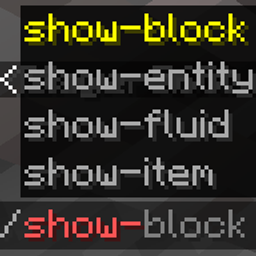
Show items, blocks, fluids, and entities in chat with hover details. The command logic runs on the server, and the mod declares remote clients as optional, so vanilla/Forge clients without this mod can still join.
Clients that also install this mod get enhanced /show-item rendering for very large item NBT. Clients without the mod receive a safe shortened hover instead, so oversized NBT cannot kick players through Minecraft's chat packet string limit.
Commands
All commands are available to normal players.
| Command | Description |
|---|---|
/show-item |
Shows the item in your main hand, or offhand if the main hand is empty. |
/show-block |
Shows the block you are looking at within 15 blocks. Falls back to your current position. |
/show-block <x> <y> <z> |
Shows the block at a specific position. |
/show-fluid |
Shows the fluid you are looking at within 15 blocks. Falls back to your current position. |
/show-fluid <x> <y> <z> |
Shows the fluid/block at a specific position. |
/show-entity |
Shows the entity you are looking at within 15 blocks. Falls back to yourself. |
/show-entity <selector> |
Shows a selected entity. |
Aliases without hyphens are also registered, such as /showitem and /showblock.
Client keybind (since v1.0.5)
With the client mod installed, an optional keybind (customizable in Controls, default H) shows the item under the cursor in chat. It works in any screen where an item tooltip is displayed — container screens, other mods' GUIs, and item-list overlays such as JEI/REI/EMI — and requires the server to run the mod. The chat output is identical to /show-item.
Show Everything (Forge Port)
Forge port of MinersLab/show-everything.
Show items, blocks, fluids, and entities in chat with hover details. The command logic runs on the server, and the mod declares remote clients as optional, so vanilla/Forge clients without this mod can still join.
Clients that also install this mod get enhanced /show-item rendering for very large item NBT. Clients without the mod receive a safe shortened hover instead, so oversized NBT cannot kick players through Minecraft's chat packet string limit.
Commands
All commands are available to normal players.
| Command | Description |
|---|---|
/show-item |
Shows the item in your main hand, or offhand if the main hand is empty. |
/show-block |
Shows the block you are looking at within 15 blocks. Falls back to your current position. |
/show-block <x> <y> <z> |
Shows the block at a specific position. |
/show-fluid |
Shows the fluid you are looking at within 15 blocks. Falls back to your current position. |
/show-fluid <x> <y> <z> |
Shows the fluid/block at a specific position. |
/show-entity |
Shows the entity you are looking at within 15 blocks. Falls back to yourself. |
/show-entity <selector> |
Shows a selected entity. |
Aliases without hyphens are also registered, such as /showitem and /showblock.
Client keybind (since v1.0.5)
With the client mod installed, an optional keybind (customizable in Controls, default H) shows the item under the cursor in chat. It works in any screen where an item tooltip is displayed — container screens, other mods' GUIs, and item-list overlays such as JEI/REI/EMI — and requires the server to run the mod. The chat output is identical to /show-item.
Screenshots
Gallery
Versions
Files
Relations
Project Relations
More like this
Similar Mods
Suggestions use data such as tags, dependencies, dependents, descriptions, titles, and more to rank how much they overlap with this mod.
On ModDex
Community snapshot
By the numbers
Statistics
Want to reach Minecraft players?
We're looking for a server hosting partner to feature here and other parts of the site. Interested? Send us a message!
Get in touchGet it on
Available Platforms
On ModDex
Community snapshot
By the numbers