
Shurui's DMZ Utilities
No reviews yet
A utility for Dragon Mine Z that enables in game editing and creation of NPC's, Forms, Races and both Sagas as well as Side Quests. More features to come!
Includes quality of life improvements and small tweaks to enhance and customize gameplay.
Forge is a popular mod loader for versions 1.1+ of Minecraft.
Community voices
Reviews
Click once to include, again to exclude, again to clear
No reviews yet. Be the first to review this project!
Get it on
Available Platforms
 CurseForge
 Modrinth
Compatibility
Supported Environments
About
Project Details
For authors
Embed Badge
If you're the author of this project, you can embed a live badge anywhere that supports HTML or Markdown. It updates automatically whenever ratings change.
Use HTML for any page that supports it, or Markdown for README files and Markdown-based descriptions.
Identifiers
Platform IDs
Resources
External Links
About
Description
⚡ Shurui's DMZ Utilities ⚡
The all-in-one content toolkit for DragonMine Z
Build custom NPCs, quests, forms, and races, all from in-game menus.
No datapacks. No JSON wrangling. No restarts.
🟢 Official Community & Support Server
This mod's official, endorsed Discord is the best place for support, updates, sneak peeks, and sharing your creations:
👉 discord.gg/HaXBGEPXyE
Come say hi. Bug reports, feature requests, and help are all welcome.
Shurui's DMZ Utilities is an add-on for DragonMine Z that hands server owners a full suite of creation tools styled to match DMZ's own UI. Whether you're building a story-driven RPG server or just want tougher enemies and unique bosses, everything is configured live, in-game, and saved straight into your world or DMZ's config.
✨ Features
🧍 Fully Configurable Custom NPCs
A single, endlessly tunable GeckoLib NPC. Right-click it with the NPC Editor to open a DMZ-styled menu and set:
- Model, texture & animations: drop your own GeckoLib models into a resource pack and pick them from a searchable dropdown
- Stats: health, melee/ki damage, defense, scale
- Saga-fighter combat (New!): pick a DMZ fighter's moveset (Frieza, Cell, Buu, Androids, Ginyu, …) and an AI tier (Simple / Tactical / Advanced) — your NPCs then teleport, dodge and block like DMZ's saga fighters, firing that fighter's ki attacks, with a simple on/off ki toggle
- Abilities: regeneration, melee knockback
- Behavior: passive, wander, follower, guard, hostile, and a DMZ-style fighter AI
- Save any setup as a reusable definition and spawn unlimited copies with an item or a command
📜 Saga & Quest Editor
Build complete DMZ story sagas without touching a file. Create quests, chain them into a real branching quest tree (fork the story with "Branch after"), and set objectives (kill, collect, talk, reach a biome/dimension/structure or exact coordinates, level a skill), rewards, and start requirements. Quest-spawned enemies can be your own fully-configured custom NPCs.
🗺️ Side Quest Editor
Design standalone DMZ side quests with their own objectives, rewards, and requirements, complete with searchable quest-giver and turn-in NPC dropdowns. Perfect for optional content, daily-style tasks, and side stories. Quests and side quests can now even reward real, castable DMZ ki and strike techniques.
🧭 Quest Compass & Waypoints (New!)
A clean compass bar sits at the top of the HUD and points players toward their current DragonMine Z quest. It follows the quest's active objective automatically, targeting an exact coordinate pin or the nearest structure, biome, or enemy, and clears itself the moment the quest is completed.
- Pin coordinates in your quests: a new
COORDSobjective lets you drop players on an exact spot (with an arrival radius), which the compass points straight at. - Named waypoints per player: place, clear, and list custom markers for any player with
/sdu waypoint— great for events, hub directions, or guided tours. - Dimension-aware: every marker only appears in the dimension it belongs to, so overworld pins won't clutter your compass on Namek or in Other World.
- Server-wide markers with item icons: the compass can show shared markers every player sees, drawn as a small item icon on the bar — Shurui's Utilities uses this to point everyone at its airdrops with a little chest.
- Grab your coordinates (New!): a "Use my current coordinates" button fills a COORDS objective straight from where you're standing.
- Location-gated spawns (New!): a KILL objective can hold its enemies back until the player reaches the quest's coordinates.
🐉 Wish Editor (New!)
Edit each dragon's wish list right in-game with /sdu wish. Add, tweak, or remove wishes of every DMZ type (item, multi-item, TP, skill, command, and the reset/relocate/recustomize wishes), with searchable item and skill dropdowns. Craft your server's own reward table for summoning the dragons.
🔮 Custom Form Editor (now with a live 3D preview!)
Create brand-new transformations with custom models, auras, hair, colors, stat multipliers, drains, mastery, stacking rules, and shader outlines, all saved in DMZ's own format so they persist and work in-game.
- Live 3D preview: a rotatable character model renders right beside the editor and updates as you build — custom model, hair style & hair code, body and eye colors, the full aura (flame, ground ring, sparks and lightning) and the outline shader, exactly as they'll look in-game.
- Stacked, multi-layer auras and per-race colors for forms shared across several races (each race can have its own body/hair/eye colors).
- Custom stack form types with their own TP unlock costs and an "always available" mastery option.
- Forms can also grant auto-dodge, damage mitigation, and damage-taken stat buffs, giving each transformation real combat identity.
🧬 Custom Race Editor
Add entirely new playable races with their own stats, classes, appearance, colors, and display names, selectable at character creation. Custom racial abilities now actually work, wire them to a trigger (always-on, low HP, on-hit, on-kill, or a hotkey) and grant stat boosts, regen, restores, damage resistance, and potion effects.
🛠️ Getting Started
- Grab the NPC Editor and NPC Spawner items (
/give @s sdu:npc_editor). - Spawn an NPC, then right-click it with the NPC Editor to configure it.
- Open the creation tools with
/sdu saga,/sdu sidequest,/sdu form,/sdu race, and/sdu wish. - Guide players with the quest compass, or place your own markers with
/sdu waypoint set <player> <name>. - Drop your custom models into the auto-generated resource pack and they'll appear in the editors.
All editing is operator-gated and server-validated, so these tools are safe to hand to trusted staff. Everything is dedicated-server ready — custom race/form display names and multi-layer auras are synced to players automatically, so your content shows up correctly for everyone (run the same build on the client and server).
📦 Requirements
| Dependency | Version | Required? |
|---|---|---|
| Minecraft | 1.20.1 (Forge) | ✅ Yes |
| DragonMine Z | 2.1.1b or newer | ✅ Yes |
| GeckoLib | 4.8.3 or newer | ✅ Yes |
💬 Join the Community
Support, updates, and everything else happen on the official Discord, the endorsed home for this mod:
🔗 discord.gg/HaXBGEPXyE
☕ Support Solo Development
Shurui's DMZ Utilities is built and maintained by one developer. It's completely free and always will be, but these tools take a lot of time and effort to build and keep updated. If you'd like to help fund continued development, you can chip in below, entirely optional and genuinely appreciated.
💛 Patreon · 💙 PayPal
No pressure at all, using and sharing the mod already helps a ton.
⚡ Shurui's DMZ Utilities ⚡
The all-in-one content toolkit for DragonMine Z
Build custom NPCs, quests, forms, and races, all from in-game menus.
No datapacks. No JSON wrangling. No restarts.
🟢 Official Community & Support Server
This mod's official, endorsed Discord is the best place for support, updates, sneak peeks, and sharing your creations:
👉 discord.gg/HaXBGEPXyE
Come say hi. Bug reports, feature requests, and help are all welcome.
Shurui's DMZ Utilities is an add-on for DragonMine Z that hands server owners a full suite of creation tools styled to match DMZ's own UI. Whether you're building a story-driven RPG server or just want tougher enemies and unique bosses, everything is configured live, in-game, and saved straight into your world or DMZ's config.
✨ Features
🧍 Fully Configurable Custom NPCs
A single, endlessly tunable GeckoLib NPC. Right-click it with the NPC Editor to open a DMZ-styled menu and set:
- Model, texture & animations: drop your own GeckoLib models into a resource pack and pick them from a searchable dropdown
- Stats: health, melee/ki damage, defense, scale
- Saga-fighter combat (New!): pick a DMZ fighter's moveset (Frieza, Cell, Buu, Androids, Ginyu, …) and an AI tier (Simple / Tactical / Advanced): your NPCs then teleport, dodge and block like DMZ's saga fighters, firing that fighter's ki attacks, with a simple on/off ki toggle
- Abilities: regeneration, melee knockback
- Behavior: passive, wander, follower, guard, hostile, and a DMZ-style fighter AI
- Save any setup as a reusable definition and spawn unlimited copies with an item or a command
📜 Saga & Quest Editor
Build complete DMZ story sagas without touching a file. Create quests, chain them into a real branching quest tree (fork the story with "Branch after"), and set objectives (kill, collect, talk, reach a biome/dimension/structure or exact coordinates, level a skill), rewards, and start requirements. Quest-spawned enemies can be your own fully-configured custom NPCs.
🗺️ Side Quest Editor
Design standalone DMZ side quests with their own objectives, rewards, and requirements, complete with searchable quest-giver and turn-in NPC dropdowns. Perfect for optional content, daily-style tasks, and side stories. Quests and side quests can now even reward real, castable DMZ ki and strike techniques.
🧭 Quest Compass & Waypoints (New!)
A clean compass bar sits at the top of the HUD and points players toward their current DragonMine Z quest. It follows the quest's active objective automatically, targeting an exact coordinate pin or the nearest structure, biome, or enemy, and clears itself the moment the quest is completed.
- Pin coordinates in your quests: a new
COORDSobjective lets you drop players on an exact spot (with an arrival radius), which the compass points straight at. - Named waypoints per player: place, clear, and list custom markers for any player with
/sdu waypoint, great for events, hub directions, or guided tours. - Dimension-aware: every marker only appears in the dimension it belongs to, so overworld pins won't clutter your compass on Namek or in Other World.
- Grab your coordinates (New!): a "Use my current coordinates" button fills a COORDS objective straight from where you're standing.
- Location-gated spawns (New!): a KILL objective can hold its enemies back until the player reaches the quest's coordinates.
🐉 Wish Editor (New!)
Edit each dragon's wish list right in-game with /sdu wish. Add, tweak, or remove wishes of every DMZ type (item, multi-item, TP, skill, command, and the reset/relocate/recustomize wishes), with searchable item and skill dropdowns. Craft your server's own reward table for summoning the dragons.
🔮 Custom Form Editor (now with a live 3D preview!)
Create brand-new transformations with custom models, auras, hair, colors, stat multipliers, drains, mastery, stacking rules, and shader outlines, all saved in DMZ's own format so they persist and work in-game.
- Live 3D preview: a rotatable character model renders right beside the editor and updates as you build: custom model, hair style & hair code, body and eye colors, the full aura (flame, ground ring, sparks and lightning) and the outline shader, exactly as they'll look in-game.
- Stacked, multi-layer auras and per-race colors for forms shared across several races (each race can have its own body/hair/eye colors).
- Custom stack form types with their own TP unlock costs and an "always available" mastery option.
- Forms can also grant auto-dodge, damage mitigation, and damage-taken stat buffs, giving each transformation real combat identity.
🧬 Custom Race Editor
Add entirely new playable races with their own stats, classes, appearance, colors, and display names, selectable at character creation. Custom racial abilities now actually work, wire them to a trigger (always-on, low HP, on-hit, on-kill, or a hotkey) and grant stat boosts, regen, restores, damage resistance, and potion effects.
🛠️ Getting Started
- Grab the NPC Editor and NPC Spawner items (
/give @s sdu:npc_editor). - Spawn an NPC, then right-click it with the NPC Editor to configure it.
- Open the creation tools with
/sdu saga,/sdu sidequest,/sdu form,/sdu race, and/sdu wish. - Guide players with the quest compass, or place your own markers with
/sdu waypoint set <player> <name>. - Drop your custom models into the auto-generated resource pack and they'll appear in the editors.
All editing is operator-gated and server-validated, so these tools are safe to hand to trusted staff. Everything is dedicated-server ready: custom race/form display names and multi-layer auras are synced to players automatically, so your content shows up correctly for everyone (run the same build on the client and server).
📦 Requirements
| Dependency | Version | Required? |
|---|---|---|
| Minecraft | 1.20.1 (Forge) | ✅ Yes |
| DragonMine Z | 2.1.1b or newer | ✅ Yes |
| GeckoLib | 4.8.3 or newer | ✅ Yes |
💬 Join the Community
Support, updates, and everything else happen on the official Discord, the endorsed home for this mod:
🔗 discord.gg/HaXBGEPXyE
☕ Support Solo Development
Shurui's DMZ Utilities is built and maintained by one developer. It's completely free and always will be, but these tools take a lot of time and effort to build and keep updated. If you'd like to help fund continued development, you can chip in below, entirely optional and genuinely appreciated.
💛 Patreon · 💙 PayPal
No pressure at all, using and sharing the mod already helps a ton.
Dependencies
Required
Optional
Screenshots
Gallery
-
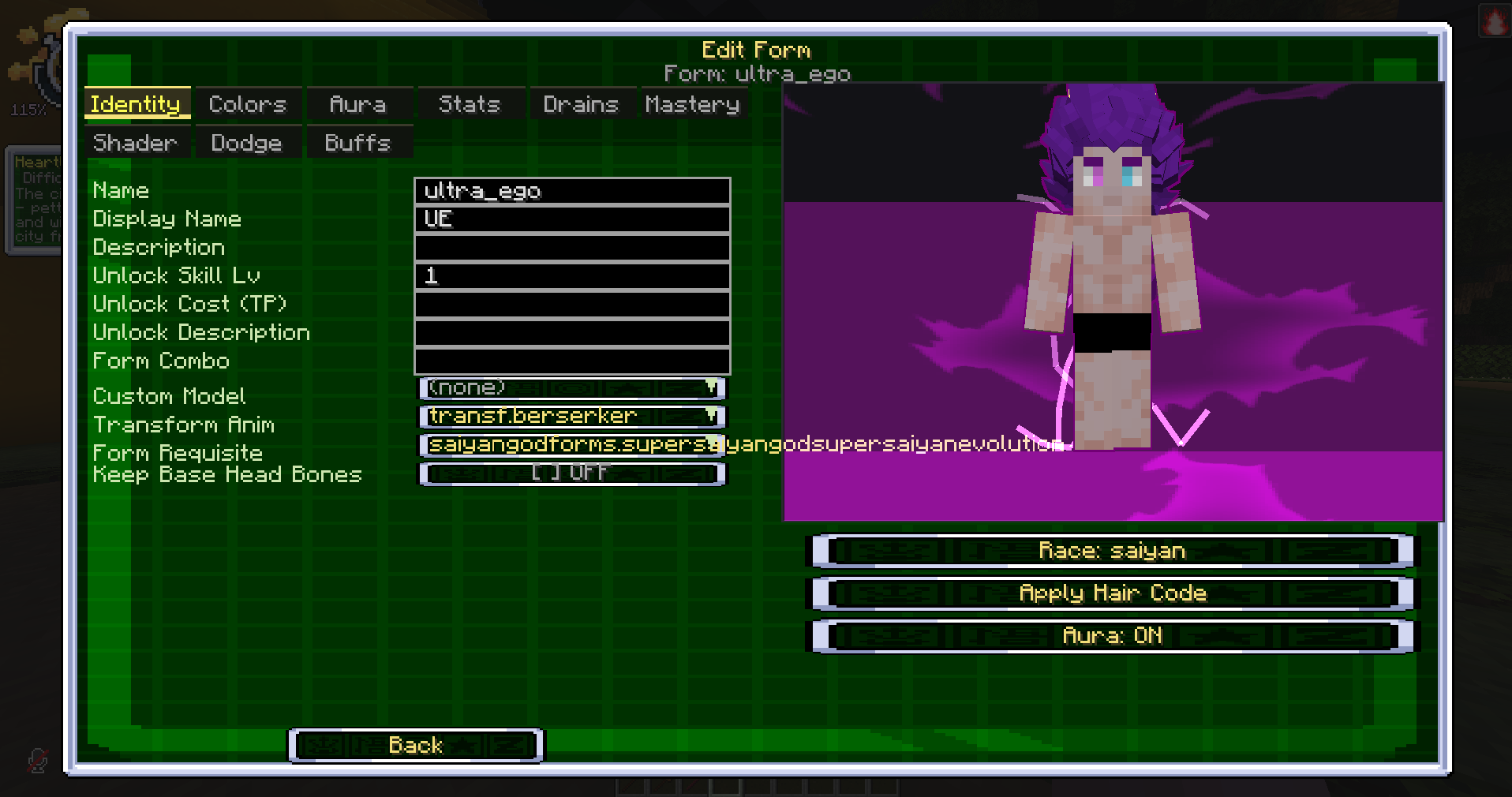 Editing a custom transformation with a live preview The form editor. Tabs cover identity, colours, aura, stats, drains, mastery, shader, dodge and buffs, with a live preview of the transformation on the right showing its aura and hair colour.
 -
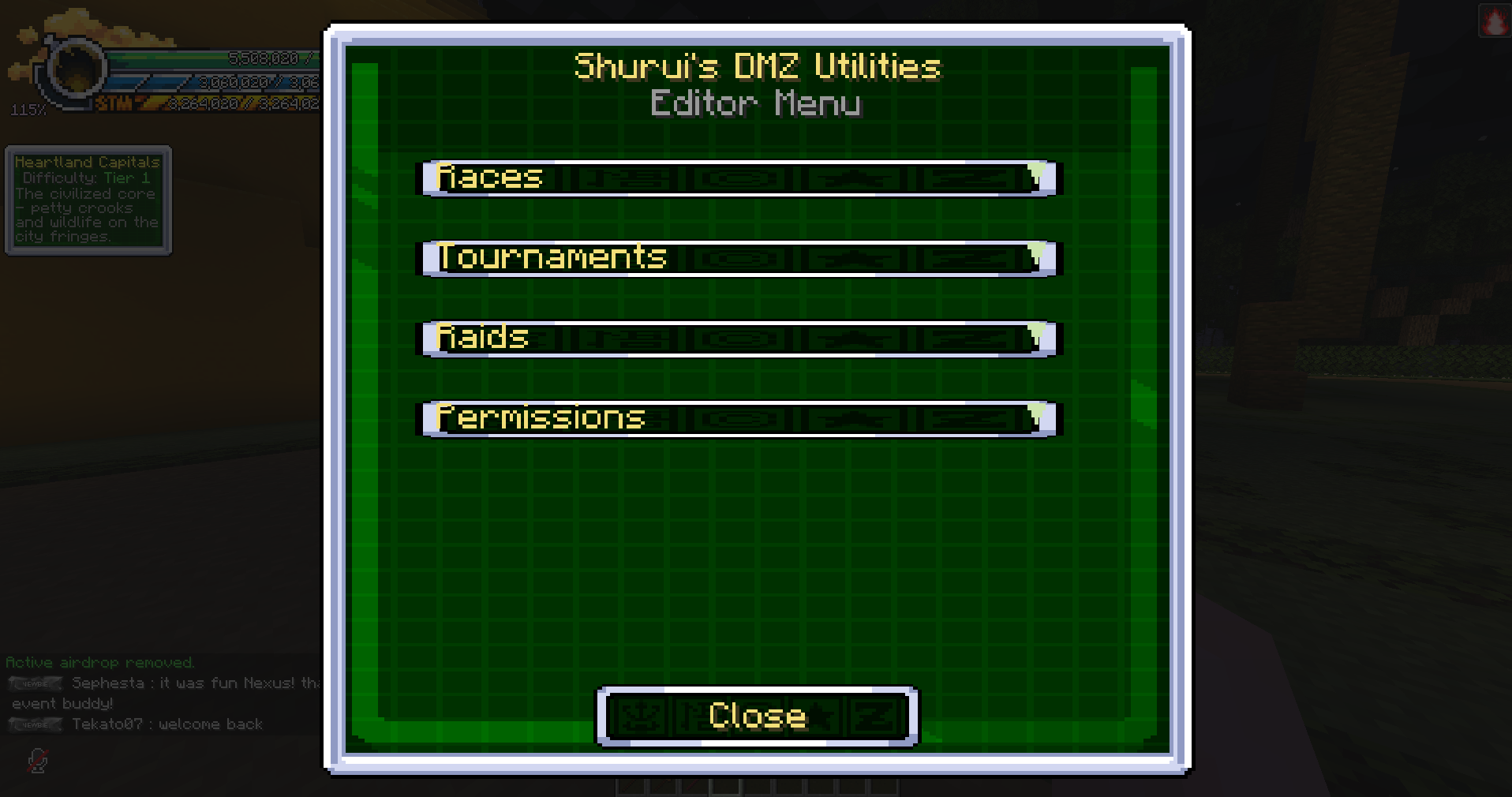 In-game editor hub The editor menu opened in game. Each entry leads to a category of DragonMine Z content that can be configured without editing files or restarting the server.
 -
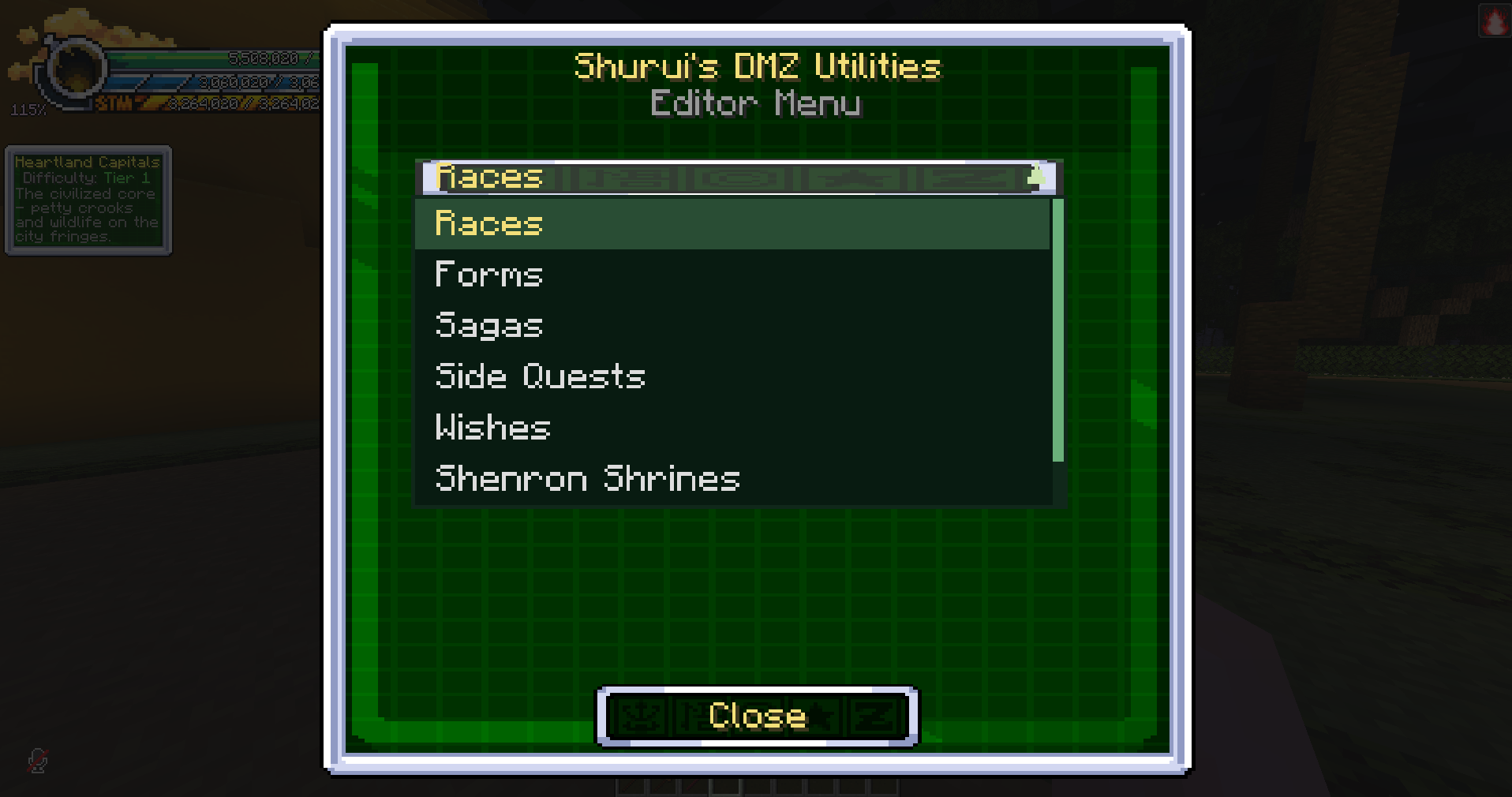 Editable content categories The category list, showing what the editor can configure: races, forms, sagas, side quests, wishes and Shenron shrines.
Versions
Files
Relations
Project Relations
More like this
Similar Mods
Suggestions use data such as tags, dependencies, dependents, descriptions, titles, and more to rank how much they overlap with this mod.
On ModDex
Community snapshot
By the numbers
Statistics
Want to reach Minecraft players?
We're looking for a server hosting partner to feature here and other parts of the site. Interested? Send us a message!
Get in touchGet it on
Available Platforms
On ModDex
Community snapshot
By the numbers
Statistics
Resources