
Community listing page, reviews here may not be monitored by the author.
Simple Animal pens


No reviews yet
A simple datapack that allows to store many animals in one block to reduce lag on the server. also available as datapack
Community voices
Reviews
No reviews yet. Be the first to review this project!
Get it on
Available Platforms
Compatibility
Supported Environments
Runs entirely on the server. Also works in singleplayer.
The author has not specified where this runs.
Varies by version.
About
Project Details
For authors
Embed Badge
If you're the author of this project, you can embed a live badge anywhere that supports HTML or Markdown. It updates automatically whenever ratings change.
Use HTML for any page that supports it, or Markdown for README files and Markdown-based descriptions.
Identifiers
Platform IDs
About
Description
This project updated first on modrinth - check it for more info and new versions.
Simple Animal Pens is a datapack that let players store infinte amounts of mobs in a single block. The pack strive to full support of all vanilla features as well as compatibility with other packs (and even mods in some cases).
Please report bugs on this project github page or my discord server
Fabric loader requires fabric API
Support Ponder lib
Uses Smithed conventions for compatability
items:
- Animal jar.
the animal jar let you collect and store the animals into it.
- Animal pen.
the pen is block that let you place the jar in the world. in order to do that first collect some animals in your jar then right click on empty pen
Commands:
Give jar:
loot give @p loot sap:animal_jarGive pen:
loot give @p loot sap:animal_penChanging pack settings:
dialog show @s sap:settingsTechnical details to modifiy the pack behavior :
  {
    "replace": false,
    "values": [
        "minecraft:cow",
        "minecraft:pig",
        "minecraft:sheep",
        "minecraft:chicken",
        "minecraft:turtle",
        "minecraft:bee",
        "minecraft:rabbit"
    ]
}sap:click_functions/loot/execute if items entity @p[tag=this] weapon.mainhand *[minecraft:custom_data~{smithed:{ignore:{functionality:1b}}}] run return fail
scoreboard players set @s sap.function_cooldown 12000
scoreboard players operation @s sap.function_cooldown -= @s sap.entity_count
scoreboard players add @s sap.function_cooldown 100
execute as @p[tag=this] run function sap:click_functions/loot/specific/collect_honeySimple Animal Pens is a datapack that let players store infinte amounts of mobs in a single block. The pack strive to full support of all vanilla features as well as compatibility with other packs (and even mods in some cases).
Please report bugs on this project github page or my discord server
Fabric loader requires fabric API
Support Ponder lib
Uses Smithed conventions for compatability
items:
- Animal jar.
the animal jar let you collect and store the animals into it.
- Animal pen.
the pen is block that let you place the jar in the world. in order to do that first collect some animals in your jar then right click on empty pen
Commands:
Give jar:
loot give @p loot sap:animal_jar
Give pen:
loot give @p loot sap:animal_pen
Changing pack settings:
dialog show @s sap:settings
Technical details to modifiy the pack behavior
If you want to add support for new mobs that not supported by default, this section will guide you keep in mind you must use the same namespaces for it to work. > NOTE : when you see `ENTITY` inside function or tag you need to put the entity name without the namespace instead e.g. "minecraft:cow" -> "cow"1-adding mob
adding the mob into the entity tag #sap:fit_in_jar
you can edit the whole tag if you want to remove animal, or you can just addon top of it with replace : false
{
"replace": false,
"values": [
"minecraft:cow",
"minecraft:pig",
"minecraft:sheep",
"minecraft:chicken",
"minecraft:turtle",
"minecraft:bee",
"minecraft:rabbit"
]
}
2-adding right click functions
create new item tag inside sap named used_on_ENTITY and specify what items can be used on this mob
then create new function named interact_with_ENTITY in
sap:click_functions/loot/
inside the function you can run whatever you want. you can split the function into 2 or more if you want more than 1 click function or diffrent tools the default file for bee looks like that
execute if items entity @p[tag=this] weapon.mainhand *[minecraft:custom_data~{smithed:{ignore:{functionality:1b}}}] run return fail

scoreboard players set @s sap.function_cooldown 12000
scoreboard players operation @s sap.function_cooldown -= @s sap.entity_count
scoreboard players add @s sap.function_cooldown 100

execute as @p[tag=this] run function sap:click_functions/loot/specific/collect_honey
inside the specific function you can add sounds,clear items,give items,particals etc
3-breeding
to add viable food for breeding create(or use the vanila one) item tag under the MINECRAFT namespace called ENTITY_food
4-Tool for breaking
tool needed to break the farm controlled by the item tag sap:tool_to_break
5-Tool for killing
tool needed to kill entity in the farm controlled by the item tag sap:tool_to_kill
Screenshots
Gallery
-
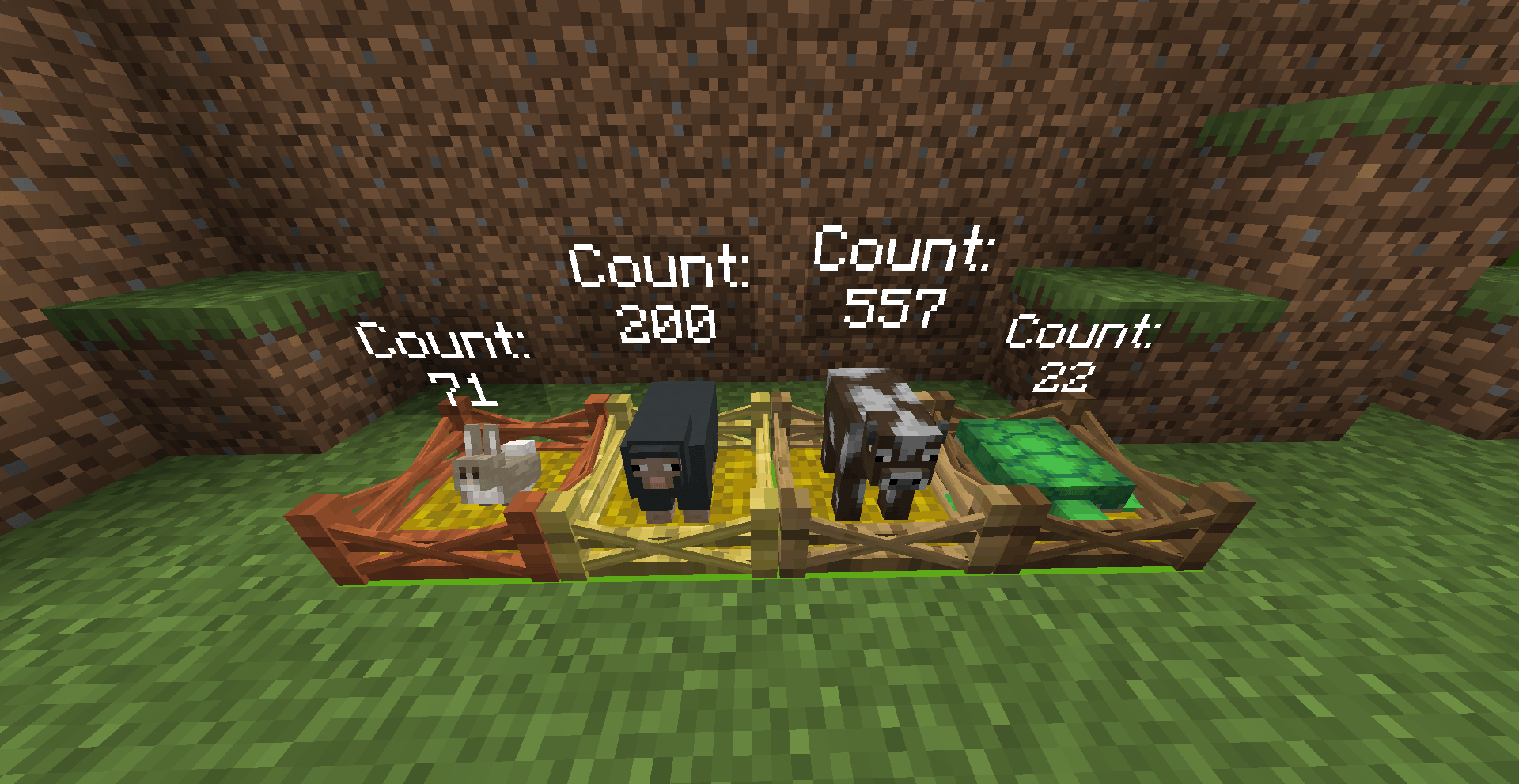 Example 2026-07-24_11.33.55.png
 -
 pack.png pack.png
 -
 title.png title.png
 -
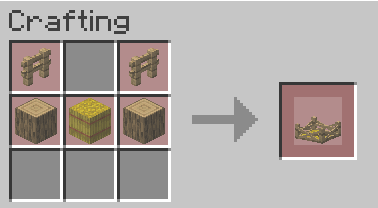 Oak pen recipe צ×××× ××¡× 2026-07-16 174047.png
 -
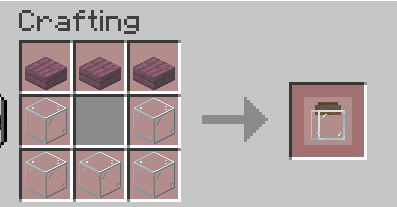 jar recipe צ×××× ××¡× 2026-07-16 174031.png
-
 Title
Title -
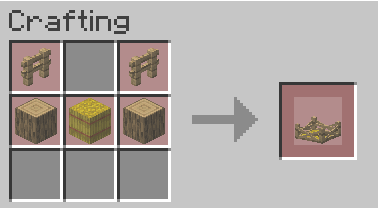 Pen recipe
 -
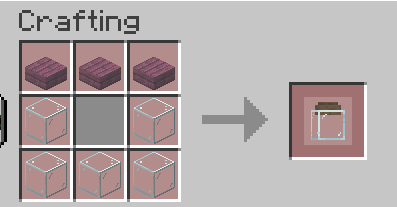 Jar recipe
Versions
Files
Relations
Project Relations
More like this
Similar Mods
Suggestions use data such as tags, dependencies, dependents, descriptions, titles, and more to rank how much they overlap with this mod.
On ModDex
Community snapshot
By the numbers
Statistics
Want to reach Minecraft players?
We're looking for a server hosting partner to feature here and other parts of the site. Interested? Send us a message!
Get in touchGet it on
Available Platforms
On ModDex
Community snapshot
By the numbers