
Community listing page, reviews here may not be monitored by the author.
Simple Mod Menu


No reviews yet
This is a lightweight mod that allows the user to toggle mods, shaders, and resource packs, all in one place.
Community voices
Reviews
No reviews yet. Be the first to review this project!
Get it on
Available Platforms
Compatibility
Supported Environments
Runs entirely on the client. Works on vanilla servers.
About
Project Details
For authors
Embed Badge
If you're the author of this project, you can embed a live badge anywhere that supports HTML or Markdown. It updates automatically whenever ratings change.
Use HTML for any page that supports it, or Markdown for README files and Markdown-based descriptions.
Identifiers
Platform IDs
Resources
External Links
About
Description
Simple Mod Menu
Overview
Simple Mod Menu is a lightweight utility designed to help players easily enable, disable, and manage their mods without the hassle of manually moving files around.
Full Spectrum Realism
This mod was designed for the modpack Full Spectrum Realism which is a carefully crafted modpack that enhances Minecraft while staying true to its vanilla feel.
It adds depth, realism, and subtle improvements without slowing your game—running smoothly even on older or low-end PCs.
Developed with months of testing and tweaking, it aims to enrich your world while keeping gameplay fluid and accessible.
Perfect for players who want a richer experience without compromise.
Key Features
- Clean and intuitive interface
- Press F8 to open the mod menu screen in-game
- Enable or disable mods with a single click
- Automatically organizes and displays available mods
- Lightweight and optimized for performance
How It Works
- Launch your game with the Simple Mod Menu installed
- Press F8 at any time to open the mod menu screen
- Browse through your installed mods
- Enable or disable mods instantly without restarting the game
Why Use Simple Mod Menu?
- Managing mods manually can be frustrating.
- Simple Mod Menu streamlines the process, making it easy for players to customize their setup.
- With its simple design and quick access key, modding has never been easier.
Requirements
- Java installed on your system
- Fabric installed on game directory
- Place the Simple-Mod-Menu.jar in your mods folder (depending on your game setup)
Controls
- F8 → Open the Mod Menu screen
Final Notes
- This tool is designed to keep modding simple, fast, and frustration-free.
- Enjoy full control of your mods with just one key press!
Usage Policy
- You may include this mod in modpacks, as long as the modpack is hosted on Modrinth.
- Please do not reupload this mod to other platforms or redistribute the jar directly.
Simple Mod Manager
Overview
Simple Mod Manager is a lightweight utility designed to help players easily enable, disable, and manage their mods without the hassle of manually moving files around.
Key Features
- Clean and intuitive interface
- Press F8 to open the mod manager screen in-game
- Enable or disable mods with a single click
- Automatically organizes and displays available mods
- Lightweight and optimized for performance
How It Works
- Launch your game with the Simple Mod Manager installed
- Press F8 at any time to open the mod manager screen
- Browse through your installed mods
- Enable or disable mods instantly without restarting the game
- Configurable Whitelist: Secure your mod list via the "Configure Whitelist" button. This feature allows you to define exactly which mods, resource packs, or shaders a user is permitted to enable or disable.
- Use case: This is highly beneficial for modpack developers who want to guarantee game stability by keeping essential dependency mods hidden and un-toggleable, while still offering flexibility for optional add-ons.
Why Use Simple Mod Manager?
- Managing mods manually can be frustrating.
- Simple Mod Manager streamlines the process, making it easy for players to customize their setup.
- With its simple design and quick access key, modding has never been easier.
Requirements
- Java installed on your system
- Fabric installed on game directory
- Place the Simple-Mod-Manager-1.1.0.jar in your mods folder (depending on your game setup)
- Important Upgrade Notice (v1.5.4): If you are upgrading from version 1.5.3 or earlier, you MUST delete the simplemodmanager_state.json file from your .minecraft/config folder before launching the game. Leaving the old file may cause configuration conflicts with the new whitelist features.
Controls
- F8 → Open the Mod Manager screen
Final Notes
- This tool is designed to keep modding simple, fast, and frustration-free.
- Enjoy full control of your mods with just one key press!
Usage Policy
- You may include this mod in modpacks, as long as the modpack is hosted on Modrinth.
- Please do not reupload this mod to other platforms or redistribute the jar directly.
Full Spectrum Realism
This mod was designed for the modpack Full Spectrum Realism which is a carefully crafted modpack that enhances Minecraft while staying true to its vanilla feel.
It adds depth, realism, and subtle improvements without slowing your game—running smoothly even on older or low-end PCs.
Developed with months of testing and tweaking, it aims to enrich your world while keeping gameplay fluid and accessible.
Perfect for players who want a richer experience without compromise.
Screenshots
Gallery
-
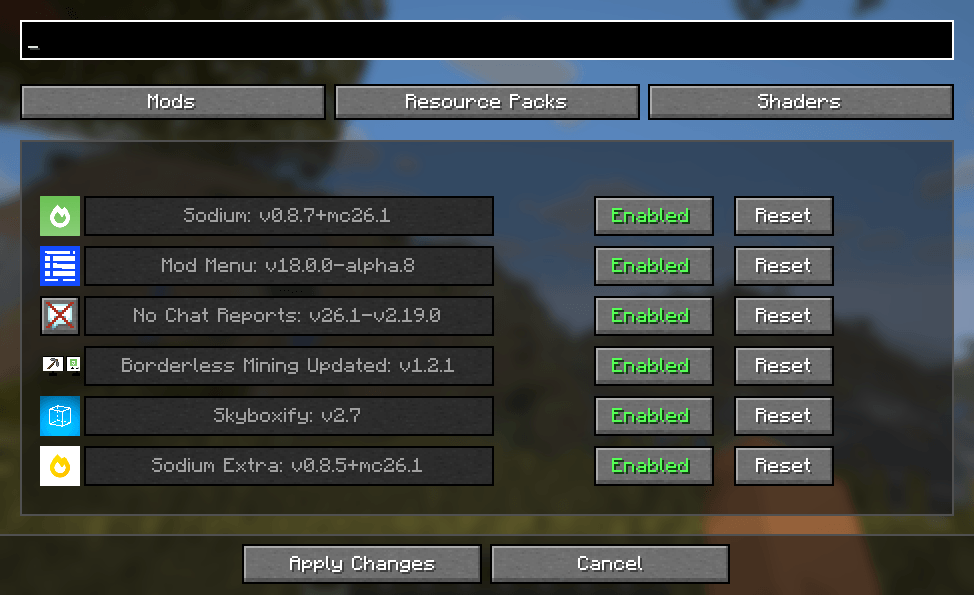 Mod UI
-
 Simple Mod Manager
 -
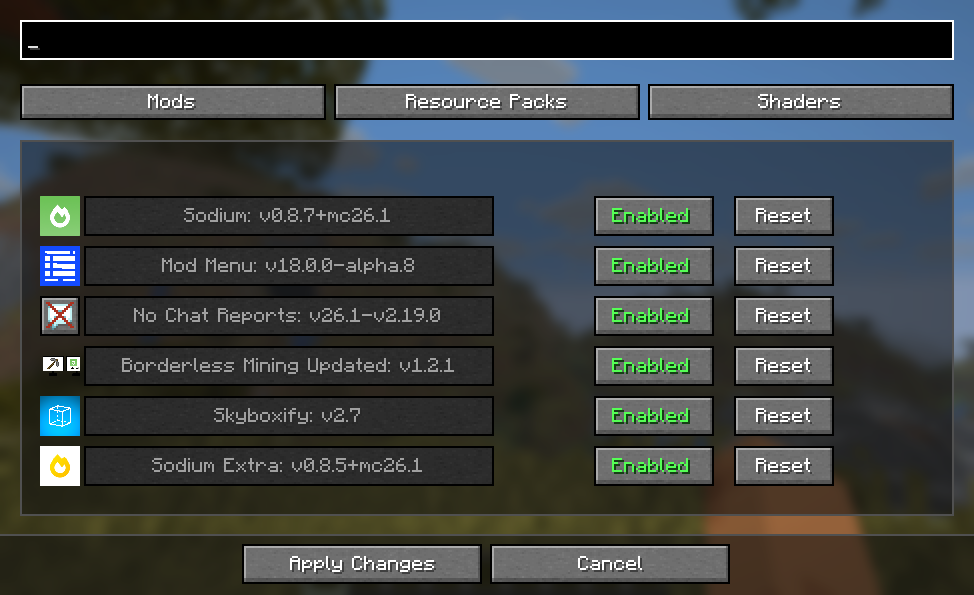 Mod UI
Versions
Files
Relations
Project Relations
More like this
Similar Mods
Suggestions use data such as tags, dependencies, dependents, descriptions, titles, and more to rank how much they overlap with this mod.
On ModDex
Community snapshot
By the numbers
Statistics
Want to reach Minecraft players?
We're looking for a server hosting partner to feature here and other parts of the site. Interested? Send us a message!
Get in touchGet it on
Available Platforms
On ModDex
Community snapshot
By the numbers
Statistics
Resources