
Community listing page, reviews may not be monitored by the author.
Simple Planner

No reviews yet
Stop alt-tabbing to Notepad. Simple Planner gives you a clean, in-game visual board to organize your goals, connect your ideas, and keep track of your progress right on your screen.

Community voices
Reviews
No reviews yet. Be the first to review this project!
Get it on
Available Platforms
About
Project Details
For authors
Embed Badge
If you're the author of this project, you can embed a live badge anywhere that supports HTML or Markdown. It updates automatically whenever ratings change.
Use HTML for any page that supports it, or Markdown for README files and Markdown-based descriptions.
Identifiers
Platform IDs
Resources
External Links
About
Description
We’ve all been there: you’re in the middle of a massive project, and you have a dozen things to remember. "Need 64 iron blocks, find a swamp for slime, fix the redstone line, and don't forget to feed the animals."
Opening a separate text document breaks your immersion, and using signs in-game just clutters up your world. That’s exactly why Simple Planner was created.
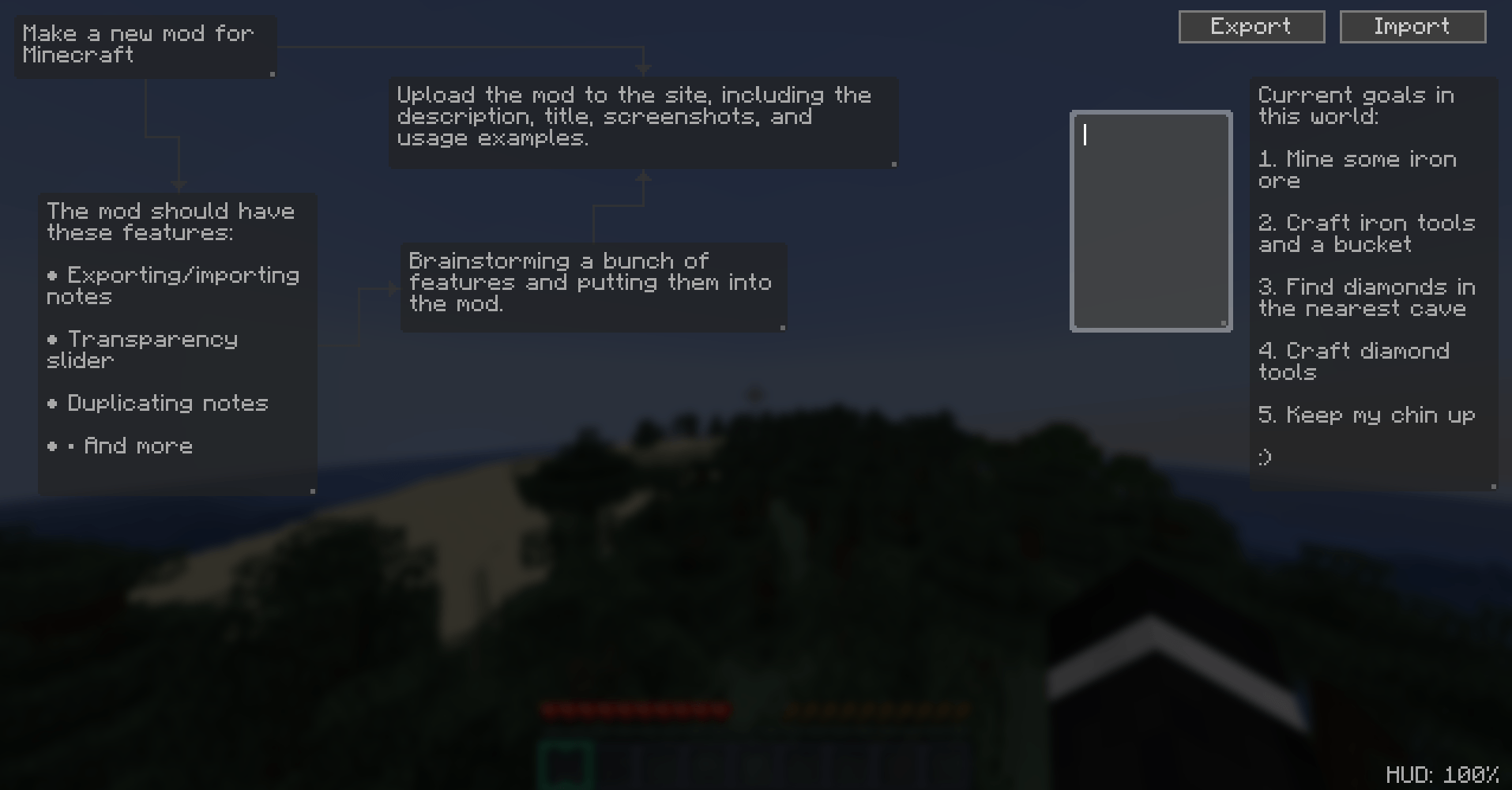
It’s a lightweight, easy-to-use visual planning tool that lets you build a custom flowchart right over your gameplay. Whether you're mapping out a complex machine, tracking your progress on a mega-build, or just writing down coordinates for a future mining trip, Simple Planner keeps your thoughts organized without pulling you out of the game.
Features
-
In-Game Visual Editor: Press
Right Ctrlto open a clean, dark-mode canvas over your game. Right-click anywhere to drop a new note. -
Connect Your Ideas: Drag from the sides of one note to another to create smart, orthogonal arrows. Perfect for flowcharts, questlines, or mapping out dependencies.
-
Live HUD Overlay: Your plans stay on your screen while you play. No need to open menus to check your to-do list. Just press
Jto quickly toggle the HUD on or off. -
HUD Opacity Control: Plans getting in the way of your view? Hold
Ctrland scroll your mouse wheel in the editor to make your notes more transparent. You can make them as solid or as faint as you want. -
Insert Player Coordinates: Need to remember where a specific ore vein is? Press
Ctrl + Lwhile editing a note to instantly paste your current X, Y, and Z coordinates. -
Export & Import: Easily back up your plans or share them with a friend. The mod saves your layouts in a neat JSON file inside your config folder, making it simple to move your setups between worlds.
-
Familiar Controls: Copy, paste, duplicate, and resize—it all works exactly like you'd expect.
Ctrl+C,Ctrl+V, andCtrl+Dfunction just like a normal text editor.
Basic Controls
-
Right Ctrl: Open/Close the Planner
-
J: Toggle HUD visibility (can be rebound in controls)
-
Right Click: Create a new note
-
Left Click: Select, drag, or resize a note
-
Click & Drag from edges: Create connections between notes
-
Delete: Remove a selected note or connection
-
Ctrl + Scroll: Adjust HUD opacity in the editor
Simple Planner is designed to stay out of your way. It doesn't add new blocks, it doesn't change how the game works—it just gives you a place to organize your thoughts. Give it a try, and keep your next big project on track.
Screenshots
Gallery
-
 ТÑмнÑйÑкÑин.png ТÑмнÑйÑкÑин.png
 -
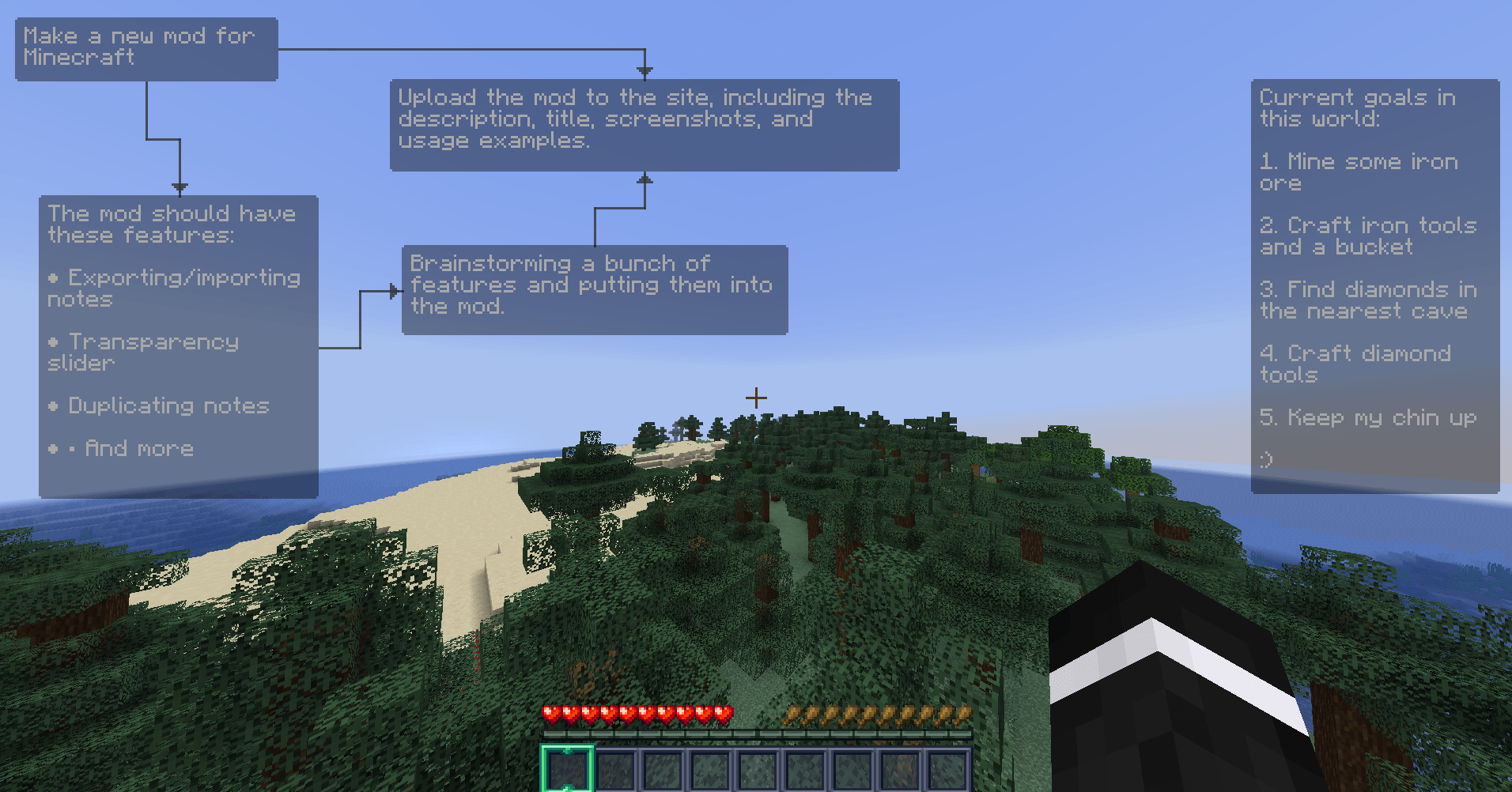 image-attachment_50cb84b5-b982-496c-a6fb-56cc3cd90113.png
Versions
Files
Relations
Project Relations
More like this
Similar Mods
Suggestions use data such as tags, dependencies, dependents, descriptions, titles, and more to rank how much they overlap with this mod.
On ModDex
Community snapshot
By the numbers
Statistics

Get it on
Available Platforms
On ModDex
Community snapshot
By the numbers
Statistics
Resources