
Community listing page, reviews may not be monitored by the author.
Simple Player Badges

No reviews yet
A simple Mod that allows you to create, assign and display Badges next to player names in Chat.

Community voices
Reviews
No reviews yet. Be the first to review this project!
Get it on
Available Platforms
Compatibility
Supported Environments
Runs entirely on the server. Also works in singleplayer.
About
Project Details
For authors
Embed Badge
If you're the author of this project, you can embed a live badge anywhere that supports HTML or Markdown. It updates automatically whenever ratings change.
Use HTML for any page that supports it, or Markdown for README files and Markdown-based descriptions.
Identifiers
Platform IDs
Resources
External Links
About
Description
Simple Player Badges is a mod that enhances your in-game chat by allowing custom player badges to appear next to player names. This mod lets you assign various badges to players and adds a timestamp feature for better chat readability. The timestamp functionality was inspired by Beautified Chat by Serilum. Thanks to Serilum for the inspiration, as some of their features were recreated into this mod.
Configuration:
To configure the badges, you'll need to create a badgenames.json file in the config folder of your Minecraft Server. The JSON configuration contains two primary sections:
players: This is where you assign badges to specific players by name.
badges: Here you define the properties of each badge, including its symbol, color, and hover text.
Here's an example configuration:
{
    "players": [
        {
            "name": "Player1",
            "badges": ["badge1", "badge2", "badge3"]
        },
        {
            "name": "Player2",
            "badges": ["badge2"]
        }
    ],
    "badges": {
        "badge1": {
            "symbol": "★",
            "color": "gold",
            "hover": "Badge1 Title"
        },
        "badge2": {
            "symbol": "α",
            "color": "blue",
            "hover": "Badge2 Title"
        },
        "badge3": {
            "symbol": "⚔",
            "color": "red",
            "hover": "Badge3 Title"
        }
    }
}
The configuration file should be saved in UTF-8 format to ensure special characters display correctly.
Operators can use /badges reload on runtime to update any changes made to badgenames.json.
Explanation of Fields:
Spoiler
players:
- name: The Minecraft username of the player.
- badges: A list of badge names assigned to the player. Each badge name refers to a badge defined in the badges section.
badges:
- symbol: The symbol or text that will be displayed as the badge next to the player's name in chat. This can include text and symbols.
- color: The color of the badge symbol. Use standard Minecraft color names (like gold, blue, red, etc.).
- hover: The text that appears when you hover over the badge in chat.
To-Do:
- Automatic Config Generation if Config doesn't already exist
- Creating and assigning badges with commands
- Option to enable and disable certain features
Screenshots
Gallery
-
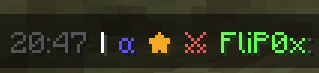 Example Badge Example
 -
 Badge Example
Versions
Files
Relations
Project Relations
More like this
Similar Mods
Suggestions use data such as tags, dependencies, dependents, descriptions, titles, and more to rank how much they overlap with this mod.
On ModDex
Community snapshot
By the numbers
Statistics


Get it on
Available Platforms
On ModDex
Community snapshot
By the numbers
Statistics
Resources