
Simple Team Generator
No reviews yet
Easily gererate a Team ingame and let other Players join via team-specific Code
Data Packs were introduced to vanilla Minecraft in version 1.13 and allow the server to modify data about the game, or run commands. Data Packs are compatible with all mod loaders.
Forge is a popular mod loader for versions 1.1+ of Minecraft.
Neoforge is a fork of the Minecraft Forge available for versions 1.20.1+ of Minecraft. Many Forge mods are compatible with Neoforge and vice versa.
Fabric is a mod loader for versions 1.14+ of Minecraft, particularly popular for client side and optimization mods.
Quilt is a fork of the Fabric mod loader. Many Fabric mods are compatible with Quilt and vice versa.
Community voices
Reviews
Click once to include, again to exclude, again to clear
No reviews yet. Be the first to review this project!
Get it on
Available Platforms
 Modrinth
Compatibility
Supported Environments
About
Project Details
For authors
Embed Badge
If you're the author of this project, you can embed a live badge anywhere that supports HTML or Markdown. It updates automatically whenever ratings change.
Use HTML for any page that supports it, or Markdown for README files and Markdown-based descriptions.
Identifiers
Platform IDs
Resources
External Links
About
Description
This Datapack provides:
dialog GUI to create Teams
- Display Name and Color (will be displayed in front of the player's name)
- a name field for the game-code (just enter the Name without spaces and special Caracters)
- after creating you get a 6-digit Code for joining
- available with the command /dialog show @s teams:add for operators level 2 and aboth
/trigger command to join
- use /trigger Team set <code> to enter the Code
- negative values let you leave the Team
- just /trigger Team to get the Code of the current Team
- 10 minutes Cooldown for joining (can be adjusted via /scoreboard players set .Cooldown Team_Cooldown 12000 by default)
- available for everyone (operator level 0 and aboth)
list-function
- lists all Teams in pages of 10 per page
- buttons for joining, removing the Team and listing it's Members
- clicking on the page-counter, suggests a command for changing the page ( has to be replaced)
- avaialabe with /function teams:list to operators (level 2+) (/function teams:list1 for datapack version 1.2 or below)
function to load generated Teams on new world
- copy command_storage_teams.dat from the data folder in your old world folder and paste it at the same place in your new world folder
- load Datapack (min. version 1.2) and run function teams:take_copy
- Teams are being copied to new world with same Team-Codes
- Players can get Team-Codes of old world with /trigger Team and rejoin the old Team with them
unistall function (datapack version 1.4+ only)
- /function teams:uninstall
- disables the datapack
- removes Teams (can be reloaded with /function teams:take_copy1 like described aboth starting at 2.)
help function (datapack version 1.4+)
- shows this text
- /function teams:help
Important to know:
- the Mods are just the datapack converted into mods and should work exactly the same
- datapack with dialog -> restart the world or server
- nut fully tested, can break at any time (but should not)
- may have problems with paper or bukkit (purpur works)
- have FUN!
Screenshots
Gallery
-
 Teamdisplay in tab
 -
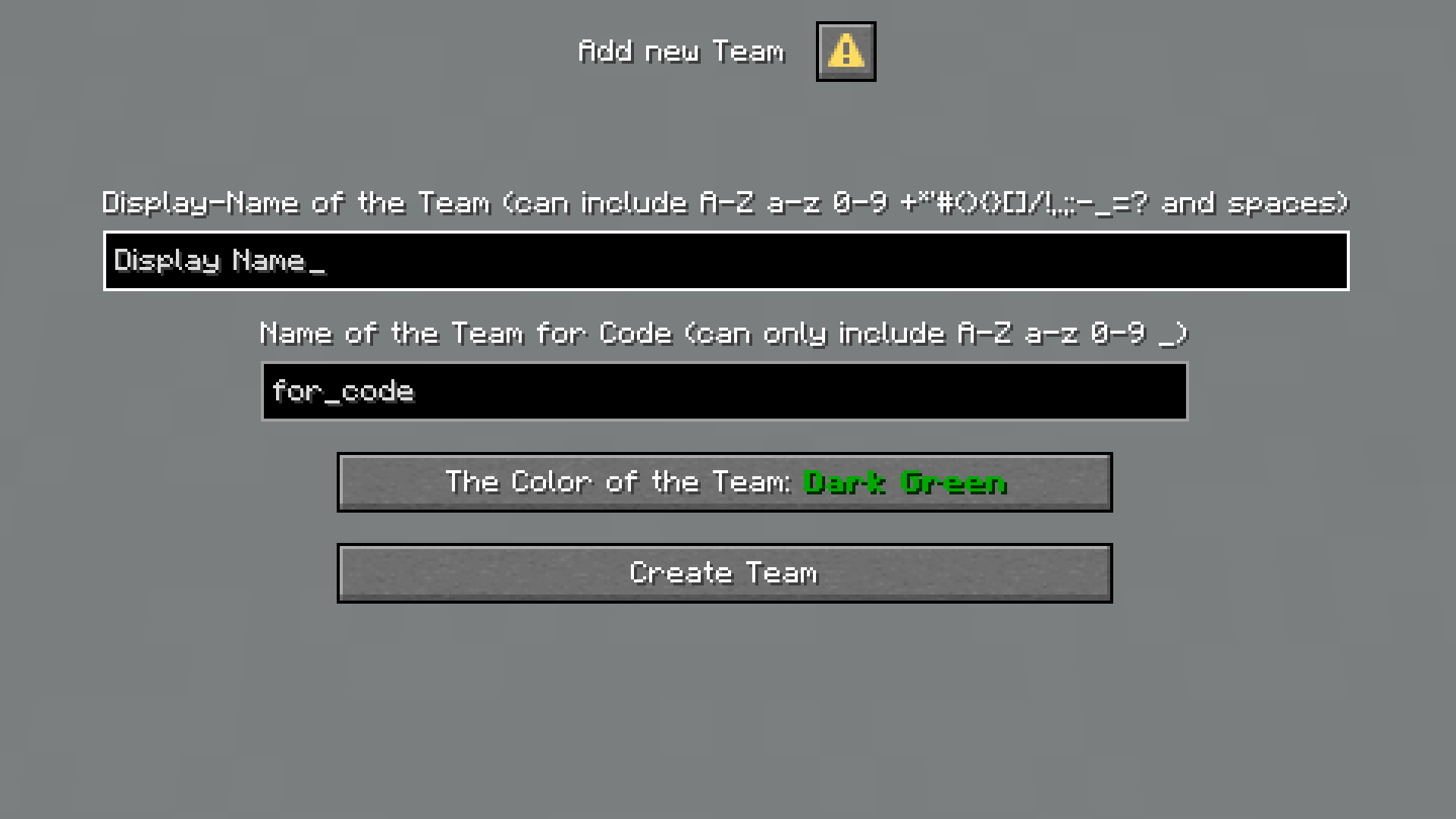 Team-Creating GUI get the GUI via /dialog show @s teams:add
Versions
Files
Relations
Project Relations
More like this
Similar Mods
Suggestions use data such as tags, dependencies, dependents, descriptions, titles, and more to rank how much they overlap with this mod.
On ModDex
Community snapshot
By the numbers
Statistics

Want to reach Minecraft players?
We're looking for a server hosting partner to feature here and other parts of the site. Interested? Send us a message!
Get in touchGet it on
Available Platforms
On ModDex
Community snapshot
By the numbers
Statistics
Resources