
Community listing page, reviews here may not be monitored by the author.
SimpleBroadcast

No reviews yet
Create, schedule and announce broadcasts to all players on a server.

Community voices
Reviews
No reviews yet. Be the first to review this project!
Get it on
Available Platforms
Compatibility
Supported Environments
Runs entirely on the server. Also works in singleplayer.
About
Project Details
For authors
Embed Badge
If you're the author of this project, you can embed a live badge anywhere that supports HTML or Markdown. It updates automatically whenever ratings change.
Use HTML for any page that supports it, or Markdown for README files and Markdown-based descriptions.
Identifiers
Platform IDs
About
Description


SimpleBroadcast
SimpleBroadcast is a server-sided broadcast command mod/plugin that allows you to announce messages to all players on the server at once.
It can be used out of the box with zero configuration, but has deep configuration and sub-commands which allow you to control the broadcast finely.
SimpleBroadcast supports the Simplified Text Format, and the Placeholder API.
Basic Usage
To use the broadcast command out of the box, simply call /broadcast <contents>
Here are some examples of the command:
/broadcast '<rainbow>Hello everyone! This is a rainbow gradient!'/broadcast 'The server TPS is currently %server:tps%'/broadcast '<color:gold>New record!<r> There are %server:online% players online!'

Advanced Usage
Message Types
As previously said, you can customize every part of the broadcast - including the prefix ([BROADCAST]) and suffix of the actual chat message sent.
This can be done through broadcast message types - these types specify the prefix, suffix and location of messages.
By default, there are three example types provided with the mod:
minecraft:plain(No prefix, no suffix, default location is chat)minecraft:vanilla(Prefix is[Server], no suffix, default location is chat)simplebroadcast:default(As seen in the basic usage section, no suffix, default location is chat)
You can modify these through the /broadcast types command:
/broadcast types create <id>- Create a new broadcast type with the ID specified./broadcast types <id> location- Get the default location of a broadcast type./broadcast types <id> location [actionbar/title/chat]- Set the default location of the broadcast type./broadcast types <id> prefix- Get the prefix of the broadcast type, if it exists./broadcast types <id> prefix <value>- Set the prefix of the broadcast type, supports placeholders and the simplified text format./broadcast types <id> suffix- Get the suffix of the broadcast type, if it exists./broadcast types <id> suffix <value>- Set the suffix of the broadcast type, supports placeholders and the simplified text format.
To use a broadcast type, you can prepend your broadcast message with a type ID:
/broadcast minecraft:vanilla 'Hello world!'

You can override the default location as well by specifying either actionbar, title or chat after the type ID and before the contents of the broadcast.
/broadcast simplebroadcast:default actionbar '<rainbow>This is awesome!'
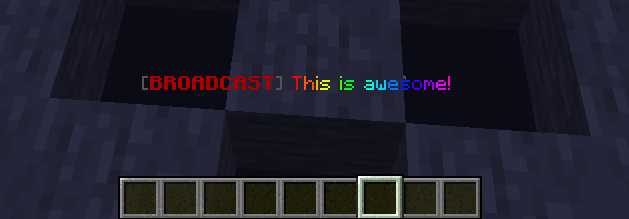
Message Presets
Message presets are useful when you want to save broadcasts that you might use quite a bit in the future. Eg: "The server will be restarting in 5 minutes."
To create a message preset, you can use the following command:
/broadcast preset create <id> <type> [contents]
Example usage:
/broadcast preset create simplebroadcast:test minecraft:vanilla "Hello world!"/broadcast preset create simplebroadcast:empty simplebroadcast:default
To broadcast a preset message simply call the following command:
/broadcast preset <id>- Broadcast a preset to the entire server.
You can modify and read preset configurations using the following commands:
/broadcast preset <id> location- Get the display location of the message preset./broadcast preset <id> location [actionbar/chat/title]- Set the location of the preset./broadcast preset <id> contents- Get the raw contents of the message preset. This will not format the contents./broadcast preset <id> contents <value>- Set the raw contents of the message preset./broadcast preset <id> type- Get the message type of the preset./broadcast preset <id> type <type>- Set the message type of the preset./broadcast preset <id> delete- Delete the message preset.
Roadmap
This is what's planned:
- Scheduling broadcasts - Schedule messages or message pools using a cron-like syntax.
- Message pools - Random, biased or linear collections of messages that can be broadcasted.
Screenshots
Gallery
-
Actionbar Example Advanced Usage
-
Basic Usage Examples
-
Example Advanced Usage Broadcast
Versions
Files
Relations
Project Relations
More like this
Similar Mods
Suggestions use data such as tags, dependencies, dependents, descriptions, titles, and more to rank how much they overlap with this mod.
On ModDex
Community snapshot
By the numbers
Statistics

 (opens in a new tab)
Get it on
Available Platforms
On ModDex
Community snapshot
By the numbers