
SimpleChat (fork)
No reviews yet
A small mod for a customizable chat, with the most simple settings. Integration with LuckPerms and FTB Teams.
Provides a framework or library for other mods to use.
Fabric is a mod loader for versions 1.14+ of Minecraft, particularly popular for client side and optimization mods.
Community voices
Reviews
Click once to include, again to exclude, again to clear
No reviews yet. Be the first to review this project!
Get it on
Available Platforms
 Modrinth
Compatibility
Supported Environments
About
Project Details
For authors
Embed Badge
If you're the author of this project, you can embed a live badge anywhere that supports HTML or Markdown. It updates automatically whenever ratings change.
Use HTML for any page that supports it, or Markdown for README files and Markdown-based descriptions.
Identifiers
Platform IDs
About
Description
SimpleChat (fork)




This fork was created because the main project is no longer maintained.
A simple chat mod for your server.
Works even in a single player game.
Just use !<message> for global chat or #<message> for world chat!

Features
-
FTB Teams integration (tested 2001.1.4)
-
LuckPerms integration (tested 5.4.25)
-
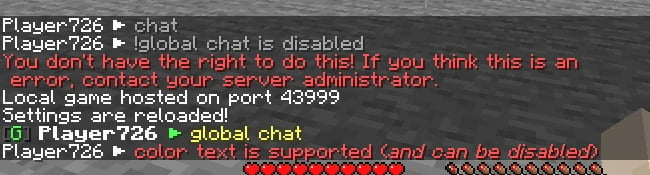
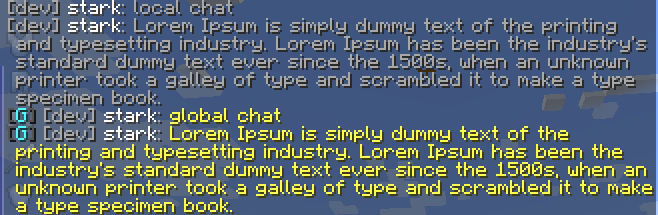
Global, world and local chat (you can turn it off)
-
Color chat (you can turn it off)
-
Reloading the configuration with the command
-
Support PlacehoderAPI (From 1.19.4)
-
Added support color tags (Example) (From 1.19.4)
-
For developers: Player chat event
Configuration
The configuration is located in <game or server directory>/config/simplechat.json.
| Name | Description | Type |
|---|---|---|
| enable_chat_mod | Enables (true) or disables (false) chat handling by the mod. | boolean |
| enable_global_chat | Enables (true) or disables (false) the global chat. | boolean |
| enable_world_chat | Enables (true) or disables (false) the world chat. | boolean |
| enable_chat_colors | Enables (true) or disables (false) the use of color codes in the chat. | boolean |
| local_chat_format | Defines the appearance of the local chat. | String |
| global_chat_format | Defines the appearance of the global chat. | String |
| no_players_nearby_text | Defines a message for local chat when there are no players nearby. | String |
| no_players_nearby_message | Enables (true) or disables (false) message. | boolean |
| no_players_nearby_action_bar | Enables (true) or disables (false) action bar message. | boolean |
| chat_range | Specifies the distance after which local chat messages will not be visible (if global chat is enabled). | int |
{
  "enable_chat_mod": true,
  "enable_global_chat": true,
  "enable_world_chat": false,
  "enable_chat_colors": false,
  "local_chat_format": "%player%&7:&r &7%message%",
  "global_chat_format": "&8[&2G&8] &r%player%&7:&r &e%message%",
  "world_chat_format": "&8[&9W&8] &r%player%&7:&r &e%message%",
  "no_players_nearby_text": "&fNo players nearby. Please use &e!<message> &ffor global chat.",
  "no_players_nearby_message": true,
  "no_players_nearby_action_bar": true,
  "chat_range": 100
}
You can use the placeholder %player% to specify the player's nickname and the placeholder %message% to specify their message in the chat.
%ftbteam%FTB Team integration - display your party in chat.%lp_group%LuckPerms - display player group.%lp_prefix%LuckPerms - display player prefix.%lp_suffix%LuckPerms - display player suffix.
You can reload the configuration without restarting the server or the game using the /simplechat command (requires permission level 1 or more).
API
If you are a developer, you can use an event called when a player writes something to the chat.
Look me.vetustus.server.simplechat.api.event.PlayerChatCallback.
To control the behavior, use the ChatMessage subclass, which can be used to cancel sending a message or change it.
Example:
/**
 * Prohibits players from writing messages by canceling an event.
 */
PlayerChatCallback.EVENT.register((player, message) -> {
  PlayerChatCallback.ChatMessage chatMessage = new PlayerChatCallback.ChatMessage(player, message);
  chatMessage.setCancelled(true);
  return chatMessage;
});
License
The MIT license is used.
Screenshots
Gallery
-
 Preview
 -
 Preview
Versions
Files
Relations
Project Relations
More like this
Similar Mods
Suggestions use data such as tags, dependencies, dependents, descriptions, titles, and more to rank how much they overlap with this mod.
On ModDex
Community snapshot
By the numbers
Statistics

Want to reach Minecraft players?
We're looking for a server hosting partner to feature here and other parts of the site. Interested? Send us a message!
Get in touchGet it on
Available Platforms
On ModDex
Community snapshot
By the numbers