
SimpleLoot
No reviews yet
A lightweight Fabric mod for Minecraft that adds Rust-style Hover Loot - quickly transfer items by holding a key and swiping your mouse over slots plus additional QOL features.
Fabric is a mod loader for versions 1.14+ of Minecraft, particularly popular for client side and optimization mods.
Community voices
Reviews
Click once to include, again to exclude, again to clear
No reviews yet. Be the first to review this project!
Get it on
Available Platforms
 Modrinth
Compatibility
Supported Environments
About
Project Details
For authors
Embed Badge
If you're the author of this project, you can embed a live badge anywhere that supports HTML or Markdown. It updates automatically whenever ratings change.
Use HTML for any page that supports it, or Markdown for README files and Markdown-based descriptions.
Identifiers
Platform IDs
About
Description
SimpleLoot




A lightweight Fabric mod for Minecraft that adds Rust-style Hover Loot - quickly transfer items by holding a key and swiping your mouse over slots.
Author: Partacus-SPQR
Source: GitHub
Download: Modrinth
Features
- Hover Loot - Hold a key and swipe over items to transfer them instantly
- Hover Drop - Hold Ctrl + hover loot key (or dedicated drop key) to drop items on the ground
- Armor Equip - Hover over armor in your inventory to instantly equip it, or hover armor slots to unequip
- Crafting Grid - Hover over items in your inventory to send them to the 2x2 or 3x3 crafting grid
- Creative Support - Hover drop works in creative mode's survival inventory tab
- Bidirectional - Works both ways: container to inventory and inventory to container
- Hotbar Protection - Optionally prevent hotbar items from being transferred
- Container Filters - Enable/disable specific container types
- No Default Keybinds - You choose your preferred keys
- Fallback Config - Full-featured config screen works without Cloth Config (sliders, tooltips, reset buttons, scrollable)
Supported Screens
Storage: Chests, Double Chests, Barrels, Shulker Boxes, Ender Chests, Dispensers, Droppers, Hoppers
Processing: Furnaces, Blast Furnaces, Smokers, Brewing Stands
Workstations: Anvils, Smithing Tables, Grindstones, Stonecutters, Looms, Enchanting Tables, Beacons, Crafters, Cartography Tables
Inventory: Player inventory slots, Crafting Table (3x3), Survival inventory crafting (2x2)
Usage
- Open Options > Controls > Key Binds > SimpleLoot
- Bind a key to Hover Loot (Hold)
- Open any container, hold your key, and swipe over items
Drop Mode
- Hold Ctrl + Hover Loot key to drop items instead of transferring
- Or bind a dedicated Hover Drop key
Armor Equip
- In your inventory, hover over armor pieces to equip them
- Hover over equipped armor slots to unequip
- Hover armor in inventory while wearing armor to swap (e.g., iron chestplate replaces diamond chestplate)
Crafting Grid
- In your inventory or crafting table, hover over items to send a full stack to the crafting grid
- Hover over crafting grid slots to move items back to inventory
- Hover over the crafting output to craft the maximum amount possible
Configuration
Access via ModMenu or edit config/simpleloot.json
| Setting | Description | Default |
|---|---|---|
| Enabled | Enable/disable the mod | true |
| Hotbar Protection | Protect hotbar slots | false |
| Transfer Delay | Delay between transfers (ms) | 20 |
| Debug Mode | Enable debug logging | false |
| Allow Hover Drop | Enable drop mode (Ctrl+hover) | true |
| Allow Crafting Grid | Enable crafting grid transfers | true |
| Allow Armor Equip | Enable armor equip via hover | true |
| Armor Swap Delay | Delay between armor swaps (ms) | 70 |
| Container Types | Per-container enable/disable | All enabled |
Keybindings
All keybindings support both keyboard keys and mouse buttons.
| Keybind | Description | Default |
|---|---|---|
| Hover Loot (Hold) | Hold to transfer items you hover over | Unbound |
| Hover Drop (Hold) | Hold to drop items you hover over | Unbound |
| Enable/Disable | Toggle the mod on/off | Unbound |
| Open Config | Open config screen | Unbound |
Requirements
- Minecraft 1.21.9, 1.21.10, 1.21.11, 26.1, or 26.2
- Fabric Loader 0.18.4+
- Fabric API
- Java 21 (for 1.21.9-1.21.11) or Java 25 (for 26.1/26.2)
Optional (Recommended)
- Cloth Config - Enhanced config screen (not available for MC 26.x yet)
- ModMenu - In-game mod configuration access
Note: SimpleLoot includes a full-featured fallback config screen with sliders, tooltips, reset buttons, and scrolling. This screen is used when Cloth Config is unavailable or incompatible with your Minecraft version.
Installation
- Install Fabric Loader
- Install Fabric API
- (Optional) Install Cloth Config and ModMenu
- Drop SimpleLoot into your
modsfolder
Building
git clone https://github.com/Partacus-SPQR/SimpleLoot.git
cd SimpleLoot
./gradlew build
License
MIT License - see LICENSE
Author
Partacus-SPQR
Author's Note
Built this because I wanted my loot to transfer just like Rust. Simple and efficient - no more shift clicking!
Screenshots
Gallery
-
 SimpleLoot Shows what the mod does. Hover over your goop and it goes where you want it!
 -
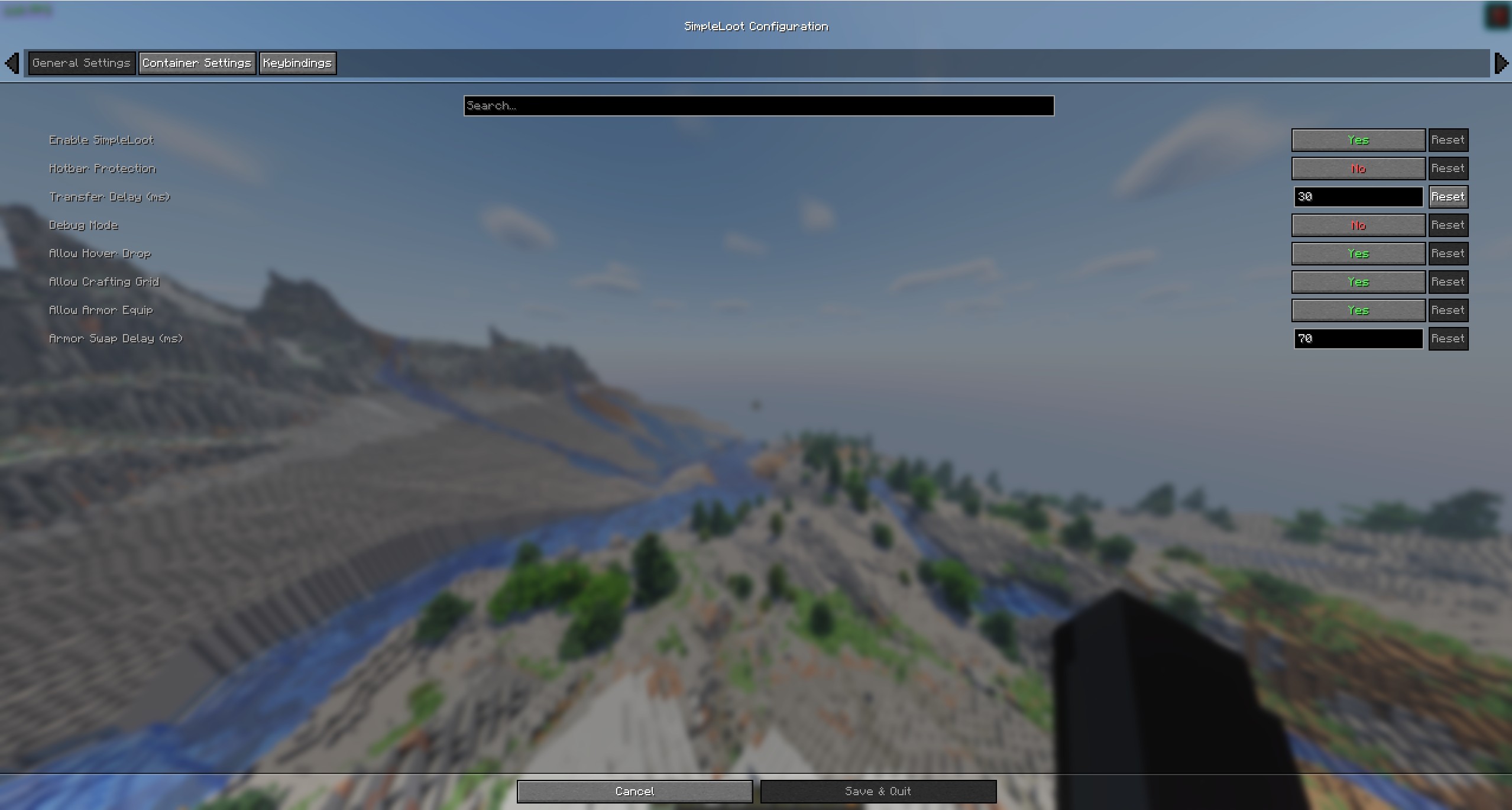 SimpleLoot Cloth Config Displays the main config, I personally like 20-30ms delay for a small visual delay. Just gives it a nice touch. Can lower MS delay to 0 for pretty much instant feedback.
 -
 SimpleLoot Backup Config Shows backup config with working sliders, as well as the containers it supports.
 -
 SimpleLoot Binds Shows the available binds.
Versions
Files
Relations
Project Relations
More like this
Similar Mods
Suggestions use data such as tags, dependencies, dependents, descriptions, titles, and more to rank how much they overlap with this mod.
On ModDex
Community snapshot
By the numbers
Statistics

Want to reach Minecraft players?
We're looking for a server hosting partner to feature here and other parts of the site. Interested? Send us a message!
Get in touchGet it on
Available Platforms
On ModDex
Community snapshot
By the numbers