
SimpleSkinSwapper
No reviews yet
A simple skin swapper that offer you a way to quickly switch skin on servers.
Fabric is a mod loader for versions 1.14+ of Minecraft, particularly popular for client side and optimization mods.
Community voices
Reviews
Click once to include, again to exclude, again to clear
No reviews yet. Be the first to review this project!
Get it on
Available Platforms
 Modrinth
Compatibility
Supported Environments
About
Project Details
For authors
Embed Badge
If you're the author of this project, you can embed a live badge anywhere that supports HTML or Markdown. It updates automatically whenever ratings change.
Use HTML for any page that supports it, or Markdown for README files and Markdown-based descriptions.
Identifiers
Platform IDs
About
Description
Simple Skin Swapper
Simple Skin Swapper is a client-side Fabric mod for Minecraft 1.21.8+ that lets you switch between your local skin files on the fly — without restarting the game or navigating through external websites. Open a dynamic skin wheel with a keybind, hover over the skin you want, click, and you're done.
Features
- Skin wheel — a radial menu that displays up to 10 of your local skins at once, opened with a configurable keybind
- Skin carousel — a classic list view for browsing skins more carefully, or for accessing skins that don't fit on the wheel when you have more than 10
- Multiplayer skin refresh — other players see your new skin in real time without reconnecting; three options depending on your server setup:
- install the mod server-side for native skin refresh support
- install the SkinShuffle Bridge plugin on Paper servers for the same result
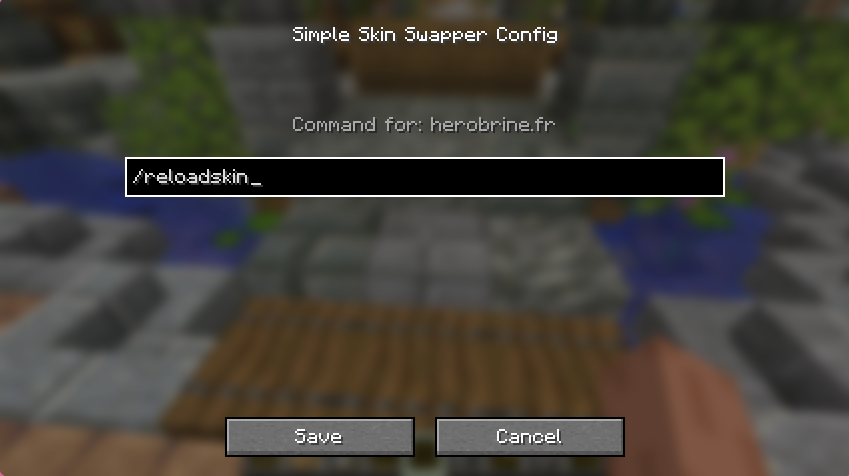
- configure a per-server command as a fallback, if the server provides one (e.g.
/reloadskin)
Installation
- Install Fabric Loader and Fabric API
- Drop the mod
.jarinto your.minecraft/mods/folder - Add your skin PNG files to
.minecraft/skins/ - Launch the game and bind the skin wheel key in Controls
Configuration
Open the configuration screen via ModMenu or from the carousel/wheel screen.
If the server does not have the SkinShuffle Bridge plugin, you can configure a command to send after applying a skin so other players see the change immediately. The server entry is created automatically on first connection with an empty command. Leave it empty to disable the feature for that server.
Note: This configuration is not needed if the server has the SkinShuffle Bridge plugin installed — the mod will detect it automatically and use the native skin refresh packet instead.
Config file location: .minecraft/config/simpleskinswapper.json
{
  "serverCommands": {
    "play.example.com": "/reloadskin",
    "another-server.net": ""
  }
}
Usage
Both the skin wheel and the skin carousel can be opened with a configurable keybind. You can set them in Options → Controls, under the Simple Skin Swapper category.

Skin wheel: hold your keybind to open the wheel, hover over the skin you want, and click to apply it. Releasing the keybind without clicking simply closes the wheel — no skin will be changed.
Skin carousel: open it by pressing its keybind once, or through ModMenu. Browse your skins and click the Apply button on the skin you want to switch to. You can also reorder skins using the arrow buttons — the order is saved, and it determines which skins appear on the wheel (the first 10 in the list).

Adding skins: drop any PNG skin file into the .minecraft/skins/ folder (or the skins/ folder of your instance if you use a custom launcher). A shortcut button to open that folder is available directly in the carousel screen.
Acknowledgements
- cobrasrock for creating SkinSwapper under an open license that allowed me to reuse parts of its logic
- imb11 for creating SkinShuffle, an outstanding mod that remains the most fully-featured in its category — and the one I would be using if not for the specific features I was looking for
License
Screenshots
Gallery
-
Skin Carousel
-
-

-
Keybind section
Versions
Files
Relations
Project Relations
More like this
Similar Mods
Suggestions use data such as tags, dependencies, dependents, descriptions, titles, and more to rank how much they overlap with this mod.
On ModDex
Community snapshot
By the numbers
Statistics

Want to reach Minecraft players?
We're looking for a server hosting partner to feature here and other parts of the site. Interested? Send us a message!
Get in touchGet it on
Available Platforms
On ModDex
Community snapshot
By the numbers