
Skin Wardrobe
No reviews yet
Skin Wardrobe is a NeoForge mod that lets players change and manage Minecraft skins in-game
Neoforge is a fork of the Minecraft Forge available for versions 1.20.1+ of Minecraft. Many Forge mods are compatible with Neoforge and vice versa.
Fabric is a mod loader for versions 1.14+ of Minecraft, particularly popular for client side and optimization mods.
Community voices
Reviews
Click once to include, again to exclude, again to clear
No reviews yet. Be the first to review this project!
Get it on
Available Platforms
 Modrinth
Compatibility
Supported Environments
About
Project Details
For authors
Embed Badge
If you're the author of this project, you can embed a live badge anywhere that supports HTML or Markdown. It updates automatically whenever ratings change.
Use HTML for any page that supports it, or Markdown for README files and Markdown-based descriptions.
Identifiers
Platform IDs
Resources
External Links
About
Description
Skin Wardrobe
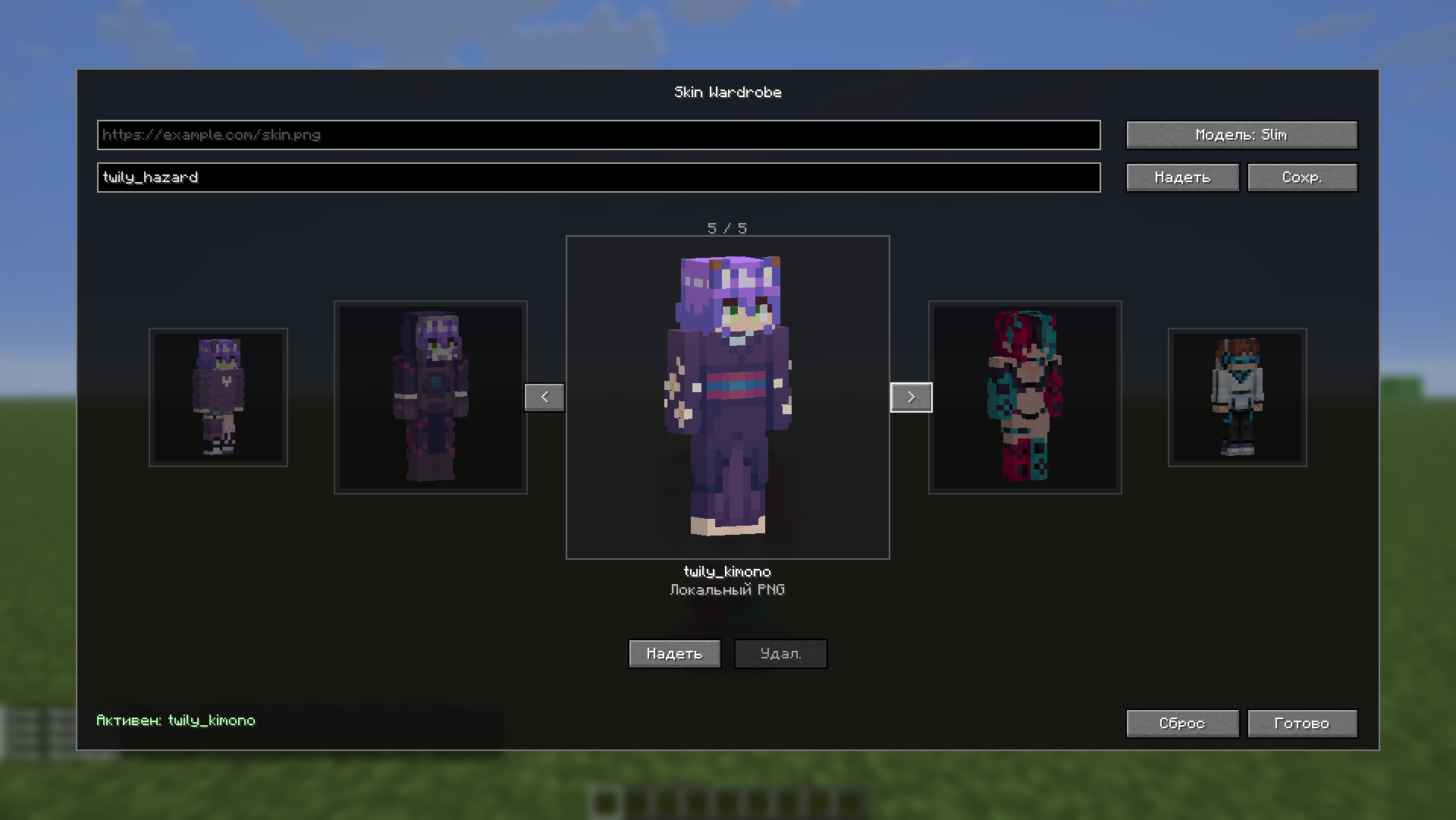
Skin Wardrobe — мод для NeoForge, который позволяет менять скин прямо в игре без перезахода. Основная часть работает на сервере через команды, а если мод установлен на клиенте, появляется удобное меню гардероба с 3D-предпросмотром.
Как установить скин
Через меню
Установи мод на клиент и сервер, зайди в игру и нажми O.
В меню можно:
- вставить ссылку на скин;
- выбрать модель
ClassicилиSlim; - применить скин;
- сохранить скин в гардероб;
- листать сохраненные и локальные скины в карусели.
Локальные PNG-скины можно положить в папку:
.minecraft/skinwardrobe
Через команды
Если мод стоит только на сервере, игроки могут пользоваться командами:
/skinwardrobe seturl <url> [classic|slim]
/skinwardrobe saveurl <name> <url> [classic|slim]
/skinwardrobe use <name>
/skinwardrobe list
/skinwardrobe delete <name>
/skinwardrobe reset
Важно про установку на клиент
Если мод установлен только на сервере, игроки без клиентского мода могут менять скины через команды. Другие игроки увидят новый скин сразу, а сам игрок увидит его после повторного входа на сервер.
Если мод установлен и на клиенте, игрок получает меню гардероба по клавише O, 3D-предпросмотр и мгновенное обновление собственного скина без перезахода.
Поддерживаемые ссылки
Скин должен быть PNG 64x64.
Поддерживаются:
- прямые PNG-ссылки;
- публичные ссылки Яндекс.Диска;
- страницы Ely.by;
- страницы NameMC.
Примеры:
https://disk.yandex.ru/i/...
https://ely.by/skins/s3512393
https://namemc.com/skin/6e8a6d2c80f9e54b
Skin Wardrobe
Skin Wardrobe is a NeoForge mod that lets players change Minecraft skins in-game without reconnecting. The core functionality runs on the server through commands, and when installed on the client it adds a wardrobe GUI with 3D skin previews.
How to install a skin
Using the GUI
Install the mod on both the server and client, join the game, and press O.
The GUI lets you:
- paste a skin URL;
- choose
ClassicorSlim; - apply a skin;
- save a skin to your wardrobe;
- browse saved and local skins in a carousel.
Local PNG skins can be placed here:
.minecraft/skinwardrobe
Using commands
If the mod is installed only on the server, players can use commands:
/skinwardrobe seturl <url> [classic|slim]
/skinwardrobe saveurl <name> <url> [classic|slim]
/skinwardrobe use <name>
/skinwardrobe list
/skinwardrobe delete <name>
/skinwardrobe reset
Client Installation Note
If the mod is installed only on the server, players without the client mod can still change skins through commands. Other players will see the new skin immediately, while the player who changed it will see it after rejoining the server.
If the mod is also installed on the client, the player gets the wardrobe GUI on the O key, 3D previews, and instant self-skin refresh without reconnecting.
Supported links
The skin must be a 64x64 PNG.
Supported sources:
- direct PNG links;
- public Yandex Disk links;
- Ely.by skin pages;
- NameMC skin pages.
Examples:
https://disk.yandex.ru/i/...
https://ely.by/skins/s3512393
https://namemc.com/skin/6e8a6d2c80f9e54b
Screenshots
Gallery
Versions
Files
Relations
Project Relations
More like this
Similar Mods
Suggestions use data such as tags, dependencies, dependents, descriptions, titles, and more to rank how much they overlap with this mod.
On ModDex
Community snapshot
By the numbers
Statistics

Want to reach Minecraft players?
We're looking for a server hosting partner to feature here and other parts of the site. Interested? Send us a message!
Get in touchGet it on
Available Platforms
On ModDex
Community snapshot
By the numbers
Statistics
Resources