![Skull [Portable]](https://cdn.modrinth.com/data/x5rDcrvh/68af4607afd63a7caac80e4411935e9bd7bc5321_96.webp)
Skull [Portable]
No reviews yet
Obtain and Customize Player Heads in Survival!
Data Packs were introduced to vanilla Minecraft in version 1.13 and allow the server to modify data about the game, or run commands. Data Packs are compatible with all mod loaders.
Forge is a popular mod loader for versions 1.1+ of Minecraft.
Neoforge is a fork of the Minecraft Forge available for versions 1.20.1+ of Minecraft. Many Forge mods are compatible with Neoforge and vice versa.
Fabric is a mod loader for versions 1.14+ of Minecraft, particularly popular for client side and optimization mods.
Quilt is a fork of the Fabric mod loader. Many Fabric mods are compatible with Quilt and vice versa.
Community voices
Reviews
Click once to include, again to exclude, again to clear
No reviews yet. Be the first to review this project!
Get it on
Available Platforms
 Modrinth
Compatibility
Supported Environments
About
Project Details
For authors
Embed Badge
If you're the author of this project, you can embed a live badge anywhere that supports HTML or Markdown. It updates automatically whenever ratings change.
Use HTML for any page that supports it, or Markdown for README files and Markdown-based descriptions.
Identifiers
Platform IDs
Resources
External Links
About
Description
Skull [Portable]
Obtain and Customize Player Heads in Survival!
📥How to Install
Choose if you want to download the pure Data Pack version or the Mod version and follow the steps accordingly.
Data Pack
- 1) Download the Datapack
- 2) Chose the world you want to install the Data Pack in and navigate to its "datapacks" folder
- 3) Copy the downloaded Data Pack file (Skull [Portable]) into this folder
- 4) Join the world and run
/reloadcommand
Mod
- 1) Download the Mod
- 2) Navigate to your
modsfolder (for the vanilla launcher the path is.minecraft/mods - 3) Put the downloaded .jar file (Skull [Portable]) into this folder
- 4) Join the world and run
/reloadcommand
📖Features
Skull [Portable] allow you to Craft and Customize player heads using just a Book and Quill.
How to craft and customize a Player Head
🎭Craft a Blank Player Head
A Blank Player Head can be crafted using any of the following materials:
|  |
📋Customize a Player Head using a texture value
- 1) Head over Minecraft Heads
- 2) Choose a head and open its relative page; Then, scroll to the
For Developersand copy thevaluefield - 3) Paste the copied
valuein a Book and Quill - 4) Hold the desired number of player heads in your off-hand
- 5) Hold the book with the
valuein your main-hand - 6) Swap hands to customize the head (Default key to swap hands is
F)
🔖Customize a Player Head using a player name
- 1) Sign a Book and Quill with the name of the player
- 2) Hold the desired number of player heads in your off-hand
- 3) Hold the signed book in your main-hand
- 4) Swap hands to customize the head (Default key to swap hands is
F)
YouTube Showcase
Settings
You can access the settings upon reloading by clicking on the [Config] button or by running the following command -> /function skull_portable:config
The settings menu includes the following:
- [Player head] Replace signed book after use: (defaults to
True) - [Custom Head] Erase book pages after use: (defaults to
True)
📤How to Uninstall
Data Pack
To uninstall the Data Pack run the command /function skull_portable:uninstall. When the uninstallation process is completed a confirmation message will be sent in the chat.
Mod
To uninstall the Mod version you need to run /function skull_portable:uninstall command. Then you close the game and remove the jar file from your .minecraft/mods folder.
🔗External links


Screenshots
Gallery
-
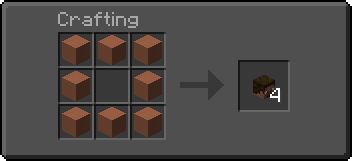 Head Crafting - Terracotta
 -
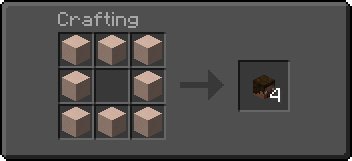 Head Crafting - White Terracotta
 -
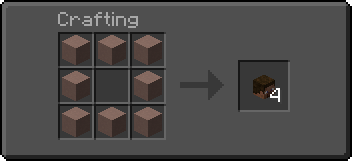 Head Crafting - Light Gray Terracotta
 -
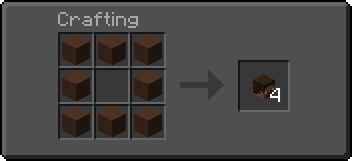 Head Crafting - Brown Terracotta
Versions
Files
Relations
Project Relations
More like this
Similar Mods
Suggestions use data such as tags, dependencies, dependents, descriptions, titles, and more to rank how much they overlap with this mod.
On ModDex
Community snapshot
By the numbers
Statistics

Want to reach Minecraft players?
We're looking for a server hosting partner to feature here and other parts of the site. Interested? Send us a message!
Get in touchGet it on
Available Platforms
On ModDex
Community snapshot
By the numbers
Statistics
Resources