
Community listing page, reviews here may not be monitored by the author.
SkyBlock Enhancements


No reviews yet
Small, efficient mod designed to improve your Hypixel SkyBlock experience with quality-of-life features and utilities.
Community voices
Reviews
No reviews yet. Be the first to review this project!
Get it on
Available Platforms
Compatibility
Supported Environments
Runs entirely on the client. Works on vanilla servers.
About
Project Details
For authors
Embed Badge
If you're the author of this project, you can embed a live badge anywhere that supports HTML or Markdown. It updates automatically whenever ratings change.
Use HTML for any page that supports it, or Markdown for README files and Markdown-based descriptions.
Identifiers
Platform IDs
About
Description




Small but meaningful quality-of-life improvements for Hypixel SkyBlock — the tweaks that bigger mods don't cover.
✨ Features
Recipe Viewer Integration
Requires the Reliable Recipe Viewer (RRV) mod.
Recipe data is sourced from the NEU repository, downloaded and cached on first launch. Use /skyblockenhancements refresh repoData to manually force a refresh.
- SkyBlock Crafting: 3×3 crafting grid recipes for SkyBlock items.
- SkyBlock Forge: Forge recipes with ingredient slots, output item, and a human-readable duration (e.g. "2h 30m").
- SkyBlock NPC Shop: NPC shop recipes showing up to 5 cost items and a result. Includes an "NPC Info" button linking to the NPC's info card.
- SkyBlock NPC Info: Info cards for every NPC — head, island, coordinates, lore, and a "⬈ Navigate" button for SkyHanni users.
- SkyBlock Mob Drops: Mob drop tables in a 4×3 grid with per-item drop chance tooltips.
- SkyBlock Trade: Simple 1:1 trade recipes.
- Kat Pet Upgrade: Kat upgrade recipes showing the input pet, materials, coin cost, upgrade time, and resulting pet.
- SkyBlock Essence Upgrade: Essence upgrade recipes showing the input item, essence type and cost, any companion materials, and the resulting upgraded item.
- SkyBlock Wiki: Fallback card for items with wiki URLs but no other recipe data, keeping every item clickable in the viewer.
- Search Calculator: Evaluate math expressions directly in the RRV search bar with real-time "ghost text" results.
- Supports basic operators (+, -, *, /, %), exponentiation (^), and parentheses.
- SkyBlock Suffixes: Understands magnitude abbreviations (k, m, b, t) and the stack suffix (st) for bulk calculations (e.g., 1st * 25k).
- Advanced Math: Support for scientific notation (e.g., 1.5e6) and functions like sqrt(), abs(), floor(), ceil(), and round().
- Category Filtering: Filter the item list to only show items for a specific category, like armor or weapons.
- Compact Item List: Compacts related items (such as dungeon star variants) into families to reduce clutter in the item list.
- All recipe types include a Wiki button that opens the item's page on the SkyBlock wiki.
Skyblock Enhancements
- Missing Enchants: Identify missing and non-maxed enchantments directly in item tooltips.
- Configurable: Option to only show when holding
Shift.
- Configurable: Option to only show when holding
- Prevent Weapon Placement: Stops weapons like Spirit Sceptre from being placed accidentally.
- Enter to Confirm Signs: Press Enter to confirm Hypixel input signs (optionally all signs).
- Kat Pet Upgrade Reminders: Set reminders for pet upgrades at Kat, with configurable sound alerts.
- General Reminders (
/remindme): Create and manage custom reminders with real-time or play-time triggers, repeating options, and multiple output types (chat, title box, sound, or chat + title). Includes a graphical interface (/remindme gui) for easy management. - Item Glow Outline: Adds a customizable glow outline to dropped items, with optional see-through-walls support and a configurable color.
- Hide Cheap Coins: Hides cheap coin ground drops (coin/coins player-head drops).
Chat Enhancements
- Compact Duplicate Messages: Merges repeated chat messages into a single line with an occurrence counter (×N).
- Option to only compact consecutive duplicates.
- Configurable time window for how long to wait before resetting the compact counter.
- Centered Hypixel Text: Properly centers space-padded Hypixel messages in the chat window.
- Smooth Separators: Replaces dash/line separator characters with clean horizontal lines.
- Chat Tabs: Adds Hypixel channel tab buttons (All, Party, Guild, PM, Co-op) above the chat input. (Button textures were made by Bentcheesee. Huge thanks!)
- Chat Context Menu: Right-click a message to open a menu with options to Copy Text, Copy Message Body, Copy with Formatting Codes, or Delete the message.
- Right-Click to Copy: Alternative simple right-click copying without the context menu.
- Chat Search: Search through chat history with an in-chat search box. Option to always show the search field.
- Extended Chat History: Increases the chat history limit from 100 to a configurable value (up to 2048).
- Chat Animation: Smooth slide-up animation when new messages arrive and when the chat screen opens, with a configurable animation duration.
Tooltip Enhancements
- Price Tooltips: Shows AH Lowest BIN and Bazaar prices in item tooltips while on SkyBlock.
- Tooltip Scroll: Scroll long tooltips vertically with configurable speed, optional top anchoring, and inverted scroll direction. Optional horizontal scrolling is also available.
General Enhancements
- Fullbright: Configurable fullbright with keybind toggle (G key), adjustable strength, and Iris shader compatibility.
- No Double Sneak: Prevents accidental double-sneak.
- Hide Item Frames: Hides item frame entities.
- Disable Resource Pack Compatibility Warning: Removes the compatibility warning when loading resource packs.
- Command Confirmation Disabler: Hides "Command execution requires confirmation" prompts.
- Hide Texture Errors: Suppresses texture signature errors in logs.
Configuration
- In-Game Config: Customize all features via the MidnightConfig menu or with
/skyblockenhancements config.
📥 Downloads
Download on Modrinth.

📦 Skyblock Enhanced Modpack
Also check out the Skyblock Enhanced modpack! It's an easy-to-install modpack that includes SkyBlock Enhancements along with many other essential mods. It comes pre-configured, so you can simply install and play with everything you need.
❤️ Support the Project
Want to support my work? You can do this on Ko‑fi. All donations are highly appreciated and help me continue providing support and updates. Thank you to everyone who wants to help!
🌐 Server Hosting Partner
In need of your own server? I partner with Bisect Hosting to bring you reliable game servers. Whether you play Minecraft or another title, they deliver high‑performance hardware and fast support.
Use code SBE at checkout for 25% off your first purchase.

🎮 Get 25% Off with Bisect Hosting
🛠️ Installation
- Install Minecraft with the Fabric Loader.
- Download the latest
.jarfile from Modrinth. - Ensure you have the Fabric API and UI Lib installed in your
modsfolder. - Optionally install RRV to enable the recipe viewer integration.
- Drag and drop the
SkyBlock Enhancements.jarfile into your.minecraft/modsfolder. - Launch the game!
💻 Commands
Access the mod's features using the following commands:
| Command | Description |
|---|---|
/skyblockenhancements |
Open the main configuration menu. |
/skyblockenhancements config |
Alternate way to open the configuration menu. |
/skyblockenhancements refresh repoData |
Manually refresh the internal data repository cache. |
/remindme create <amount> <unit> <trigger> <output> message <message> |
Create a custom reminder. |
/remindme gui |
Open the graphical reminder management interface. |
/remindme list |
List all active reminders. |
/remindme remove <id> |
Remove a specific reminder. |
/remindme toggle <id> |
Toggle a reminder on or off. |
/remindme snooze <id> <amount> <unit> |
Delay a reminder. |
Previously licensed under Polyform Shield, now MIT as of 08.04.2026

Small but meaningful quality-of-life improvements for Hypixel SkyBlock — the tweaks that bigger mods don't cover.
✨ Features
Skyblock Enhancements
- Missing Enchants: Identify missing and non-maxed enchantments directly in item tooltips.
- Configurable: Option to only show when holding
Shift.
- Prevent Weapon Placement: Stops weapons like Spirit Sceptre from being placed accidentally.
- Enter to Confirm Signs: Press Enter to confirm Hypixel input signs (optionally all signs).
- Kat Pet Upgrade Reminders: Set reminders for pet upgrades at Kat, with configurable sound alerts.
- General Reminders (
/remindme): Create and manage custom reminders with real-time or play-time triggers, repeating options, and multiple output types (chat, title box, sound, or chat + title). Includes a graphical interface (/remindme gui) for easy management. - Item Glow Outline: Adds a customizable glow outline to dropped items, with optional see-through-walls support and a configurable color.
- Hide Cheap Coins: Hides cheap coin ground drops (coin/coins player-head drops).
- Slot Locking & Binding: Link inventory slots to hotbar slots for quick item swapping. Hold the Slot Edit key (default L) and left-click an inventory slot, then a hotbar slot, to create the link.
- Hold down Shift and click one of the bound slots to instantly swap the item between the inventory and hotbar slot.
- Press L quickly to lock a slot, preventing accidental item movement. Press L again to unlock.
- Configurable: Option to only show when holding
Tooltip Enhancements
- Price Tooltips: Shows AH Lowest BIN and Bazaar prices in item tooltips while on SkyBlock.
- Tooltip Scroll: Scroll long tooltips vertically with configurable speed, optional top anchoring, and inverted scroll direction. Optional horizontal scrolling is also available.
General Enhancements
- Fullbright: Configurable fullbright with keybind toggle (G key), adjustable strength, and Iris shader compatibility.
- No Double Sneak: Prevents accidental double-sneak.
- Hide Item Frames: Hides item frame entities.
- Disable Resource Pack Compatibility Warning: Removes the compatibility warning when loading resource packs.
- Command Confirmation Disabler: Hides "Command execution requires confirmation" prompts.
- Hide Texture Errors: Suppresses texture signature errors in logs.
Configuration
- In-Game Config: Customize all features via the MidnightConfig menu or with
/skyblockenhancements config.
📥 Downloads
Download on Modrinth.

📦 Skyblock Enhanced Modpack
Also check out the Skyblock Enhanced modpack! It's an easy-to-install modpack that includes SkyBlock Enhancements along with many other essential mods. It comes pre-configured, so you can simply install and play with everything you need.
🌐 Server Hosting Partner
In need of your own server? I partner with Bisect Hosting to bring you reliable game servers. Whether you play Minecraft or another title, they deliver high‑performance hardware and fast support.
Use code SBE at checkout for 25% off your first purchase.
🎮 Get 25% Off with Bisect Hosting
🛠️ Installation
- Install Minecraft with the Fabric Loader.
- Download the latest
.jarfile from Modrinth. - Ensure you have the Fabric API and UI Lib installed in your
modsfolder. - Drag and drop the
SkyBlock Enhancements.jarfile into your.minecraft/modsfolder. - Launch the game!
💻 Commands
Access the mod's features using the following commands:
| Command | Description |
|---|---|
/skyblockenhancements |
Open the main configuration menu. |
/skyblockenhancements config |
Alternate way to open the configuration menu. |
/remindme create <amount> <unit> <trigger> <output> message <message> |
Create a custom reminder. |
/remindme gui |
Open the graphical reminder management interface. |
/remindme list |
List all active reminders. |
/remindme remove <id> |
Remove a specific reminder. |
/remindme toggle <id> |
Toggle a reminder on or off. |
/remindme snooze <id> <amount> <unit> |
Delay a reminder. |
Previously licensed under Polyform Shield, now MIT as of 08.04.2026
AI tools were extensively used during the development of this project.
Screenshots
Gallery
-
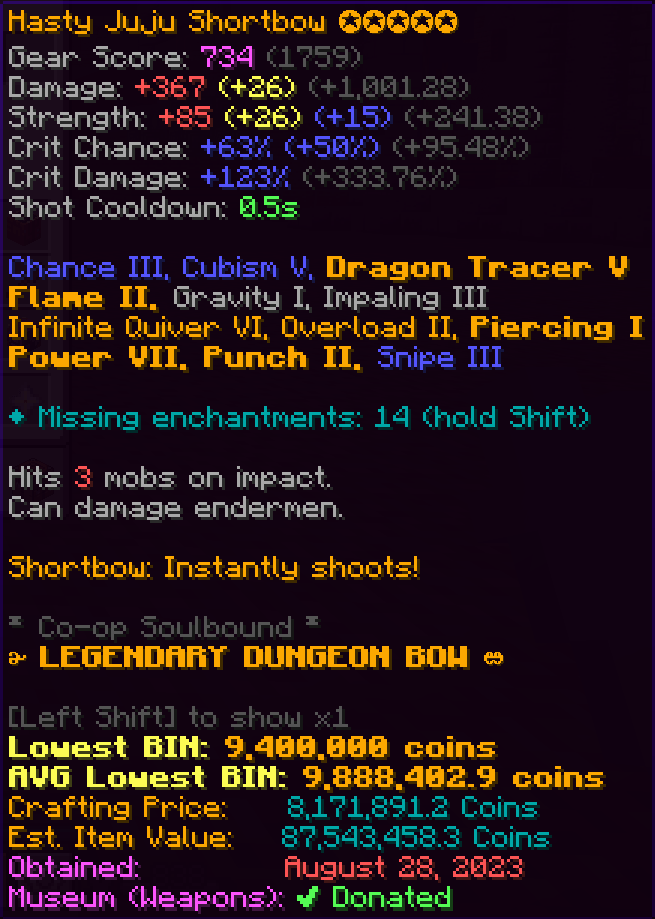 Missing Enchants Displays a list of missing enchants for the item in the tooltip.
 -
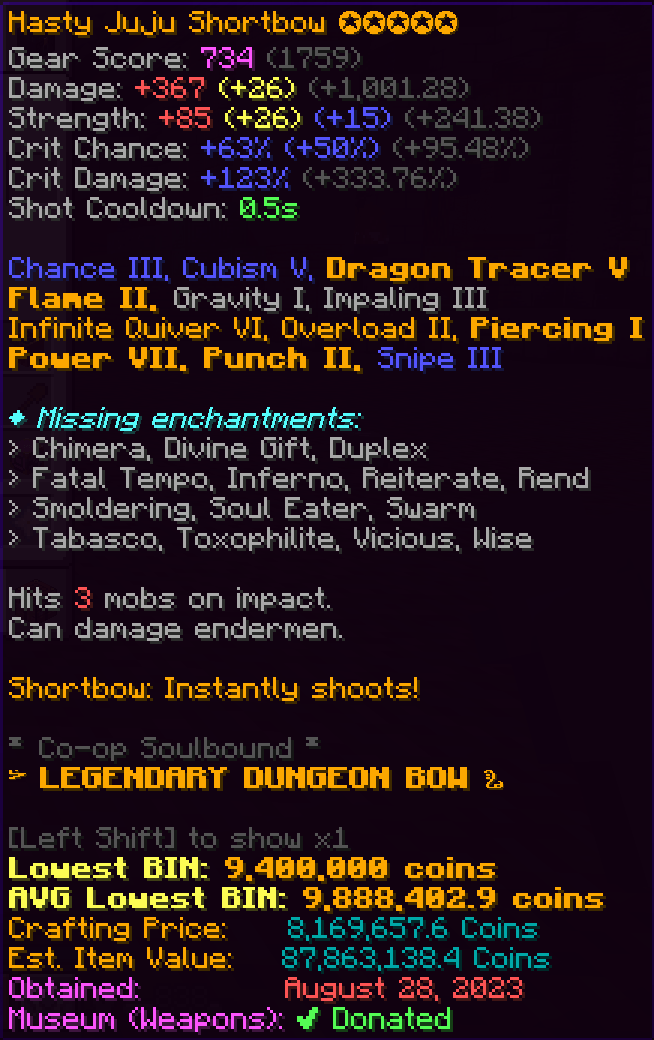 Missing Enchants Displays a list of missing enchants for the item in the tooltip.
 -
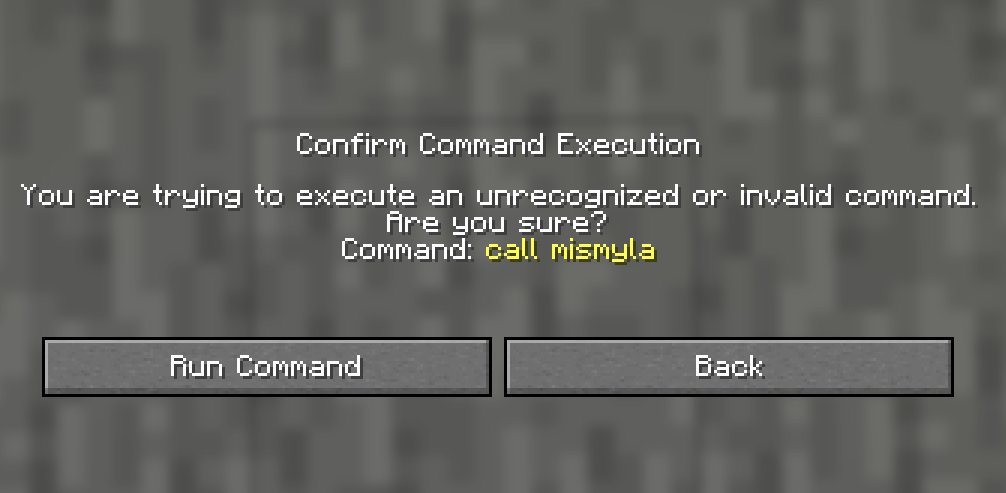 Remove Command Confirmation Remove command execution confirmation
 -
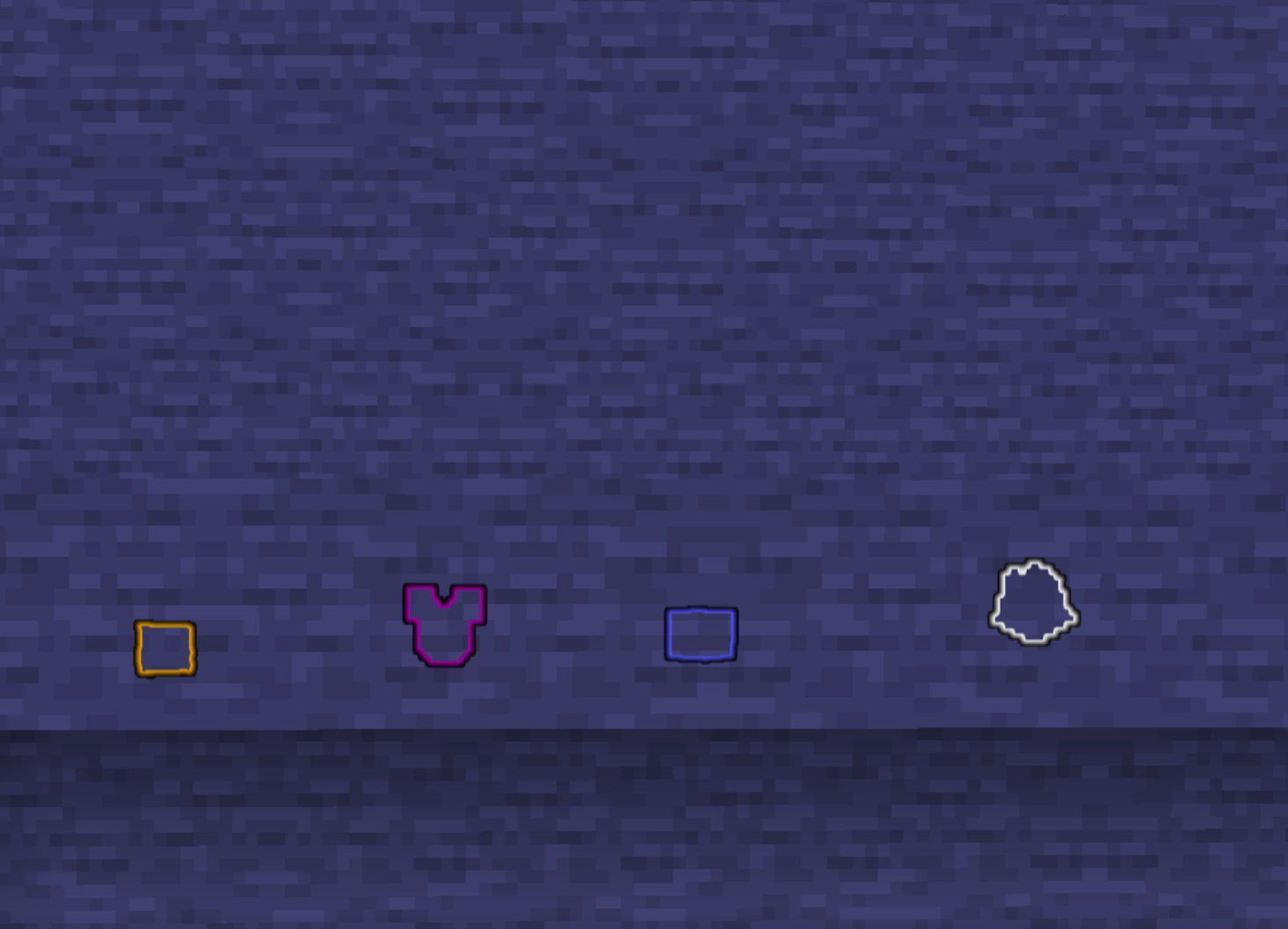 Glowing Outline Through Walls See a glowing outline on dropped items through a wall matching their rarity.
 -
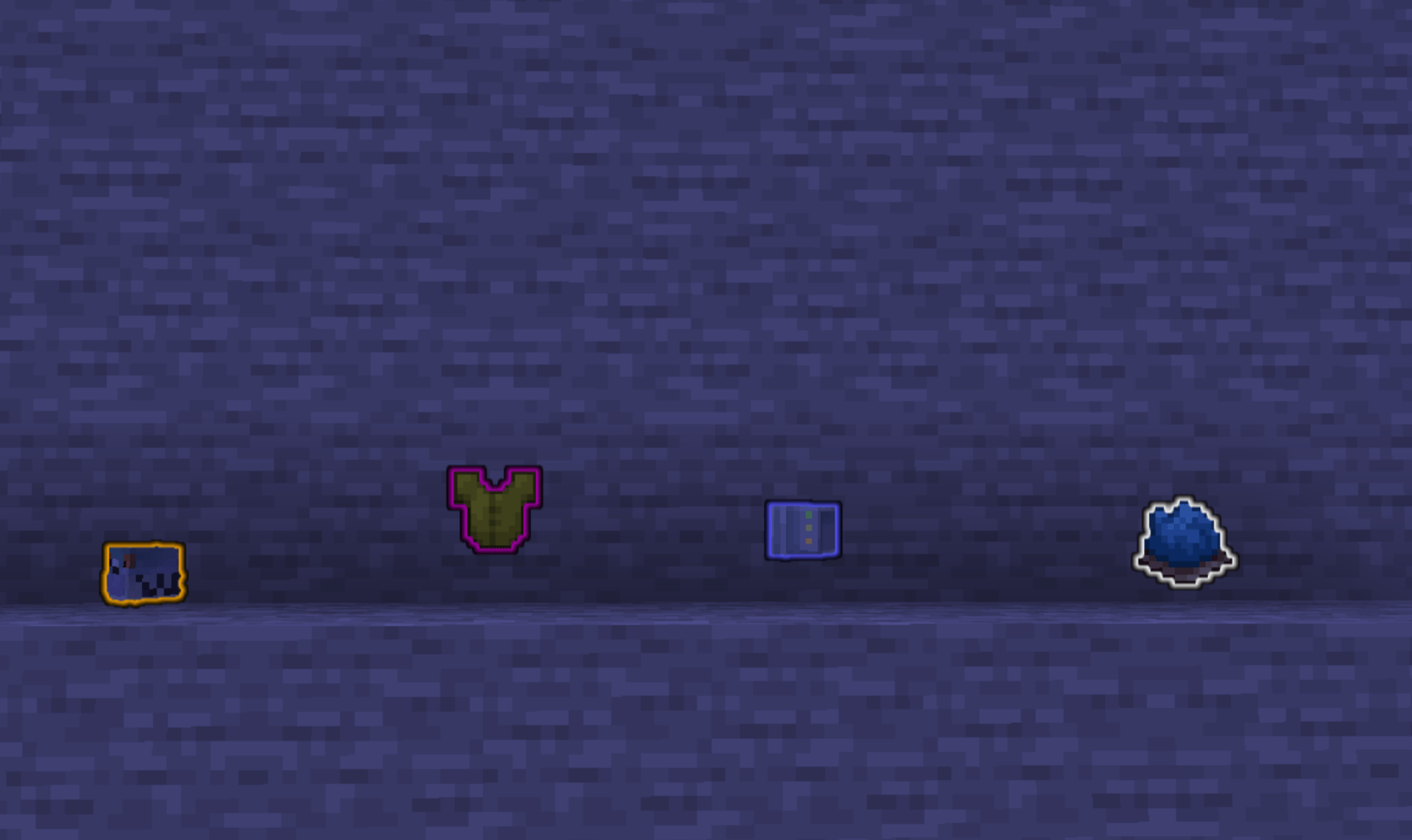 Glowing Outline See a glowing outline on dropped items matching their rarity
-
 Missing Enchants Displays a list of missing enchants for the item in the tooltip.
 -
 Missing Enchants Displays a list of missing enchants for the item in the tooltip.
 -
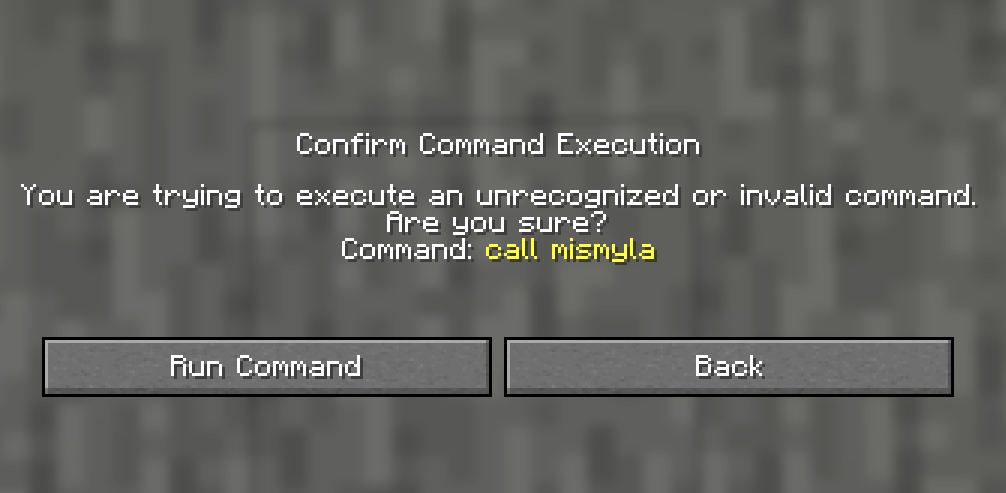 Remove Command Confirmation Removed the command execution confirmation.
 -
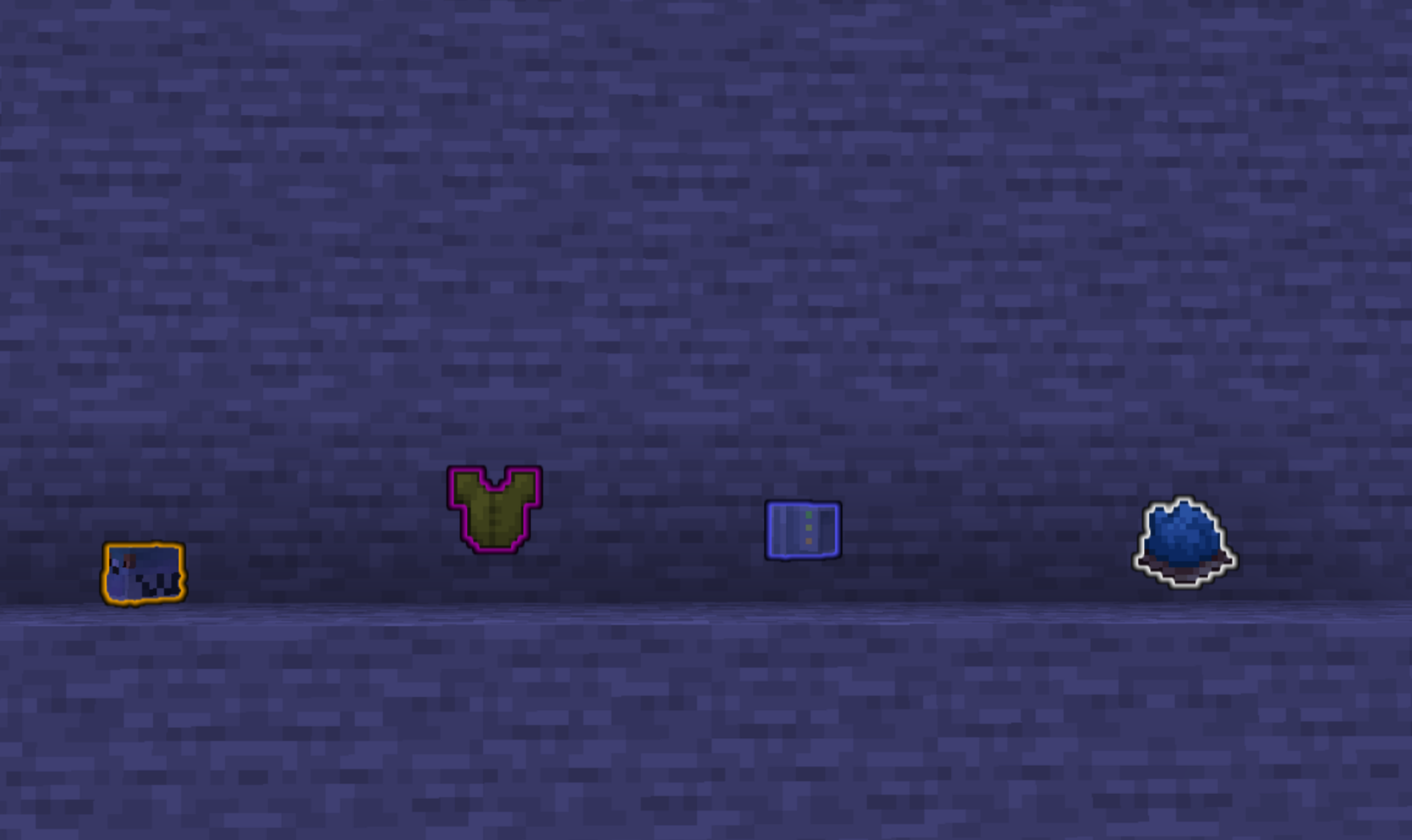 Glowing Outline See a glowing outline on dropped items matching their rarity
 -
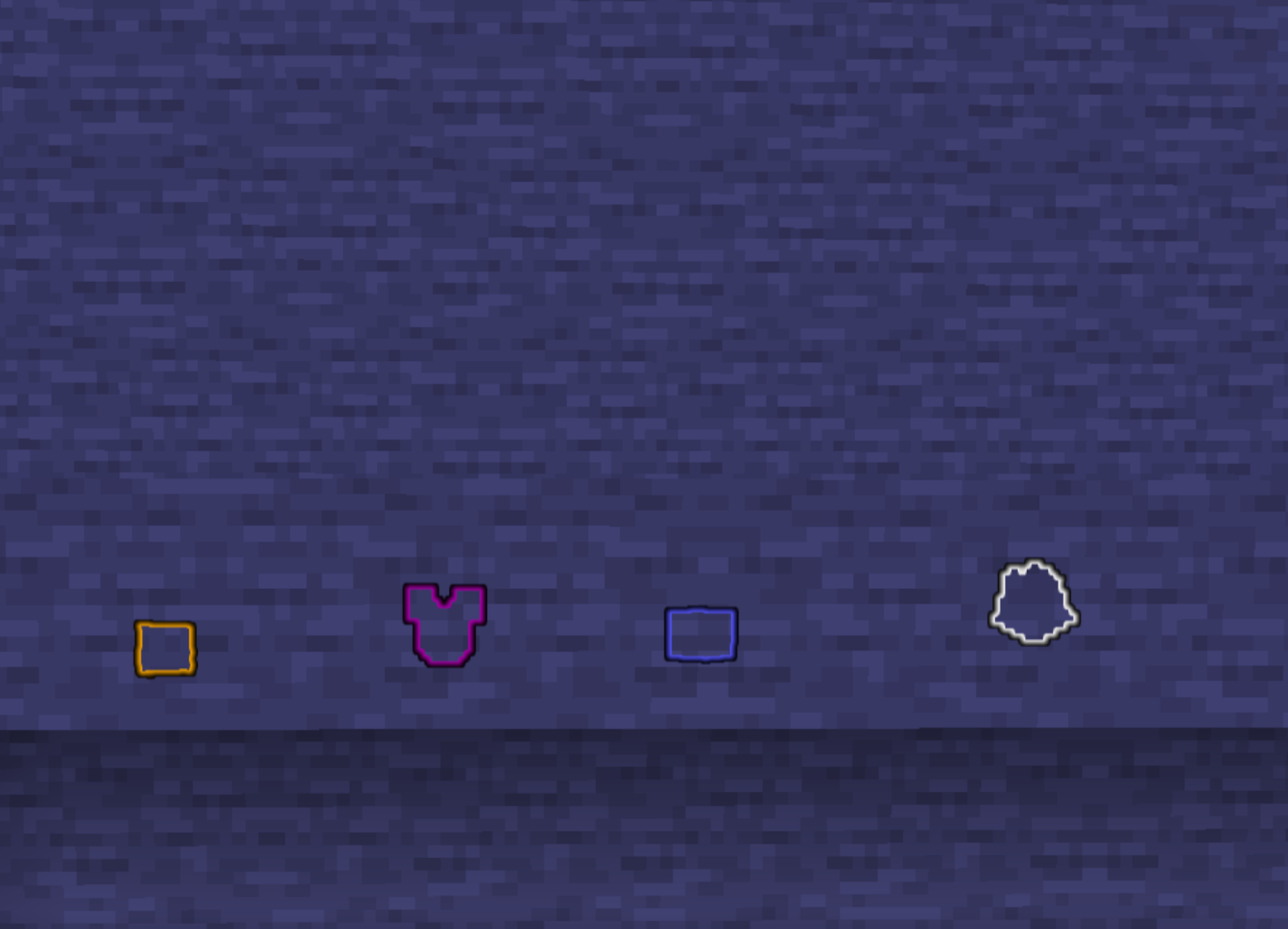 Glowing Outline Through Walls See a glowing outline on dropped items through a wall matching their rarity.
Versions
Files
Relations
Project Relations
More like this
Similar Mods
Suggestions use data such as tags, dependencies, dependents, descriptions, titles, and more to rank how much they overlap with this mod.
On ModDex
Community snapshot
By the numbers
Statistics
Want to reach Minecraft players?
We're looking for a server hosting partner to feature here and other parts of the site. Interested? Send us a message!
Get in touchGet it on
Available Platforms
On ModDex
Community snapshot
By the numbers