Community listing page, reviews may not be monitored by the author.
Slot Highlight for CI Embossed Legacy

No reviews yet
Custom slot highlight for Cobblemon Interface Embossed Legacy (Or any other RP).

Community voices
Reviews
No reviews yet. Be the first to review this project!
Get it on
Available Platforms
 CurseForge
Modrinth
CurseForge
Modrinth
About
Project Details
For authors
Embed Badge
If you're the author of this project, you can embed a live badge anywhere that supports HTML or Markdown. It updates automatically whenever ratings change.
Use HTML for any page that supports it, or Markdown for README files and Markdown-based descriptions.
Identifiers
Platform IDs
Resources
External Links
About
Description
Slot Highlight for CI Embossed Legacy
The ultimate interface polish for your Cobblemon adventure.
Slot Highlight for CI Embossed Legacy is a 100% client-side mod specifically designed to complement the aesthetics of Cobblemon Interface Embossed Legacy (CIEL). This mod replaces the standard gray inventory selection box with a highlight tailored to the "cut-corner" style of the CIEL resource pack interfaces, customized with various color options.
🚀 Key Features:
- Real-time Customization: Change the highlight color (Amber Yellow, Deep Blue, Crimson Red, Obsidian Black, or Default) instantly from the config menu—no game restart or texture reload required.
- Solution for Version 1.21.1: In this Minecraft version, slot highlights are hardcoded and cannot be modified through conventional resource packs. This mod bypasses that limitation to allow for a fully cohesive UI.
- Full Optimization: The change is achieved by efficiently replacing the game's original rendering. It is designed to be lightweight, ensuring no impact on performance (FPS) or extra GPU load.
🎨 How to Configure:
If you have Mod Menu installed, simply find the mod in your list and click the Configuration button.
- 🟡 Amber Yellow: Sets a radiant yellow highlight for your slots.
- 🔵 Deep Blue: Sets a cool blue highlight for your slots.
- 🔴 Crimson Red: Sets a vibrant red highlight for your slots.
- ⚫ Obsidian Black: Sets a deep black highlight for your slots.
- ⚪ Default (Gray): The classic look for Cobblemon Interface Embossed Legacy.
🛠️ Dependencies:
To ensure it works correctly, make sure you have:
- Fabric API (Required)
- Mod Menu (Optional, but recommended for easy color switching)
🤝 Support:
Do you like my work? Support me on Buy Me a Coffee
Slot Highlight for CI Embossed Legacy
The ultimate interface polish for your Cobblemon adventure.
Slot Highlight for CI Embossed Legacy is a 100% client-side mod specifically designed to complement the aesthetics of Cobblemon Interface Embossed Legacy (CIEL). This mod replaces the standard gray inventory selection box with a highlight tailored to the "cut-corner" style of the CIEL resource pack interfaces, customized with various color options.
🚀 Key Features:
- Real-time Customization: Change the highlight color (Amber Yellow, Deep Blue, Crimson Red, Obsidian Black, or Default) instantly from the config menu—no game restart or texture reload required.
- Solution for Version 1.21.1: In this Minecraft version, slot highlights are hardcoded and cannot be modified through conventional resource packs. This mod bypasses that limitation to allow for a fully cohesive UI.
- Full Optimization: The change is achieved by efficiently replacing the game's original rendering. It is designed to be lightweight, ensuring no impact on performance (FPS) or extra GPU load.
🎨 How to Configure:
If you have Mod Menu installed, simply find the mod in your list and click the Configuration button.
You can choose from these colors:
- 🟡 Amber Yellow: Sets a radiant yellow highlight for your slots.
- 🔵 Deep Blue: Sets a cool blue highlight for your slots.
- 🔴 Crimson Red: Sets a vibrant red highlight for your slots.
- ⚫ Obsidian Black: Sets a deep black highlight for your slots.
- ⚪ Default (Gray): The classic look for Cobblemon Interface Embossed Legacy.

🛠️ Dependencies:
To ensure it works correctly, make sure you have:
- Fabric API (Required)
- Mod Menu (Optional, but recommended for easy color switching)
🤝 Support:
Do you like my work? Support me on Buy Me a Coffee
Descripción en Español
Mostrar
Slot Highlight for CI Embossed Legacy
The ultimate interface polish for your Cobblemon adventure.
Slot Highlight for CI Embossed Legacy es un mod 100% orientado al cliente diseñado específicamente para complementar la estética de Cobblemon Interface Embossed Legacy (CIEL). Este mod reemplaza el cuadro gris de selección del inventario por un resaltado adaptado al estilo de esquinas cortadas de las interfaces del paquete de recursos CIEL, personalizado con diferentes colores.
🚀 Características principales:
- Personalización en tiempo real: Cambia el color del resaltado (Amarillo, Azul, Rojo, Negro o Default) al instante desde el menú de configuración, sin necesidad de reiniciar el juego o recargar texturas.
- Solución para la versión 1.21.1: En esta versión de Minecraft, el resaltado de los slots está bloqueado por código y no puede modificarse con paquetes de recursos convencionales. Este mod desbloquea esa limitación para permitir una interfaz totalmente cohesiva.
- Optimización total: El cambio se realiza reemplazando la renderización original del juego de forma eficiente. Está diseñado para ser ligero, por lo que no afecta el rendimiento (FPS) ni añade carga adicional al procesador gráfico.
🎨 Cómo configurar:
Si tienes instalado Mod Menu, simplemente busca el mod en tu lista y haz clic en el botón de Configuración.
Podrás elegir entre estos colores:
- 🟡Amarillo Ámbar: Aplica un resaltado amarillo radiante a los slots.
- 🔵Azul Profundo: Aplica un resaltado azul frío a los slots.
- 🔴Rojo Carmesí: Aplica un resaltado rojo vibrante a los slots.
- ⚫Negro Obsidiana: Aplica un resaltado negro profundo a los slots.
- ⚪Por defecto (Gris): El estilo clásico para Cobblemon Interface Embossed Legacy.
🛠️ Dependencias:
Para que funcione, asegúrate de tener:
- Fabric API (Requerido)
- Mod Menu (Opcional, pero recomendado para cambiar los colores fácilmente)
🤝 Apoyo:
¿Te gusta mi trabajo? Apóyame en Buy Me a Coffee
Screenshots
Gallery
-
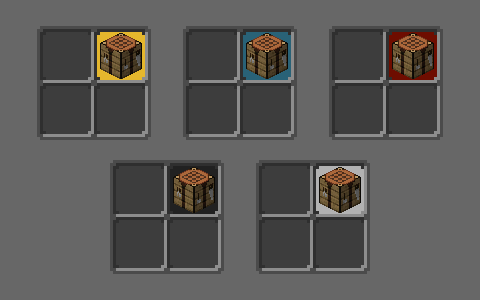 In-game color preview / Visualización de colores in-game In-game color preview / Visualización de colores in-game
-
 In-game color preview / Visualización de colores in-game
Versions
Files
Relations
Project Relations
More like this
Similar Mods
Suggestions use data such as tags, dependencies, dependents, descriptions, titles, and more to rank how much they overlap with this mod.
On ModDex
Community snapshot
By the numbers
Statistics

Get it on
Available Platforms
CurseForge
Modrinth
On ModDex
Community snapshot
By the numbers
Statistics
Resources