
Community listing page, reviews here may not be monitored by the author.
Smart Optimization


No reviews yet
This mod lowering or enlarge graphic settings based on your FPS
Community voices
Reviews
No reviews yet. Be the first to review this project!
Get it on
Available Platforms
Compatibility
Supported Environments
Runs entirely on the client. Works on vanilla servers.
About
Project Details
For authors
Embed Badge
If you're the author of this project, you can embed a live badge anywhere that supports HTML or Markdown. It updates automatically whenever ratings change.
Use HTML for any page that supports it, or Markdown for README files and Markdown-based descriptions.
Identifiers
Platform IDs
Resources
External Links
About
Description
Smart Optimization
Smart Optimization is an adaptive performance optimization mod for Minecraft that automatically adjusts your graphics settings based on your current FPS.
The mod continuously monitors performance and dynamically applies or restores graphical settings depending on whether your game is running below or above your configured FPS thresholds.
This allows you to keep high-quality visuals most of the time while still ensuring smooth gameplay during heavy performance drops.
⚠️ This mod is still in active development. Features may change, and new optimization options will be added over time.
Important stuff
The update time is the time it takes to change the settings again. If you're not sure what value is the best for your device, then this section would be helpful.
If you have a low-end PC or laptop and always want to play with a lot of FPS, I recommend setting the update time to a lower value like 30 (seconds)
If you want stable FPS, even if you have a good PC or laptop, I will recommend setting the update time to a higher value like 300 (seconds / 5 minutes).
**You can edit the update time in the chat with this command:
/smartopt updatetime <seconds>**
Note: The lowest value you can enter is 20 (seconds). The highest value you can enter is 600 (seconds / 10 minutes)
How it works
Smart Optimization tracks your average FPS over time.
- If FPS drops below the low threshold, the mod gradually reduces performance-heavy settings.
- If FPS rises above the high threshold, the mod restores your original settings step by step.
Before making any changes, Smart Optimization saves your original configuration so everything can be restored exactly as it was.
Optimizations are applied gradually in a controlled order to avoid sudden visual changes.
Optimizations include
Depending on configuration, Smart Optimization can adjust the following:
- Entity render distance
- Entity shadows
- Particle effects
- Cloud rendering
- Simulation distance
- Render distance
Each category can be individually enabled or disabled.
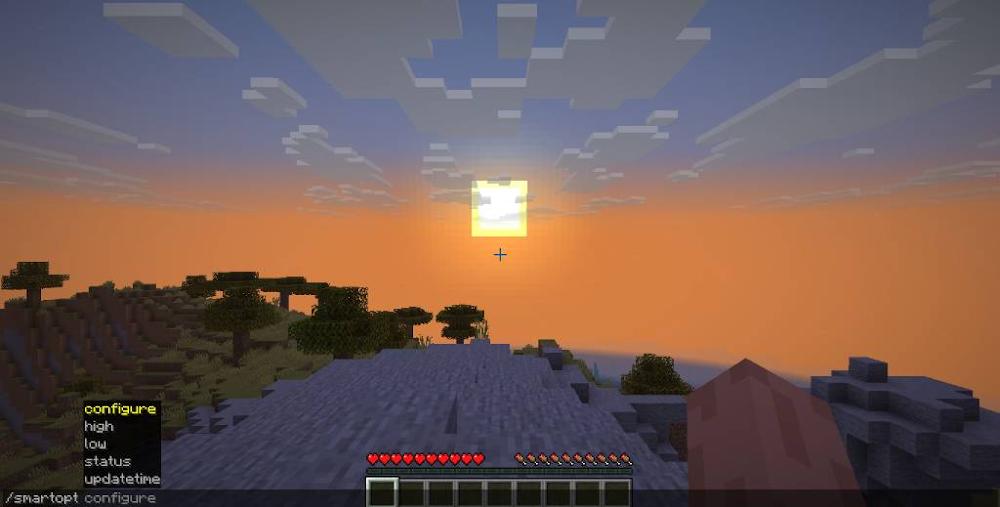
Commands
FPS control
Set the FPS threshold for when optimization starts:
/smartopt low <fps>
Set the FPS threshold for when settings are restored:
/smartopt high <fps>
Set how often FPS is checked:
/smartopt updatetime <seconds>
Configuration system
Enable or disable specific optimizations:
/smartopt configure <setting> <true/false>
Available settings:
- entitydistance
- entityshadows
- particles
- clouds
- simulationdistance
- renderdistance
Example:
/smartopt configure particles false
This prevents Smart Optimization from modifying particle settings.
Status
View all current settings:
/smartopt status
This includes:
- FPS thresholds
- Update interval
- Enabled optimization options
Features
- Adaptive FPS monitoring
- Gradual performance optimization
- Automatic restoration of original settings
- Fully configurable optimization system
- Lightweight client-side design
- No permanent visual changes
Who is this mod for?
Smart Optimization is designed for players who:
- experience FPS drops in specific situations
- want better performance without permanently lowering graphics settings
- play on low-end or mid-range PCs
- use modpacks or heavy worlds
- prefer automatic optimization instead of manual tweaking
Development status
This mod is currently in active development.
More features, optimization options, and configuration controls will be added in future updates.
Smart Optimization
Smart Optimization is an adaptive performance optimization mod for Minecraft that automatically adjusts your graphics settings based on your current FPS.
The mod continuously monitors performance and dynamically applies or restores graphical settings depending on whether your game is running below or above your configured FPS thresholds.
This allows you to keep high-quality visuals most of the time while still ensuring smooth gameplay during heavy performance drops.
⚠️ This mod is still in active development. Features may change, and new optimization options will be added over time.
Important stuff
The update time is the time it takes to change the settings again. If you're not sure what value is the best for your device, then this section would be helpful.
If you have a low-end PC or laptop and always want to play with a lot of FPS, I recommend setting the update time to a lower value like 30 (seconds)
If you want stable FPS, even if you have a good PC or laptop, I will recommend setting the update time to a higher value like 300 (seconds / 5 minutes).
**You can edit the update time in the chat with this command:
/smartopt updatetime **
Note: The lowest value you can enter is 20 (seconds). The highest value you can enter is 600 (seconds / 10 minutes)
How it works
Smart Optimization tracks your average FPS over time.
- If FPS drops below the low threshold, the mod gradually reduces performance-heavy settings.
- If FPS rises above the high threshold, the mod restores your original settings step by step.
Before making any changes, Smart Optimization saves your original configuration so everything can be restored exactly as it was.
Optimizations are applied gradually in a controlled order to avoid sudden visual changes.
Optimizations include
Depending on configuration, Smart Optimization can adjust the following:
- Entity render distance
- Entity shadows
- Particle effects
- Cloud rendering
- Simulation distance
- Render distance
Each category can be individually enabled or disabled.
Commands
FPS control
Set the FPS threshold for when optimization starts:
/smartopt low <fps>
Set the FPS threshold for when settings are restored:
/smartopt high <fps>
Set how often FPS is checked:
/smartopt updatetime <seconds>
Configuration system
Enable or disable specific optimizations:
/smartopt configure <setting> <true/false>
Available settings:
- entitydistance
- entityshadows
- particles
- clouds
- simulationdistance
- renderdistance
Example:
/smartopt configure particles false
This prevents Smart Optimization from modifying particle settings.
Status
View all current settings:
/smartopt status
This includes:
- FPS thresholds
- Update interval
- Enabled optimization options
Features
- Adaptive FPS monitoring
- Gradual performance optimization
- Automatic restoration of original settings
- Fully configurable optimization system
- Lightweight client-side design
- No permanent visual changes
Who is this mod for?
Smart Optimization is designed for players who:
- experience FPS drops in specific situations
- want better performance without permanently lowering graphics settings
- play on low-end or mid-range PCs
- use modpacks or heavy worlds
- prefer automatic optimization instead of manual tweaking
Development status
This mod is currently in active development.
More features, optimization options, and configuration controls will be added in future updates.
Screenshots
Gallery
-
 Commands
 -
 Sunset
Versions
Files
Relations
Project Relations
More like this
Similar Mods
Suggestions use data such as tags, dependencies, dependents, descriptions, titles, and more to rank how much they overlap with this mod.
On ModDex
Community snapshot
By the numbers
Statistics
Want to reach Minecraft players?
We're looking for a server hosting partner to feature here and other parts of the site. Interested? Send us a message!
Get in touchGet it on
Available Platforms
On ModDex
Community snapshot
By the numbers
Statistics
Resources