Community listing page, reviews may not be monitored by the author.
Sols Simply Tooptips Fix

No reviews yet
Disables Simply Tooltips entirely, restoring plain vanilla item tooltips for every item.

Community voices
Reviews
No reviews yet. Be the first to review this project!
Get it on
Available Platforms
About
Project Details
For authors
Embed Badge
If you're the author of this project, you can embed a live badge anywhere that supports HTML or Markdown. It updates automatically whenever ratings change.
Use HTML for any page that supports it, or Markdown for README files and Markdown-based descriptions.
Identifiers
Platform IDs
Resources
External Links
About
Description
Sol's SimplyTooltips Compat
Disables Simply Tooltips' custom tooltip rendering completely. Every item — Simply Swords gear included — falls back to the plain vanilla tooltip. Also restores the one piece of information that had nowhere else to go once Simply Tooltips stops rendering: Simply Swords' Unique-weapon Awakening level.
Why this exists
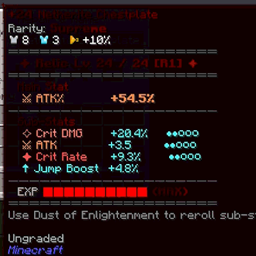
Simply Tooltips replaces the vanilla tooltip box with its own themed panel for a wide range of items. That's convenient on its own, but it conflicts with other tooltip-styling mods (rarity systems, relic systems, custom tooltip overlays) that expect to draw onto — or fully control — the vanilla tooltip pipeline instead. Rather than patch each conflict individually, this addon turns Simply Tooltips off outright, so whatever else is styling your tooltips (rarity colors, relic stat blocks, etc.) is guaranteed to show correctly.
Simply Tooltips does ship its own global on/off setting (enableTooltipRendering in its config file), which does the same thing — this addon just makes that outcome travel with your modpack automatically, without anyone needing to find and edit that config by hand.
One casualty of turning Simply Tooltips off entirely: Simply Swords' Unique weapons (Dormant Relic, Caelestis, and the rest) have an internal 0–8 Awakening level that governs their stat growth and ability unlocks — normally shown only via Simply Tooltips' own custom icon/ring display, with no plain-tooltip equivalent anywhere in Simply Swords itself. Disabling Simply Tooltips used to make that number invisible. This addon puts it back, in two places.
Features
- Turns off Simply Tooltips' custom rendering for every item, unconditionally
- No config, no per-item exceptions — a straightforward on/off
- Restores Simply Swords' Awakening level as an aqua, italicized line at the top of the item's (now plain vanilla) tooltip
- Also shows it as an always-visible gauge bar along the left edge of the item's icon in your inventory/hotbar (fills bottom-to-top as the weapon awakens further) plus the bare level number in the corner — no need to even hover
- Client-side only; safe to install on a server, where it simply does nothing
Requirements
- Minecraft 1.20.1
- Minecraft Forge 47+
- Simply Tooltips (required dependency)
- Simply Swords (required dependency — the Awakening-level display reads its data directly)
Notes
This is an unofficial third-party addon, not affiliated with the authors of Simply Tooltips or Simply Swords. If you'd rather keep Simply Tooltips for some items, you don't need this addon at all — just leave enableTooltipRendering = true and use Simply Tooltips' own per-item/per-namespace settings instead.
Screenshots
Gallery
Versions
Files
Relations
Project Relations
More like this
Similar Mods
Suggestions use data such as tags, dependencies, dependents, descriptions, titles, and more to rank how much they overlap with this mod.
On ModDex
Community snapshot
By the numbers
Statistics

Get it on
Available Platforms
On ModDex
Community snapshot
By the numbers
Statistics
Resources