
Community listing page, reviews here may not be monitored by the author.
Sound Webhook Alert

No reviews yet
Client-side Fabric mod that sends Discord webhook alerts when selected Minecraft sounds are heard
Community voices
Reviews
No reviews yet. Be the first to review this project!
Get it on
Available Platforms
About
Project Details
For authors
Embed Badge
If you're the author of this project, you can embed a live badge anywhere that supports HTML or Markdown. It updates automatically whenever ratings change.
Use HTML for any page that supports it, or Markdown for README files and Markdown-based descriptions.
Identifiers
Platform IDs
Resources
External Links
About
Description
-
Sound Webhook Alert is a client-side Fabric utility for Minecraft Java Edition 1.21.11.
It lets you listen for Minecraft sounds on your own client and send a Discord webhook message when a matching sound is heard. The server does not need to install the mod.
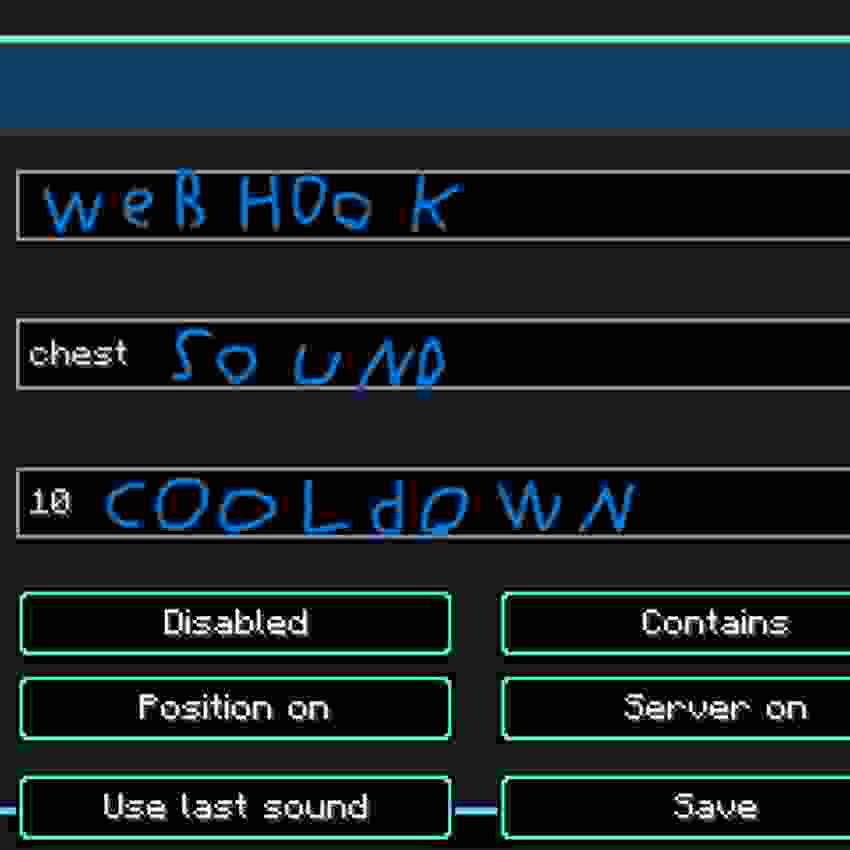
Open the in-game menu with V, paste your Discord webhook URL, choose a sound filter, enable the listener, and save.
Features
- Client-side sound listener
- Discord webhook alerts
- In-game configuration menu
- V keybind
- Broad sound matching with Contains
- Exact sound matching with Exact match
- Last-heard-sound helper
- Cooldown setting to reduce spam
- Optional player position in alerts
- Optional server address in alerts
- English, Lithuanian, and Russian UI translations
Settings
Discord Webhook URL
The Discord webhook URL where alerts are sent.
The webhook URL is saved locally in:
.minecraft/config/sound_webhook_alert.jsonKeep this URL private.
Sound Filter
The sound filter decides which Minecraft sounds trigger an alert.
Examples:
step
break
chest
minecraft:block.chest.open
minecraft:block.stone.break
minecraft:entity.zombie.hurt
Match Mode
Contains triggers when the sound ID contains your filter.
Example:
stepcan match:
minecraft:block.stone.step minecraft:block.grass.stepExact match triggers only when the full sound ID is exactly the same as your filter.
Cooldown
Cooldown controls the minimum time between Discord messages.
Recommended values:
10 seconds for testing
30-60 seconds for normal use
Include Position
When enabled, alerts include your current block position.
Include Server
When enabled, alerts include the server address shown to your client.
Use Last Sound
The menu shows the last useful sound heard by your client.
Press Use last sound to copy it into the sound filter box. UI sounds such as button clicks are ignored.
Popular Sound Filters
Event Filter Player footsteps step Block breaking break Chest opening minecraft:block.chest.open Chest closing minecraft:block.chest.close Doors door Buttons button Levers lever Explosions explode Bows bow Eating eat Drinking drink Villagers villager Zombies zombie Creepers creeper How To Use
- Install Fabric Loader for Minecraft 1.21.11.
- Install Fabric api DO NOT FORGET FABRIC API
- Put the mod jar in your mods folder.
- Start Minecraft.
- Join a world or server.
- Press V.
- Paste your Discord webhook URL.
- Enter a sound filter.
- Enable the listener.
- Press Save.
Safety And Server Rules
Use this mod only on servers where client-side alert mods are allowed.
This mod does not add server-side features. It only listens to sounds that your Minecraft client receives.
Screenshots
Gallery
Versions
Files
Relations
Project Relations
More like this
Similar Mods
Suggestions use data such as tags, dependencies, dependents, descriptions, titles, and more to rank how much they overlap with this mod.
On ModDex
Community snapshot
By the numbers
Statistics
Want to reach Minecraft players?
We're looking for a server hosting partner to feature here and other parts of the site. Interested? Send us a message!
Get in touchGet it on
Available Platforms
On ModDex
Community snapshot
By the numbers
Statistics
Resources