
Community listing page, reviews here may not be monitored by the author.
SoundMuffler++


No reviews yet
Making your world quiet again
Community voices
Reviews
No reviews yet. Be the first to review this project!
Get it on
Available Platforms
Compatibility
Supported Environments
Must be installed on both the client and the server.
About
Project Details
For authors
Embed Badge
If you're the author of this project, you can embed a live badge anywhere that supports HTML or Markdown. It updates automatically whenever ratings change.
Use HTML for any page that supports it, or Markdown for README files and Markdown-based descriptions.
Identifiers
Platform IDs
About
Description
Bak-bak-bak
Baaaaaa
Mooooooo!
*huff*
Hrmmm
Heard all these before? Sick and tired of your cow farm making a racket? Wishing your nether portal would be just a bit quieter? Well, then this mod is for you! This mod brings a simple block to the game that will muffle any nearby sounds, or mute them altogether, based on its configuration.
But wait, you scream at me. Didn't another popular mod already do this!?
Well, yes, but to put things into perspective, where that mod provides Kleenex, this mod cures the common cold and removes your nose! How do I accomplish such a miraculous feat? By providing an incredible level of customization and portability.
You see, once the block is placed in the world, it doesn't immediately do anything. Right-clicking on the block will open a GUI that allows one to specify what sounds to act on, and what percentage to modify the volume by. All sound rules are also available in a list that can be scrolled through, selected by clicking, and removed by clicking the X button.
As you can see in the image, wildcards are also supported. The rule in the image would reduce all mob "say" sounds by 50%.
The two input fields at the top can be toggled via the TAB key, and once both are filled, the rule can be added by pressing ENTER.
Now, there are a lot of sounds, and with mods, even more, and the names can sometimes be quite cryptic. That's why I've also added the ability to search for a specific sound. Clicking on the magnifying glass button will open a search GUI.
This GUI allows for the searching of sounds by splitting the sound by category. For example, "mob.cow.say" would be under mob, then cow, then say as the endpoint. One can jump to a category by double-clicking, or use it as a wild-card by clicking the checkbox button. Any endpoint sounds (an actual sound, not a category) will display as red and underlined.
Now, all this is fantastic, but there's one problem. A block in the world is useful, but it's hardly portable, and there are some sound rules you simply want to keep with you at all times. That's why this mod also adds magical earplugs! By holding them in your hand and shift-right-clicking, you open the configuration GUI, and can configure it in the same way. Then equip them in your helmet armor slot to apply the effect.

Bak-bak-bak
Baaaaaa
Mooooooo!
*huff*
Hrmmm
Heard all these before? Sick and tired of your cow farm making a racket? Wishing your nether portal would be just a bit quieter? Well, then this mod is for you! This mod brings a simple block to the game that will muffle any nearby sounds, or mute them altogether, based on its configuration.
But wait, you scream at me. Didn't another popular mod already do this!?
Well, yes, but to put things into perspective, where that mod provides Kleenex, this mod cures the common cold and removes your nose! How do I accomplish such a miraculous feat? By providing an incredible level of customization and portability.
You see, once the block is placed in the world, it doesn't immediately do anything. Right-clicking on the block will open a GUI that allows one to specify what sounds to act on, and what percentage to modify the volume by. All sound rules are also available in a list that can be scrolled through, selected by clicking, and removed by clicking the X button.
As you can see in the image, wildcards are also supported. The rule in the image would reduce all mob "say" sounds by 50%.
The two input fields at the top can be toggled via the TAB key, and once both are filled, the rule can be added by pressing ENTER.
Now, there are a lot of sounds, and with mods, even more, and the names can sometimes be quite cryptic. That's why I've also added the ability to search for a specific sound. Clicking on the magnifying glass button will open a search GUI.
This GUI allows for the searching of sounds by splitting the sound by category. For example, "mob.cow.say" would be under mob, then cow, then say as the endpoint. One can jump to a category by double-clicking, or use it as a wild-card by clicking the checkbox button. Any endpoint sounds (an actual sound, not a category) will display as red and underlined.
Now, all this is fantastic, but there's one problem. A block in the world is useful, but it's hardly portable, and there are some sound rules you simply want to keep with you at all times. That's why this mod also adds magical earplugs! By holding them in your hand and shift-right-clicking, you open the configuration GUI, and can configure it in the same way. Then equip them in your helmet armor slot to apply the effect.
Archival disclosure
This mod is abandoned and has been uploaded for archival purposes. It was originally created Dec 2, 2014 by dmillerw. It has been uploaded to Modrinth under the ModrinthArchives account with permission from the original author.

Screenshots
Gallery
-
Banner image
-
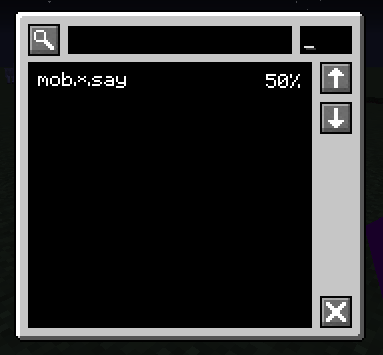 Wildcards supported
 -
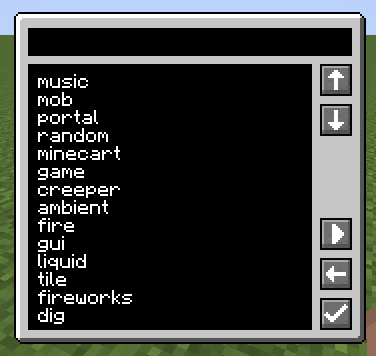 Search for sounds
 -
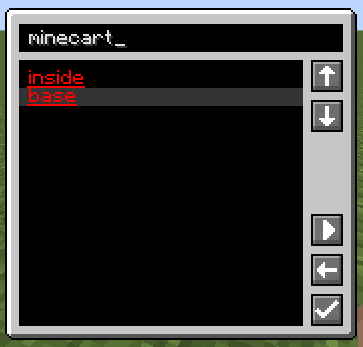 Endpoint sounds show as red
Versions
Files
Relations
Project Relations
More like this
Similar Mods
Suggestions use data such as tags, dependencies, dependents, descriptions, titles, and more to rank how much they overlap with this mod.
On ModDex
Community snapshot
By the numbers
Statistics
Want to reach Minecraft players?
We're looking for a server hosting partner to feature here and other parts of the site. Interested? Send us a message!
Get in touchGet it on
Available Platforms
On ModDex
Community snapshot
By the numbers