
Community listing page, reviews may not be monitored by the author.
SoundRecording


No reviews yet
Record the sound around you and play it :D.

Community voices
Reviews
No reviews yet. Be the first to review this project!
Get it on
Available Platforms
Compatibility
Supported Environments
Must be installed on both the client and the server.
About
Project Details
For authors
Embed Badge
If you're the author of this project, you can embed a live badge anywhere that supports HTML or Markdown. It updates automatically whenever ratings change.
Use HTML for any page that supports it, or Markdown for README files and Markdown-based descriptions.
Identifiers
Platform IDs
Resources
External Links
About
Description
MP4player GUI:
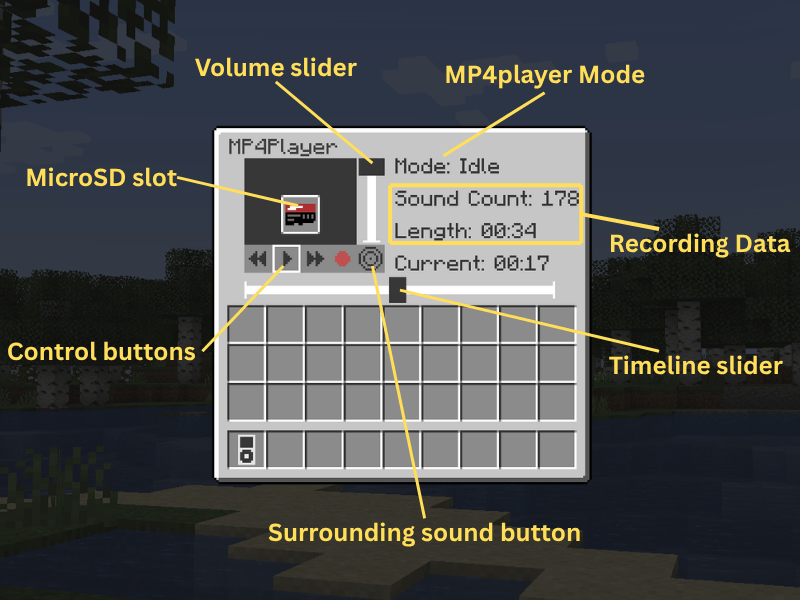
- Spacebar to pasue.
- Left/Right arrow to move the timeline slider.
How to Record:
1. Shift and right-click the MP4player to open the GUI. (You can also right-click to play/pause the recording.)
2. Insert the microSD into it.
3. Click the red button to start recording. (The old recording data in microSD will be removed.)
4. Now the sounds you heard should be recorded. (It is not allowed to take away the microSD from the MP4player while recording.)
5. Open the GUI again and click the square button to save the recording to the microSD.
How to play your recording from speaker:
1. Right-click the speaker with the microSD to insert.
2. The recording should loop automatically.
3. Give a redstone signal to the speaker to pause the loop.
4. Right-click the speaker with your hand to get back the microSD.
This mod is still under development.
More playable features are coming soon.
If you find any bugs, please tell me.
This is my first mod. Hope you enjoy it!
MP4player GUI:
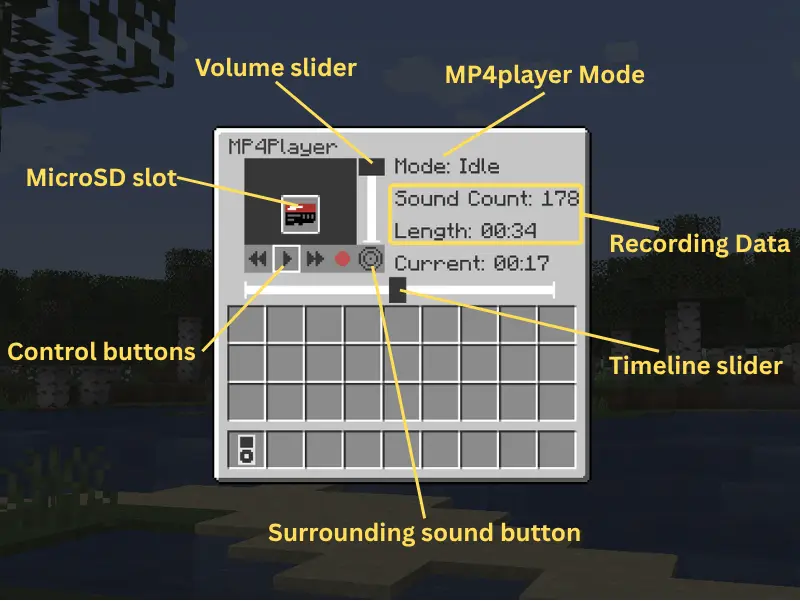
- Spacebar to pasue.
- Left/Right arrow to move the timeline slider.
How to Record:
-
Shift and right-click the MP4player to open the GUI. (You can also right-click to play/pause the recording.)
-
Insert the microSD into it.
-
Click the red button to start recording. (The old recording data in microSD will be removed.)
-
Now the sounds you heard should be recorded. (It is not allowed to take away the microSD from the MP4player while recording.)
-
Open the GUI again and click the square button to save the recording to the microSD.
How to play your recording from speaker:
-
Right-click the speaker with the microSD to insert.
-
The recording should loop automatically.
-
Give a redstone signal to the speaker to pause the loop.
-
Right-click the speaker with your hand to get back the microSD.
This mod is still under development.
More playable features are coming soon.
If you find any bugs, please tell me.
This is my first mod. Hope you enjoy it!
Screenshots
Gallery
Versions
Files
Relations
Project Relations
More like this
Similar Mods
Suggestions use data such as tags, dependencies, dependents, descriptions, titles, and more to rank how much they overlap with this mod.
On ModDex
Community snapshot
By the numbers
Statistics

Get it on
Available Platforms
On ModDex
Community snapshot
By the numbers
Statistics
Resources