
Sound Reloader
No reviews yet
Sound Reloader automatically reloads your audio whenever you reconnect your output device.
Enhances game performance and optimizes resource usage.
Fabric is a mod loader for versions 1.14+ of Minecraft, particularly popular for client side and optimization mods.
Community voices
Reviews
Click once to include, again to exclude, again to clear
No reviews yet. Be the first to review this project!
Get it on
Available Platforms
 Modrinth
Compatibility
Supported Environments
Runs entirely on the client. Works on vanilla servers.
About
Project Details
For authors
Embed Badge
If you're the author of this project, you can embed a live badge anywhere that supports HTML or Markdown. It updates automatically whenever ratings change.
Use HTML for any page that supports it, or Markdown for README files and Markdown-based descriptions.
Identifiers
Platform IDs
Resources
External Links
About
Description
Sound Reloader
Ever accidentally unplugged your headphones and Minecraft just didn't reload the audio? Does that annoy the shit out of you because it should just do it by default? Well I've got just the mod for you!
Sound Reloader makes sure your audio comes back AUTOMATICALLY whenever you plug your speakers or headphones back in!
There's even a litte popup when it does it. (WOW!!) (you can even turn off the popup in the Music & Sound menu WOWWOW!!)
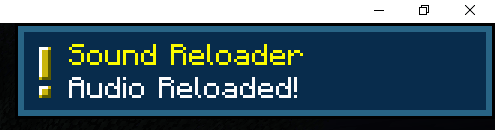
Note
There's a chance it wont detect when your audio device is reconnected. Replugging your device back in should fix it.
How it works
Sound Reloader uses two detection paths to notice when your audio output changes.
First, it checks OpenAL every second via the ALC_EXT_disconnect extension to see if the current device has disconnected and then reconnected.
Second, a background thread polls Java’s AudioSystem every 2 seconds for new output mixers (e.g., when you plug in headphones or a USB DAC).
When either path detects a change, it waits 3 seconds for the device to stabilize, then calls Minecraft’s SoundManager.reloadSounds() to reinitialize the sound engine.
Tested on 1.21.1 and 1.21.11. Requires Fabric API.
Screenshots
Gallery
-
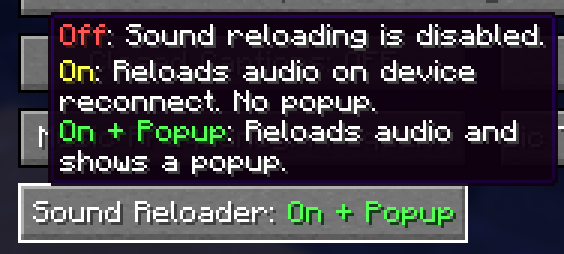 Options on the Music & Sound Menu
 -
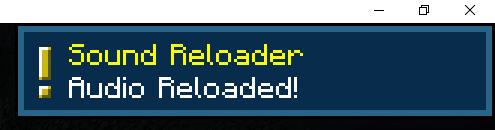 Audio Reloaded Popup
Versions
Files
Relations
Project Relations
More like this
Similar Mods
Suggestions use data such as tags, dependencies, dependents, descriptions, titles, and more to rank how much they overlap with this mod.
On ModDex
Community snapshot
By the numbers
Statistics

Want to reach Minecraft players?
We're looking for a server hosting partner to feature here and other parts of the site. Interested? Send us a message!
Get in touchGet it on
Available Platforms
On ModDex
Community snapshot
By the numbers
Statistics
Resources