
Community listing page, reviews here may not be monitored by the author.
SoundSelection Babric

No reviews yet
This mod adds custom sound loading capabilities to the game similar to texture packs. Special thanks to Spring Spring for the sound icon and to NFC team for the pack list GUI.
Community voices
Reviews
No reviews yet. Be the first to review this project!
Get it on
Available Platforms
Compatibility
Supported Environments
Runs entirely on the client. Works on vanilla servers.
About
Project Details
For authors
Embed Badge
If you're the author of this project, you can embed a live badge anywhere that supports HTML or Markdown. It updates automatically whenever ratings change.
Use HTML for any page that supports it, or Markdown for README files and Markdown-based descriptions.
Identifiers
Platform IDs
About
Description
SoundSelection for Minecraft Beta 1.7.3
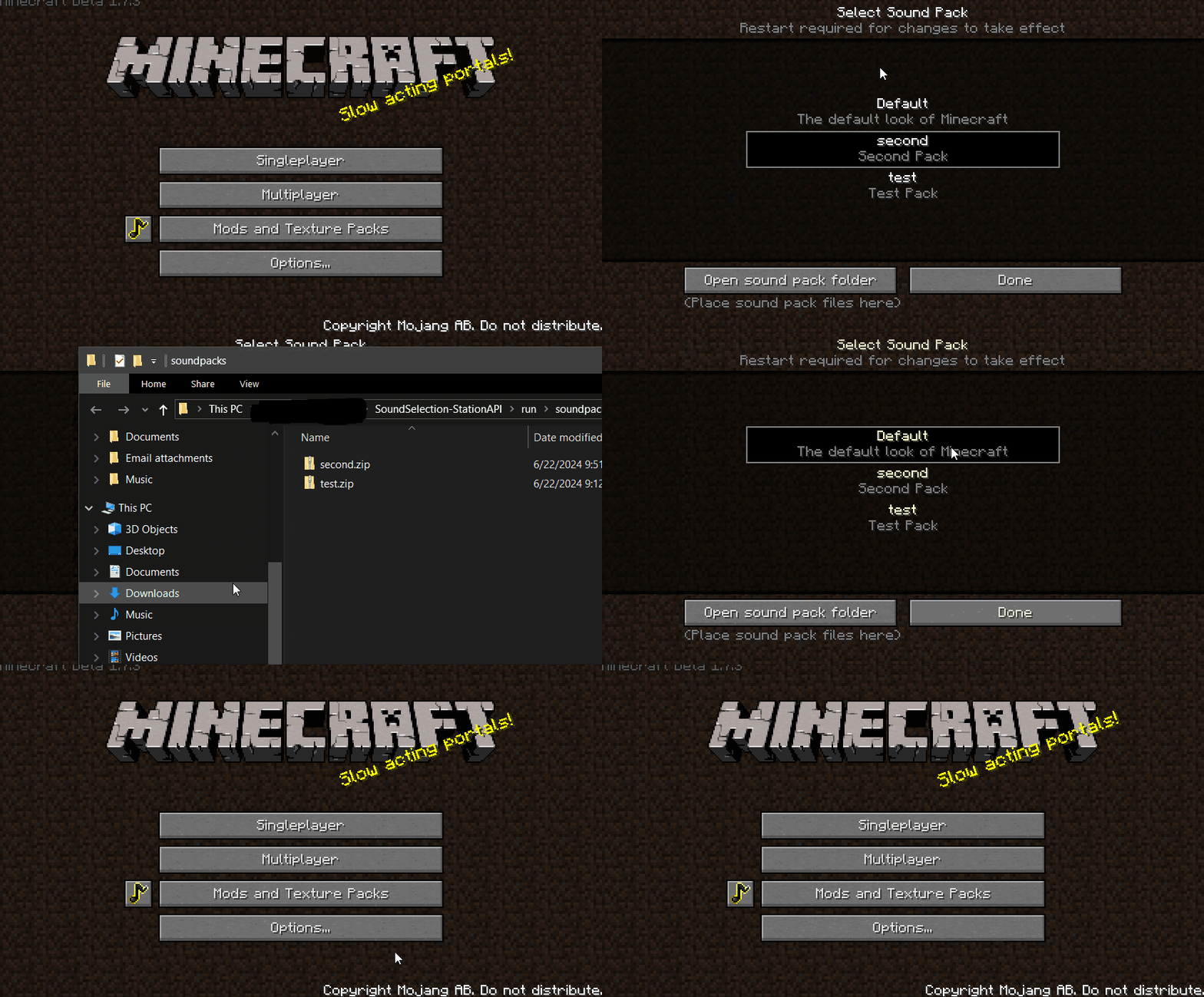
A babric mod for Minecraft Beta 1.7.3 that adds custom sound loading capabilities to the game similar to texture packs. Special thanks to Spring Spring for the sound icon and to NFC team for the pack list GUI.
Sound Selection
Mod works on Multiplayer as it is completely clientside!
- GUI icon can be disabled using CryonicConfig.
- After loading the mod and selecting your desired soundpack, go to the config folder and change
displayGUIin thesoundselection.jsonfile tofalse.
- Adds ability to add sound packs to the game.
- On first run of the mod a folder named
soundpackswill be created. - To make a sound pack copy the structure of the
resourcesfolder and edit whatever you want, once finished zip the pack and remove sounds you did not change. - Default Minecraft sounds will be used if a sound is not found in the sound pack.
pack.mcmetais used to get the packdescriptionandtitle, if no title is provided the zip name will be used as the title.- When the mod is run, click the sound icon to go to the sound pack selection screen.
- The sounds will be extracted to
resources-soundpackwhen a sound pack is selected. - Unfortunately after you select your desired sound pack you must restart the game for the new sounds to load.
- On first run of the mod a folder named
- After loading the mod and selecting your desired soundpack, go to the config folder and change
Installation using Prism Launcher
- Download an instance of Babric for Prism Launcher: https://github.com/Glass-Series/babric-prism-instance
- Install Java 17 and set the instance to use it: https://adoptium.net/temurin/releases/
- (Optional) Add CryonicConfig to the mod folder for the instance: https://modrinth.com/mod/cryonicconfig
- (Optional) Add StationAPI to the mod folder for the instance: https://modrinth.com/mod/stationapi
- (Optional) Add Mod Menu to the mod folder for the instance: https://modrinth.com/mod/modmenu-beta
- Add this mod to the mod folder for the instance: https://github.com/telvarost/BetaTweaks-StationAPI/releases
- Run and enjoy! 👍
Feedback
Got any suggestions on what should be added next? Feel free to share it by creating an issue. Know how to code and want to do it yourself? Then look below on how to get started.
Contributing
Thanks for considering contributing! To get started fork this repository, make your changes, and create a PR.
If you are new to StationAPI consider watching the following videos on Babric/StationAPI Minecraft modding: https://www.youtube.com/watch?v=9-sVGjnGJ5s&list=PLa2JWzyvH63wGcj5-i0P12VkJG7PDyo9T
Screenshots
Gallery
Versions
Files
Relations
Project Relations
More like this
Similar Mods
Suggestions use data such as tags, dependencies, dependents, descriptions, titles, and more to rank how much they overlap with this mod.
On ModDex
Community snapshot
By the numbers
Statistics

Want to reach Minecraft players?
We're looking for a server hosting partner to feature here and other parts of the site. Interested? Send us a message!
Get in touchGet it on
Available Platforms
On ModDex
Community snapshot
By the numbers