
SoundSwitcher
No reviews yet
Backport the switching audio device from 21w37a to 1.7.10
Forge is a popular mod loader for versions 1.1+ of Minecraft.
Community voices
Reviews
Click once to include, again to exclude, again to clear
No reviews yet. Be the first to review this project!
Get it on
Available Platforms
 Modrinth
Compatibility
Supported Environments
About
Project Details
For authors
Embed Badge
If you're the author of this project, you can embed a live badge anywhere that supports HTML or Markdown. It updates automatically whenever ratings change.
Use HTML for any page that supports it, or Markdown for README files and Markdown-based descriptions.
Identifiers
Platform IDs
Resources
External Links
About
Description
SoundSwitcher
SoundSwitcher brings the "Device" button from the Minecraft 21w37a snapshot's or newer version's Music & Sounds menu to older versions of the game. Switch your headphones, speakers, or any other audio output on the fly — no restart required.
How It Works
- Device Enumeration – On game startup, SoundSwitcher queries OpenAL to build a list of all currently available audio output devices. This list is presented right inside the in-game sound settings.
- Live Switching – Selecting a device immediately reinitializes the OpenAL context, redirecting all game audio to your chosen output. No restart, no reload.
- Fallback Safety – If the selected device becomes disconnected or unavailable during gameplay, the mod automatically falls back to the system's default device, preventing silent game audio.
Important Notes & Limitations
- New devices after launch won't appear – Just like the original 21w37a implementation, the device list is captured at startup. If you plug in or pair a new audio device (e.g., Bluetooth headphones) while the game is running, you'll need to restart Minecraft for it to show up in the list.
While I tried a lot to add the ability to dynamically refresh the device list when new audio hardware is connected, I found that the required implementation is extremely complex. Current platform restrictions also make it impossible to deliver a fully working solution, so I have decided to abandon the development of this feature. - For other non-English-speaking players – This mod displays device names exactly as they appear in OpenAL, so you may encounter garbled text. Please be aware of this.
- Client‑side only – SoundSwitcher is entirely client‑side and safe to use on any server, vanilla or modded.
Why use SoundSwitcher?
- Finally get the 21w37a device switcher on 1.7.10 .
- Instantly move game audio from speakers to a headset without interrupting your gameplay.
- Avoid the hassle of editing configs or restarting just to change your output device.
Creadits
Mojang Studio for the modern minecraft device switcher idea.
Nieobie for the logo icon.
Screenshots
Gallery
-
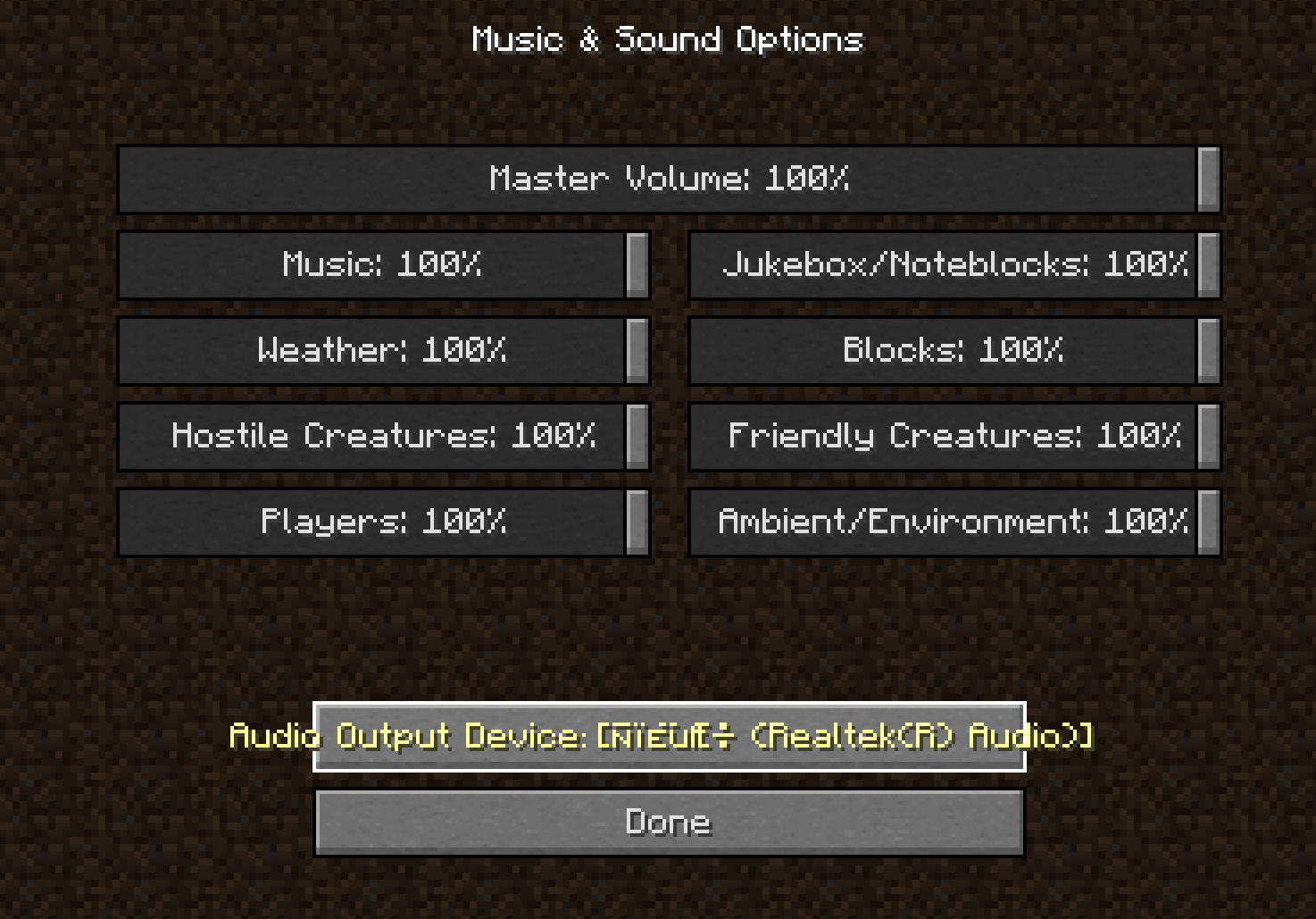 Audio outputs
Versions
Files
Relations
Project Relations
More like this
Similar Mods
Suggestions use data such as tags, dependencies, dependents, descriptions, titles, and more to rank how much they overlap with this mod.
On ModDex
Community snapshot
By the numbers
Statistics

Want to reach Minecraft players?
We're looking for a server hosting partner to feature here and other parts of the site. Interested? Send us a message!
Get in touchGet it on
Available Platforms
On ModDex
Community snapshot
By the numbers
Statistics
Resources