
SP_NTF_MSG
No reviews yet
This mod is written for the private minecraft server ("СП") and adds notifications to direct messages (/msg command). When a direct message is received, the notification sound is played. The volume and tone of the sound can be changed in the mod menu.
Fabric is a mod loader for versions 1.14+ of Minecraft, particularly popular for client side and optimization mods.
Community voices
Reviews
Click once to include, again to exclude, again to clear
No reviews yet. Be the first to review this project!
Get it on
Available Platforms
 Modrinth
Compatibility
Supported Environments
About
Project Details
For authors
Embed Badge
If you're the author of this project, you can embed a live badge anywhere that supports HTML or Markdown. It updates automatically whenever ratings change.
Use HTML for any page that supports it, or Markdown for README files and Markdown-based descriptions.
Identifiers
Platform IDs
About
Description
SP_NTF_MSG – Мод для уведомлений о личных сообщениях
(Mod for private‑message notifications)
RU (Русский)
Мод добавляет звуковые уведомления при получении личных сообщений в чате.
Он написан специально для приватного сервера «СП» и реагирует на команду /msg.
При получении сообщения воспроизводится выбранный звук, громкость и тон которого можно изменить в меню мода.
1. Режимы звука
| Режим | Описание | Настройки |
|---|---|---|
| NOTE_BLOCK | Стандартный звук нотного блока Minecraft | Громкость, тон |
| CUSTOM_FILE | Выберите MP3 или OGG файл из папки config/info_ls_ms/soundsMP3 файлы автоматически конвертируются в OGG |
Путь к файлу, громкость |
| PREPACKAGED | Встроенные звуки, поставляемые вместе с модом | Громкость |
2. Предустановленные (пакетные) звуки
| Файл | Описание | Источник | Лицензия |
|---|---|---|---|
wood_stick.ogg |
WoodPlankSmack by NightDrawr | https://freesound.org/s/819536/ | Creative Commons 0 |
champagne.ogg |
Open or Uncork Champagne Bottle 2 by Centraca | https://freesound.org/s/818931/ | Creative Commons 0 |
Установка
- Поместите файл мода в папку
mods. - Запустите игру.
- Откройте настройки через ModMenu и выберите режим звука.
Настройка пользовательских звуков
- Скопируйте MP3‑ или OGG‑файлы в папку
config/info_ls_ms/sounds. - Выберите режим CUSTOM_FILE в настройках мода.
- В выпадающем списке выберите нужный файл.
Технические детали
- Динамический ресурс‑пак создаётся автоматически в
resourcepacks/info_ls_ms_dynamic. - MP3 файлы конвертируются в WAV (после чего переименовываются в OGG для совместимости).
- Ресурс‑пак пересобирается при запуске клиента и после сохранения настроек.
EN (English)
This mod is written for the private Minecraft server (“СП”) and adds notifications to direct messages (/msg command). When a direct message is received, the notification sound is played. The volume and tone of the sound can be changed in the mod menu.
1. Sound Modes
| Mode | Description | Settings |
|---|---|---|
| NOTE_BLOCK | Uses the standard Minecraft note block sound | Volume, pitch |
| CUSTOM_FILE | Pick an MP3 or OGG file from config/info_ls_ms/soundsMP3 files are automatically converted to OGG |
File path, volume |
| PREPACKAGED | Built‑in sounds that ship with the mod | Volume |
2. Prepackaged (Bundled) Sounds
| File | Description | Source | License |
|---|---|---|---|
wood_stick.ogg |
WoodPlankSmack by NightDrawr | https://freesound.org/s/819536/ | Creative Commons 0 |
champagne.ogg |
Open or Uncork Champagne Bottle 2 by Centraca | https://freesound.org/s/818931/ | Creative Commons 0 |
Installation
- Place the mod in the
modsfolder. - Launch the game.
- Open the mod settings via ModMenu and choose a sound mode.
Configuring Custom Sounds
- Put MP3 or OGG files into
config/info_ls_ms/sounds. - Select CUSTOM_FILE mode in the mod settings.
- Pick the desired file from the drop‑down list.
Technical Details
- A dynamic resource pack is automatically created under
resourcepacks/info_ls_ms_dynamic. - MP3 files are converted to WAV, then renamed to OGG for compatibility.
- The resource pack is rebuilt at client launch and whenever settings are saved.
Creators / Создатели

qirieshka – Programmer / Программист
Specially for [#СП]/Специально для #СП
Screenshots
Gallery
-
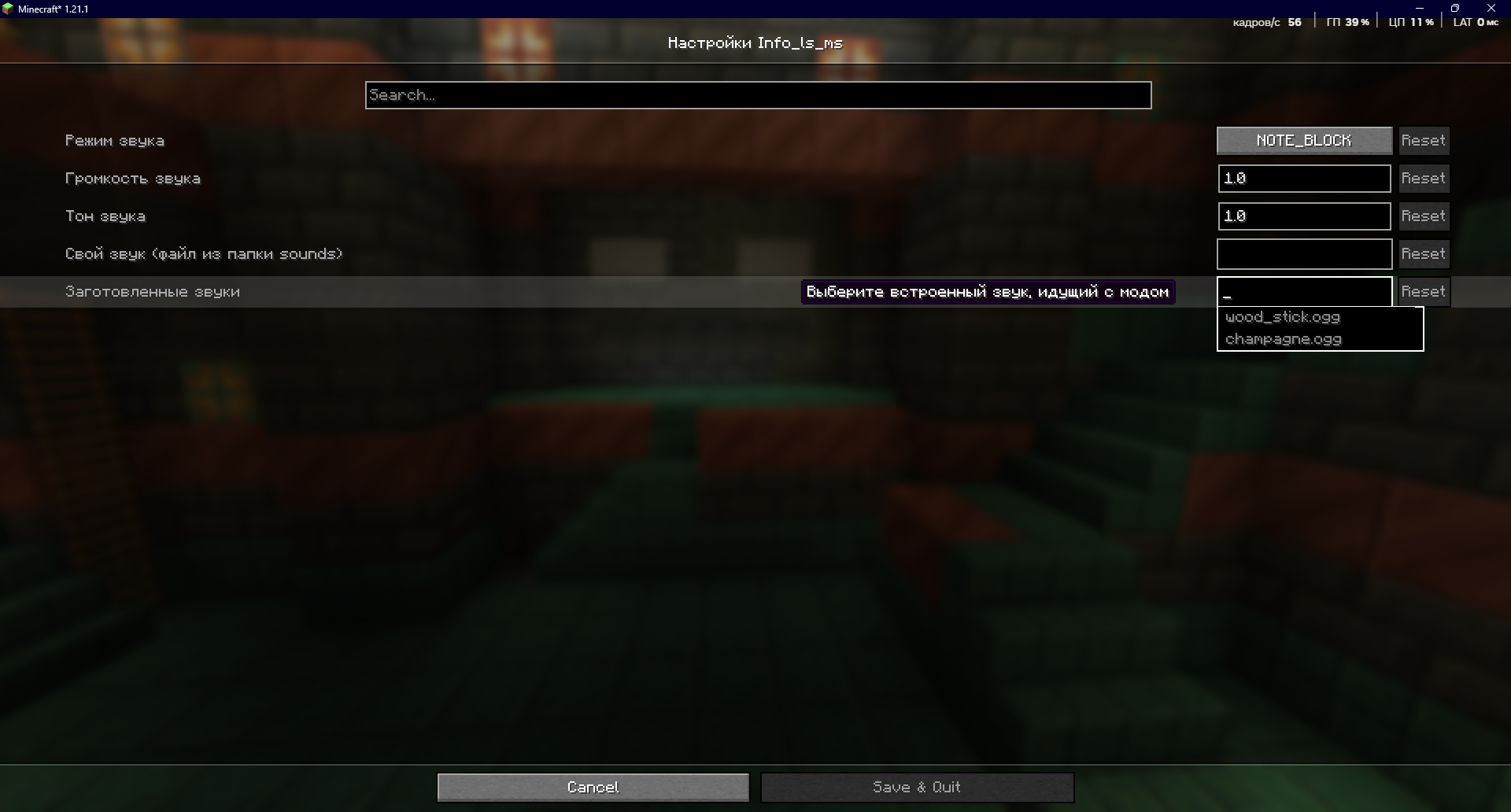 settings in the modmenu
Versions
Files
Relations
Project Relations
More like this
Similar Mods
Suggestions use data such as tags, dependencies, dependents, descriptions, titles, and more to rank how much they overlap with this mod.
On ModDex
Community snapshot
By the numbers
Statistics

Want to reach Minecraft players?
We're looking for a server hosting partner to feature here and other parts of the site. Interested? Send us a message!
Get in touchGet it on
Available Platforms
On ModDex
Community snapshot
By the numbers