
Spawn Rules
No reviews yet
A server-side Fabric mod that lets you block specific mobs and animals from spawning on your server.
Fabric is a mod loader for versions 1.14+ of Minecraft, particularly popular for client side and optimization mods.
Community voices
Reviews
Click once to include, again to exclude, again to clear
No reviews yet. Be the first to review this project!
Get it on
Available Platforms
 Modrinth
Compatibility
Supported Environments
About
Project Details
For authors
Embed Badge
If you're the author of this project, you can embed a live badge anywhere that supports HTML or Markdown. It updates automatically whenever ratings change.
Use HTML for any page that supports it, or Markdown for README files and Markdown-based descriptions.
Identifiers
Platform IDs
About
Description
Spawn Rules
A server-side Fabric mod that lets you block specific mobs and animals from spawning. It cancels spawns early in the tick loop to save server performance.
Key features:
- Blocks spawns before the mob entity is created, which reduces server CPU load.
- Prevents "Can't spawn entity of type" warning spam in the console logs.
- Player-spawned entities (spawn eggs, summon commands, breeding, buckets, and portal travel) are always allowed.
- Includes an in-game GUI to change settings without editing files.
How to use the In-Game GUI (Click to expand)
Run the command /spawnrules config in-game (requires operator level 2).
- A menu will open showing all survival mobs in the game (including modded ones).
- Hovering over a mob shows if it is allowed or blocked in the Overworld, Nether, and End.
- Click any mob to toggle its spawn status for those dimensions.
- Changes save to disk and update in memory immediately.
Configuration File Example (Click to expand)
You can also edit the config file directly at config/spawnrules.json. Here is an example config that blocks zombies in the overworld:
{
  "dimensions": {
    "minecraft:overworld": {
      "blocked_types": [
        "minecraft:zombie"
      ],
      "blocked_categories": []
    }
  }
}
- blocked_types: A list of entity IDs (like minecraft:zombie) to block in that dimension.
- blocked_categories: A list of categories to block. The categories are:
- monster (zombies, creepers, skeletons, etc.)
- creature (cows, pigs, sheep, etc.)
- ambient (bats)
- water_creature (squids, dolphins)
- water_ambient (tropical fish)
- axolotls
- underground_water_creature (glow squids)
Commands (Click to expand)
- /spawnrules config - Opens the visual settings GUI (Requires OP level 2).
- /spawnrules reload - Reloads the settings from the configuration file (Requires OP level 2).
Screenshots
Gallery
-
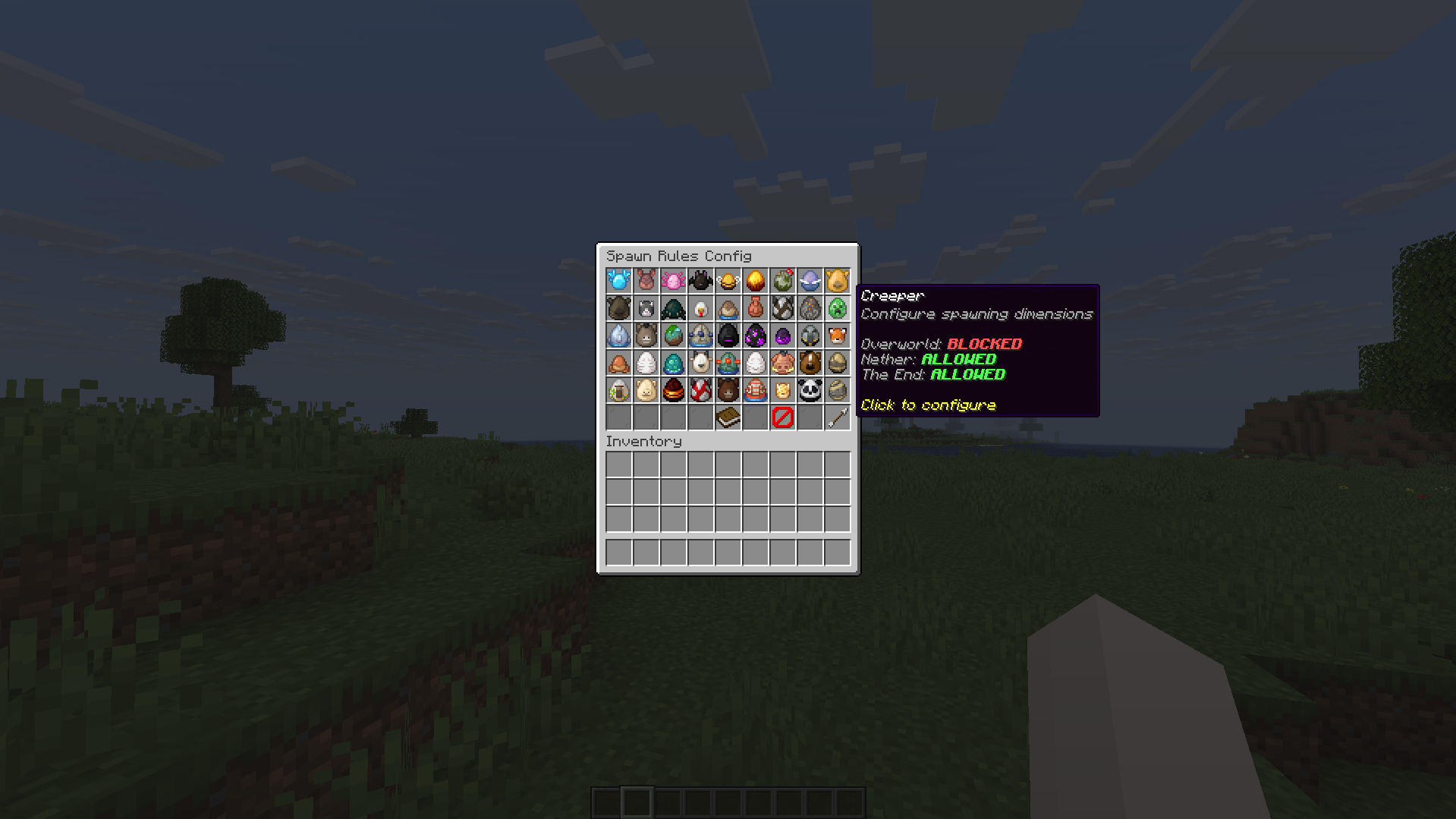 Config menu The spawn rules config menu in game, along with a preview of options
Versions
Files
Relations
Project Relations
More like this
Similar Mods
Suggestions use data such as tags, dependencies, dependents, descriptions, titles, and more to rank how much they overlap with this mod.
On ModDex
Community snapshot
By the numbers
Statistics

Want to reach Minecraft players?
We're looking for a server hosting partner to feature here and other parts of the site. Interested? Send us a message!
Get in touchGet it on
Available Platforms
On ModDex
Community snapshot
By the numbers