
Special Nametags
No reviews yet
Adds many new special names, like Jeb_ or Dinnerbone, to give to mobs!
Data Packs were introduced to vanilla Minecraft in version 1.13 and allow the server to modify data about the game, or run commands. Data Packs are compatible with all mod loaders.
Forge is a popular mod loader for versions 1.1+ of Minecraft.
Neoforge is a fork of the Minecraft Forge available for versions 1.20.1+ of Minecraft. Many Forge mods are compatible with Neoforge and vice versa.
Fabric is a mod loader for versions 1.14+ of Minecraft, particularly popular for client side and optimization mods.
Quilt is a fork of the Fabric mod loader. Many Fabric mods are compatible with Quilt and vice versa.
Community voices
Reviews
Click once to include, again to exclude, again to clear
No reviews yet. Be the first to review this project!
Get it on
Available Platforms
 Modrinth
Compatibility
Supported Environments
About
Project Details
For authors
Embed Badge
If you're the author of this project, you can embed a live badge anywhere that supports HTML or Markdown. It updates automatically whenever ratings change.
Use HTML for any page that supports it, or Markdown for README files and Markdown-based descriptions.
Identifiers
Platform IDs
Resources
External Links
About
Description
Special NameTags V1.4
Adds many new special names, like Jeb_ or Dinnerbone, to give to mobs!
This presentation refers to the latest Data Pack release: Version 1.4.x.
For previous releases, check the "Older Versions" section at the bottom of the page.
📥How to Install
Choose if you want to download the pure Data Pack version or the Mod version and follow the steps accordingly.
Data Pack
- 1) Download the Data Pack
- 2) Chose the world you want to install the Data Pack in and navigate to its "datapacks" folder
- 3) Copy the downloaded Data Pack file (Special Nametags) into this folder
- 4) Join the world and run
/reloadcommand
Mod
- 1) Download the Mod
- 2) Navigate to your
modsfolder (for the vanilla launcher the path is.minecraft/mods - 3) Put the downloaded .jar file (Special Nametags) into this folder
- 4) Join the world and run
/reloadcommand
⚠ Mod version is available starting from Minecraft 1.21 and up
📖Features
This Data Pack adds many new special names to give to mobs! (Like Dinnerbone and Jeb_)
How to use
Simply rename a mob with one of the names in the list below, and the corresponding effect will be applied!
Special Names and Effects
| Special Name Tag | Effect |
|---|---|
Speedy Ghast(NEW) |
Happy Ghast will have its flying speed increased by 3x (+200%) |
Lazy Ghast(NEW) |
Happy Ghast flying speed will be restored to default |
freeze |
Mob will no longer move and won't suffer any damage |
unfreeze |
Mob will move normally and you'll be able to hit it again |
silent |
Mob will no longer emit sounds |
noisy |
Mob will emit sounds normally |
noname |
Mob Custom Name will be removed |
nozombification |
Piglin and hoglin will no longer zombificate in the Overworld |
zombification |
Piglin and hoglin will be able to zombificate in the Overworld |
invulnerable |
Mob will be invulnerable to any non-creative mode damage |
vulnerable |
Mob will become vulnerable to any damage source |
gravityoff |
Mob will no longer be affected by gravity |
gravityon |
Mob will be affected by gravity |
onfire |
Mob will visually be set on fire |
notonfire |
Mob will no longer have visual fire |
baby |
Mob will stay in baby form / Will became baby if is an adult already |
adult |
Mob will grow up |
sit |
Mob will sit on the ground |
unsit |
Mob will stand up |
YouTube Showcase
📤How to Uninstall
Data Pack
To uninstall the Data Pack run the command /function tags-nbt:uninstall. When the uninstallation process is completed a confirmation message will be sent in the chat.
Mod
To uninstall the Mod version you need to run /function tags-nbt:uninstall command. Then you close the game and remove the jar file from your .minecraft/mods folder.
🔗External links


💾Older Versions
Version 1.3 to 1.3.2 (for Minecraft 1.21.4-1.21.8)
Special NameTags
Adds many new special names, like Jeb_ or Dinnerbone, to give to mobs!
This presentation concerns about the latest release.
For older ones, check the "Older Versions" section, at the bottom of the page.
📥How to Install
Choose if you want to download the pure Data Pack version or the Mod version and follow the steps accordingly.
Data Pack
- 1) Download the Data Pack
- 2) Chose the world you want to install the Data Pack in and navigate to its "datapacks" folder
- 3) Copy the downloaded Data Pack file (Special Nametags) into this folder
- 4) Join the world and run
/reloadcommand
Mod
- 1) Download the Mod
- 2) Navigate to your
modsfolder (for the vanilla launcher the path is.minecraft/mods - 3) Put the downloaded .jar file (Special Nametags) into this folder
- 4) Join the world and run
/reloadcommand
⚠ Mod version is available starting from Minecraft 1.21 and up
📖Features
This Data Pack adds many new special names to give to mobs! (Like Dinnerbone and Jeb)
How to use
Simply rename a mob with one of the name in the list below, and the corresponding effect will be applied!
Special Names and Effects (1.21.4+)
| Special Name Tag | Effect |
|---|---|
freeze |
Mob will no longer move and won't suffer any damage |
unfreeze |
Mob will move normally and you'll be able to hit it again |
silent |
Mob will no longer emit sounds |
noisy |
Mob will emit sounds normally |
noname |
Mob Custom Name will be removed |
nozombification |
Piglin and hoglin will no longer zombificate in the Overworld |
zombification |
Piglin and hoglin will be able to zombificate in the Overworld |
invulnerable |
Mob will be invulnerable to any non-creative mode damage |
vulnerable |
Mob will become vulnerable to any damage source |
gravityoff |
Mob will no longer be affected by gravity |
gravityon |
Mob will be affected by gravity |
onfire |
Mob will visually be set on fire |
notonfire |
Mob will no longer have visual fire |
baby |
Mob will stay in baby form / Will became baby if is an adult already |
adult |
Mob will grow up |
sit |
Mob will sit on the ground |
unsit |
Mob will stand up |
YouTube Showcase
📤How to Uninstall
Data Pack
To uninstall the Data Pack run the command /function tags-nbt:uninstall. When the uninstallation process is completed a confirmation message will be sent in the chat.
Mod
To uninstall the Mod version you need to run /function tags-nbt:uninstall command. Then you close the game and remove the jar file from your .minecraft/mods folder.
🔗External links
Version 1.3 and below (for Minecraft 1.18-1.21.3)
Special NameTags
Adds many Special Name Tags that allows more customization and control over mobs!
📥How to Install
Decide if you want to download the pure Data Pack version or the Mod version and follow the steps accordingly.
Data Pack
- 1) Download the Data Pack
- 2) Chose the world you want to install the Data Pack in and navigate to its "datapacks" folder
- 3) Copy the downloaded Data Pack file (Special Nametags) into this folder
- 4) Join the world and run
/reloadcommand
Mod
- 1) Download the Mod
- 2) Navigate to your
modsfolder (for the vanilla launcher the path is.minecraft/mods - 3) Put the downloaded .jar file (Special Nametags) into this folder
- 4) Join the world and run
/reloadcommand
⚠ Mod version is available starting from Minecraft 1.21 and up
📖Features
This Data Pack allows you to have more special names to give to mobs!
NameTags Effects 1.20.3-1.21.3
⚠ IMPORTANT!
Due to a bug fix made in 1.20.3, removing a mob's name has become almost impossible. This means that, when using a special name tag, the mob's name will no longer disapper as it did before. As a temporary workaround (until MC-128225 is fixed) a new name tag has been added:noname.
| NameTag | Effect |
|---|---|
noname (new) | Mob custom name will be removed (new) |
freeze | Mob will no longer move and you won't be able to hit it |
unfreeze | Mob will move normally and you'll be able to hit it again |
silent | Mob will no longer emit sounds |
noisy | Mob will emit sound normally |
nozombification | Piglin and hoglin will no longer zombificate in the Overworld |
zombification | Piglin and hoglin will be able to zombificate in the Overworld |
zombification | Mob will be invulnerable to non creative damage |
vulnerable | Mob will become vulnerable to any damage source |
gravityoff | Mob will no longer be affected by gravity |
gravityon | Mob will be affected by gravity |
onfire | Mob will visually be set on fire |
notonfire | Mob will no longer have visual fire |
baby | Mob will stay in baby form / Will became baby if is an adult already |
adult | Mob will grow up |
sit | Mob will sit on the ground |
unsit | Mob will stand up |
NameTags Effects 1.20 - 1.20.2
| NameTag | Effect |
|---|---|
freeze | Mob will no longer move and you won't be able to hit it |
unfreeze | Mob will move normally and you'll be able to hit it again |
silent | Mob will no longer emit sounds |
noisy | Mob will emit sound normally |
nozombification | Piglin and hoglin will no longer zombificate in the Overworld |
zombification | Piglin and hoglin will be able to zombificate in the Overworld |
invulnerable | Mob will be invulnerable to non creative damage |
vulnerable | Mob will become vulnerable to any damage source |
gravityoff | Mob will no longer be affected by gravity |
gravityon | Mob will be affected by gravity |
onfire | Mob will visually be set on fire |
notonfire | Mob will no longer have visual fire |
baby | Mob will stay in baby form / Will became baby if is an adult already |
adult | Mob will grow up |
sit | Mob will sit on the ground (New) |
unsit | Mob will stand up (New) |
NameTags Effects 1.18 - 1.19
| NameTag | Effect |
|---|---|
freeze | Mob will no longer move and you won't be able to hit it |
unfreeze | Mob will move normally and you'll be able to hit it again |
silent | Mob will no longer emit sounds |
noisy | Mob will emit sound normally |
nozombification | Piglin and hoglin will no longer zombificate in the Overworld |
zombification | Piglin and hoglin will be able to zombificate in the Overworld |
invulnerable | Mob will be invulnerable to non creative damage |
vulnerable | Mob will become vulnerable to any damage source |
gravityoff | Mob will no longer be affected by gravity |
gravityon | Mob will be affected by gravity |
onfire | Mob will visually be set on fire |
notonfire | Mob will no longer have visual fire |
baby | Mob will stay in baby form / Will became baby if is an adult already |
adult | Mob will grow up |
YouTube Showcase
📤How to Uninstall (1.20 +)
Data Pack
To uninstall the Data Pack run the command /function tags-nbt:uninstall. When the uninstallation process is completed a confirmation message will be sent in the chat.
Mod
To uninstall the Mod version you need to run /function tags-nbt:uninstall command. Then you close the game and remove the jar file from your .minecraft/mods folder.
🔗External links
Screenshots
Gallery
-
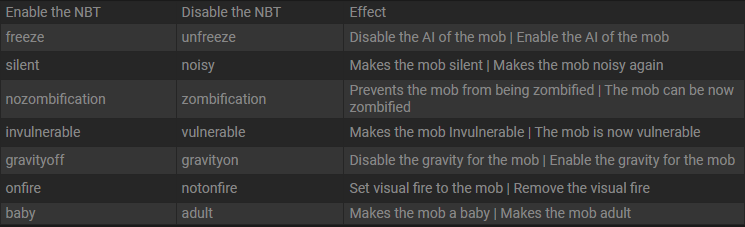 Nametags Effects
 -
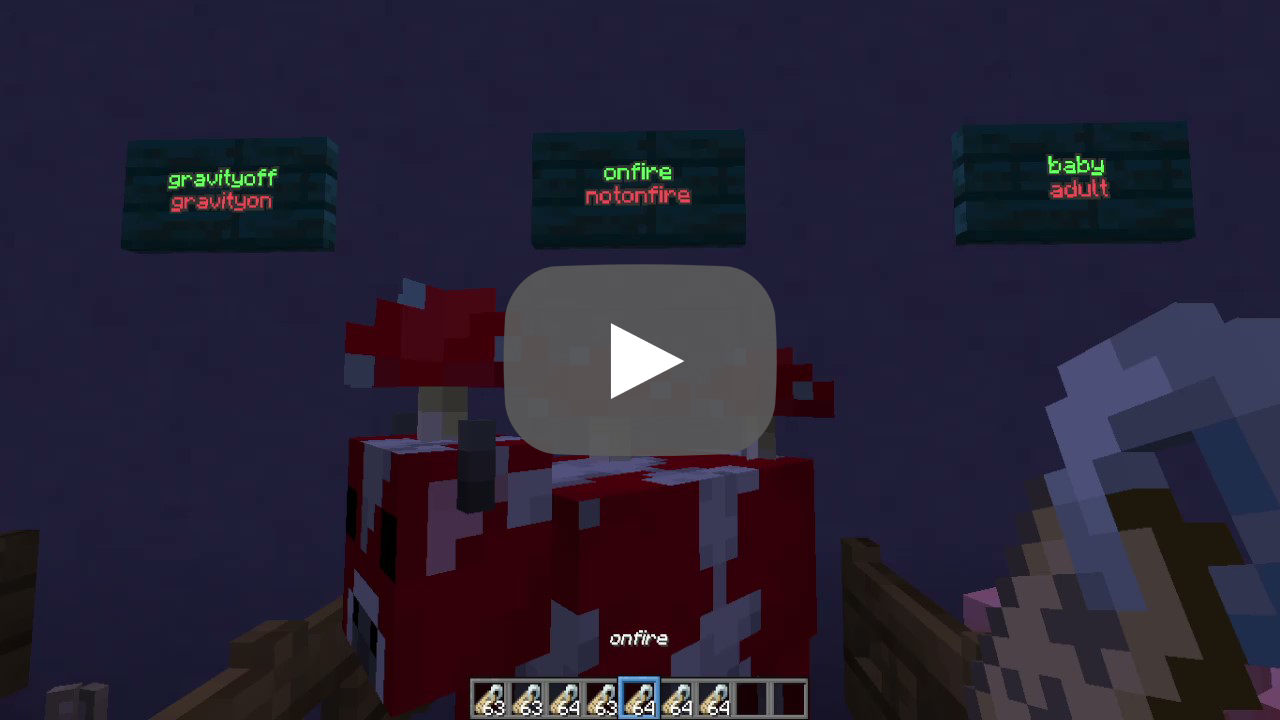 Special NameTags ShowCase
Versions
Files
Relations
Project Relations
More like this
Similar Mods
Suggestions use data such as tags, dependencies, dependents, descriptions, titles, and more to rank how much they overlap with this mod.
On ModDex
Community snapshot
By the numbers
Statistics

Want to reach Minecraft players?
We're looking for a server hosting partner to feature here and other parts of the site. Interested? Send us a message!
Get in touchGet it on
Available Platforms
On ModDex
Community snapshot
By the numbers
Statistics
Resources