
Community listing page, reviews may not be monitored by the author.
Spok's Hud+


No reviews yet
A lightweight client-side HUD mod for Minecraft that displays useful information to the player.

Community voices
Reviews
No reviews yet. Be the first to review this project!
Get it on
Available Platforms
Compatibility
Supported Environments
Runs entirely on the client. Works on vanilla servers.
About
Project Details
For authors
Embed Badge
If you're the author of this project, you can embed a live badge anywhere that supports HTML or Markdown. It updates automatically whenever ratings change.
Use HTML for any page that supports it, or Markdown for README files and Markdown-based descriptions.
Identifiers
Platform IDs
About
Description
Sp0k's HUD+
Sp0k's HUD+ is a lightweight client-side Fabric mod that adds useful player information to the Minecraft HUD without opening the debug screen.
It is designed to keep important gameplay information visible in a clean, minimal, and configurable way.
Features
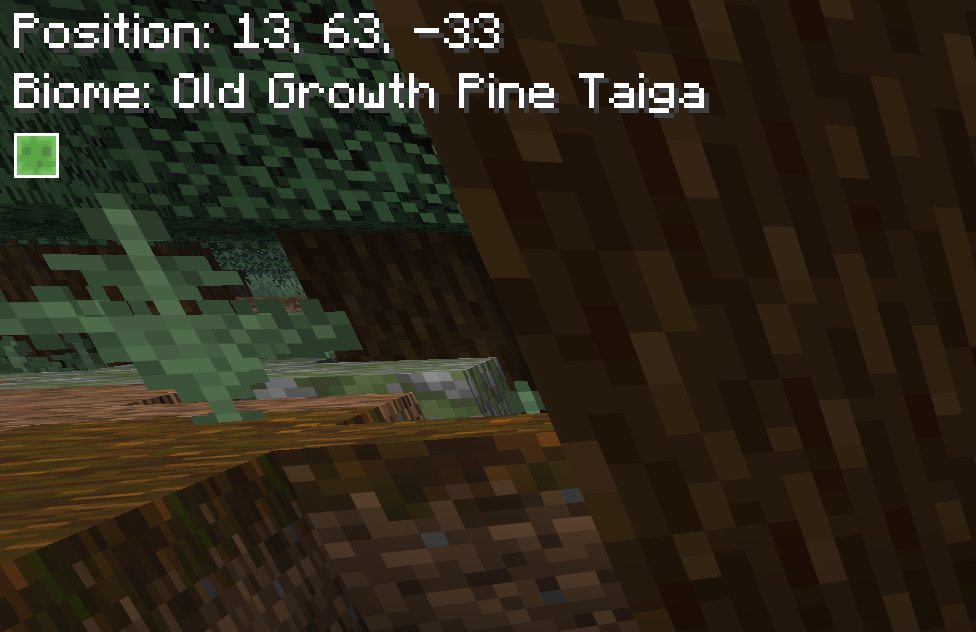
- Displays the player's current block position
- Displays the biome the player is standing in
- Formats biome names into readable text
- Example:
old_growth_birch_forest->Old Growth Birch Forest
- Example:
- Shows the player's cardinal direction at the top-center of the screen
- Optional direction guide lines beside the cardinal direction
- Displays equipped armor icons on the top-right of the screen
- Displays the currently held damageable tool alongside equipment
- Shows armor and tool durability
- Supports durability display modes:
- Percentage
- Remaining hits
- Uses color-coded durability text:
- Green for high durability
- Yellow for medium durability
- Orange/red for low durability
- Supports HUD UI scaling:
- Small
- Medium
- Large
- Medium is the default size and keeps the original HUD scale
- Allows HUD offset customization with
hudXandhudY - Hides the custom HUD when the vanilla F3 debug screen is open
- Moves the equipment HUD down when active status effects are visible to avoid overlap
Configuration
Sp0k's HUD+ includes an in-game configuration screen when Mod Menu is installed.
The configuration screen is organized into submenus:
Main Options
- UI Size: Small, Medium, or Large
- HUD X position slider
- HUD Y position slider
- Location Information submenu
- Direction submenu
- Equipment HUD submenu
Location Information
- Toggle the full location information display
- Toggle position display
- Toggle biome display
Direction
- Toggle the full direction display
- Toggle direction guide lines
Equipment HUD
- Toggle the full equipment display
- Toggle armor display
- Toggle tools display
- Switch durability display between percentage and remaining hits
The config file is generated automatically at:
.minecraft/config/spokhud.json
Requirements
- Minecraft
26.1.2 - Fabric Loader
- Fabric API
- Java
25
Optional Dependencies
- Mod Menu
- Required only for the in-game configuration screen
- The HUD itself works without Mod Menu
Installation
- Install Fabric Loader for Minecraft
26.1.2. - Install the matching Fabric API version.
- Optional: install Mod Menu if you want to configure the HUD in-game.
- Download the latest
.jarrelease of Sp0k's HUD+. - Place the
.jarfile in your Minecraftmodsfolder. - Launch Minecraft with the Fabric profile.
License
Distributed under the CC0-1.0 license. See LICENSE for more information.
Sp0k's HUD+
Sp0k's HUD+ is a lightweight client-side Fabric mod that adds useful player information to the Minecraft HUD without opening the debug screen.
It is designed to keep important gameplay information visible in a clean, minimal, and configurable way.

Features
- Displays the player's current block position
- Displays the biome the player is standing in
- Formats biome names into readable text
- Example:
old_growth_birch_forest->Old Growth Birch Forest
- Shows the player's cardinal direction at the top-center of the screen
- Optional direction guide lines beside the cardinal direction
- Displays equipped armor icons on the top-right of the screen
- Displays the currently held damageable tool alongside equipment
- Shows armor and tool durability
- Supports durability display modes:
- Percentage
- Remaining hits
- Uses color-coded durability text:
- Green for high durability
- Yellow for medium durability
- Orange/red for low durability
- Supports HUD UI scaling:
- Small
- Medium
- Large
- Medium is the default size and keeps the original HUD scale
- Allows HUD offset customization with
hudXandhudY - Hides the custom HUD when the vanilla F3 debug screen is open
- Moves the equipment HUD down when active status effects are visible to avoid overlap
- Example:
Configuration
Sp0k's HUD+ includes an in-game configuration screen when Mod Menu is installed.
The configuration screen is organized into submenus:
Main Options
- UI Size: Small, Medium, or Large
- HUD X position slider
- HUD Y position slider
- Location Information submenu
- Direction submenu
- Equipment HUD submenu
- Display HUD when F3 is open
Location Information
- Toggle the full location information display
- Toggle position display
- Toggle biome display
- Toggle the slime chunk indicator
Direction
- Toggle the full direction display
- Toggle direction guide lines
Equipment HUD
- Toggle the full equipment display
- Toggle armor display
- Toggle tools display
- Switch durability display between percentage and remaining hits
The config file is generated automatically at:
.minecraft/config/spokhud.json
Requirements
- Minecraft
- Fabric Loader
- Fabric API
Optional Dependencies
- Mod Menu
- Required only for the in-game configuration screen
- The HUD itself works without Mod Menu
Installation
- Install Fabric Loader for your Minecraft.
- Install the matching Fabric API version.
- Optional: install Mod Menu if you want to configure the HUD in-game.
- Download the latest
.jarrelease of Sp0k's HUD+. - Place the
.jarfile in your Minecraftmodsfolder. - Launch Minecraft with the Fabric profile.
License
Distributed under the CC0-1.0 license. See LICENSE for more information.
Screenshots
Gallery
-
 hud_view.png hud_view.png
-
-
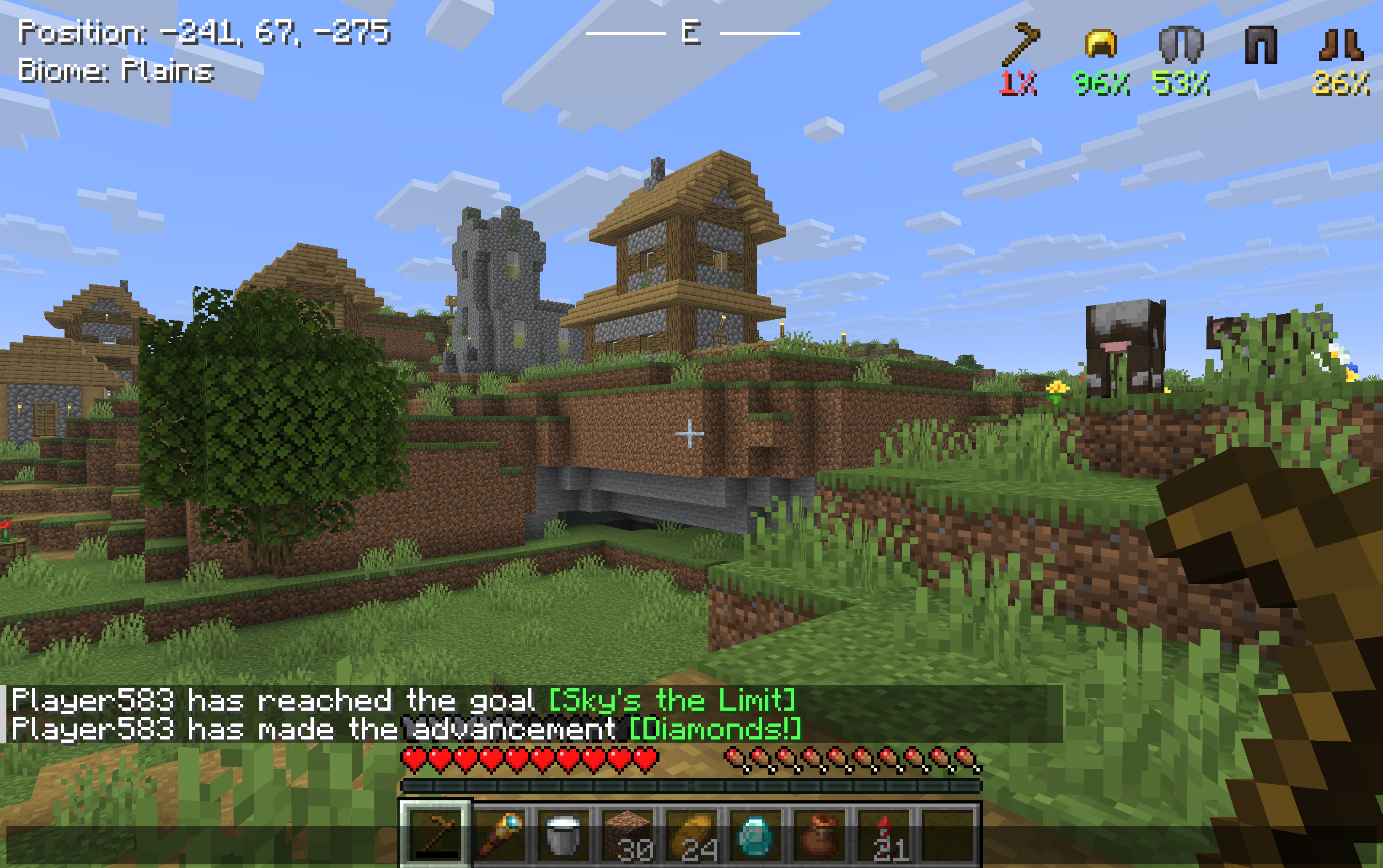 Sp0k's HUD+ Fullscreen view of the HUD showing how small it is while displaying important information
 -
 Screenshot of the HUD Screenshot taken of only the HUD, showing the exact information that can be found in the HUD.
Versions
Files
Relations
Project Relations
More like this
Similar Mods
Suggestions use data such as tags, dependencies, dependents, descriptions, titles, and more to rank how much they overlap with this mod.
On ModDex
Community snapshot
By the numbers
Statistics

Get it on
Available Platforms
On ModDex
Community snapshot
By the numbers