
Community listing page, reviews may not be monitored by the author.
(ST) Locator Radar

No reviews yet
Converts the locator bar into a mob radar.

Community voices
Reviews
No reviews yet. Be the first to review this project!
Get it on
Available Platforms
Compatibility
Supported Environments
Runs entirely on the server. Also works in singleplayer.
About
Project Details
For authors
Embed Badge
If you're the author of this project, you can embed a live badge anywhere that supports HTML or Markdown. It updates automatically whenever ratings change.
Use HTML for any page that supports it, or Markdown for README files and Markdown-based descriptions.
Identifiers
Platform IDs
Resources
External Links
About
Description
🎯 ST Locator Radar
Turns your locator bar into an actual mob radar — three categories, adjustable range, zero setup.
ST Locator Radar is a standalone datapack built around vanilla's locator bar (1.21.6+), giving you a live read on what's nearby without ever opening the map.
📡 How it works
The locator bar already exists in vanilla — this datapack puts it to work. Every nearby mob shows up as a dot on your hotbar, split into three independent categories you can toggle from an in-game menu:
- ☠️ Hostile — 37 mobs, 48-block range, on by default (the Wither and the Ender Dragon included)
- 🐑 Passive — 36 mobs, 32-block range, on by default
- 🐺 Neutral — 15 mobs, 40-block range, on by default
Turn any of the three off if it's too much — /trigger str_menu set 1
opens the menu any time, with a click sound on every button.
📏 Range, your way
Want less noise, or want to see further? The same menu has a Radar range button that cycles through three settings, in blocks:
| ☠️ Hostile | 🐺 Neutral | 🐑 Passive | |
|---|---|---|---|
| Short | 24 | 20 | 16 |
| Normal (default) | 48 | 40 | 32 |
| Long | 72 | 60 | 48 |
The change applies right away to every mob already on your bar.
🖼️ Coverage
88 mobs, audited against every Minecraft update that added a creature — nothing slipped through. Classification follows the Minecraft wiki's own hostile/passive/neutral categories, not a "does it actually attack you" guess — that's why fox, goat, and pufferfish sit under neutral even though none of them strike first.
🎨 Icons built in
Every one of the 88 mobs has its own icon, and they ship in the same file
— no separate download. To see them instead of the default color dot,
drop the same .zip into .minecraft/resourcepacks/ and enable it, or
use the mod version, where everything loads on its own. Without the icons
the radar works exactly the same.
The icon set is also published on its own as Capupack, for use with any datapack.
🔧 Installation
- Drop the
.zipinto.minecraft/saves/<your world>/datapacks/ - Run
/reload - (Optional, for icons) Add the same
.zipto.minecraft/resourcepacks/and enable it
Works completely standalone — no other datapack required. Its namespace,
objectives, and tags (st_radar / str_*) are entirely its own, so it
installs cleanly alongside anything else, including the full Survival
Tweaks pack.
Compatible with 1.21.6 through 26.3 — the locator bar doesn't exist on older versions.
💚 Part of something bigger
Made by the same people behind Survival Tweaks — a bigger pack with graves, a custom HUD, multiplayer sleep, personal waypoints with light beams and colors, biome and structure explorers, durability / hunger / inventory alerts, dynamic lighting, and gameplay tips. This radar module ships bundled inside Survival Tweaks too, as one toggle in its unified menu — get it standalone here, or get everything at once.
Screenshots
Gallery
-
 Normal Range
-
 Short Range
-
 Long Range
-
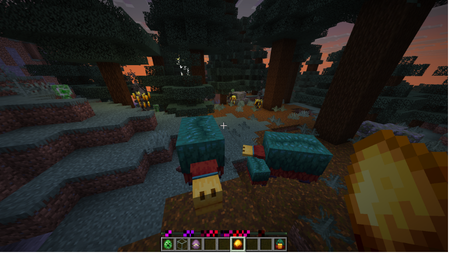 Icons without the resource pack (Capupack)
-
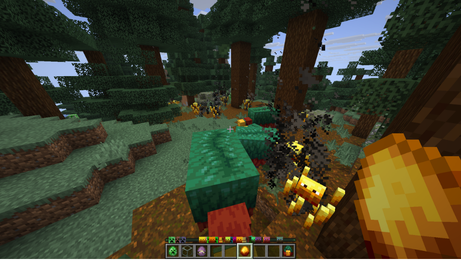 Example
-
 Datapack Menu (Update 1.3)
Versions
Files
Relations
Project Relations
More like this
Similar Mods
Suggestions use data such as tags, dependencies, dependents, descriptions, titles, and more to rank how much they overlap with this mod.
On ModDex
Community snapshot
By the numbers
Statistics


Get it on
Available Platforms
On ModDex
Community snapshot
By the numbers
Statistics
Resources