
Starshadow Config
No reviews yet
Starshadow configuration building mod
Fabric is a mod loader for versions 1.14+ of Minecraft, particularly popular for client side and optimization mods.
Community voices
Reviews
Click once to include, again to exclude, again to clear
No reviews yet. Be the first to review this project!
Get it on
Available Platforms
 Modrinth
Compatibility
Supported Environments
About
Project Details
For authors
Embed Badge
If you're the author of this project, you can embed a live badge anywhere that supports HTML or Markdown. It updates automatically whenever ratings change.
Use HTML for any page that supports it, or Markdown for README files and Markdown-based descriptions.
Identifiers
Platform IDs
Resources
External Links
About
Description
★ Starshadow Config
Beautiful config screens from plain Java classes.
Starshadow Config is an annotation-driven configuration library for Fabric mods. Define your settings as a simple Java class, annotate the fields, and get a polished config screen — complete with tabs, sections, sliders, toggles, and enum dropdowns — with zero boilerplate UI code.
"Config screens shouldn't require a PhD in GUI programming."
🪄 How It Works
For Mod Developers
- Add the dependency to your
build.gradle.kts - Create a config class with annotated fields
- Done — Starshadow Config generates the entire screen
@StarConfig(modId = "mymod")
public class MyConfig {
    @Tab(id = "general", icon = "minecraft:crafting_table")
    @Section("scanning")
    @Range(min = 1, max = 64)
    @DefaultValue("16")
    private int scanRange = 16;

    @Section("display")
    @DefaultValue("true")
    private boolean showOverlay = true;
}
That's it. No screen builder class. No widget positioning. No layout math. Just your config fields with annotations.
For Players
If a mod uses Starshadow Config, you get:
- A tabbed settings screen accessible via Mod Menu
- Clean, consistent UI across all mods that use the library
- Sliders, toggles, and dropdowns instead of raw text fields
- Reset buttons to restore defaults
✨ Features
📝 Annotation-Driven API
Annotate your config POJO and the screen builds itself:
@StarConfig— marks the class as a config@Tab— groups fields into tabs with icons@Section— organizes fields into labeled sections@Range— sets min/max for numeric fields@DefaultValue— defines the default value@EnabledWhen— conditionally enables fields based on other values@Hidden— excludes fields from the generated screen@Widget— overrides the default widget type
🔨 Fluent Builder API
Need more control? Use StarConfigBuilder for a fully programmatic approach:
StarConfigBuilder.create("mymod")
    .parent(parentScreen)
    .tab("general", tab -> tab
        .icon(Items.CRAFTING_TABLE)
        .section("scanning", section -> section
            .intSlider("scanRange", b -> b
                .range(1, 64).defaultValue(16)
                .binding(() -> config.scanRange,
                         v -> config.scanRange = v))
        )
    )
    .onSave(() -> serializer.save())
    .build();
💾 JSON Persistence
GsonConfigSerializer handles loading and saving config files as readable JSON. Files are stored in config/<mod-id>.json following Fabric conventions.
🎛️ Rich Widget Types
- Toggles for booleans
- Sliders for numbers with ranges
- Steppers for integer values
- Enum cycles for enum selections
- String fields for text input
- Description entries for informational text
🔗 Mod Menu Integration
Register your config screen with a single class:
public class MyModMenuIntegration implements ModMenuApi {
    @Override
    public ConfigScreenFactory<?> getModConfigScreenFactory() {
        return ModMenuConfigFactory.create("mymod", MyConfig.class, MyConfig::get);
    }
}
🧩 Conditional Fields
Use @EnabledWhen to create dependent settings that gray out when their condition isn't met:
@EnabledWhen(field = "pacingMode", notEquals = "ADAPTIVE")
private int linesPerSecond = 4;
📦 Installation
For Mod Developers
Add to your build.gradle.kts:
dependencies {
    modstitchModImplementation("com.starshadow:starshadow-config:${property("starshadow_version")}")
    modstitchModImplementation("com.starshadow:starshadow-lib:${property("starshadow_version")}")
    include("com.starshadow:starshadow-config:${property("starshadow_version")}")
    include("com.starshadow:starshadow-lib:${property("starshadow_version")}")
}
For Players
Starshadow Config is bundled inside mods that use it — you typically don't need to install it separately. If a mod requires it as an external dependency:
- Install Fabric Loader for your Minecraft version
- Install Fabric API
- Drop the Starshadow Config and Starshadow Lib
.jarfiles into yourmods/folder - Launch Minecraft
Supported: Minecraft 1.20.1 · 1.20.4 · 1.21.1 — Fabric only
🧩 Compatibility
| Mod | Compatibility |
|---|---|
| Fabric API | ✅ Required |
| Mod Menu | ✅ Optional — config screen registration (not needed if Starshadow Menu is installed) |
| Starshadow Menu | ✅ Optional — config screen discovery |
| Cloth Config | ✅ Can coexist — different config systems |
📋 Requirements
| Dependency | Required? |
|---|---|
| Fabric Loader | ✅ Yes |
| Fabric API | ✅ Yes |
| Starshadow Lib | ✅ Yes |
| Mod Menu or Starshadow Menu | Optional — either provides config screen access |
🌟 Config Made Simple
Stop writing hundreds of lines of config screen code. Starshadow Config turns your config class into a beautiful, functional settings screen — automatically.
Made with ❤️ by Ghent Starshadow Licensed under MPL-2.0 — free to use, share, and modify.
Screenshots
Gallery
-
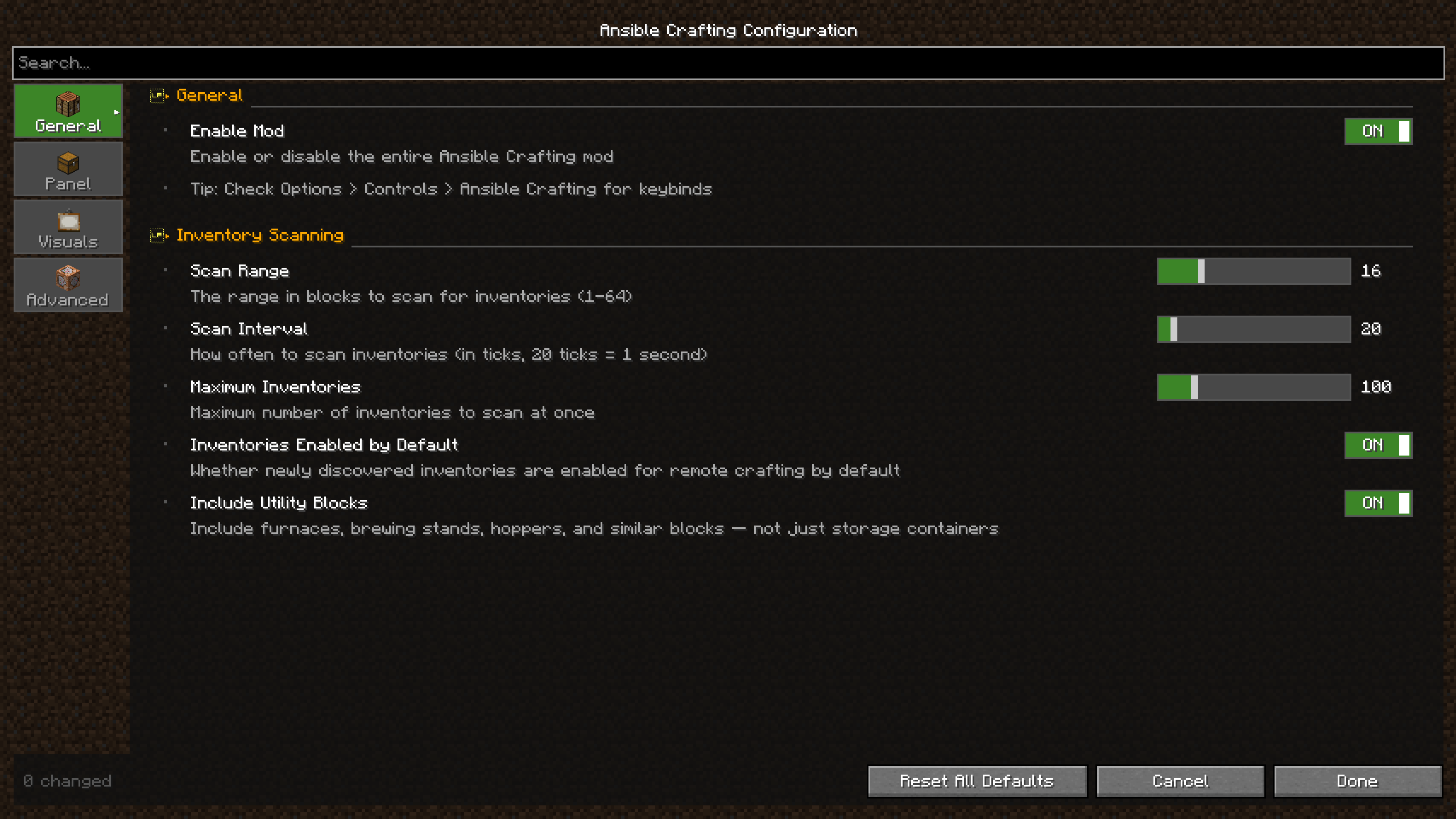 Generated config for Ansible Crafting
 -
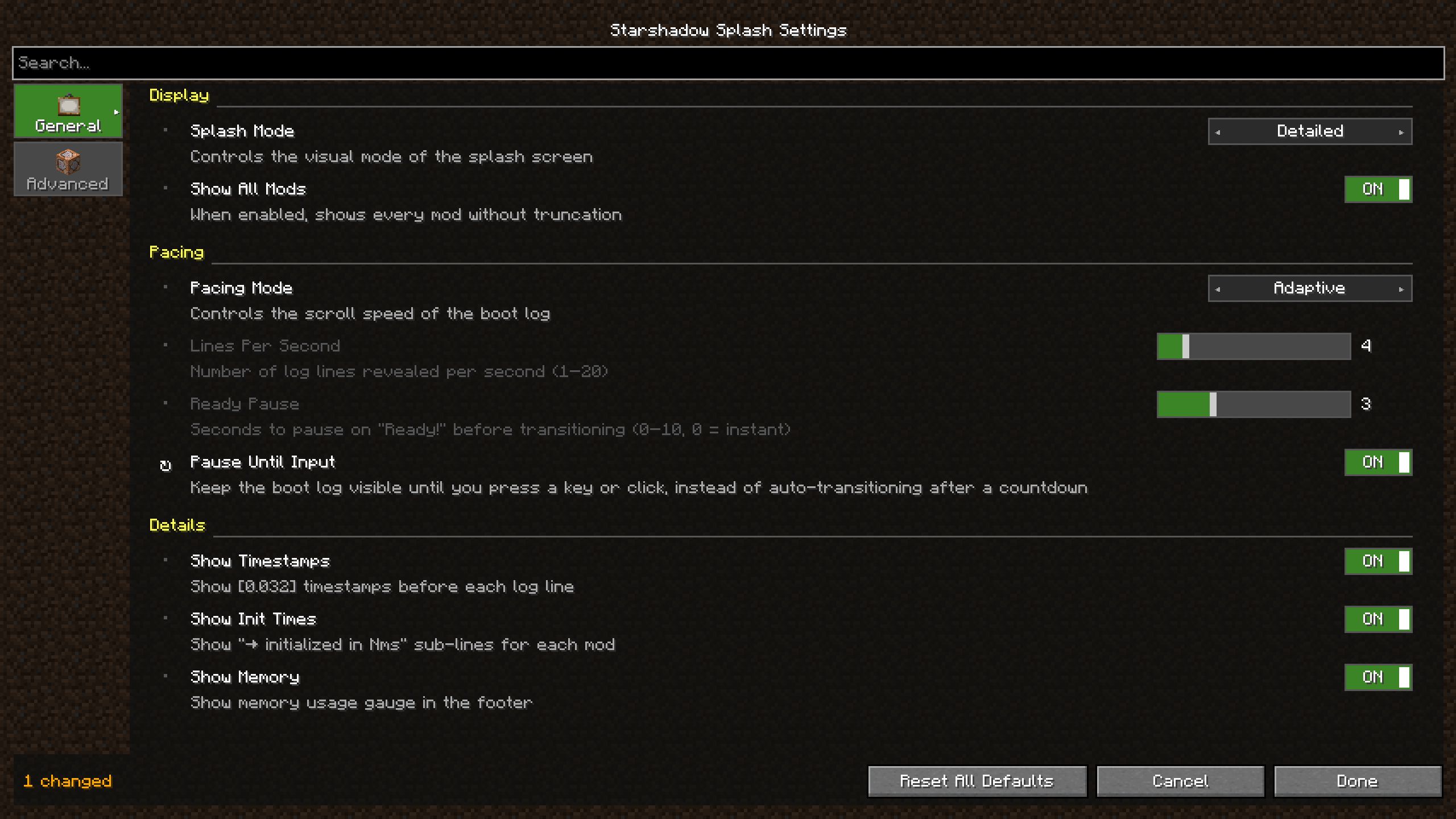 Generated config for Starshadow Splash
Versions
Files
Relations
Project Relations
More like this
Similar Mods
Suggestions use data such as tags, dependencies, dependents, descriptions, titles, and more to rank how much they overlap with this mod.
On ModDex
Community snapshot
By the numbers
Statistics

Want to reach Minecraft players?
We're looking for a server hosting partner to feature here and other parts of the site. Interested? Send us a message!
Get in touchGet it on
Available Platforms
On ModDex
Community snapshot
By the numbers
Statistics
Resources