
Community listing page, reviews here may not be monitored by the author.
Starshadow Modlist

No reviews yet
Starshadow mod menu list
Community voices
Reviews
No reviews yet. Be the first to review this project!
Get it on
Available Platforms
Compatibility
Supported Environments
Must be installed on both the client and the server.
About
Project Details
For authors
Embed Badge
If you're the author of this project, you can embed a live badge anywhere that supports HTML or Markdown. It updates automatically whenever ratings change.
Use HTML for any page that supports it, or Markdown for README files and Markdown-based descriptions.
Identifiers
Platform IDs
Resources
External Links
About
Description
★ Starshadow Menu
Your mods, beautifully organized.
Starshadow Menu replaces the default mod list with a clean, modern screen that makes browsing your installed mods a pleasure. Search, filter, view details, and jump straight into any mod's config — all from one place.
"Finally, a mod list that doesn't feel like a spreadsheet."
🪄 How It Works
- Install the mod and launch Minecraft
- Click "Mods" on the title screen or pause menu — a new button appears automatically
- Browse your mods in a clean, scrollable list with search
- Click any mod to see its details, links, and config button
- Open config screens with a single click — no more hunting through Mod Menu
That's it. A better mod list, instantly.
✨ Features
📋 Clean Mod List
A beautifully designed mod list screen with each mod displayed as a card showing its name, version, and description. Scroll through your entire modpack effortlessly.
🔍 Instant Search
Type to search across mod names and descriptions. Find any mod in your pack instantly, even with hundreds installed.
📄 Detailed Mod Info
Click any mod to see its full details in a side panel:
- Description, version, and author
- License information
- Links to website, source code, and issue tracker
- One-click config button (when available)
⚙️ Config Screen Discovery
Starshadow Menu automatically discovers config screens from all installed mods. Double-click a mod or hit the config button to jump straight into its settings.
🔘 Dynamic Button Injection
A "Mods" button is automatically added to both the title screen and the pause menu. No extra keybinds needed — the mod list is always one click away.
🔧 Filtering Options
Toggle whether system/builtin mods (Minecraft, Java, Mixin) are shown in the list. Keep it clean and focused on the mods you actually installed.
📥 Get It
Recommended: Modrinth
Download on Modrinth — the preferred platform for Starshadow Menu.
Also available on CurseForge
Download on CurseForge — same mod, same releases.
📦 Installation
From Modrinth (recommended)
- Go to the Starshadow Menu Modrinth page
- Select your Minecraft version (1.20.1, 1.20.4, or 1.21.1)
- Click Install — dependencies are installed automatically if using a compatible launcher
- Launch and click "Mods" on the title screen! 🚀
Manual Install
- Install Fabric Loader for your Minecraft version
- Install Fabric API
- Drop the following into your
mods/folder:- Starshadow Menu
.jar - Starshadow Config
.jar(required dependency) - Starshadow Lib
.jar(required dependency)
- Starshadow Menu
- Launch Minecraft! 🚀
Supported: Minecraft 1.20.1 · 1.20.4 · 1.21.1 — Fabric only
⚙️ Configuration
Settings are accessible via the Starshadow Menu config screen, or by editing config/starshadow-menu.json directly.
| Setting | Default | Options |
|---|---|---|
| Show Builtin Mods | Off | On · Off |
When "Show Builtin Mods" is off (default), system mods like Minecraft, Java, and Mixin are hidden from the list so you only see mods you've installed.
🧩 Compatibility
| Mod | Compatibility |
|---|---|
| Fabric API | ✅ Required |
| Mod Menu | ✅ Compatible — both can coexist; Starshadow Menu provides its own button |
| Starshadow Splash | ✅ Optional — custom splash feeds into mod list |
| Config mods | ✅ Discovers config screens from any mod that registers them |
📋 Requirements
| Dependency | Required? |
|---|---|
| Fabric Loader | ✅ Yes |
| Fabric API | ✅ Yes |
| Starshadow Config | ✅ Yes |
| Starshadow Lib | ✅ Yes |
🌟 Your Mods Deserve a Better Home
Stop scrolling through tiny text lists. Starshadow Menu gives your modpack the mod list it deserves — clean, searchable, and always one click away.
Made with ❤️ by Ghent Starshadow Licensed under MPL-2.0 — free to use, share, and modify.
Screenshots
Gallery
-
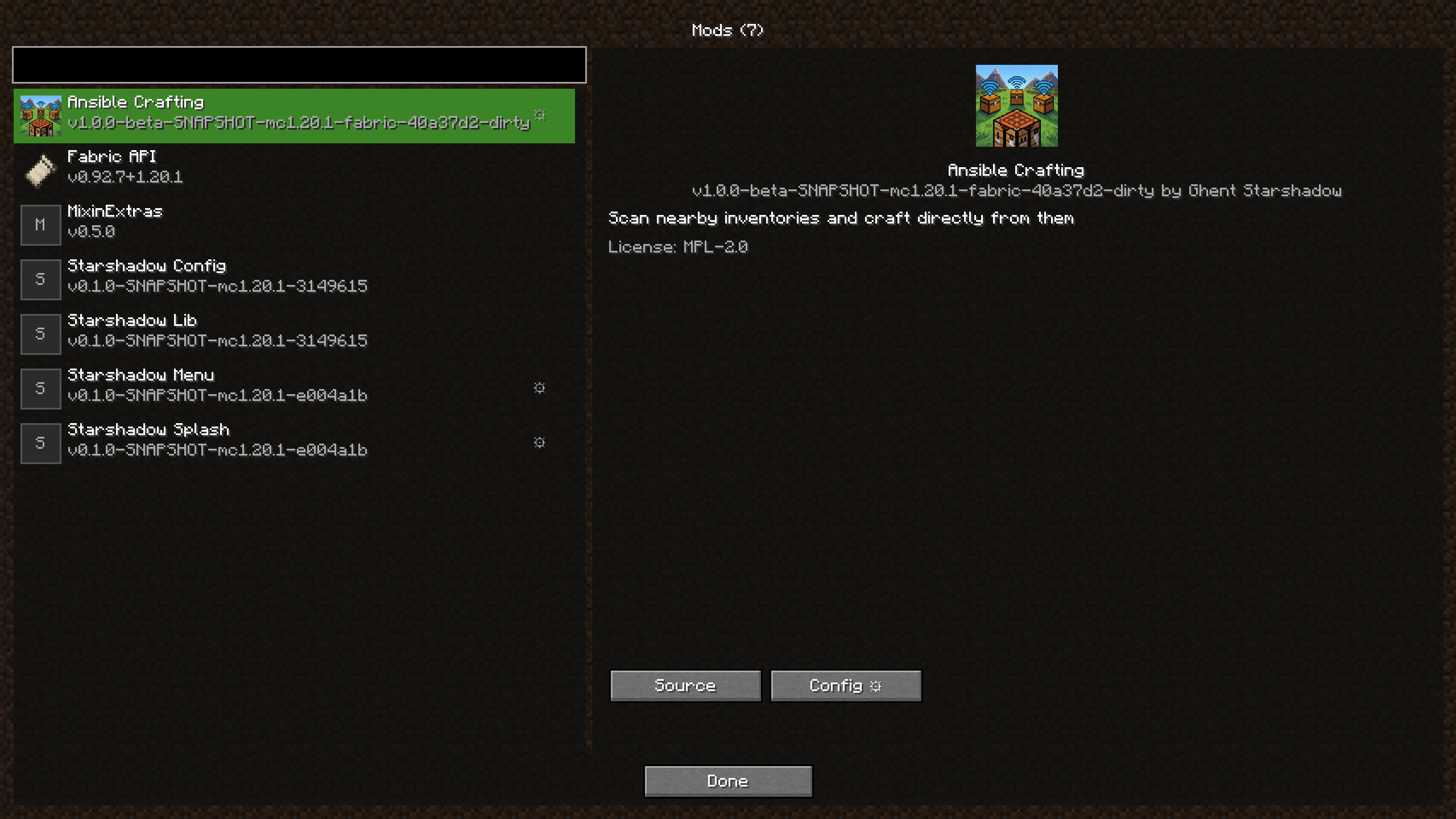 Starshadow Menu mod list
Versions
Files
Relations
Project Relations
More like this
Similar Mods
Suggestions use data such as tags, dependencies, dependents, descriptions, titles, and more to rank how much they overlap with this mod.
On ModDex
Community snapshot
By the numbers
Statistics

Want to reach Minecraft players?
We're looking for a server hosting partner to feature here and other parts of the site. Interested? Send us a message!
Get in touchGet it on
Available Platforms
On ModDex
Community snapshot
By the numbers
Statistics
Resources