
Community listing page, reviews here may not be monitored by the author.
Status4Discord

No reviews yet
A discord bot, showing the current status of your server as embed, activity and more.
Community voices
Reviews
No reviews yet. Be the first to review this project!
Get it on
Available Platforms
Compatibility
Supported Environments
Runs on a dedicated server only; does not work in singleplayer.
About
Project Details
For authors
Embed Badge
If you're the author of this project, you can embed a live badge anywhere that supports HTML or Markdown. It updates automatically whenever ratings change.
Use HTML for any page that supports it, or Markdown for README files and Markdown-based descriptions.
Identifiers
Platform IDs
About
Description
Status4Discord
Status4Discord is a dynamic Discord bot for Minecraft servers that provides real-time server stats through embeds and activities. It effortlessly connects your Minecraft server to Discord, keeping your community in the loop and engaged with information ranging from TPS to player counts.
Getting started
https://github.com/LasaJoniHD/Status4DiscordMC/wiki/Setup
Commands
Minecraft
/status4discord reload reload the config
/status4discord invite invite the discord bot
/status4discord info info about this plugin
/status4discord help all commands
Discord
@YourDiscordBot setembed set the embed textchannel
@YourDiscordBot setlogs set the logs textchannel
Permissions
Minecraft
status4mc.adminUse /status4discord reload and /status4discord invite
Discord
- Permission.ADMINISTRATOR
Config
Show config
#   _____ _        _             _  _   _____  _                       _
#  / ____| |      | |           | || | |  __ \(_)                     | |
# | (___ | |_ __ _| |_ _   _ ___| || |_| |  | |_ ___  ___ ___  _ __ __| |
#  \___ \| __/ _` | __| | | / __|__   _| |  | | / __|/ __/ _ \| '__/ _` |
#  ____) | || (_| | |_| |_| \__ \  | | | |__| | \__ \ (_| (_) | | | (_| |
# |_____/ \__\__,_|\__|\__,_|___/  |_| |_____/|_|___/\___\___/|_|  \__,_|
#
# Thank you for using Status4Discord by Joni
# To setup Status4Discord, please visit https://github.com/LasaJoniHD/Status4DiscordMC/wiki/Setup

#   _____ ___  _  _____ _  _
# |_   _/ _ \| |/ / __| \| |
#   | || (_) | ' <| _|| .` |
#   |_| \___/|_|\_\___|_|\_|
#
# Please paste your discord bot token here
token: ""

#    _   ___ _____ _____   _____ _______   __
#   /_\ / __|_   _|_ _\ \ / /_ _|_   _\ \ / /
#  / _ \ (__  | |  | | \ V / | |  | |  \ V /
# /_/ \_\___| |_| |___| \_/ |___| |_|   |_|
#
# Available Activities:
# PLAYING, WATCHING, LISTENING, CUSTOM_STATUS, COMPETING
# Available Status:
# ONLINE, IDLE, DO_NOT_DISTURB, INVISIBLE, OFFLINE
# You can use PlaceholderAPI if installed (only placeholders that do not require a player).
# Find placeholders included in Status4Discord at https://github.com/LasaJoniHD/Status4DiscordMC/wiki/Placeholders.
activity: "PLAYING %online_players% / %max_players% Players"
status-activity: "ONLINE"
update-activity: 30 # in seconds

# Activities for server start
server-starting-activity: "CUSTOM_STATUS Server is starting..."
server-starting-status: "IDLE"

# ServerIP
# will replace internal Placeholder %serverip%
# --------------------------------------------------------------------------------------------------------------------
# 'serverIP' sets the server IP shown in activity and in the embed.
# If in server.properties, it will obtain the IP that the server is bound to; if not set, it will display "not set."
serverIP: "server.properties"

#  _    ___   ___ ___
# | |  / _ \ / __/ __|
# | |_| (_) | (_ \__ \
# |____\___/ \___|___/
#
# If enabled, the bot will send a message when the server starts/stops in the specified logs channel.
# If you don't know how to obtain the textChannelID and have admin privileges,
# simply send a message in Discord in the channel like this: @MentionYourDiscordBot setlogs.
logs:
  enabled: true
  textChannelID: ""
  start:
    color: "GREEN"
    message: ":white_check_mark: **Server started!**"
  stop:
    color: "RED"
    message: ":x: **Server stopped!**"

#  ___ __  __ ___ ___ ___
# | __|  \/  | _ ) __|   \
# | _|| |\/| | _ \ _|| |) |
# |___|_|  |_|___/___|___/
#
# If enabled, the bot will send a status embed in the specified channel; this embed will be updated every few seconds.
# If you don't know how to obtain the textChannelID and have admin privileges,
# simply send a message in Discord in the channel like this:
# @MentionYourDiscordBot setembed.
embed:
  enabled: true
  textChannelID: ""
  update: 15 # in seconds

  online:
    title: "Online"
    color: "GREEN" # supports any java.awt.Color enum name (e.g. `RED`, `BLUE`, etc.) or a hex code (e.g. `#FF0000` for red)

    timestamp: true

    footer:
      text: "Uptime: %uptime%"

    fields:
      - name: "Server IP"
        value: "%serverip%"
        inline: true

      - name: "Player Count"
        value: "%online_players% / %max_players%"
        inline: true

      - name: "RAM"
        value: "Used: %usedram_percentage% % (%usedram% mb / %maxram% mb)"
        inline: false

      - name: "Uptime"
        value: "%uptime%"
        inline: true

      - name: "TPS"
        value: "%tps%"
        inline: true

      - name: "CPU"
        value: "%cpu% %"
        inline: true

  offline:
    title: "Offline"
    color: "RED"

    fields:
      - name: "Server IP"
        value: "%serverip%"
        inline: true

# Do not touch if you don't know what this setting does
embedMessageID: ""
debug: false
config-version: 4
Examples
Activity

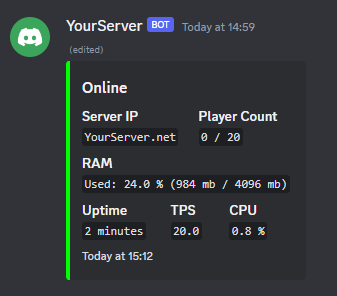
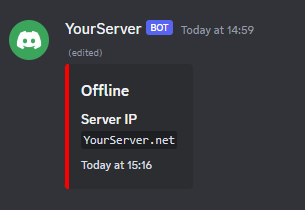
Status Embeds
When server is online
When server is offline
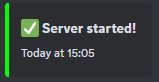
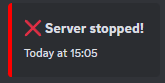
Start/Stop Log Messages
Server Start
Server Stop
Screenshots
Gallery
-
A status embed when the server is offline An example of an embed that shows that the server is offline
-
Example activity An example activity that the bot can display
-
A status embed An example of an embed that shows the status of the server
-
Server Started
-
Server Stopped
Versions
Files
Relations
Project Relations
More like this
Similar Mods
Suggestions use data such as tags, dependencies, dependents, descriptions, titles, and more to rank how much they overlap with this mod.
On ModDex
Community snapshot
By the numbers
Statistics

Want to reach Minecraft players?
We're looking for a server hosting partner to feature here and other parts of the site. Interested? Send us a message!
Get in touchGet it on
Available Platforms
On ModDex
Community snapshot
By the numbers