Community listing page, reviews here may not be monitored by the author.
Stockyard

No reviews yet
Separate baby animals, build matching iron pens, and automate feeding with a timed breeding trough.

Community voices
Reviews
No reviews yet. Be the first to review this project!
Get it on
Available Platforms
About
Project Details
For authors
Embed Badge
If you're the author of this project, you can embed a live badge anywhere that supports HTML or Markdown. It updates automatically whenever ratings change.
Use HTML for any page that supports it, or Markdown for README files and Markdown-based descriptions.
Identifiers
Platform IDs
Resources
External Links
About
Description
Stockyard
Separate the calves. Feed the herd. Build a better livestock pen.
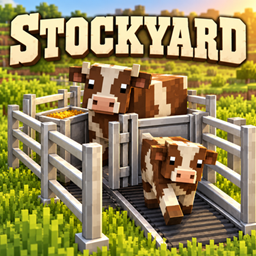
Stockyard brings cattle-station-style animal handling to Minecraft with a baby sorting funnel, matching iron enclosures, and a timed breeding trough. Keep your breeding animals in one pen and move their young into a separate nursery, without manually sorting the whole herd.
Cattle Funnel
Place one item to build a three-block livestock lane: intake → sorting gate → exit.
- The middle gate lets baby animals through while blocking adults.
- A moving conveyor carries nearby babies toward the nursery.
- Iron side rails have fence-height collision to keep the lane enclosed.
- Fences, gates, and walls connect to the sides to seal your pens.
- No power or redstone is needed.
- Breaking any section removes the whole funnel and drops one item.
Face toward the nursery when placing the funnel, and keep its outlet clear. The intake collects babies directly in front of the lane; it does not pull animals from across the entire pen.
Matching Iron Enclosures
Build your stockyard with Station Iron Fences and Station Iron Walls. Open iron rails and reinforced iron panels match the funnel's industrial farm design. Both have fence-height collision, support waterlogging, and connect to the funnel and each other.
Breeding Trough
Load the trough with breeding food and let it handle feeding on a schedule.
- 30-second interval by default, with 60-, 120-, and 300-second options.
- Each cycle opens a 10-second feeding window.
- Attracts ready adults within eight blocks only while food is available during that window.
- Ignores babies, animals on breeding cooldown, animals already in love, and leashed or mounted animals.
- Consumes one correct breeding food per animal when it reaches the trough.
- Supports mixed food stocks, a 27-slot inventory, hoppers, and compatible item pipes.
- Saves its inventory, interval setting, and timer phase.
Right-click to open the inventory. Shift-right-click with an empty hand to change the interval.
Use wheat for cows and sheep, seeds for chickens, carrots or other valid pig breeding foods, and the appropriate food for other species. Horses and donkeys require golden breeding foods; llamas require hay bales. Taming and special breeding requirements still apply.
The trough uses normal animal breeding behaviour. Parents keep their vanilla breeding cooldown, and babies are produced by the animals themselves. Keep at least two compatible adults in the pen and leave a clear route to the food.
Getting Started
- Build a breeding pen and a separate nursery with matching iron enclosures.
- Place the cattle funnel between them, facing from the breeding pen toward the nursery.
- Stock a breeding trough inside the adult pen, choose your feeding interval, and bring in your animals.
All blocks are craftable in survival and available in the Functional Blocks creative tab.
Requirements
- Minecraft 1.21.1
- NeoForge 21.1.248 or newer for Minecraft 1.21.1
- Install Stockyard on both the client and server.
- No additional mods are required.
Modded animals can work with Stockyard when they use Minecraft's standard animal age and breeding-food systems. Species with custom behaviour may need additional compatibility.
Screenshots
Gallery
Versions
Files
Relations
Project Relations
More like this
Similar Mods
Suggestions use data such as tags, dependencies, dependents, descriptions, titles, and more to rank how much they overlap with this mod.
On ModDex
Community snapshot
By the numbers
Statistics
 (opens in a new tab)
Get it on
Available Platforms
On ModDex
Community snapshot
By the numbers
Statistics
Resources