
Community listing page, reviews here may not be monitored by the author.
StreamingModule

No reviews yet
The ultimate Twitch integration for Spigot and Proxies. Offer custom viewer drops, channel point rewards, and live chat features
Community voices
Reviews
No reviews yet. Be the first to review this project!
Get it on
Available Platforms
About
Project Details
For authors
Embed Badge
If you're the author of this project, you can embed a live badge anywhere that supports HTML or Markdown. It updates automatically whenever ratings change.
Use HTML for any page that supports it, or Markdown for README files and Markdown-based descriptions.
Identifiers
Platform IDs
About
Description
StreamingModule — Twitch Drops & Live Integration for Minecraft
Turn every Twitch stream into a reward for your viewers — and a growth engine for your streamer. StreamingModule connects Twitch and your Minecraft server (Spigot, Paper, Purpur, BungeeCord, Velocity), letting chatters earn real in-game drops just for watching, while streamers get live announcements, Twitch chat in-game, and channel point rewards that trigger actual server commands.
Twitch doesn't support native "Drops" for Minecraft the way it does for other games — StreamingModule closes that gap so your community gets the same hype without needing Twitch's Drops API.
What StreamingModule does
- Twitch Viewer Drops — viewers watching a configured streamer have a chance to receive a reward, executed as any Minecraft command. Give items, money, ranks, crate keys, or anything a plugin can run — the drop itself has no limits.
- Offline Drop Queue — viewers who are watching the stream but aren't online on the server don't miss out. Drops are saved and delivered automatically next time they join.
- Twitch Chat inside Minecraft — each streamer can see their own Twitch chat directly in-game, no alt-tabbing required.
- Twitch Chat Commands — define custom chat commands that respond with live PlaceholderAPI data, right inside Twitch chat.
- Channel Point Rewards — connect Twitch Channel Points to Minecraft commands. Positive or negative effects, your choice.
- Live Announcements — automatic broadcast in-game and via Discord webhook the moment a streamer goes live, with zero manual steps.
- Live Tag via PlaceholderAPI — show who's currently streaming anywhere PlaceholderAPI is supported (tab list, chat, scoreboards, holograms).
- Watch Time Tracking — tracks how long each viewer has watched a streamer since installation, so you can gate rewards or chat commands behind a minimum watch time.
- Multi-Streamer Support — run drops, settings, and chat integration for several streamers at once, each with independent configuration.
- Configurable Drop Chance — fine-tune odds per streamer or globally to match your community size and economy.
- Cross-Platform — works on single Spigot/Paper/Purpur servers as well as BungeeCord and Velocity proxy networks, version-safe across Minecraft releases.
- No OAuth Required — all core features work without you needing to generate or manage a Twitch OAuth token.
Why streamers and server owners use it
Streamers get free promotion every time a viewer wants in-game drops badly enough to check out the server. Server owners get a built-in growth loop — viewers become players, players become community members, and the stream itself becomes a recurring event worth tuning in for.
Requirements
- SMLib (required dependency)
- Java 11+
- Open HTTPS port for outgoing requests
- The StreamingModule Twitch bot account must be set as a moderator in your channel
- Optional: PlaceholderAPI for the live tag feature
If /online throws an HTTP(S) error, your server is likely blocking outgoing connections — check your firewall/port settings.
Setup
Full step-by-step installation guide: Setup Wiki
Quick overview:
- Install SMLib and StreamingModule
- Start the server once to generate config files
- Add your Twitch channel name(s) in
streamer.yml - Mod the StreamingModule bot in your Twitch chat (
/mod StreamingModule) - Configure drops, rewards, and chat commands to taste
Want more?
The Premium version adds per-streamer drop lists, Twitch Events (Follow, Sub, GiftedSub, Bits, Raid, Poll), follow-bot protection, custom branding, and more — see the full Feature Overview for a side-by-side comparison.
Known incompatibilities
- Matrix Anti-Cheat (may cause issues, not guaranteed)
Support
- Run
/sm reportin-game to generate a support file with the info needed to help you fast - Join the Discord server — support is available in English and German
- Full documentation: GitHub Wiki
Screenshots
Gallery
-
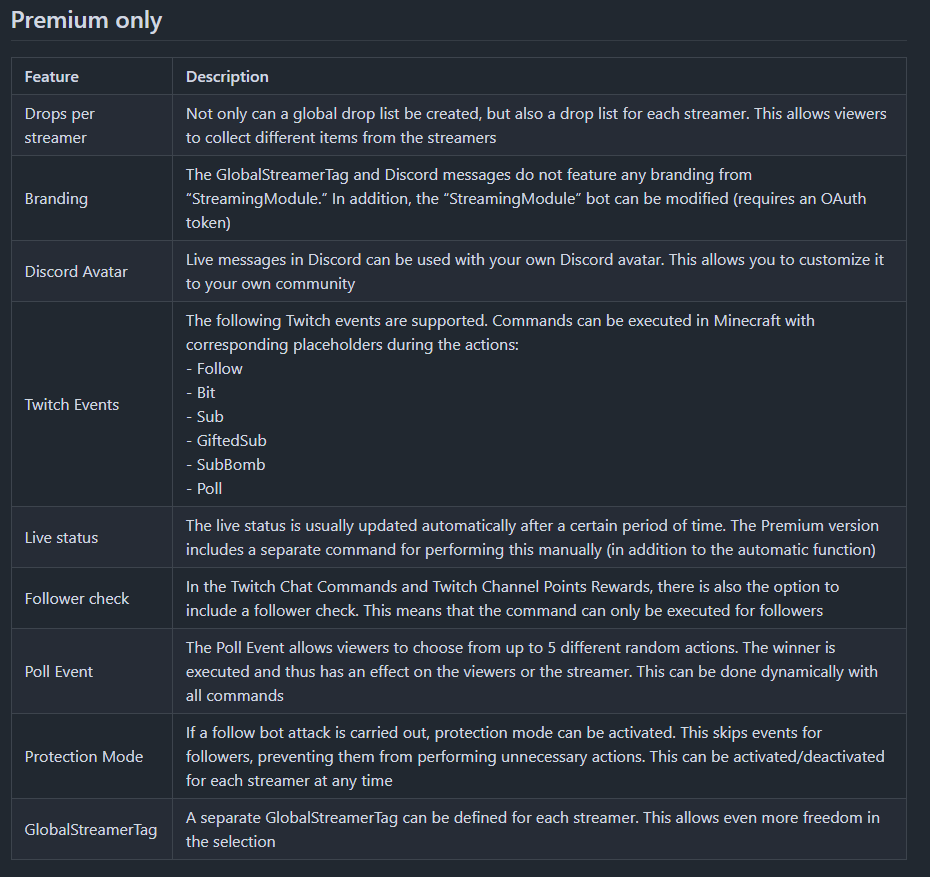 StreamingModule Premium Features
 -
 GlobalStreamerTag Example for using the GlobalStreamerTag
 -
 ModuleKey Example for using the ModuleKey
 -
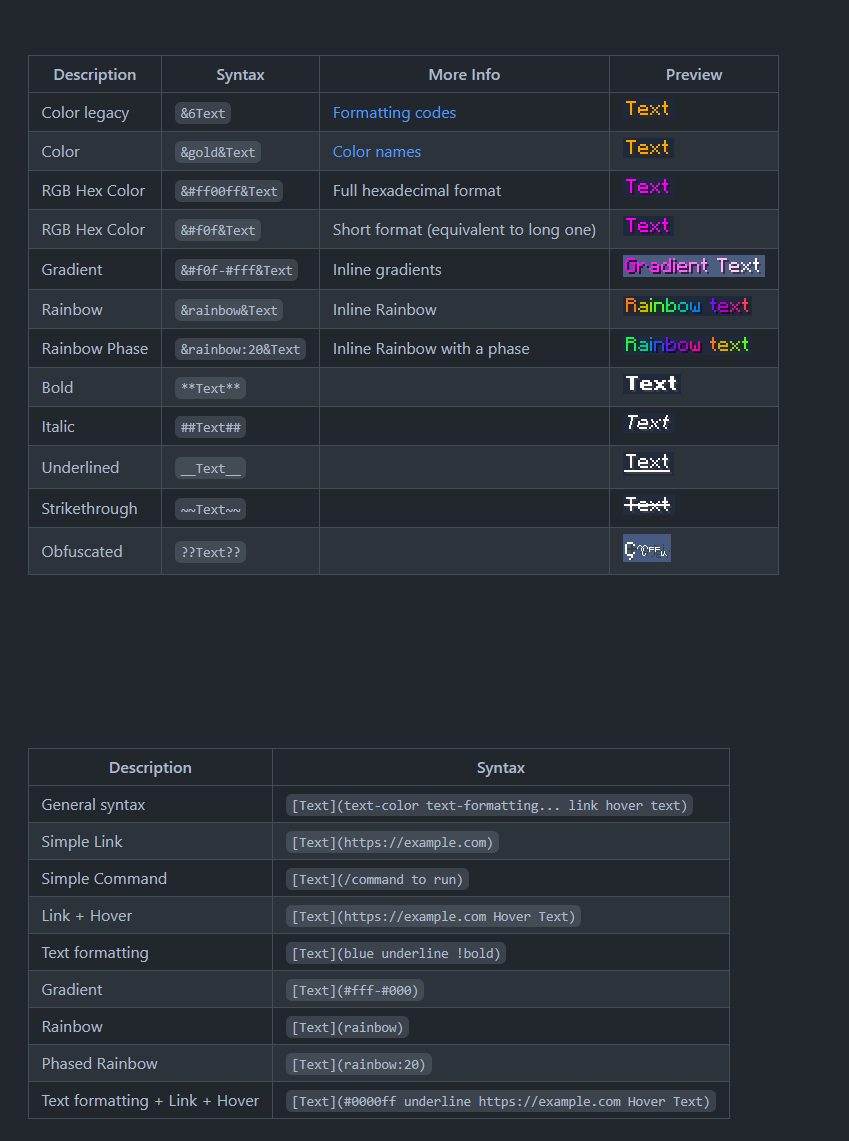 Messages
 -
 Twitch rewards Use Twitch rewards (channel points)
 -
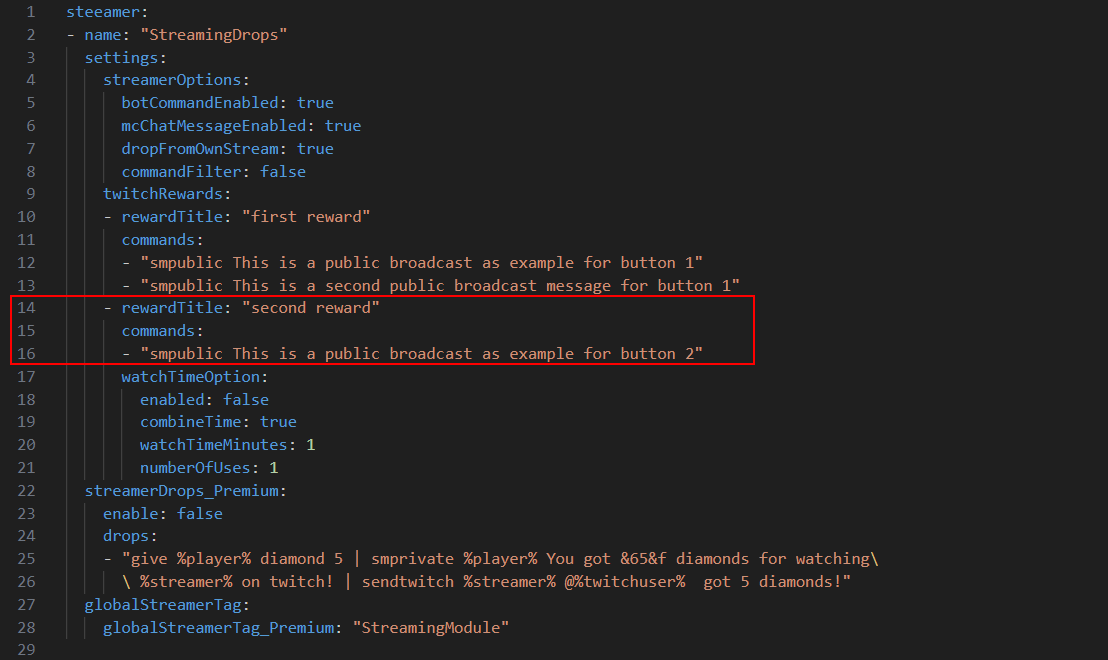 Multiple Twitch Rewards
 -
 Twitch drops
 -
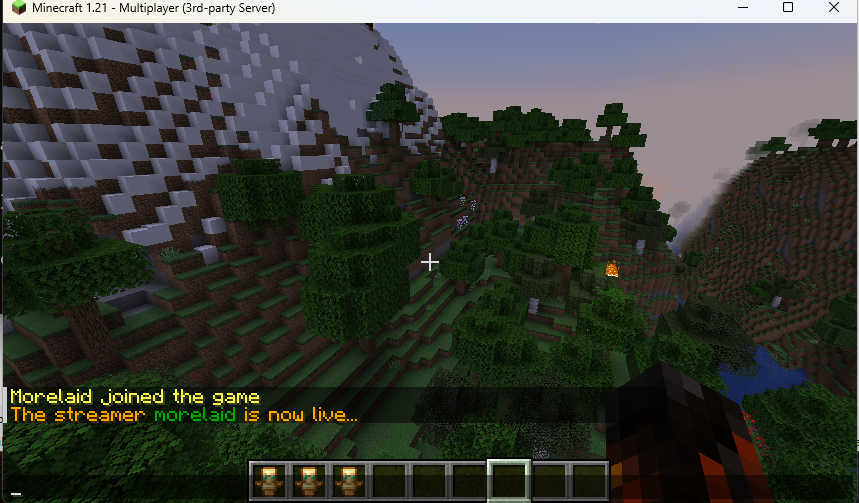 Live Announcement Live message in minecraft chat (broadcast)
 -
 Twitch chat
 -
 StreamingModule
 -
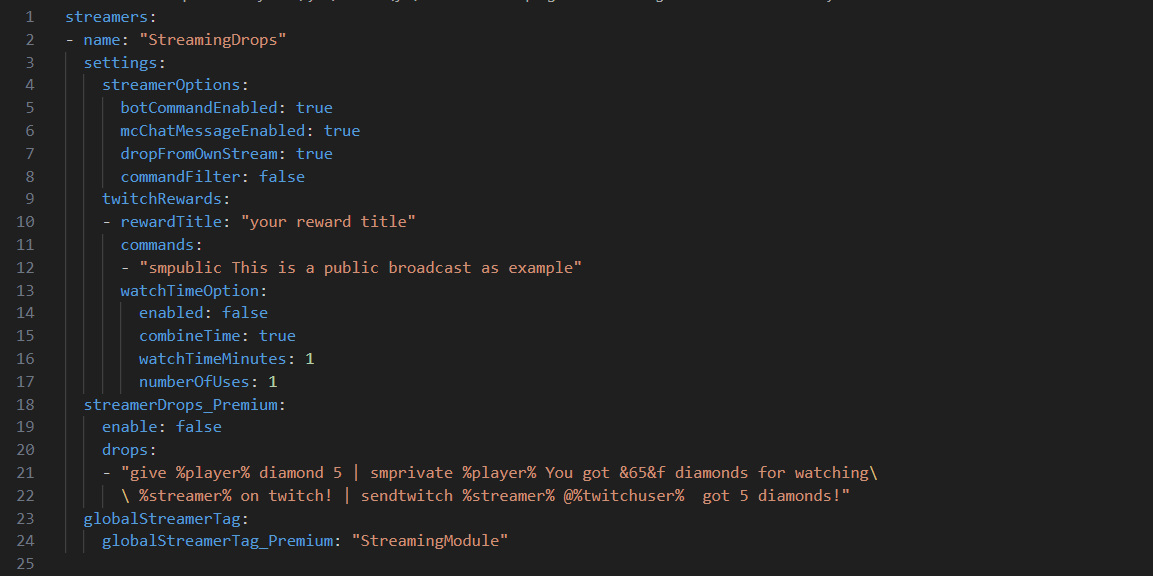 streamer.yml The default config of streamers.yml
 -
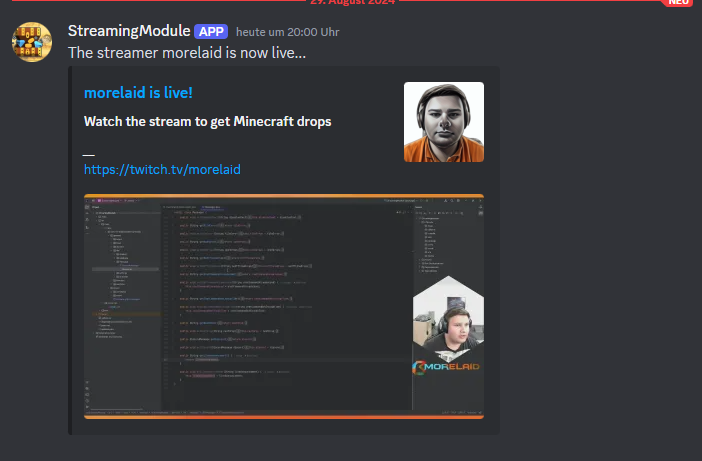 Discord Integration Send a discord message, if a streamer is live on twitch where you can get twitch drops
Versions
Files
Relations
Project Relations
More like this
Similar Mods
Suggestions use data such as tags, dependencies, dependents, descriptions, titles, and more to rank how much they overlap with this mod.
On ModDex
Community snapshot
By the numbers
Statistics

Want to reach Minecraft players?
We're looking for a server hosting partner to feature here and other parts of the site. Interested? Send us a message!
Get in touchGet it on
Available Platforms
On ModDex
Community snapshot
By the numbers