
Structure Item Mod
No reviews yet
A NBT-tag driven item that places structures on right-click
Fabric is a mod loader for versions 1.14+ of Minecraft, particularly popular for client side and optimization mods.
Community voices
Reviews
Click once to include, again to exclude, again to clear
No reviews yet. Be the first to review this project!
Get it on
Available Platforms
 Modrinth
Compatibility
Supported Environments
About
Project Details
For authors
Embed Badge
If you're the author of this project, you can embed a live badge anywhere that supports HTML or Markdown. It updates automatically whenever ratings change.
Use HTML for any page that supports it, or Markdown for README files and Markdown-based descriptions.
Identifiers
Platform IDs
About
Description
This mod is intended for modpack creators that want to give their players a possibility to spawn (custom) structures at will.
The structure as well as the placement option are set via NBT-tags.
Usage:
This is an item capable of placing structures on right click:
structure_item:item{offset:{X:0,Y:5,Z:0},structure:"structure:mine",allowedOn:"minecraft:stone",blacklist:["minecraft:bedrock"],replaceEntities:0,placeEntities:0,rotate:"north"}
1.21:
structure_item:item[minecraft:custom_data={offset:{X:0,Y:5,Z:0},structure:"structure:mine",allowedOn:"minecraft:stone",blacklist:["minecraft:bedrock"],replaceEntities:0,placeEntities:0,rotate:"north"}]
If the clicked block is Stone, no Bedrock and no entity is in the way, it will place the structure "structure:mine" excluding (potentially) saved Entities moved up by 5 blocks, rotating it so that the southern side is directed towards the clicked on blockface. (The low coordinate corner will start 5 blocks above the block you would have placed if this item were a block).
If you leave out "structure", it won't work.
If you leave out "offset", it will place the structure at the block you clicked at, expanding in your view direction, up and to both sides. if you look up or down, it'll place the structure centred above or below the block you clicked at.
If you leave out "blacklist", it will replace anything.
If you leave out "allowedOn", it will allow "placement" on any block.
If you leave out "replaceEntities" or set it to 1, it will allow placement even if non player entities are in the way of blocks (non structure voids). Those will get deleted.
If you leave out "placeEntities" or set it to 1, entities saved in the structure will be placed.
If you leave out "rotate", the structure will not be rotated.
You can use whitelist instead of blacklist to whitelist the replacement of certain blocks instead of blacklisting it. If both are specified, blacklist takes precedence and whitelist is ignored.
offsetV2:
You can replace offset:{X:0,Y:5,Z:0} with e.g. offsetV2:{x:"~",y:"~-sizeY/2",z:"~"} to get the structure placed in front of the clicked on block, centred in up and down direction. Behaving like offset was left out, but moved down by halve the hight. For side-faceing blockfaces, that means it's centred in y direction as well.
offsetV2:{x:"~",y:"~dirSelect(dir,0,0,-sizeY/2,-sizeY/2,-sizeY/2,-sizeY/2)",z:"~"} will always place the structure centred behind (including) the blockface you clicked at.
offsetV2 allows arbitrary mathematical expressions using following operators:
- Addition: 2 + 2
- Subtraction: 2 - 2
- Multiplication: 2 * 2
- Division: 2 / 2
- Exponentation: 2 ^ 2
- Unary Minus,Plus (Sign Operators): +2 - (-2)
- Modulo: 2 % 2
And following functions:
- abs: absolute value
- acos: arc cosine
- asin: arc sine
- atan: arc tangent
- cbrt: cubic root
- ceil: nearest upper integer
- cos: cosine
- cosh: hyperbolic cosine
- exp: euler's number raised to the power (e^x)
- floor: nearest lower integer
- log: logarithmus naturalis (base e)
- log10: logarithm (base 10)
- log2: logarithm (base 2)
- sin: sine
- sinh: hyperbolic sine
- sqrt: square root
- tan: tangent
- tanh: hyperbolic tangent
- signum: signum function
- dirSelect: dirSelect(dir, down, up, north, south, west, east) with the directions being expressions to evaluate in case of a click on that block face.
And following variables:
- pi, π: π
- e: Euler constant
- φ: golden Ratio
- dir: variable indicating the clicked on blockface, for use in dirSelect
- sizeX: size of Structure in x direction
- sizeY: size of Structure in y direction
- sizeZ: size of Structure in z direction
Error handling:
Errors made by the items' creator will be displayed in Chat, any errors made by the user will produce a fat massage in the middle of the screen.
Model & Localization:
If you use this mod, you may want to change the model of the item (currently = stick) and edit the language file.
Screenshots
Gallery
-
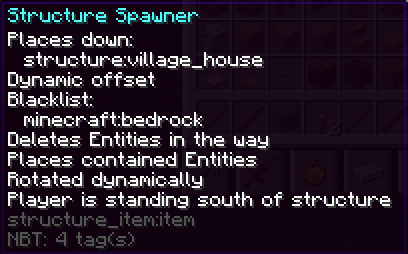 Tooltip (enabled with F3+h)
Versions
Files
Relations
Project Relations
More like this
Similar Mods
Suggestions use data such as tags, dependencies, dependents, descriptions, titles, and more to rank how much they overlap with this mod.
On ModDex
Community snapshot
By the numbers
Statistics

Want to reach Minecraft players?
We're looking for a server hosting partner to feature here and other parts of the site. Interested? Send us a message!
Get in touchGet it on
Available Platforms
On ModDex
Community snapshot
By the numbers