
Community listing page, reviews may not be monitored by the author.
Super Chat : Moderation and practice

No reviews yet
Transform your server's chat into a powerful, interactive social hub.

Community voices
Reviews
No reviews yet. Be the first to review this project!
Get it on
Available Platforms
About
Project Details
For authors
Embed Badge
If you're the author of this project, you can embed a live badge anywhere that supports HTML or Markdown. It updates automatically whenever ratings change.
Use HTML for any page that supports it, or Markdown for README files and Markdown-based descriptions.
Identifiers
Platform IDs
Resources
External Links
About
Description
💬 Super Chat — Forge Mod
Super Chat is a lightweight utility mod for Minecraft Forge that elevates every message beyond plain text. Player names and chat messages become clickable shortcuts, a robust moderation toolkit keeps your community in check, and quality-of-life features like @mentions, public announcements, and private message styling make communication genuinely enjoyable.

✨ Features
🖱️ Interactive Chat
Every message in the chat is now interactive. Click a player's name to instantly suggest a teleport command (/tpa), or click the message text to pre-fill a private reply (/msg). Both actions are fully configurable in the config file. Roles and prefixes from LuckPerms are fully preserved and displayed normally alongside all interactive features.
🔇 Advanced Mute System
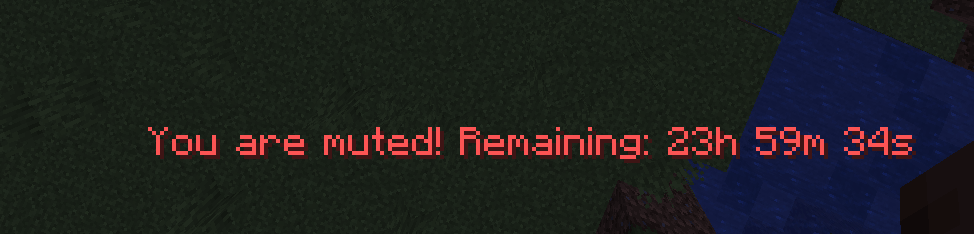
Silence disruptive players with /spchat mute. Mutes survive server restarts — they are saved to disk and automatically expire at the correct time even after a reboot. Muted players receive clear, real-time feedback when they try to speak or use blocked commands.
🚫 Command Blacklist
Define a list of commands that muted players cannot use (e.g. /me, /say, /tell, /msg, /pub). All other commands remain accessible — mutes are surgical, not a blanket ban.
📢 Public Announcements — /pub
Send a highlighted, eye-catching announcement to the entire server. A visual separator frames the message to make it stand out from regular chat. A configurable cooldown (default: 20 minutes) prevents spam, and server operators bypass it automatically.
💌 Styled Private Messages
/msg, /tell, and /w are replaced with a visually distinct format that is easy to distinguish from public chat. Each private message is also clickable to reply instantly. A new /r command lets you reply to your last conversation partner in one keystroke.
🔔 @Mentions
Type @PlayerName anywhere in your message to highlight it in bold yellow and notify the target player with a bell sound and an action-bar alert. Works dynamically with all currently online players.
⏱️ Anti-Spam Cooldown
A configurable delay between messages (default: 5 seconds) prevents chat flooding. Server operators are automatically exempt. The remaining cooldown is shown directly on the player's action bar.
🔤 Word Filter
Define a list of banned words in the config. They are automatically replaced with a configurable string (default: ***) before the message is broadcast. Filtering is case-insensitive and supports partial matches.
📋 Chat History Log
All chat activity — public messages, private messages, announcements, mutes, and unmutes — is logged to logs/superchat_log.txt with timestamps. Useful for moderation audits.
🗂️ Tab List Sorting (LuckPerms soft-dependency)
Players are automatically sorted in the tab list according to their LuckPerms rank. The order is fully configurable (e.g. Owner → Admin → Moderator → VIP → Default). If you already use a dedicated tab mod (TabTPS, BetterTab, etc.), this feature can be disabled in the config to avoid conflicts.
🛠️ Admin Commands
📜 Commands
| Command | Description | Permission |
/spchat mute <player> <duration> <unit> |
Mutes a player for a specified duration (units: s / m / h / d). |
OP Level 2 |
/spchat unmute <player> |
Immediately lifts a mute from a player. | OP Level 2 |
/pub <message> |
Broadcasts a highlighted global server announcement. | All players (cooldown applies) |
/msg <player> <message> |
Sends a styled private message to another player. | All players |
/tell <player> <message> |
Alias for /msg. |
All players |
/w <player> <message> |
Alias for /msg. |
All players |
/r <message> |
Replies to the last private message . | All players |
⚙️ Configuration (superchat-server.toml)
The configuration file is generated automatically in your server's config folder on the first launch. You can customize the following settings:
| Default Value | Description | |
click_name_command |
/tpa %player% |
The command suggested in the chat when clicking a player's name. |
click_message_command |
/msg %player% |
The command suggested in the chat when clicking a message. |
blacklisted_commands |
msg, tell, w, say, me, pub… |
Commands that muted players are strictly blocked from using. |
chat_cooldown_seconds |
5 |
Anti-spam delay (in seconds) required between sending chat messages. |
filtered_words |
(empty) | List of blacklisted words to automatically censor in the chat. |
filter_replacement |
*** |
The replacement string used to hide filtered words. |
pub_cooldown_minutes |
20 |
Cooldown duration (in minutes) required between uses of the /pub command. |
pub_prefix |
📢 [ANNONCE] |
The prefix prefixing all global server announcements. |
pub_color |
§6§l |
The formatting color code applied to announcement texts. |
msg_format_sender |
§8[§dYou §8→ §d{target}§8] §f{message} |
Private message format displayed on the sender's side. |
msg_format_receiver |
§8[§b{sender} §8→ §bYou§8] §f{message} |
Private message format displayed on the receiver's side. |
mentions_enabled |
true |
Enables or disables visual @mentions notifications in chat. |
mention_color |
§e§l |
The formatting color code applied to the @mention text. |
chat_log_enabled |
true |
Saves all chat logs and activities into a dedicated server log file. |
tab_sort_enabled |
true |
Enables sorting the player tab list dynamically by LuckPerms weight/rank. |
tab_rank_order |
owner, admin, moderator… |
The custom hierarchy order for the tab list sorting (from top to bottom). |

🔗 Compatibility
- LuckPerms — Soft dependency. Prefixes and rank display are fully preserved. Tab sorting reads LuckPerms groups via reflection (no hard dependency).
- Custom Tab Mods (TabTPS, BetterTab, etc.) — Set
tab_sort_enabled = falseto disable Super Chat's tab sorting and let your tab mod take over. - EssentialsX / FTB Essentials — Compatible. The
/msgoverride uses Forge's command priority system; set it as the preferred handler if conflicts arise.
Screenshots
Gallery
-
 1 1
1 1 -
 6 6
6 6 -
 5 5
5 5 -
 3 3
3 3 -
 2 2
2 2 -
 4 4
4 4
Versions
Files
Relations
Project Relations
More like this
Similar Mods
Suggestions use data such as tags, dependencies, dependents, descriptions, titles, and more to rank how much they overlap with this mod.
On ModDex
Community snapshot
By the numbers
Statistics

Get it on
Available Platforms
On ModDex
Community snapshot
By the numbers
Statistics
Resources